


Is WordPress just a CMS?
Once seen mainly as a content management system for publishing blogs and pages, WordPress has evolved into much more. Today, WordPress as a platform serves as a flexible business infrastructure, supporting eCommerce, memberships, marketing operations, integrations, and enterprise workflows.
In this article, you’ll learn how WordPress transformed from a simple CMS into a digital platform supporting complex business operations. We’ll explore its technical foundations, real-world applications, and platform strategies that enterprises can leverage for growth.
Table of contents
- CMS to Platform Evolution of WordPress Digital Platform
- Technical Foundations of WordPress as a Business Platform
- How WordPress is Used as a Platform in Real Businesses
- Measuring WordPress as a Platform
- WordPress Platform Strategy for Enterprises
- Challenges and Solutions in Using WordPress as a Business Infrastructure
- The Future of WordPress as a Digital Platform
- FAQs About WordPress as a Platform
- WordPress as a Platform: Conclusion
CMS to Platform Evolution of WordPress Digital Platform
Let’s be honest: WordPress is no longer just a CMS. If you think of it only as a tool for publishing posts or managing pages, you’re missing out. Traditional CMS platforms are fine for simple sites, but they fall short when you need integrations, complex workflows, or enterprise scalability.
WordPress has grown into a full digital platform. Now, it can integrate apps, automate processes, and support enterprise-level workflows. It’s not just about content anymore. It’s about creating a centralized business infrastructure that grows with your organization.
Here’s how WordPress evolved from CMS to platform:
1. Plugins and Themes Expansion
Use plugins and themes to extend functionality for e-commerce, marketing, memberships, and more. These tools let you customize WordPress for your exact business needs.
2. APIs and Headless WordPress
REST API and GraphQL allow you to deliver content across websites, apps, and other devices. This means your content and data can reach every digital channel without extra overhead.
3. Multi-Site Management
Manage multiple brands, departments, or regional sites from a single WordPress installation. Multi-site networks save time and keep operations consistent across your organization.
4. Enterprise-Grade Workflows
Implement role-based permissions, collaborative editorial processes, and automation tools. Define who can create, approve, or publish content. This ensures secure, efficient workflows across teams.
This evolution empowers you to:
- Streamline operations
- Connect multiple systems and tools
- Deliver consistent digital experiences
- Scale efficiently across teams and projects
When you understand this shift, it’s clear: WordPress as a platform is no longer just a website tool. It’s a strategic business platform. Organizations of all sizes are using it to unify workflows, enhance collaboration, and drive growth.
Technical Foundations of WordPress as a Business Platform
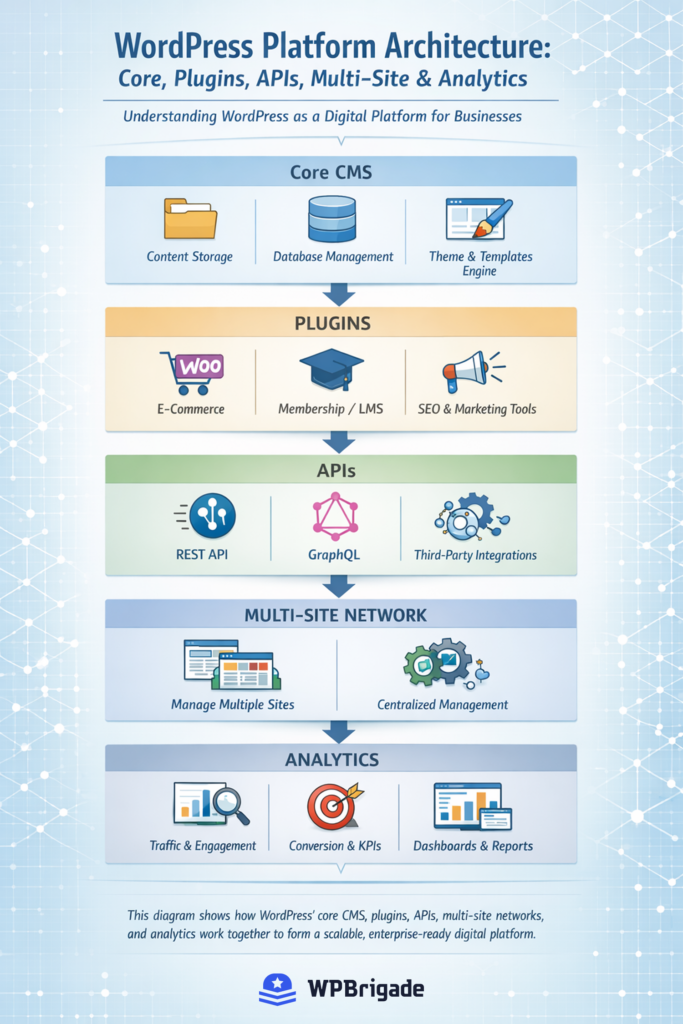
WordPress is more than a website tool. It can serve as a flexible business infrastructure capable of supporting complex operations. Its technical foundations, modular architecture, integrations, scalability, security, and data intelligence enable this.

1. Core Architecture and Scalability
WordPress is modular and flexible. Multi-site networks let you manage multiple websites, brands, or regions from a single installation. The plugin and theme ecosystem allows you to extend functionality without changing the core code. This means WordPress can grow with your business, handling more traffic, content, and users efficiently.
2. APIs, Integrations and Headless Capabilities
Your systems need to communicate seamlessly. WordPress supports REST API and GraphQL, so you can integrate with CRMs, ERPs, marketing tools, and other applications. Headless WordPress separates content management from presentation. This lets you deliver content across websites, apps, and even IoT devices without sacrificing performance.
3. Security, Roles and Governance
Enterprises require strong governance. WordPress provides role-based permissions, authentication protocols, and advanced security measures. You can control access, monitor user activity, and maintain compliance while protecting sensitive business and customer data. Regular updates and careful plugin management further strengthen your security posture.
4. Data Layer and Intelligence
WordPress isn’t just for content. It’s a source of insights. Analytics integrations let you track traffic, user behavior, and conversion metrics. Personalization tools tailor content to specific audiences. Reporting dashboards give executives a clear view of business performance.
These technical layers make WordPress a full digital platform and enterprise-ready infrastructure. It supports workflows, integrations, and data-driven decision-making at scale, empowering your organization to operate efficiently and strategically.
How WordPress is Used as a Platform in Real Businesses
WordPress is no longer just a CMS. It is a full business platform. Companies use it to manage content, revenue streams, marketing, and enterprise operations. Its flexibility supports a wide range of business models.
1. Powering E-Commerce and Revenue Growth
WordPress integrates seamlessly with WooCommerce and other commerce plugins. Businesses can manage products, inventory, payments, and shipping from a single dashboard. Multi-site networks allow franchises or subsidiaries to maintain separate stores under one system. APIs enable connections with payment gateways, CRMs, and ERP systems. This turns WordPress into a reliable enterprise revenue platform.
2. Membership Sites and Secure Portals
WordPress can host subscription-based services, learning platforms, or private communities. Plugins like MemberPress or LearnDash manage roles, access levels, and secure content delivery. Enterprises can restrict sensitive information while scaling portals across departments or global offices. Security plugins and two-factor authentication ensure enterprise-grade protection.
3. Marketing Automation and Campaign Management
Integrated analytics and marketing tools allow businesses to run campaigns, track conversions, and personalize user experiences. WordPress can connect with email platforms, CRMs, and marketing automation software. REST API and GraphQL endpoints allow real-time data sharing. This transforms WordPress into a digital platform for marketing operations.
4. Enterprise Content Operations and Collaboration
Multi-site and role-based access control support large teams. Editors, developers, and marketers can collaborate in defined workflows. Content approvals, version control, and staging environments ensure consistency. Enterprises can manage multiple brands, sites, or regional content streams efficiently from a single platform.
WordPress combines flexibility, security, and integration capabilities. This makes it a robust business infrastructure. Companies of all sizes can scale operations, run commerce, automate marketing, and manage enterprise content all from WordPress.
Measuring WordPress as a Platform
Measuring performance is essential to understanding the value of WordPress as a digital platform. Your business needs metrics for infrastructure, user engagement, and business outcomes.
Proper measurement demonstrates how the CMS to platform evolution supports enterprise goals.
1. Infrastructure KPIs
Monitor uptime, load speed, and server performance. Multi-site networks and modular plugins require consistent monitoring. Security audits, plugin updates, and database optimization indicate the health of the WordPress business infrastructure.
2. User and Engagement Metrics
Track page views, session duration, conversions, and user interactions. Analytics plugins like Analytify make these metrics accessible inside WordPress.

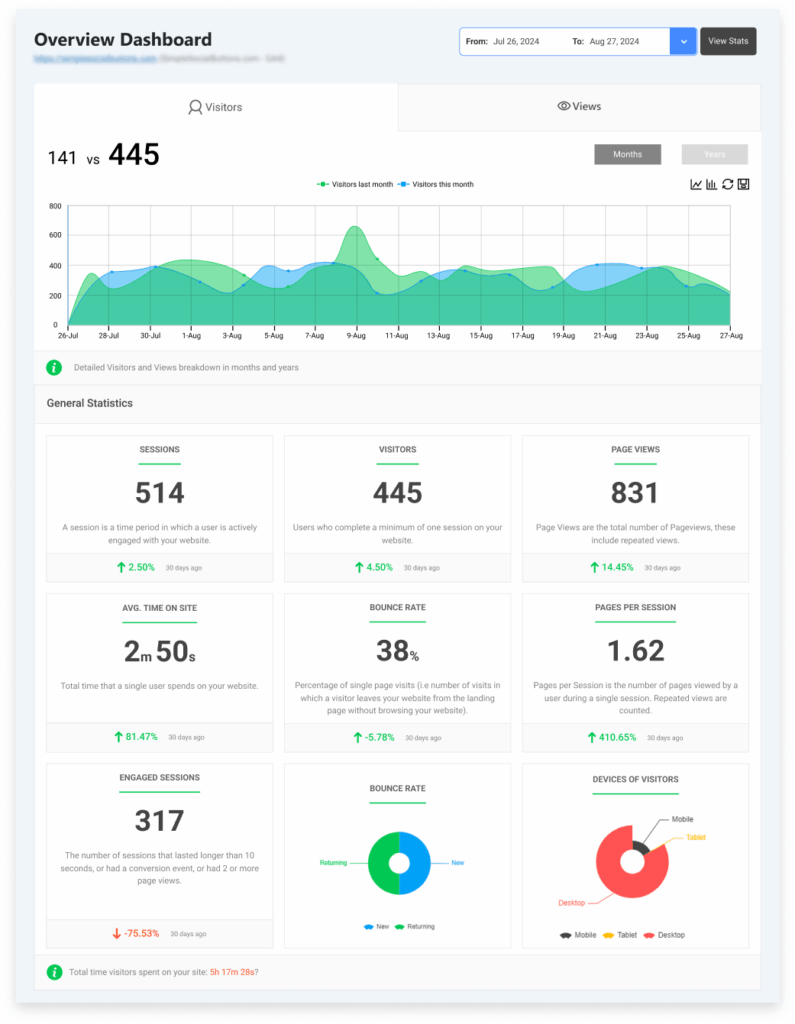
Analytify provides clear dashboards for non-technical users while maintaining detailed reports for developers and marketers. Measuring engagement is essential for understanding WordPress infrastructure for businesses and answering How is WordPress used as a platform?
3. Business and Revenue Metrics
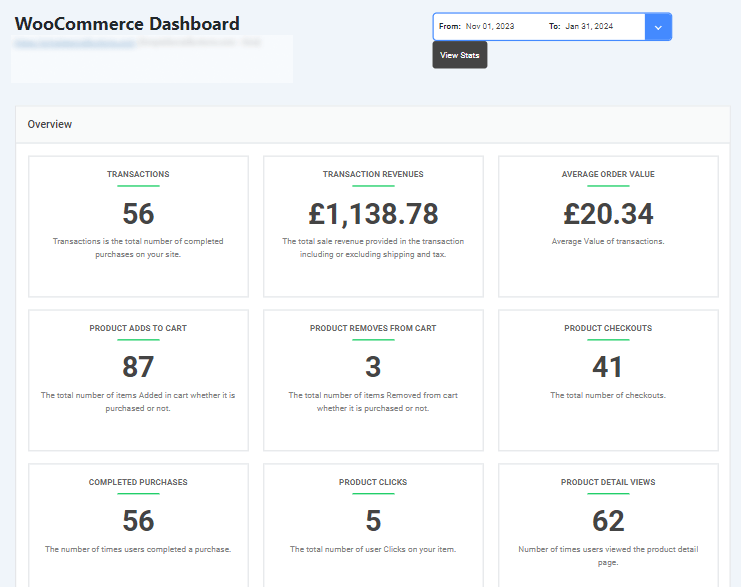
Evaluate sales, subscription growth, lead generation, and campaign ROI. WooCommerce and CRM integrations make these metrics actionable in real time. With Analytify, teams can view revenue and engagement data directly inside WordPress, ensuring insights are centralized. These metrics validate a WordPress enterprise platform and guide scaling decisions.

4. Analytics-Driven Platform Strategy
Data informs a WordPress platform strategy. Teams can optimize workflows, plan integrations, and ensure governance using insights from analytics. Plugins like Analytify allow businesses to monitor KPIs without leaving the WordPress dashboard. This strengthens the WordPress ecosystem and supports evidence-based decision-making across departments.
Tracking metrics demonstrates that WordPress is more than a CMS. With tools like Analytify, it becomes easier to monitor, report, and optimize a WordPress business infrastructure, confirming its value as a true enterprise platform.
WordPress Platform Strategy for Enterprises
If you want WordPress to work as a true enterprise platform, you need a clear strategy. Follow these steps to align technology, workflows, and governance with your business goals.
1. Define Your Platform Vision
Start by asking yourself: What do I want WordPress to achieve for my business? Identify the websites, applications, and departments it will serve. Plan for multi-site networks and plugin requirements. Think of this as moving along the CMS to platform evolution. A clear vision positions WordPress as a reliable digital platform for your enterprise.
2. Plan Integrations and Workflows
Decide which tools WordPress needs to connect with, such as CRMs, ERPs, or marketing software. Map out how data will flow between them. As mentioned earlier, Analytify helps you track performance, user engagement, and revenue directly inside WordPress. Use these insights to shape workflows and optimize your WordPress business infrastructure.
3. Set Up Governance, Roles, and Security
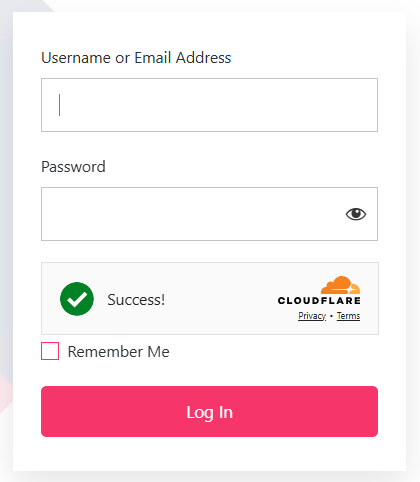
Define who can access, edit, and publish content. Assign roles and permissions clearly. Monitor plugin updates, content approvals, and multi-site governance. Use LoginPress to secure login workflows, enforce strong authentication, and manage user roles efficiently. Combining LoginPress with analytics from Analytify ensures your WordPress ecosystem is secure, well-governed, and optimized for enterprise operations.

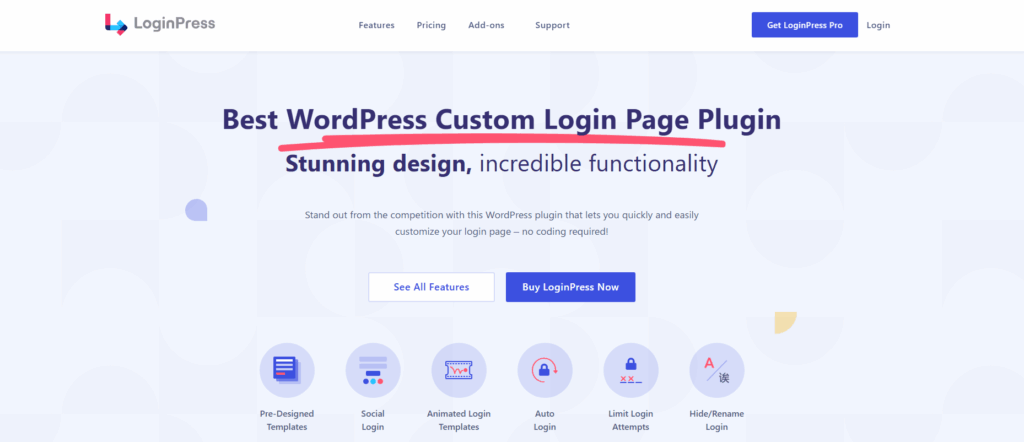
Implement security best practices to protect your WordPress ecosystem. This ensures teams can collaborate safely without risking your enterprise data.

4. Scale and Optimize Continuously
Plan for growth. Use multi-site networks, modular plugins, and caching to maintain performance. Consider headless implementations for complex content delivery. Keep tracking KPIs with Analytify to measure site efficiency and resource usage. Continuous monitoring ensures your WordPress enterprise platform scales with your business needs.
Pro Tip: Treat WordPress as a living system. Regularly review analytics, update workflows, and optimize integrations. By following this WordPress platform strategy, you’ll turn your CMS into a robust business infrastructurethat drives measurable results.
Challenges and Solutions in Using WordPress as a Business Infrastructure
When you scale WordPress into a business platform, you will face challenges. Don’t worry. Each challenge has a clear solution. Here’s how to tackle them.
1. Plugin Conflicts and Compatibility Issues
Adding multiple plugins can sometimes cause conflicts. This can break workflows or slow your sites.
Solution: Test new plugins in a staging environment first. Keep core, themes, and plugins updated. Use only trusted plugins and remove unused ones. Monitor performance regularly to catch issues early.
2. Security and Unauthorized Access
Enterprise sites are prime targets for attacks. Weak logins, outdated software, or improper role management can create risks.
Solution: Use LoginPress to secure login pages. Enable strong passwords, two-factor authentication, and role-based access. Regularly audit user accounts and permissions. This ensures your WordPress ecosystem stays safe.
3. Multi-Site and Scalability Management
Managing multiple sites or departments can be complex. Without clear processes, you may face inconsistent updates or duplicated content.
Solution: Plan your multi-site structure carefully. Assign responsibilities for updates, backups, and governance. Use centralized dashboards to maintain oversight. This keeps your WordPress enterprise platform reliable as it scales.
4. Performance and User Experience Issues
High traffic or large sites can slow down pages, hurting engagement and conversions.
Solution: Implement caching, optimize images, and consider headless WordPress for complex content delivery. Monitor speed and engagement regularly to fix issues before they impact users.
Challenges are natural when evolving from a CMS to a WordPress digital platform. By managing plugins, security, multi-site networks, and performance effectively, you ensure your WordPress business infrastructure operates efficiently and securely.
The Future of WordPress as a Digital Platform
WordPress is evolving rapidly. If you want your platform to stay relevant, you need to anticipate trends and plan ahead. Here’s what you should focus on.
1. Headless WordPress and Omnichannel Delivery
Deliver content beyond websites. Headless WordPress separates the front-end from the back-end. You can publish to websites, apps, and digital signage simultaneously. Plan your architecture to support this approach. It positions WordPress as a true enterprise platform.
2. AI and Automation Integration
AI tools and LLMs are becoming essential. Use them to automate content generation, personalization, and workflow optimization. Integrating AI into WordPress improves efficiency and enhances the WordPress business infrastructure.
3. Enterprise-Grade Security and Compliance
Security demands will increase. Enterprises must enforce role-based access, secure login workflows, and regular audits. Plugins like LoginPress help maintain enterprise-grade protection. Compliance with data regulations should be built into your platform strategy.
4. Ecosystem Expansion
The WordPress ecosystem will continue to grow. Expect more integrations, APIs, and specialized plugins. Use this growth to expand your platform capabilities without compromising stability or governance.
5. Data-Driven Optimization
Metrics and analytics will guide future decisions. Plan your WordPress platform strategy around continuous monitoring, reporting, and optimization. This ensures your platform evolves with business needs.
With these developments, WordPress is positioned not just as a CMS, but as a scalable, future-ready business platform that can adapt to evolving enterprise needs.
FAQs About WordPress as a Platform
WordPress as a Platform: Conclusion
WordPress is more than a website CMS. By evolving it into a digital platform, enterprises can manage content, commerce, marketing, and operations from one system.
Follow a structured WordPress platform strategy:
- Define your platform vision
- Plan integrations and workflows
- Set governance, roles, and security
- Scale and optimize continuously
Use tools like LoginPress for secure logins and access control, and analytics tools for performance insights. Anticipate trends like headless WordPress, AI integrations, and ecosystem growth.
With careful planning and execution, WordPress becomes a robust business infrastructure. It supports growth, improves efficiency, and aligns with long-term enterprise goals.