


WordPress performance optimization is the process of improving how fast and reliably a WordPress website loads, responds, and scales under real traffic.
For growing businesses, performance is not a technical “nice to have.” It directly affects revenue, search visibility, and user trust.
As a WordPress site grows, performance usually degrades. More content, plugins, third-party scripts, analytics tools, and marketing tags increase load time and execution cost. Slow WordPress sites cause measurable business losses, including higher bounce rates, lower conversion, weaker SEO performance, and poor retention.
WordPress performance optimization goes beyond installing a caching plugin or upgrading hosting. It requires a structured approach that includes auditing, server configuration, front-end optimization, backend efficiency, Core Web Vitals tuning, and ongoing monitoring.
This guide follows an agency-level checklist designed for growing businesses. It shows how to:
- Measure real performance problems accurately
- Fix bottlenecks across the server, front-end, and backend
- Improve Core Web Vitals with repeatable methods
- Maintain performance as traffic and complexity increase
This checklist ensures no optimization step is missed as your site grows
Let’s get started!
Table of contents
- How to Do WordPress Performance Optimization for Growing Businesses (Step by Step)
- Step 1: WordPress Performance Audit: Identify Speed & Bottlenecks
- Step 2: Optimize Server & Infrastructure for Maximum Speed
- Step 3: Front-End Optimization for Faster User Experiences
- Step 4: Backend & Database WordPress Technical Optimization
- Step 5: Core Web Vitals Optimization
- Step 6: Reporting & WordPress Performance Audit Deliverables
- Step 7: Quality Assurance & Regression Testing
- Step 8: Ongoing Optimization Strategy for Growing Businesses
- Choose WPBrigade for WordPress Performance Optimization
- How to Evaluate Your WordPress Performance Partner
- FAQs About WordPress Performance Optimization
- WordPress Performance Optimization: Conclusion
How to Do WordPress Performance Optimization for Growing Businesses (Step by Step)
WordPress performance optimization works best when done in a clear sequence. Growing sites face performance issues across hosting, code, and front-end assets, which can’t be fixed with isolated changes.
The steps below follow a structured approach used by performance-focused agencies, starting with accurate measurement and moving toward technical optimization and long-term stability.
Step 1: WordPress Performance Audit: Identify Speed & Bottlenecks
Before optimizing anything, you need a clear and accurate picture of how your WordPress site is performing today. A performance audit identifies what is slow, why it is slow, and which issues have the biggest business impact. Skipping this step leads to guesswork and wasted effort.
A proper WordPress performance audit combines lab data, field data, and technical inspection. Relying on a single tool or score is not enough for growing sites.
Measure WordPress Speed Accurately: Lab & Field Data
Performance should be measured from two perspectives:
- Lab data: Controlled test results that help diagnose technical issues.
- Field data: Real user data that shows how visitors actually experience your site.
Use both to avoid false conclusions. A site can score well in lab tests but still fail Core Web Vitals in real traffic.
Tools & Metrics for Accurate Measurement
Below are some tools to track sped metrics. These metrics will help you to optimize wordpress website performance.
Google PageSpeed Insights (Field + Lab Metrics)
Google PageSpeed Insights is the starting point for most audits because it combines:
- CrUX field data (real user experience)
- Lighthouse lab data (diagnostic insights)
Helpful Tip: Plugins like Analytify can help track real user metrics for Core Web Vitals directly in your WordPress dashboard, complementing lab data from PageSpeed Insights.

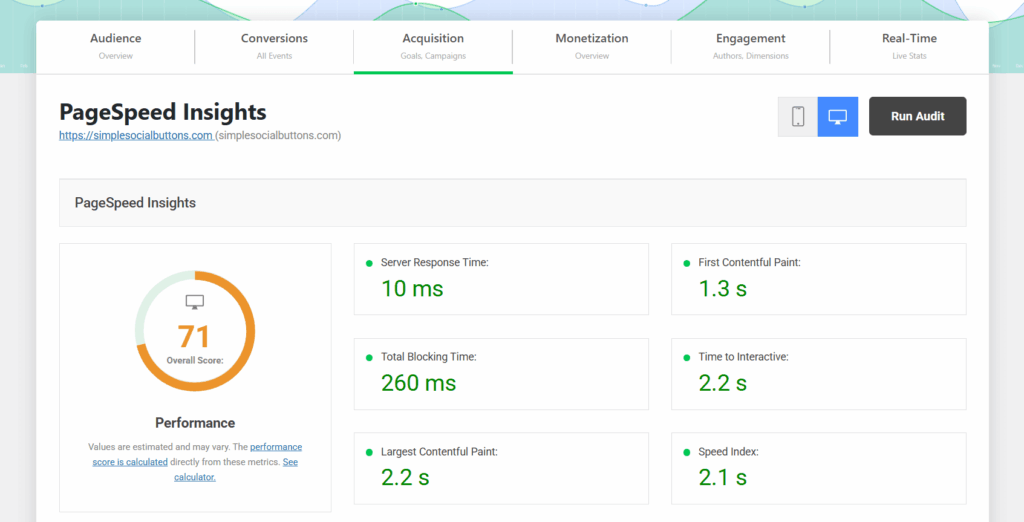
Key areas to review:
- Core Web Vitals pass/fail status
- Mobile vs desktop performance differences
- Opportunities and diagnostics (not just the score)
Avoid optimizing for the score alone. Focus on the underlying metrics.
Core Web Vitals Metrics to Track
For WordPress performance optimization, these metrics matter most:
- Largest Contentful Paint (LCP): Loading performance of the main content
- Interaction to Next Paint (INP): Responsiveness to user interactions
- Cumulative Layout Shift (CLS): Visual stability during load
If field data is unavailable (low traffic), use lab data as a temporary baseline and re-evaluate once traffic increases.
Audit Checklist: Page Load, Core Web Vitals, and Plugin Bloat
A structured checklist prevents missed issues.
Measure key timing metrics:
- Time to First Byte (TTFB)
- First Contentful Paint (FCP)
- Largest Contentful Paint (LCP)
- Interaction delays (INP or FID)
- Cumulative Layout Shift (CLS)
Review themes and plugins:
- Count total active plugins
- Identify plugins loading assets site-wide
- Flag page builders, sliders, and heavy form plugins
- Check for duplicate functionality across plugins
Identify third-party performance risks:
- Analytics and tracking scripts
- Chat widgets and marketing tools
- Ad networks and embedded media
These often impact INP and TTFB more than core WordPress itself.
Documenting the Business Impact of Performance Issues
Performance audits should not be purely technical. Tie issues to business outcomes.
- Record current Core Web Vitals status (pass/fail)
- Note the average page load time for key pages
- Map slow pages to:
- High-traffic landing pages
- Conversion funnels
- Revenue-generating content
- High-traffic landing pages
Create a baseline report that includes:
- Current metrics
- Identified bottlenecks
- Affected business pages
This baseline is critical for validating improvements after optimization and for reporting ROI to stakeholders.
Step 2: Optimize Server & Infrastructure for Maximum Speed
Server and infrastructure decisions have a direct impact on WordPress performance. Even a well-optimized front end cannot compensate for slow server response times or inefficient backend configuration. For growing businesses, infrastructure must be built to handle traffic spikes, concurrent users, and dynamic requests without delay.
This step focuses on reducing Time to First Byte (TTFB) and improving overall server responsiveness.
Understand How Backend Infrastructure Impacts WordPress Performance
Every WordPress request passes through multiple layers:
- DNS resolution
- Server processing (PHP, database)
- Asset delivery (images, CSS, JavaScript)
If any layer is slow, page load times increase. Poor hosting, outdated PHP versions, or missing caching layers are common causes of high TTFB and unstable performance.
Choosing the Right Hosting & Server Configuration
Hosting quality matters more as your site grows.
Key requirements for performance-focused WordPress hosting:
- Managed WordPress hosting with SSD or NVMe storage
- PHP 8.x or higher for better execution speed
- Sufficient CPU and RAM for traffic growth
- Isolated resources to avoid “noisy neighbor” issues
Avoid shared hosting plans that limit server-level optimization and scalability.
Implementing CDN and Global Delivery Optimization
A Content Delivery Network (CDN) reduces load times by serving static assets from locations closer to users.
Key benefits:
- Faster image, CSS, and JavaScript delivery
- Reduced server load during traffic spikes
- Improved global performance consistency
In addition to CDN setup:
- Use optimized DNS providers
- Enable modern protocols like HTTP/3
- Ensure SSL is properly configured to avoid handshake delays
Server-Level Caching & Performance Enhancements
Caching reduces repeated processing for the same requests.
Essential server-side caching layers include:
- Page caching for HTML output
- Object caching to reduce database queries
- Opcode caching to speed up PHP execution
For high-traffic WordPress sites:
- Implement Redis or Memcached
- Configure cache rules for logged-in users and dynamic pages carefully
Proper server caching significantly lowers TTFB and improves Core Web Vitals, especially LCP.
Once your server and infrastructure are optimized, the next focus is the front-end experience. Optimizing JavaScript, CSS, images, and plugin behavior ensures users see content quickly and interact smoothly, complementing backend improvements.
Step 3: Front-End Optimization for Faster User Experiences
Front-end optimization focuses on what loads in the user’s browser. For growing WordPress sites, heavy themes, unoptimized media, and excessive JavaScript are common causes of slow load times and poor Core Web Vitals.
This step targets faster rendering, smoother interactions, and better visual stability.
WordPress Front-End Optimization: JS, CSS & Images
Front-end optimization focuses on what loads in the user’s browser. Heavy themes, unoptimized media, and excessive scripts are common causes of slow load times and poor Core Web Vitals.
Actionable Steps:
- JavaScript & CSS: Minify files, defer/async non-critical scripts, inline critical CSS, remove unused CSS/JS. Reducing JS execution time improves INP and overall responsiveness.
- Images & Media: Compress images without visible quality loss, convert to WebP/AVIF, serve responsive images using srcset, enable lazy loading, and preload hero images for faster LCP.
- Themes & Plugins: Remove unused/redundant plugins, replace bloated plugins with lightweight alternatives, disable plugin assets on pages where not needed, and choose themes with minimal dependencies.
This combined approach ensures smoother rendering, faster interactivity, and improved Core Web Vitals across your site.
With a faster front-end, optimizing backend code and database efficiency ensures your dynamic pages remain responsive under load.
Step 4: Backend & Database WordPress Technical Optimization
Backend and database efficiency directly affect how quickly WordPress can process requests. As sites grow, inefficient queries, unused data, and poorly written code increase server load and slow down dynamic pages.
This step focuses on improving WordPress technical optimization, including server-side execution and database performance.
Database Cleanup and Query Optimization
Over time, WordPress databases accumulate unnecessary data that slows down queries.
Key optimization actions:
- Remove expired transients and unused options
- Reduce or clean excessive autoloaded options
- Delete old revisions, drafts, and orphaned metadata
- Add indexes to slow or frequently queried tables
A cleaner database reduces query time and lowers server load.
Improving Backend Code Efficiency
Poorly optimized PHP code can create performance bottlenecks even on strong servers.
Areas to review:
- Identify slow database queries using query monitoring tools
- Reduce repeated queries in templates and plugins
- Refactor inefficient loops and conditional logic
- Avoid unnecessary API calls during page load
Optimized backend code improves consistency and reduces response times under traffic.
Keeping WordPress Core, Themes, and Plugins Updated
Updates are not just for security. Performance improvements are frequently included in:
- WordPress core releases
- Theme updates
- Plugin updates
Best practices:
- Keep PHP, WordPress core, themes, and plugins up to date
- Test updates in staging before deploying live
- Remove abandoned or unsupported plugins
Up-to-date software ensures compatibility with modern performance standards and reduces technical debt.
Step 5: Core Web Vitals Optimization
Core Web Vitals for WordPress are the Google-defined metrics that measure real-world user experience. For growing WordPress sites, optimizing these metrics is essential for SEO, conversions, and retention.
Core Web Vitals for WordPress measure real-world user experience of your WordPress site: LCP (loading), INP (interactivity), and CLS (visual stability).
Improve LCP (Largest Contentful Paint):
- Prioritize above-the-fold content and preload key resources (fonts, hero images).
- Reduce render-blocking CSS/JS and optimize server response (TTFB).
Improve INP (Interactivity)
- Minimize JS execution time and break long tasks into smaller chunks.
- Use asynchronous event handlers and reduce main-thread work from heavy plugins or page builders.
Reduce CLS (Cumulative Layout Shift)
- Reserve space for images, ads, and embeds with explicit width/height.
- Avoid dynamically injected content above existing content.
- Minimize layout shifts from font swaps or late-loading scripts.
Core Web Vitals optimization is ongoing; monitor regularly to catch regressions from new content, plugins, or ads.
Step 6: Reporting & WordPress Performance Audit Deliverables
After completing performance optimizations, documenting results is critical. Reports show the impact of changes, validate improvements, and provide a baseline for ongoing monitoring.
Clear, structured reporting also allows stakeholders to understand the business benefits of technical optimization.
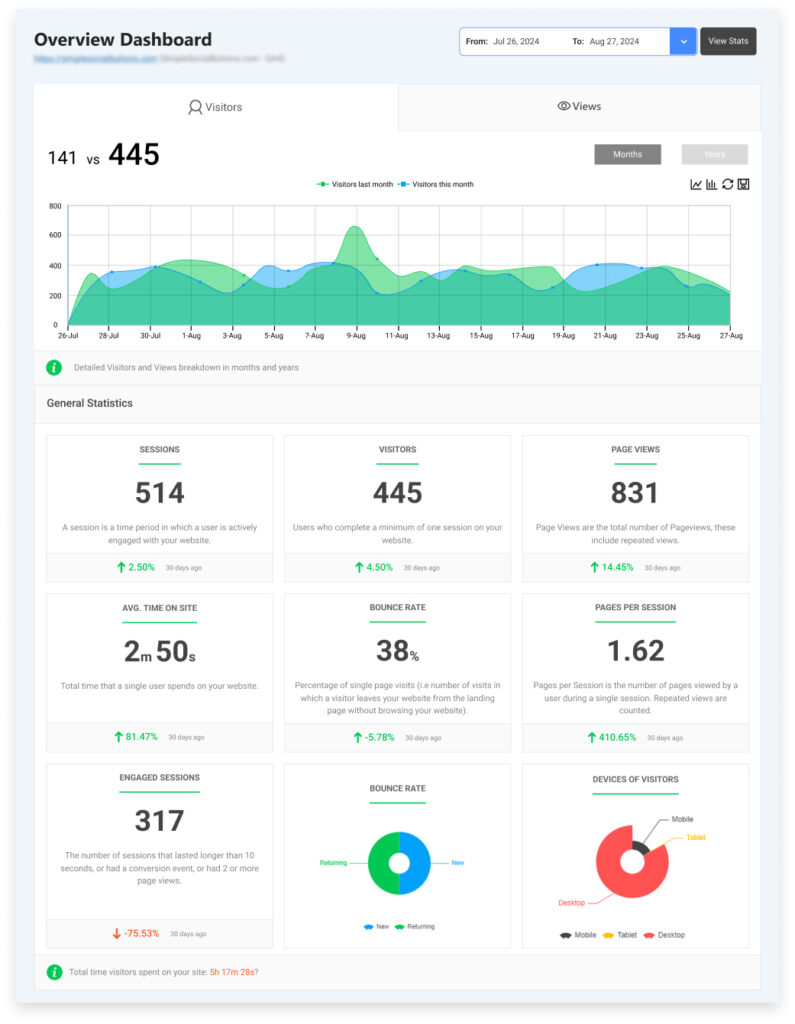
You can use Analytify to generate detailed reports showing Core Web Vitals and other performance metrics, making it easier to communicate improvements to stakeholders.

Before/After Metrics and Field Data
A proper audit report should include:
- Core Web Vitals: LCP, INP/FID, CLS
- Page load times (FCP, TTFB, total load)
- Mobile vs desktop performance differences
- Key business pages or conversion funnels
Compare before and after metrics to highlight improvements and prioritize further optimizations.
Waterfall Analysis & Technical Summary
Use waterfall charts from tools like GTmetrix or WebPageTest to identify:
- Bottlenecks fixed during optimization
- Remaining issues that require attention
- Asset load order and dependencies
Include a technical summary with actionable recommendations, such as:
- Scripts still blocking rendering
- Heavy plugins impacting performance
- Database or server-level adjustments required
Well-structured reporting ensures your optimization work is measurable, transparent, and actionable for teams managing growing WordPress sites.
Step 7: Quality Assurance & Regression Testing
Optimizations are only effective if they work consistently across devices, browsers, and future updates. Quality assurance (QA) and regression testing ensure that performance improvements remain stable as the site evolves.
Integrating Analytify into your QA workflow allows automated tracking of performance KPIs and alerts for regressions caused by plugin or theme changes.
Cross-Device & Browser Validation
Test optimized pages on:
- Mobile, tablet, and desktop devices
- Major browsers (Chrome, Firefox, Safari, Edge)
- Different screen sizes and resolutions
Ensure that Core Web Vitals improvements, page layout, and interactivity are consistent across environments.
Performance Tracking and Alerts for Regression
Even after optimization, changes like plugin updates or new content can degrade performance. To maintain speed:
- Implement real user monitoring (RUM) for Core Web Vitals
- Set up automated alerts for performance regressions
- Track key KPIs over time to detect slowdowns early
Regular QA combined with automated monitoring prevents unnoticed performance degradation, ensuring a reliable user experience for growing WordPress sites.
Step 8: Ongoing Optimization Strategy for Growing Businesses
Performance is not a one-time task. Growing WordPress sites constantly change new content, plugins, themes, and traffic patterns can introduce new bottlenecks. An ongoing strategy ensures that speed, responsiveness, and Core Web Vitals remain optimal over time.
Scheduled WordPress Performance Audit
Regular WordPress performance audit allows you to track performance trends and prevent regression:
- Conduct monthly or quarterly audits depending on traffic and site complexity
- Re-measure Core Web Vitals, page load times, and server response metrics
- Update baselines to reflect the new site structure or content
Scheduled audits make optimizations proactive rather than reactive.
Continuous Monitoring & Updates
Use monitoring tools to catch performance issues in real time:
- Monitor Core Web Vitals continuously through RUM or analytics tools
- Track server uptime, TTFB, and database performance
- Adjust caching, scripts, or database optimization as needed
Continuous monitoring ensures your WordPress site scales without compromising user experience.
Plugin & Theme Change Management
Changes in themes or plugins can reverse previous optimizations. Best practices include:
- Review updates in a staging environment before deploying live
- Test Core Web Vitals and key pages after updates
- Remove unnecessary plugins and replace heavy plugins with optimized alternatives
A structured change management process prevents unintentional slowdowns and maintains consistent performance.
Choose WPBrigade for WordPress Performance Optimization
For growing businesses, performance optimization requires more than basic fixes. It demands technical expertise, scalable solutions, and measurable results. WPBrigade offers agency-level WordPress performance services designed for real-world business needs.
Technical Expertise Beyond Hosting
WPBrigade optimizes across multiple layers:
- Server and hosting configuration
- Front-end asset management (JS, CSS, images)
- Backend code and database efficiency
- Core Web Vitals compliance
This ensures your site performs reliably under increasing traffic and complexity, not just on a test server.
Enterprise-Level Optimization for High-Traffic Sites
For businesses with significant traffic or complex functionality:
- Scalable infrastructure solutions
- Advanced caching strategies (Redis, Memcached, CDN)
- Load testing and bottleneck identification
- Optimization of high-traffic pages and conversion funnels
These approaches guarantee that performance remains consistent even under peak load.
Proven Results with Core Web Vitals & Speed Gains
WPBrigade delivers measurable performance improvements:
- Faster LCP and reduced INP for better user experience
- Lower CLS for visual stability
- Documented speed gains on high-traffic pages
- Case studies highlighting real-world impact on conversions and SEO
Partnering with WPBrigade ensures that optimization is strategic, data-driven, and sustainable, rather than a temporary fix.
How to Evaluate Your WordPress Performance Partner
Selecting the right agency is critical for long-term WordPress performance. Not all service providers offer the technical depth required to optimize growing sites while maintaining stability and scalability.
Portfolio Review & Case Studies
- Examine real-world examples of optimized WordPress sites
- Look for improvements in Core Web Vitals, load times, and user experience
- Ensure case studies include measurable results, not just before/after screenshots
A strong portfolio demonstrates practical expertise, not theory.
Communication, Support, and SLAs
- Confirm responsiveness and clarity in project communication
- Understand service-level agreements for updates, monitoring, and incident response
- Evaluate how the agency manages post-optimization support
Transparent communication prevents surprises and ensures timely resolution of performance issues.
Transparent Pricing & ROI Analysis
- Compare cost against measurable performance improvements and business impact
- Ask for expected results tied to traffic, conversions, or Core Web Vitals
- Avoid agencies promising unrealistic speed gains without evidence
A clear pricing model paired with ROI-oriented deliverables ensures your investment aligns with business goals.
FAQs About WordPress Performance Optimization
No. While caching, minification, and image optimization plugins help, they cannot solve server-level inefficiencies, heavy database queries, or Core Web Vitals issues caused by theme structure or third-party scripts.
For growing businesses, schedule monthly or quarterly audits. Frequent monitoring ensures new plugins, themes, or content changes do not degrade performance over time.
Not if done correctly. Optimization focuses on asset delivery, script management, and layout stability, preserving your design while improving speed and interactivity.
Scalable infrastructure
Code and database optimization
Continuous monitoring and regression testing
DIY approaches may fix small issues, but often fail under growth.
WordPress Performance Optimization:
Conclusion
WordPress performance optimization is essential for growing businesses. Faster, more responsive sites improve user experience, reduce bounce rates, increase conversions, and strengthen SEO through better Core Web Vitals.
Optimizing WordPress requires a structured approach: auditing current performance, tuning server infrastructure, optimizing front-end assets, improving backend efficiency, and continuously monitoring results. Each step ensures that improvements are measurable, scalable, and sustainable.
By following this step-by-step checklist, businesses can maintain high performance as they grow, while making data-driven decisions about plugins, themes, and infrastructure. Partnering with an experienced agency like WPBrigade ensures that optimizations are implemented correctly, delivering long-term speed gains, improved Core Web Vitals, and measurable business impact.
You may also like to read:
Now that you have a step-by-step roadmap for WordPress performance optimization, we’d love to hear from you: Which area of your site do you think is slowing down your users the most: server, front-end, or Core Web Vitals, and what’s your first step to fix it?