


SaaS products need more than a good idea. They need a platform that is secure, scalable, and easy to grow. This is why many teams choose WordPress for SaaS when they want flexibility without long development cycles.
WordPress supports SaaS landing pages, user registrations, subscription tiers, and custom dashboards. It also integrates easily with payment gateways, CRMs, and other SaaS tools.
However, SaaS WordPress projects come with real challenges. Login security is a common risk. User roles and memberships can become messy. Basic analytics often fail to show how trials, upgrades, and user behavior connect to revenue.
In this guide, you’ll learn how to plan, build, and secure a WordPress SaaS site the right way. We’ll cover security best practices, membership management, and analytics tracking, with real examples from WPBrigade’s experience using LoginPress and Analytify.
Table of contents
- Why WordPress Works for SaaS Products
- How to Build Secure WordPress Sites for SaaS Products (Step by Step)
- Step 1: Define Your SaaS Goals and Requirements
- Step 2: Set Up Reliable Hosting and Infrastructure
- Step 3: Install and Secure WordPress
- Step 4: Choose a SaaS-Ready WordPress Theme
- Step 5: Install Essential Plugins
- Step 6: Secure Authentication and Login
- Step 7: Design Core SaaS Pages and User Dashboards
- Step 8: Design Secure User Onboarding and Access Flows
- Step 9: Implement Membership and Subscription Workflows
- Step 10: Integrate Payments and APIs
- Step 11: Track Analytics and Conversions
- Step 12: Test Performance and Security
- Step 13: Maintain, Monitor, and Scale
- Step 14: Address Common Challenges
- Frequently Asked Questions
- WordPress for SaaS: Conclusion
Why WordPress Works for SaaS Products
WordPress is often seen as a blogging tool. In reality, it is a flexible business platform that can support full SaaS WordPress projects when built correctly.
For SaaS teams, the goal is speed, control, and scalability. WordPress delivers all three without locking you into a closed system.
Flexibility and Custom WordPress SaaS Development
WordPress allows full control over how your SaaS works.
You can build:
- SaaS landing pages on WordPress
- Custom pricing and signup flows
- User dashboards and gated features
- Role-based access for different subscription tiers
You are not limited to themes or templates. Custom development lets you shape the product around your SaaS model.
WordPress also supports API integrations. This makes it easy to connect CRMs, payment gateways, and third-party SaaS tools.
Analytify fits naturally here by showing real-time user activity, trial signups, and engagement data directly inside WordPress.
Scalability for Growing SaaS Platforms
SaaS platforms grow fast. Traffic spikes happen during launches, campaigns, or feature releases.
WordPress can scale when the setup is done right.
- Enterprise-grade hosting handles high traffic
- Caching and CDNs improve global performance
- Membership systems manage thousands of users
You can also manage multiple membership tiers and user roles without slowing the site down. This makes WordPress a strong option for long-term WordPress SaaS development.
Built-In Security Capabilities
Security is critical for SaaS platforms with user logins and payments.
WordPress supports:
- Role-based access control
- Secure authentication
- SSL and data protection standards
The key is implementation. Login security needs extra attention in SaaS environments.
LoginPress helps secure login forms, restrict admin access, and enforce stronger authentication rules. This reduces common risks tied to user accounts.
Faster Time-to-Market
SaaS teams often need to launch quickly.
WordPress speeds up development by combining:
- Proven frameworks
- Reliable plugins
- Custom development where needed
This approach helps SaaS teams release an MVP faster, test ideas, and improve the platform without rebuilding it from scratch.
How to Build Secure WordPress Sites for SaaS Products (Step by Step)
Below are the simple steps to help you build secure WordPress sites for SaaS products.
Step 1: Define Your SaaS Goals and Requirements
Before starting any WordPress for SaaS project, you need clarity on what you’re building and why. This step prevents overbuilding and helps you make better technical decisions later.
Start by defining how WordPress will be used:
- Will WordPress power the full SaaS product or only the marketing site?
- Will users access features directly inside WordPress dashboards?
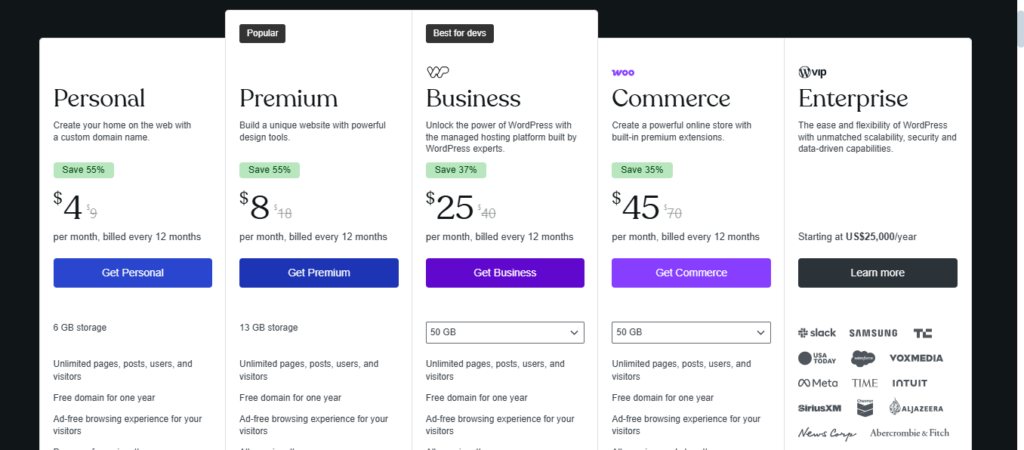
Are you choosing WordPress.org or WordPress.com? Check our detailed guide to understand the differences and help you decide based on your requirements.
Let’s assume you choose WordPress.com in this scenario. Next, outline your subscription model:
- Free trial, freemium, or paid plans
- Monthly or annual billing
- Feature limits per plan

List your core features clearly:
- MVP features required for launch
- Features planned for future growth
Finally, prioritize everything. Focus on what delivers value early and supports scale later. Clear SaaS goals make WordPress SaaS development more efficient and reduce security and performance risks down the line.
Step 2: Set Up Reliable Hosting and Infrastructure
A SaaS platform needs stable performance from day one. Weak hosting can cause downtime, slow load times, and security risks as users grow.
Choose hosting built for WordPress SaaS projects:
- Enterprise-grade servers with auto-scaling
- Built-in CDN for global users
- SSL enabled by default
- Server-level caching for faster performance
Plan your infrastructure early:
- Prepare for traffic spikes during launches or campaigns
- Ensure your hosting supports membership and subscription workflows
- Use staging environments for safe testing
A strong hosting foundation supports secure WordPress SaaS builds and ensures your platform can scale without disruption.
Step 3: Install and Secure WordPress
With hosting in place, the next step is a clean and secure WordPress setup. This forms the base of your WordPress for SaaS platform.
Start with a fresh WordPress installation:
- Use the latest WordPress version
- Remove default themes and unused plugins
- Set up a strong admin username and password
Secure the core setup early:
- Enable HTTPS across the site
- Limit admin access to trusted users only
- Disable unnecessary features that increase attack surfaces
Prepare WordPress for SaaS use:
- Configure user roles properly
- Set up basic security rules before adding plugins
- Ensure your environment is ready for memberships and subscriptions
A hardened WordPress install reduces security risks and creates a stable foundation for WordPress SaaS development.
Step 4: Choose a SaaS-Ready WordPress Theme
Your theme plays a key role in performance, usability, and scalability. For WordPress SaaS sites, design must support both marketing pages and user dashboards.
Choose a theme built for SaaS use:
- Lightweight and performance-focused
- Flexible layouts for landing pages and pricing pages
- Compatibility with membership and subscription plugins
Avoid heavy or multipurpose themes that slow down your site. Speed and clarity matter more than visual effects.
Prepare your theme for growth:
- Ensure it supports custom dashboards and user areas
- Make it easy to add or modify pages as features evolve
- Keep design consistent across landing pages and logged-in areas
A SaaS-ready theme helps deliver clean SaaS landing pages on WordPress while keeping your platform fast and secure.
Step 5: Install Essential Plugins
Plugins extend WordPress into a full SaaS platform. The goal is to add only what supports security, access control, subscriptions, and analytics.
Start with core SaaS requirements:
- Membership and subscription management
- Secure authentication and access control
- Analytics and user behavior tracking
Add security-focused tools first. LoginPress strengthens login flows and protects user access, which is critical for secure WordPress SaaS builds.
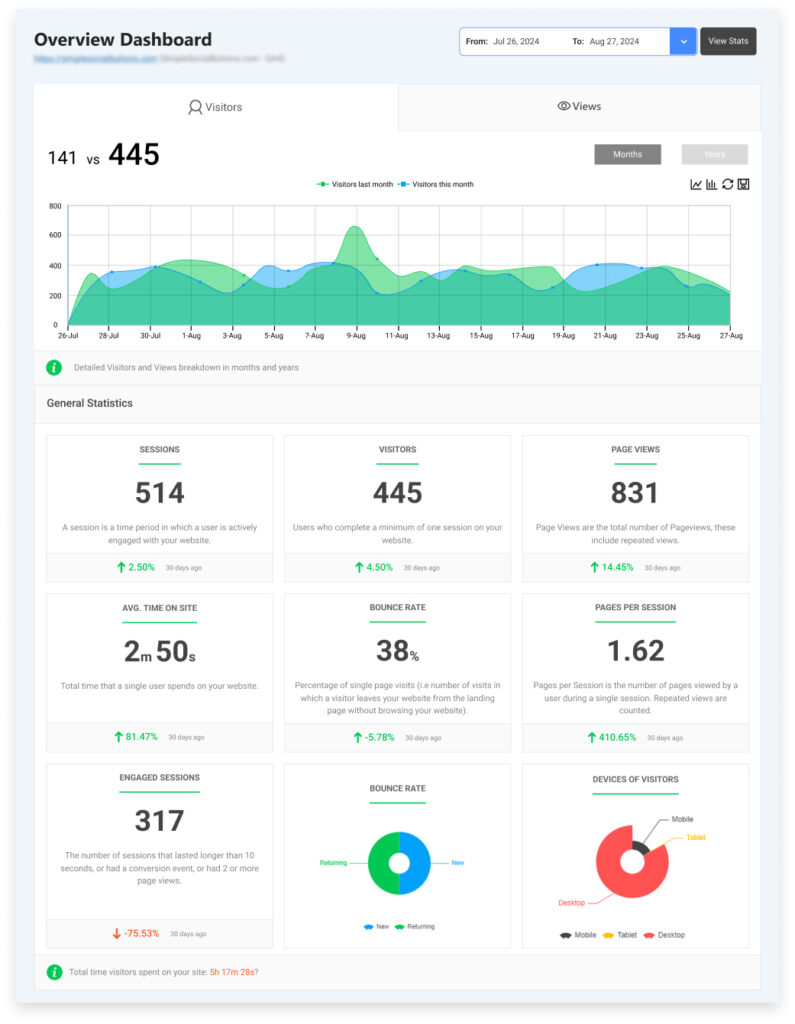
Next, set up analytics. Analytify helps track user engagement, trial conversions, and subscription activity directly inside WordPress.

Keep your plugin stack lean:
- Avoid overlapping features
- Remove unused plugins
- Test compatibility in a staging environment
A focused plugin setup supports scalable WordPress SaaS development without sacrificing performance or security.
Step 6: Secure Authentication and Login
User logins are often the weakest link in a WordPress SaaS site. Protecting them is critical for user trust, data security, and platform integrity.
Start by enforcing strong passwords for all accounts and enabling two-factor authentication (2FA) for an extra security layer.
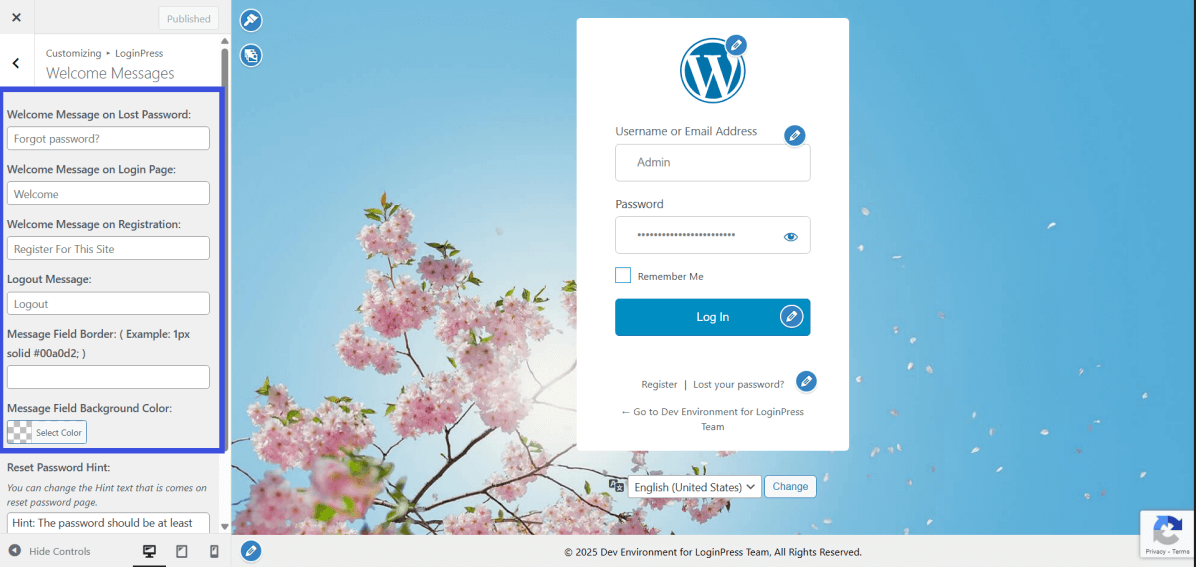
LoginPress makes login security simple and robust:
- Custom login pages reduce automated attacks and phishing attempts

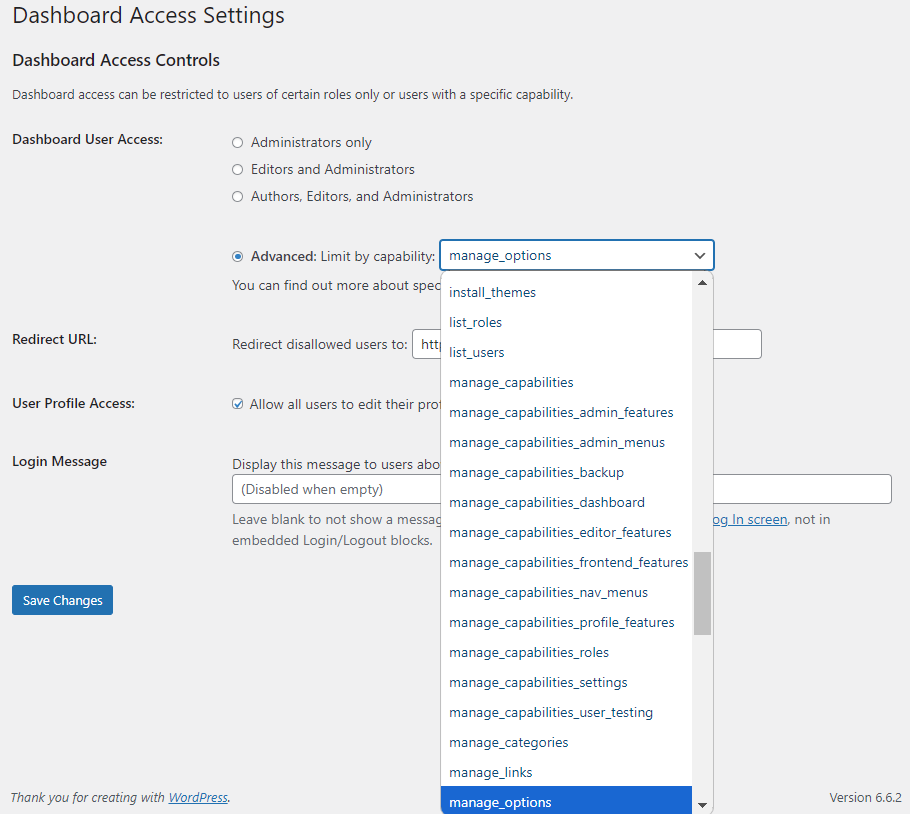
- Role-based dashboard access ensures only authorized users reach sensitive areas

- Brute-force protection blocks repeated failed login attempts automatically

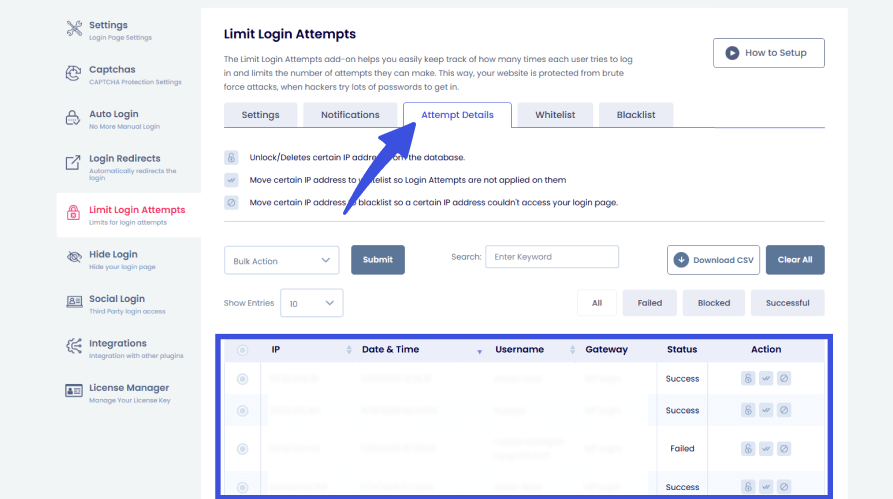
- Login activity monitoring tracks suspicious behavior, including failed logins and unusual IP addresses
By combining strong credentials, 2FA, and LoginPress features, only authorized users access your SaaS platform. This protects sensitive data and m
Step 7: Design Core SaaS Pages and User Dashboards
After securing logins, focus on designing pages that drive engagement and conversions. For a WordPress SaaS site, pages are part of the product experience.
Key pages to design:
- Landing pages – clearly explain your SaaS value, features, and benefits
- Pricing and plan comparison pages – highlight differences between subscription tiers with clear CTAs
- User dashboards – show personalized content and features based on subscription level
- Onboarding and account pages – signup, login, password recovery, and account management
Integrate LoginPress to protect sensitive areas:
- Restrict dashboards by role: Only allow certain users to see admin or member dashboards. For example, trial users see limited features, while paid subscribers see full access. This prevents accidental access and keeps your SaaS platform secure.
- Secure premium pages: Protect content, tools, or dashboards behind role-based rules. LoginPress ensures that only the correct subscription tier can access premium pages, reducing content leaks or unauthorized usage.
- Control access to features during onboarding: Guide new users through trial features safely. You can show or hide features based on user role until they upgrade, improving UX while maintaining security.
Well-designed pages improve SaaS landing pages on WordPress, enhance the user experience, and make the platform easier to scale securely.
Step 8: Design Secure User Onboarding and Access Flows
A smooth and secure onboarding experience is essential for WordPress SaaS sites. It ensures users can start using your platform safely while guiding them toward paid plans.
Map the user journey from signup to active use:
- Signup flow: Collect only necessary information and guide users to select a plan
- Trial management: Restrict features for trial users and gradually unlock access
- Upgrade/downgrade flow: Automatically adjust dashboards, roles, and feature access when users change plans
Use LoginPress to enforce access rules during onboarding:
- Redirect users based on subscription level or role
- Block trial users from accessing premium dashboards
- Secure onboarding pages and forms with login restrictions

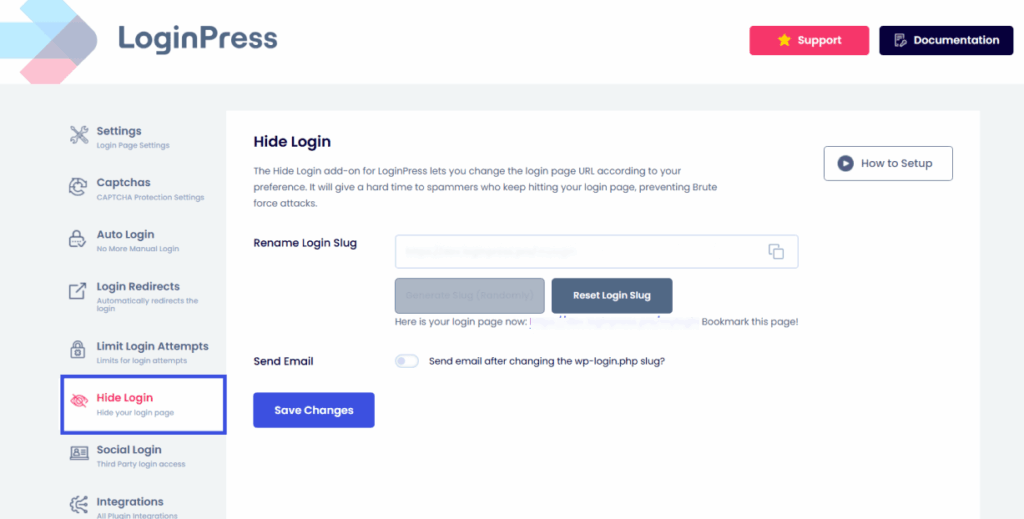
By combining role-based access with clear workflows, you protect your platform, reduce user confusion, and set the stage for higher retention and conversions.
Step 9: Implement Membership and Subscription Workflows
With onboarding in place, it’s time to set up membership tiers and subscription workflows. This ensures users only access what they’ve paid for and keeps your WordPress SaaS site organized and secure.
Start by mapping subscription plans to WordPress user roles:
- Assign features and dashboards to each tier (trial, basic, premium)
- Automate upgrades, downgrades, and expirations so access changes immediately
Use LoginPress to maintain long-term security and access control:
- Protect premium content and dashboards for paid tiers
- Restrict admin areas to authorized staff
- Ensure users never access features above their subscription level
Automate workflows for payment issues, cancellations, or refunds:
- Adjust roles automatically when subscriptions change
- Ensure users never lose access unexpectedly
- Track user activity for analytics and retention
Proper membership workflows reduce confusion, enhance security, and provide a seamless SaaS experience while supporting growth.
Step 10: Integrate Payments and APIs
Your WordPress SaaS site needs seamless payment processing and integrations with other tools to operate efficiently.
Start with payment setup:
- Use verified gateways like Stripe or PayPal
- Test all payment flows in a staging environment
- Automate upgrades, downgrades, and subscription expirations
Your WordPress SaaS site needs smooth payment processing and integration with other tools.
- Payment gateways: Use verified services like Stripe or PayPal. Test all flows in a staging environment. Automate upgrades, downgrades, and expirations.
- Other SaaS tools: Connect CRMs, email platforms, or marketing tools via APIs as needed for user management and onboarding.
- Analytics: Install Analytify to track trial conversions, subscriptions, and user engagement directly inside WordPress. No API setup required.
Custom development may be needed for advanced dashboards or unique SaaS features. Integrating APIs ensures your platform is connected, automated, and ready to scale.
Proper payment and API integration keep your workflows smooth and enhance user experience while maintaining security.
Step 11: Track Analytics and Conversions
Monitoring user behavior is essential for growing a WordPress SaaS site. Analytics help you understand trial conversions, feature usage, and subscription trends.
Analytify brings Google Analytics directly into WordPress, making it easier to monitor performance without leaving your site. With Analytify, you can:
- Track trial signups and completions
- Monitor upgrades, downgrades, and subscription activity
- Measure feature engagement and dashboard usage
- Analyze user retention and churn

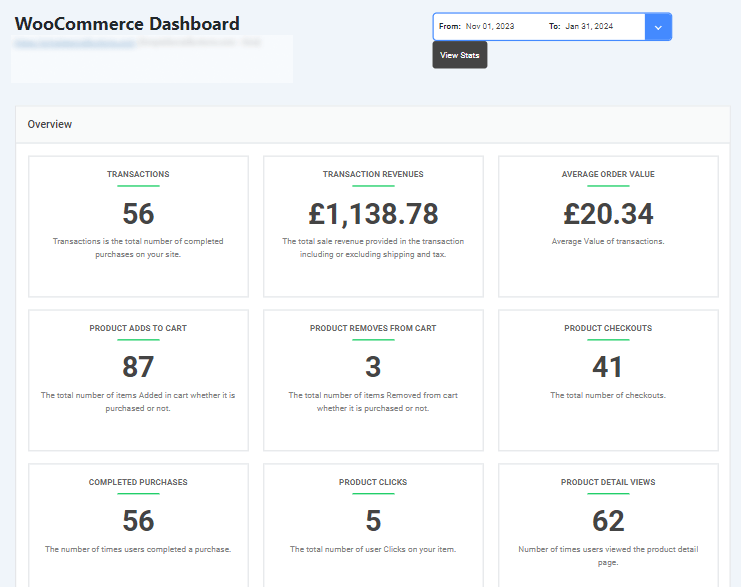
Use this data to improve onboarding, adjust subscription plans, and optimize SaaS workflows. Regular tracking ensures your platform is data-driven, secure, and ready to scale.
Step 12: Test Performance and Security
Before launching, thoroughly test your WordPress SaaS site to ensure it’s secure, fast, and reliable for all users.
Key testing areas:
- Performance: Check page load times, dashboard responsiveness, and mobile experience
- Security: Test login flows, role-based access, and plugin configurations
- Subscription workflows: Simulate trial signups, plan upgrades, and cancellations
- Payments: Verify gateways and automation in a staging environment
Include load testing to see how your site handles traffic spikes and multiple simultaneous logins.
Testing ensures your platform is stable, secure, and ready for real-world usage, minimizing risks at launch.
Step 13: Maintain, Monitor, and Scale
After launch, ongoing maintenance is essential for a secure and high-performing WordPress SaaS site.
Focus on:
- Regular updates: Keep WordPress core, themes, and plugins current
- Plugin audits: Remove unused or outdated plugins to reduce vulnerabilities
- Backups and uptime monitoring: Ensure data safety and continuous access for users
- Periodic security audits: Detect and fix potential threats before they cause issues
- Scaling: Upgrade hosting or optimize infrastructure as the user base grows
Agencies like WPBrigade can handle advanced monitoring, security compliance, and performance tuning, keeping your SaaS platform reliable and ready to grow.
Step 14: Address Common Challenges
Building a WordPress SaaS site comes with common challenges. Planning for them early keeps your platform secure, scalable, and user-friendly.
| Challenge | Solution / Tool |
| High traffic spikes | Use enterprise hosting with CDN and caching to handle sudden loads. |
| Membership conflicts | Implement role-based access using LoginPress to prevent feature overlap. |
| Payment integration errors | Test verified gateways in a staging environment before going live. |
| Security threats & GDPR compliance | Enforce SSL, firewalls, and regular security audits. Use LoginPress for login protection. |
| Multi-tenant user management | Set up custom roles and access rules to manage different subscription levels safely. |
This table gives a quick, actionable overview of common problems SaaS teams face and the tools or strategies to solve them.
Frequently Asked Questions
WordPress for SaaS: Conclusion
Building a secure WordPress SaaS site requires careful planning, strong security, and a thoughtful user experience. WordPress provides the flexibility, scalability, and plugin ecosystem needed to manage subscriptions, dashboards, and integrations effectively.
With WPBrigade’s expertise, your SaaS platform can be high-performing and secure from day one. By integrating LoginPress, you protect logins and control access, while Analytify provides actionable insights into user behavior, trial conversions, and subscription performance.
Whether you’re launching your first SaaS product or scaling an existing platform, WPBrigade ensures your WordPress SaaS site is built for security, growth, and success.
Contact WPBrigade today to create a custom WordPress SaaS platform that combines strong security, analytics, and seamless user experiences.