
WordPress project planning has eight steps: brief, scope, design, development, content and SEO, testing, launch and maintenance. Planning each step up front prevents late launches, scope creep and budget overruns. Most WordPress projects don’t fail because of coding mistakes. They fail because planning was rushed or skipped.
Sites launch late, features change mid-build, budgets expand, and teams struggle to define what “done” actually looks like. If you’ve ever rebuilt a WordPress site twice in a year or inherited a messy project, you’ve seen the cost of unclear planning firsthand.
That’s why it pays to approach WordPress project planning methodically.
In this guide, you’ll learn how to structure requirements, scope work effectively, create realistic timelines, and avoid common mistakes that cause delays and rework.
By following these steps, you can deliver a predictable, high-quality WordPress build that meets business goals and provides a smooth experience for users.
Table of contents
- Step 1: Understanding the Project Brief
- Step 2: Project Scoping and Documentation
- Step 3: Design and User Experience Planning
- Step 4: Development Planning
- Step 5: Content and SEO Planning
- Step 6: Testing and Quality Assurance
- Step 7: Launch Planning
- Step 8: Maintenance and Continuous Improvement
- How WPBrigade Applies This WordPress Project Planning Framework
- Common WordPress Project Planning Mistakes to Avoid
- Frequently Asked Questions About WordPress Project Planning
- WordPress Project Planning: Conclusion
Here are the eight steps of WordPress project planning and what each one produces.
| Step | What Happens | Output |
|---|---|---|
| 1. Project brief | Gather requirements and research competitors | Clear goals |
| 2. Scoping | Define scope, roadmap and risks | Signed-off scope |
| 3. Design and UX | Wireframes, mockups, login experience | Approved designs |
| 4. Development | Setup, plugins, workflow | Stable build plan |
| 5. Content and SEO | Structure, keywords, analytics | Ready content |
| 6. Testing | Functional and cross-device QA | Client sign-off |
| 7. Launch | Checklist and go-live plan | Live site |
| 8. Maintenance | Updates, backups, monitoring | Healthy site over time |
Step 1: Understanding the Project Brief
A strong project brief lays the foundation for a successful WordPress build. Weak briefs often lead to unclear priorities, scope creep, and features that don’t align with business objectives. Investing time upfront reduces risks, protects timelines, and ensures all stakeholders share the same definition of success.
1. Gathering Client Requirements
Start by understanding the client’s requirements. Clarity at the start prevents costly missteps later. WPBrigade recommends focusing on:
- Business Goals: Measurable objectives like lead generation, subscriptions, sales, or workflow improvements.
- Target Audience: Understanding who the site serves and how they interact with content.
- Success Metrics (KPIs): Defining how success will be measured, e.g., conversions, engagement rates, or site performance benchmarks.
- Functional Needs: Essential features such as forms, memberships, integrations, dashboards, or automations.
- Constraints: Timelines, budget limits, and internal resources to set realistic expectations.
Pro Tip: Using structured intake forms, discovery calls, and stakeholder interviews helps uncover hidden requirements early, like security policies, content ownership, or post-launch responsibilities, before they become problems.
2. Competitive and Market Analysis
Understanding the environment your site will compete in ensures design and functionality are informed, not generic.
Key actions include:
- Reviewing competitor websites and common UX patterns.
- Identifying industry-standard features, navigation structures, and layouts.
- Spotting gaps in content, usability, or performance that your project can address.
Practical Tip: By incorporating competitor insights, we at WPBrigade ensure projects prioritize the right features, refine user flows, and create layouts that truly meet audience needs.
Step 2: Project Scoping and Documentation
Project scoping defines the scope of work, a roadmap and the risks and resources for the build. Once the project brief is clear, the next step is defining the scope and documenting every aspect of the build.
Without proper scoping, WordPress projects often expand quietly, with extra pages, “small” feature requests, or last-minute integrations until timelines and budgets become unrealistic. Proper scoping transforms ideas into a structured, executable plan.
1. Defining Scope of Work
A clear scope protects both the client and the development team. It specifies what will be built and what won’t, helping prevent misunderstandings and scope creep.
A typical WordPress scope includes:
- Page Types & Count: List core pages, templates, and expected total page count.
- Core Features & Functionality: Include forms, memberships, integrations, and custom modules.
- Plugins & Third-Party Tools: Specify which tools will be used and why.
- Hosting, Security & Performance Needs: Define expected traffic handling, uptime, and backup strategy.
- Content Responsibilities & Migration: Clarify who provides content and how existing content will be migrated.
Pro Tip: WPBrigade separates in-scope and out-of-scope items early to keep both clients and teams aligned, reducing disputes or delays later.
2. Creating a Detailed Roadmap
Scoping feeds directly into a website development roadmap, breaking the project into phases: Discovery, Design, Development, Testing, Launch, and Maintenance. Each phase should have clear milestones and deliverables.
Best practices include:
- Assigning realistic timelines to each phase.
- Defining review and approval checkpoints.
- Giving clients visibility into progress without micromanagement.
Following WPBrigade’s structured roadmaps ensures projects stay predictable, accountable, and aligned with client expectations.
3. Risk Assessment and Resource Planning
Every WordPress project carries potential risks: plugin conflicts, third-party delays, content readiness, or approval bottlenecks. Identifying these early allows for mitigation and smoother execution.
Key actions:
- Evaluate potential risks for each phase of the project.
- Allocate developers, designers, and QA resources based on project complexity.
- Plan contingencies for high-risk areas to reduce delays.
When risk assessment and resource planning are part of the roadmap, the project stays on track even when something unexpected comes up.
Step 3: Design and User Experience Planning
Design planning is not just about how a WordPress site looks; it directly affects usability, conversions, accessibility, and long-term maintainability. When design decisions are rushed or made without structure, teams often face repeated revisions, confusing navigation, and poor user engagement after launch.
A well-planned design phase ensures that visual choices support business goals and user behavior, not just aesthetics.
1. Wireframes and Visual Planning
Before development begins, it’s important to map out how key pages will function. Wireframes help define structure and content flow without locking the project into final design decisions too early.
During this phase, WPBrigade typically plans:
- Key page layouts: Homepages, service or product pages, dashboards, and critical landing pages
- Mobile-first structure: Ensuring layouts adapt cleanly across devices
- Accessibility considerations: Readable font sizes, proper color contrast, and logical navigation order
Wireframes make it easier to validate layout decisions early, reducing design-related rework during development.
2. Design Mockups and Feedback Workflow
Once layouts are approved, mockups translate structure into visual design. This stage defines branding, color systems, typography, and UI components while still allowing room for refinement.
A structured feedback process is essential at this point. Best practices include:
- Reviewing designs at predefined milestones
- Providing consolidated, actionable feedback instead of scattered revisions
- Tracking changes to avoid version confusion
I like this iterative review process because it keeps design aligned with scope and timelines and avoids late-stage redesigns.
3. User Experience (UX) Best Practices
Strong UX planning ensures the site is intuitive and goal-oriented. Design decisions should be guided by how users navigate, interact, and convert, not assumptions.
Key UX principles applied during WordPress project planning include:
- Clear navigation hierarchy: Logical menus and page relationships
- Optimized CTAs: Placement and messaging that support conversions
- Simplified forms and interactions: Reducing friction for users
When UX decisions follow real user behavior, the design supports engagement, performance and long-term scalability.
4. Secure Access and Login Experience Planning
For projects that involve user accounts, memberships, or restricted content, the login experience is part of the overall UX, not an afterthought.
During planning, this includes:
- Defining user roles and permissions
- Ensuring login and registration flows are secure and user-friendly
- Customizing login pages to match site branding and reduce confusion
In many projects, WPBrigade plans secure access using plugins like LoginPress to maintain consistency between public-facing pages and authenticated user areas, while enforcing security best practices.
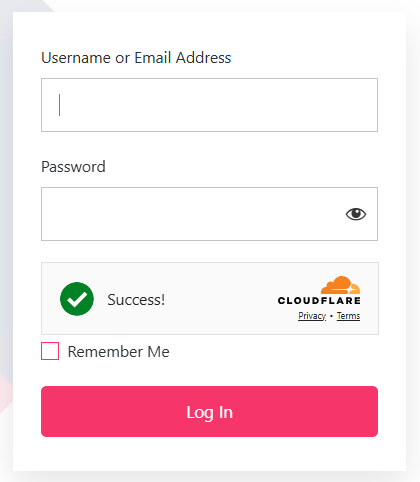
Clear design and UX planning reduces friction for users, shortens development cycles, and ensures the final WordPress build aligns with both business objectives and user expectations.
Step 4: Development Planning
Development planning translates approved designs and requirements into a stable, scalable WordPress build. Without a clear technical plan, projects often suffer from plugin conflicts, inconsistent code, performance issues, and maintenance challenges after launch.
A structured development plan ensures the WordPress build process remains predictable, secure, and easy to manage long-term.
1. Choosing the Right WordPress Setup
Not every WordPress project requires the same technical foundation. The setup should be selected based on project complexity, content management needs, and future growth.
Common setup options include:
- Custom themes: Best suited for unique designs or complex functionality
- Child themes: Ideal when extending a stable parent theme while retaining update compatibility
- Page builders: Useful for rapid builds or client-managed content updates
- Specialized setups: Multi-site networks, membership portals, SaaS platforms, or eCommerce stores
As part of its WordPress development planning process, WPBrigade evaluates project scope, traffic expectations, and long-term maintenance needs before finalizing the setup.
2. Plugin and Functionality Strategy
Plugins are powerful, but unplanned plugin usage often leads to performance issues and security risks. A defined plugin strategy focuses on necessity, quality, and long-term support.
A well-planned plugin stack typically includes:
- Security and firewall protection
- Analytics and tracking tools
- SEO and schema support
- Forms, memberships, or eCommerce functionality
WPBrigade prioritizes a minimal, performance-conscious plugin stack, assessing each tool for compatibility, update history, and developer support to reduce risks during the WordPress build process.
3. Development Workflow and Code Management
A structured workflow ensures code quality and reduces errors during development. Planning the workflow early also makes collaboration and future maintenance easier.
Key components of a reliable development workflow include:
- Staging environments: Isolating development from the live site
- Version control (Git): Tracking changes and enabling safe rollbacks
- Incremental development: Delivering features in manageable sprints
- Documentation: Ensuring knowledge transfer and long-term maintainability
Following this approach keeps development organized and makes the move into testing and launch far less stressful.
Step 5: Content and SEO Planning
Content and SEO planning means structuring content early, mapping keywords to pages and setting up analytics before launch. A WordPress site can be technically sound and visually polished, yet still underperform if content and SEO are treated as an afterthought. Effective WordPress project planning integrates content structure and search visibility early, reducing rework and improving long-term performance.
Planning content and SEO alongside development ensures the site is built to support traffic, engagement, and measurable business outcomes from day one.
1. Structuring Content Early
Content planning defines how information is organized across the site. Without this step, teams often redesign templates or restructure pages late in development.
Key planning activities include:
- Mapping content types: Pages, posts, blogs, product listings, and media
- Defining hierarchy: Clear relationships between parent and child pages
- Standardizing layouts: Consistent formatting for headings, sections, and CTAs
- Preparing for scalability: Making future content updates easy to manage
We plan content structure before development starts, so templates and dynamic elements match how the site will actually be published.
2. Keyword Mapping and On-Page SEO
SEO planning works best when it informs content creation rather than reacting to it later. Keyword mapping ensures each page has a clear purpose and avoids internal competition.
Best practices include:
- Assigning focus keywords to core pages
- Distributing secondary keywords across supporting content
- Planning headings (H1–H3), meta titles, and descriptions
- Defining schema and structured data requirements early
This approach ensures WordPress pages are optimized for search engines while remaining clear and useful for readers.
3. Analytics and Performance Tracking
Content performance should be measurable from launch. Planning analytics early avoids missing data and unclear reporting later.
Key considerations include:
- Defining engagement and conversion metrics
- Tracking form submissions, downloads, and subscriptions
- Monitoring content performance over time
WPBrigade typically integrates analytics dashboards, such as Analytify, during development to ensure content and SEO performance can be reviewed and optimized continuously.
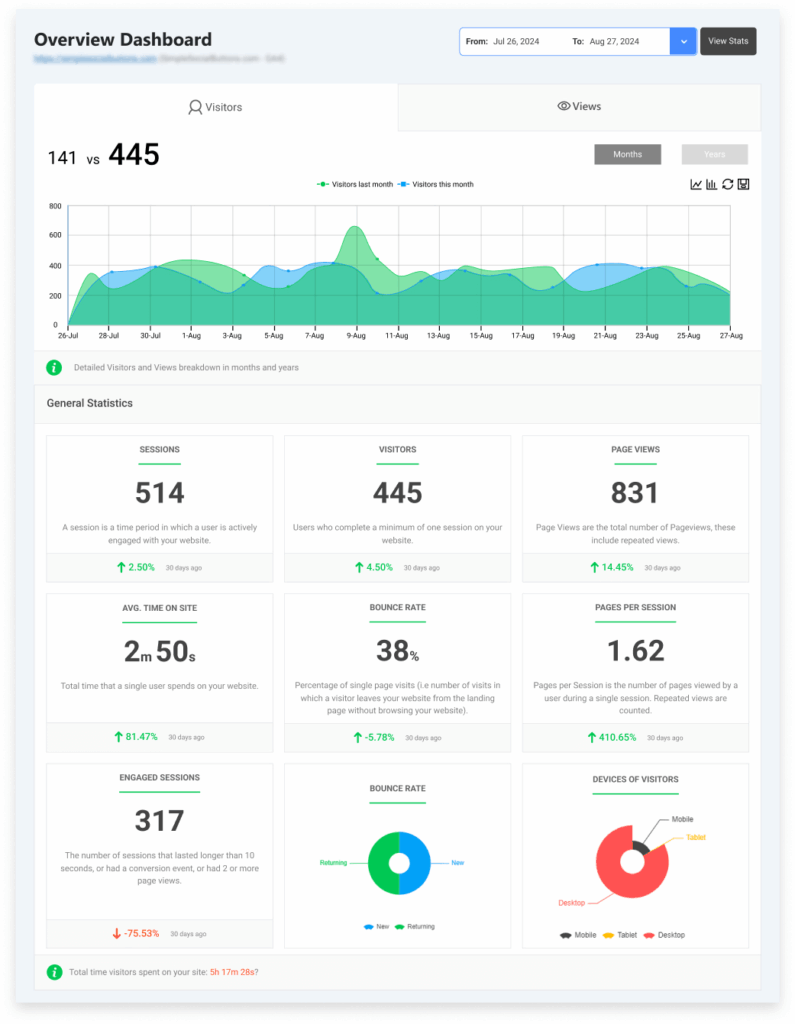
Early content and SEO planning improves discoverability, reduce post-launch fixes, and ensure the WordPress site supports long-term growth rather than just visual presentation.
Step 6: Testing and Quality Assurance
Testing is where a WordPress project proves its reliability. Even well-planned builds can fail at launch if quality assurance is rushed or incomplete. Skipping structured testing often leads to broken forms, slow pages, security gaps, and inconsistent user experiences.
A defined QA process ensures the site works as intended before it reaches real users.
1. Functional Testing
Functional testing confirms that every feature behaves as expected under real-world conditions.
Key areas to test include:
- Forms, login, and registration flows
- Payment gateways, subscriptions, or memberships
- Third-party integrations and automations
- Custom workflows and dashboards
Test every function against the documented requirements, so nothing is missed or built incorrectly.
2. Performance and Security Testing
Performance and security directly affect user trust, SEO, and conversions. These checks should be completed before launch, not treated as post-launch fixes.
Testing typically covers:
- Page load times, caching, and asset optimization
- SSL configuration and firewall validation
- Malware scans and plugin vulnerability reviews
Testing under expected traffic is the only reliable way to know performance and security will hold up after launch.
3. Cross-Browser and Device Testing
Users access WordPress sites from a wide range of devices and browsers. Testing across environments helps maintain consistent usability and appearance.
This includes:
- Desktop, tablet, and mobile responsiveness
- Major browsers such as Chrome, Firefox, Edge, and Safari
- Interactive elements like menus, sliders, and forms
Consistent testing across devices prevents layout issues and usability problems after launch.
4. Client Review and Sign-Off
Quality assurance should include client validation, not just internal checks. Structured review points reduce last-minute changes and uncertainty.
Best practices include:
- Reviewing functionality and design at defined QA milestones
- Confirming alignment with the approved scope and roadmap
- Documenting final approvals before launch
WPBrigade incorporates client sign-off into the QA phase to ensure confidence and clarity before moving to launch.
Thorough testing reduces post-launch issues, protects user trust, and ensures the WordPress build meets agreed-upon quality standards.
Step 7: Launch Planning
Launching a WordPress site is more than publishing files to a live server. Without a structured launch plan, even well-tested projects can experience downtime, broken links, tracking issues, or lost user trust. A controlled launch process ensures the site goes live smoothly and performs as expected from day one.
1. Pre-Launch Checklist
Before going live, every technical and content element should be verified. A pre-launch checklist helps catch issues that are easy to miss late in the project.
Key checks include:
- Domain configuration, hosting readiness, and SSL certificates
- 301 redirects, broken link checks, and URL consistency
- Analytics, tracking scripts, and conversion events
- Backup configuration and error monitoring
- Final content review and approvals
We check launch readiness against a written checklist, because that’s what stops something critical from slipping through.
2. Go-Live Execution Strategy
The transition from staging to production should be planned to minimize downtime and data loss. Rushing this step often leads to errors that affect users immediately after launch.
A structured go-live process typically includes:
- Controlled migration from staging to live
- DNS updates and propagation monitoring
- Verifying content synchronization and media integrity
- Monitoring error logs and server performance in real time
Executing the launch in defined steps ensures the live site reflects exactly what was tested and approved.
3. Immediate Post-Launch Validation
Once the site is live, validation should continue. Early monitoring helps identify issues before they impact users or search engines.
Post-launch checks include:
- Verifying core functionality such as forms, logins, and checkout flows
- Confirming analytics data is being recorded correctly
- Monitoring performance, uptime, and security alerts
This short validation window helps stabilize the site and ensures a reliable experience during the critical post-launch period.
A structured launch plan protects user trust, preserves SEO equity, and ensures the WordPress project transitions smoothly from development to real-world use.
Step 8: Maintenance and Continuous Improvement
A WordPress site is never truly finished. Without ongoing maintenance, even a well-planned and well-built site can suffer from security vulnerabilities, performance issues, broken functionality, and declining search visibility. Planning for maintenance early ensures the site remains stable, secure, and effective long after launch.
1. Scheduled Updates and Backups
Regular updates are critical for security and compatibility. Ignoring updates increases the risk of vulnerabilities, plugin conflicts, and site downtime.
A structured maintenance plan includes:
- Updating WordPress core, themes, and plugins on a defined schedule
- Performing automated and manual backups before updates
- Reviewing plugin compatibility after major releases
- Removing unused or outdated plugins
Good maintenance planning focuses on prevention, not emergency fixes, and that lowers long-term risk for site owners.
2. Performance Monitoring and Optimization
Site performance can degrade over time as content grows, plugins change, or traffic patterns shift. Continuous monitoring helps identify issues before users notice them.
Key maintenance activities include:
- Monitoring page speed and Core Web Vitals
- Reviewing caching, image optimization, and database performance
- Identifying performance regressions after updates or new features
Ongoing performance tuning ensures the site continues to meet user expectations and SEO requirements.
3. Security Monitoring and Risk Management
Security threats evolve constantly, making one-time hardening insufficient. Maintenance should include active monitoring and periodic audits.
Best practices include:
- Regular security scans and firewall monitoring
- Reviewing user roles and access permissions
- Auditing plugins for vulnerabilities or abandoned support
By treating security as an ongoing process, WordPress sites remain protected against emerging threats.
4. Content Updates and SEO Optimization
Content maintenance is essential for engagement and search visibility. Outdated or unoptimized content can undermine even strong technical foundations.
Ongoing content optimization includes:
- Refreshing key pages and blog content
- Improving internal linking and page structure
- Updating metadata, headings, and schema
- Ensuring accessibility and media optimization
Continuous content updates help maintain relevance and support long-term organic growth.
Maintenance and continuous improvement protect the investment made during development, ensuring the WordPress site remains secure, performant, and aligned with business goals over time.
How WPBrigade Applies This WordPress Project Planning Framework
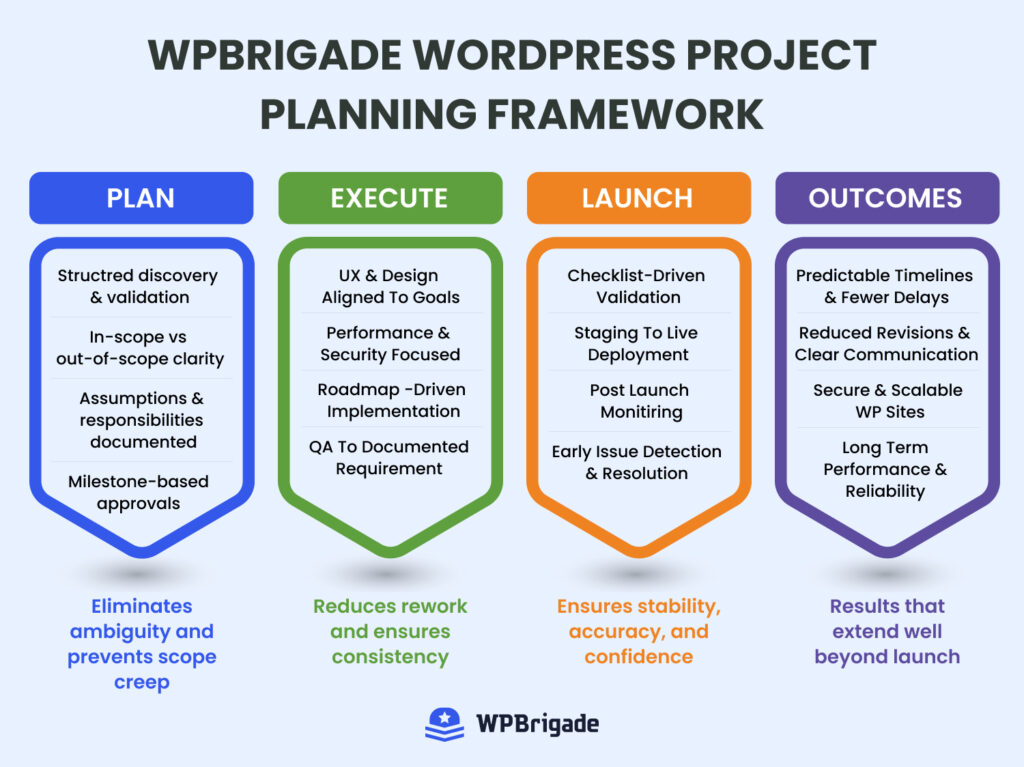
WPBrigade applies this framework in three ways: documented discovery, planned execution, and treating launch and maintenance as core phases. This planning framework is not theoretical. It reflects how structured WordPress projects are executed in real client environments, where timelines, budgets, and long-term maintainability matter as much as design and functionality.
We apply this framework end-to-end at WPBrigade, from the first brief through post-launch maintenance, because it makes projects predictable.
A Process Built Around Clarity and Documentation
Every project starts with documented discovery and scoping. Requirements, assumptions, constraints, and responsibilities are clearly defined before development begins. This reduces scope creep and ensures all stakeholders share the same expectations throughout the project lifecycle.
Key elements include:
- Structured discovery and requirement validation
- Clear separation of in-scope and out-of-scope items
- Milestone-based approvals at each phase
Execution Aligned With Planning, Not Guesswork
Design, development, and content decisions are guided by the approved roadmap rather than ad-hoc requests. Each phase builds on the previous one, ensuring consistency and reducing rework.
In practice, this means:
- Design decisions tied to user behavior and business goals
- Development workflows that prioritize performance, security, and maintainability
- Testing and QA based on documented requirements, not assumptions
Launch and Maintenance Treated as Core Phases
Launch is treated as a controlled transition, not a last-minute task. Post-launch monitoring and maintenance are planned early to ensure stability and long-term performance.
This approach includes:
- Checklist-driven launches with validation at every step
- Immediate post-launch monitoring and issue resolution
- Ongoing maintenance focused on prevention, not reactive fixes
The Outcome of a Structured Approach
Applying this planning framework consistently leads to:
- Predictable timelines and fewer delays
- Reduced revisions and clearer communication
- WordPress sites that are easier to maintain, secure, and scale
That’s how a WordPress project stays reliable long after launch.
Common WordPress Project Planning Mistakes to Avoid
The most common WordPress project planning mistakes are skipping discovery, late content, late security work, treating launch as the end and plugin overload. Even experienced teams run into problems when WordPress project planning is rushed or loosely defined. Avoiding these common mistakes can prevent delays, rework, and post-launch issues.
1. Skipping Proper Discovery
Jumping straight into design or development without clear discovery often leads to scope creep and misaligned expectations.
Common issues include:
- Undefined goals and success metrics
- Vague feature requirements
- Assumptions about integrations or user roles
A documented discovery phase ensures everyone understands what is being built and why.
2. Underestimating Content Preparation
Content is frequently treated as an afterthought, causing delays near launch. Missing or unstructured content can block development and testing.
To avoid this:
- Finalize content requirements early
- Define who owns content creation and approvals
- Prepare media assets before development milestones
Early content planning keeps projects on schedule.
3. Ignoring Performance and Security Until Late
Performance and security should be planned from the start, not patched after launch. Late fixes are often more complex and costly.
Risks include:
- Slow page speeds affecting SEO and conversions
- Security vulnerabilities from outdated plugins
- Poor Core Web Vitals scores
Building performance and security into planning reduces long-term technical debt.
4. Treating Launch as the Finish Line
Launch is not the end of a WordPress project. Without post-launch planning, sites can degrade quickly.
Common post-launch failures include:
- No maintenance or update schedule
- Lack of monitoring and backups
- Delayed fixes for early user-reported issues
Planning for maintenance ensures the site remains stable and effective.
5. Overloading the Site With Plugins
Adding too many plugins to solve individual problems increases complexity and risk.
Best practices include:
- Using well-maintained, reputable plugins
- Avoiding overlapping functionality
- Regularly reviewing and removing unused plugins
A lean plugin strategy improves performance and maintainability.
Preventing these issues leads to smoother execution, fewer revisions, and WordPress projects that are easier to manage long term.
Frequently Asked Questions About WordPress Project Planning
Goals and success metrics
Scope and feature requirements
Design and content guidelines
Development timeline and milestones
Testing, launch, and maintenance plans
WordPress Project Planning: Conclusion
Structured planning is the backbone of any successful WordPress project. By defining goals, scope, timelines, content, design, and technical requirements early, teams can reduce risks, prevent scope creep, and deliver sites that perform reliably and meet business objectives.
From discovery and scoping to launch and ongoing maintenance, each step builds on the previous one to ensure clarity, efficiency, and long-term scalability. Proper planning also supports performance, security, and SEO, helping WordPress sites achieve measurable results beyond just aesthetics.
For teams and businesses seeking a predictable, process-driven approach, this framework provides a reliable foundation. WPBrigade applies these methods across real projects to ensure that WordPress builds are not only functional and secure but also maintainable and optimized for long-term success.
If you’re planning a WordPress project, following a structured approach can save time, reduce risks, and improve outcomes.
Further reading:
Now over to you. Have you ever faced delays or rework in a WordPress project due to unclear planning? What would you do differently next time? Share your thoughts in the comments below.
Leave a Reply