

Most businesses have happy customers, but very few have a system to consistently turn that satisfaction into public reviews. The result? Silent customers, weak Google visibility, and missed trust signals.
In today’s business environment, online reputation is essential and a primary driver of customer retention and engagement.
Whether the goal is to increase online reviews for improved local search visibility or to enhance overall brand reputation, this guide provides relevant strategies.
In this, you will find 11 innovative, tested strategies for gaining more customer reviews, along with the specific tools and workflows we use at WPBrigade.
Let’s begin!
Get More Customer Reviews (TOC)
- Why Customer Reviews Matter
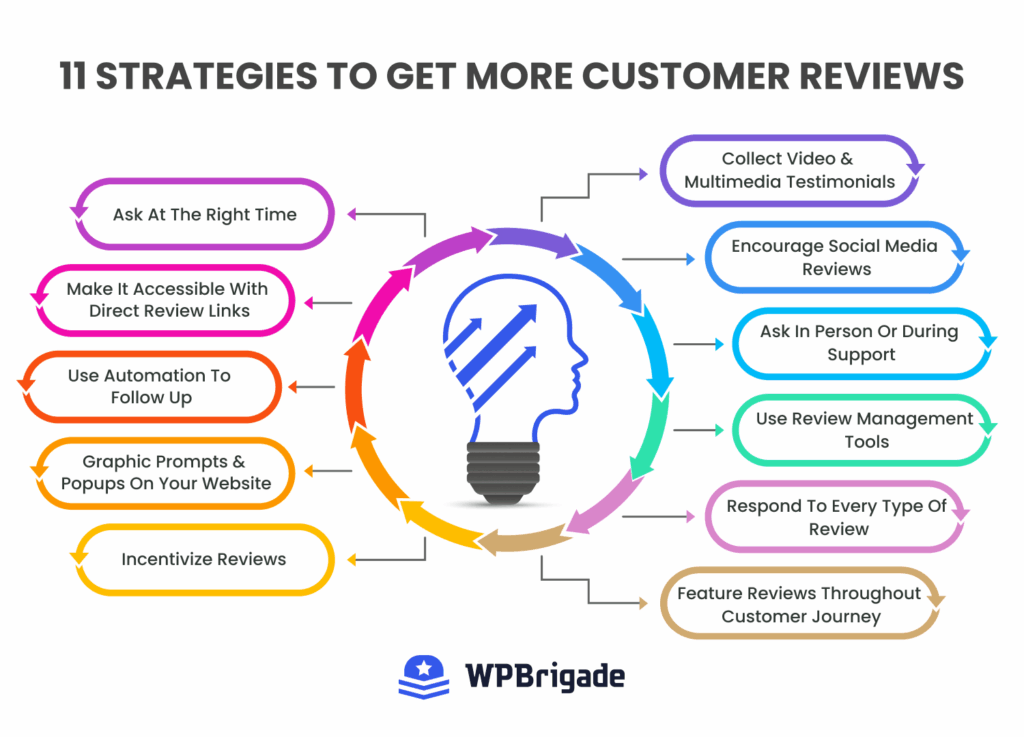
- 11 Strategies to Get More Customer Reviews
- Strategy #1: The Right Time to Ask
- Strategy #2: The Zero Friction Direct Link
- Strategy #3: Use Automation to Follow Up
- Strategy #4: Pattern-Interrupt Popups
- Strategy #5: Incentivize Ethically
- Strategy #6: Collect Video & Multimedia Testimonials
- Strategy #7: Encourage Social Media Reviews
- Strategy #8: Train Your Team for the Reviews
- Strategy #9: Use Review Management Tools
- Strategy #10: Respond to EVERY Review
- Strategy #11: Feature Reviews Throughout User Journey
- Track & Measure Your Review Success
- FAQs: Get More Customer Reviews
- Get More Customer Reviews: Conclusion
Why Customer Reviews Matter
Social proof has a powerful influence on consumer behavior. However, the extent of its impact needs closer examination.
The following are some reasons why customer reviews matter:
1. The Conversion Multiplier
Multiple studies, including research from Spiegel Research Center, show that displaying reviews can increase conversion rates by up to 270%.
For higher-priced items, the increase is even more significant, as reviews help reduce the perceived risk for users.
2. The Local SEO Engine
If you are wondering how to get more customer reviews on Google, it’s usually because you want to rank in the Map Pack.
Here’s what Google’s algorithm looks at while analyzing review signals:
- Quantity: The total number of reviews a business has received.
- Velocity: The frequency at which new reviews are submitted.
- Diversity: The presence of reviews across multiple platforms.
3. The Trust Gap
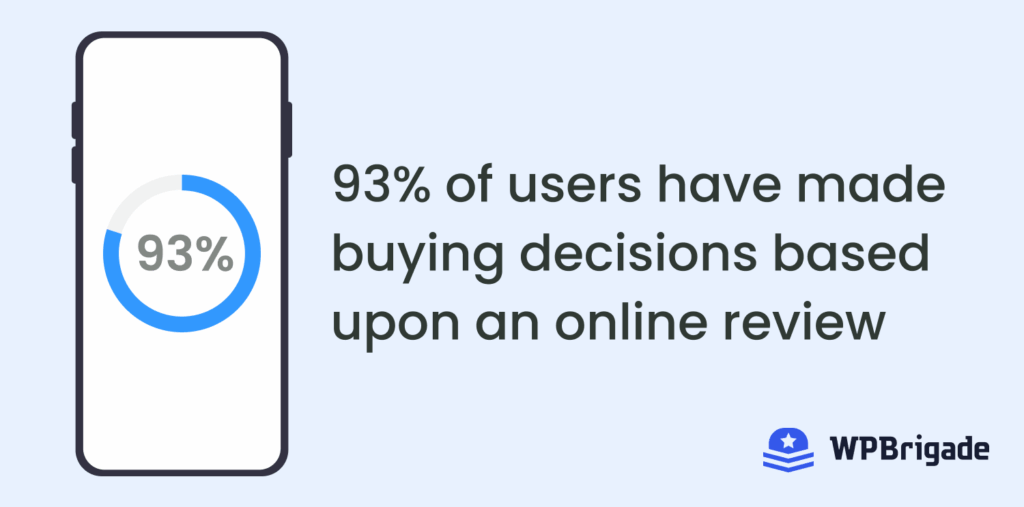
93% of users say online reviews impact their buying decisions. Reviews don’t just influence conversions; they actively shape how your brand is perceived across search, social, and customer conversations.
11 Strategies to Get More Customer Reviews
Let’s go through some of the best ways to get more customer reviews and utilize them strategically:
Strategy #1: The Right Time to Ask
In the world of reviews, timing is everything. Ask for a review three weeks after a purchase? You’re too late.
The excitement of the new product purchase has worn off, and your request is just another email in their already full inbox.
To get the highest conversion, you have to strike while the product is still new and the user is still interested:
Here is the best timing for the most popular industries:
- SaaS/Apps: Immediately after a “success milestone” (e.g., right after they export their first report).
- E-commerce: 2–3 days after delivery. This gives them enough time to unbox the product, but not enough time to forget about it.
- Service Industry: Within 1 hour of the job being finished.
Stop using stiff, formal language. It sounds like a template, and users can smell a template from a mile away. Instead, you can try this:
“Hi [Name]! So glad to see you just [Action]. We’re thrilled it’s working out for you.
Would you mind taking 30 seconds to share your experience? It really helps our team out: [Link].”
Strategy #2: The Zero Friction Direct Link
The biggest review killer is friction.
If a customer has to search for your business on Google, find your Google Business Profile, click “Reviews,” and then click “Write a Review.”
You’ve already lost half of them.
The secret is a frictionless, one-click experience that lets them leave feedback in seconds.
Here is how you can create a direct, one-click Google link:
Go to the Google Place ID Finder. Find your “Place ID.” Before you can build your link, you need your Place ID.
Think of this as a unique digital fingerprint that Google assigns to every specific business location on Google Maps.
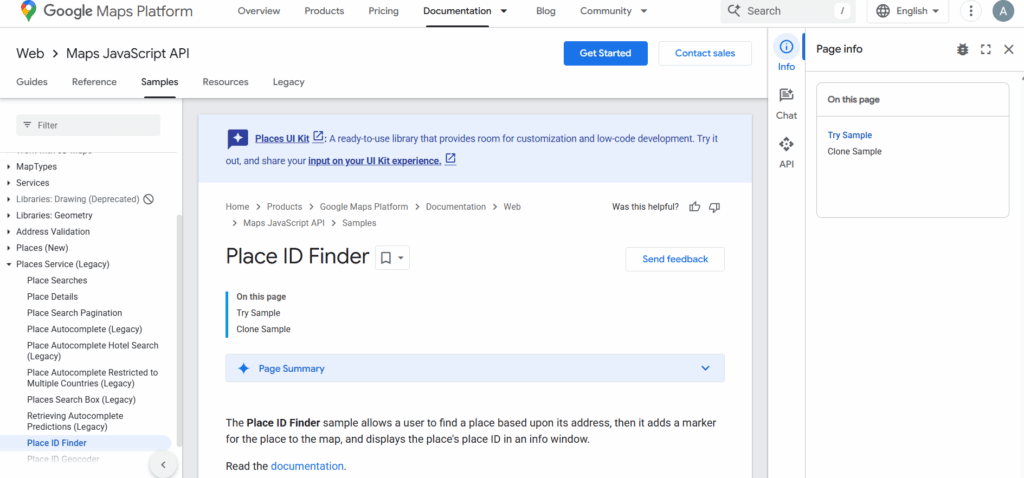
Search for your business.
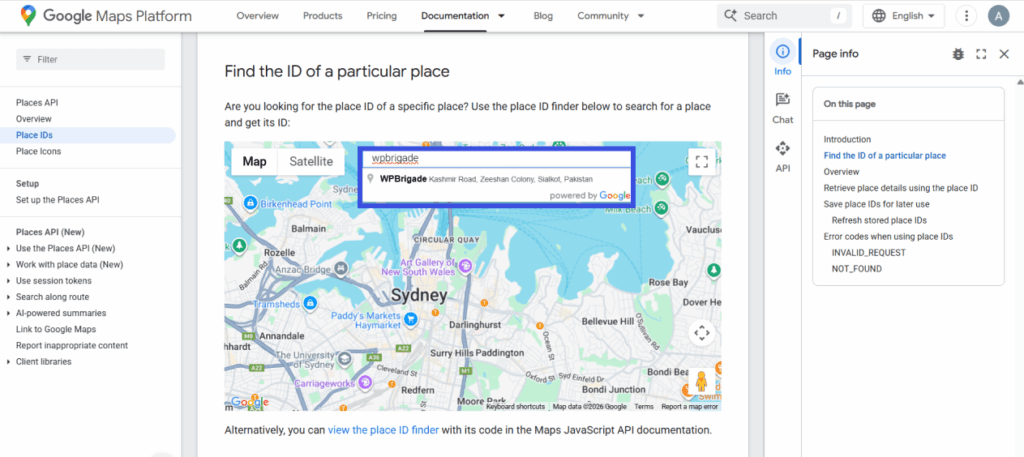
Copy the Place ID.
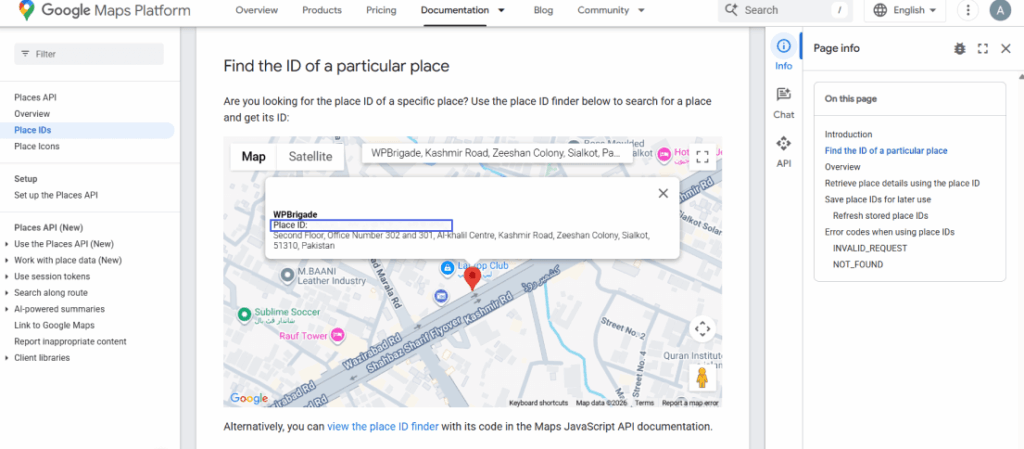
- Add it to the end of your Google review URL: [https://search.google.com/local/writereview?placeid=[YOUR_ID_HERE]
Pro Tip: Use QR Codes Everywhere. Physical businesses should place QR codes on:
- Table tents in restaurants.
- The bottom of the packing slips.
- Business cards handed out by technicians.
Strategy #3: Use Automation to Follow Up
The initial email is for onboarding and request-based. The second email is where the review actually happens. SMBs can ensure smooth automation and a streamlined user onboarding flow.
Most people are not ignoring you; they are just busy. An automated follow-up increases your review volume by 30–40%.
The Ideal Workflow:
- Day 1: The Initial Ask.
- Day 4: The Gentle Nudge (only if they didn’t click the first link).
- Day 10: The “Last Chance” (Mention how much their feedback helps the community).
At WPBrigade, we use Analytify to track the performance of these emails. By using UTM parameters on your review links, you can see in your WordPress dashboard which email subject lines are actually driving traffic to your Google Business Profile.
Strategy #4: Pattern-Interrupt Popups
Standard pop-ups are annoying and can frustrate users, leading to unwanted bounces.
This is where contextual prompts are helpful.
Instead of showing a pop-up the second someone lands on your site, use specific behavioral triggers.
Tip: Pop-ups can also become extremely annoying if there is an overused. We suggest using frequency apps to test your pop-ups and assess how they disrupt the UX.
Best Practices for Review Popups:
- Scroll Trigger: Show the pop-up only after the user has scrolled to 70% of the way down a How-To page.
- Time on Site: Wait until they’ve been on the site for at least 2 minutes.
- The Micro-Ask: Use a 2-step pop-up. Step 1: Are you enjoying our product? (Yes/No). If they click Yes, Step 2 is the review link.
Strategy #5: Incentivize Ethically
Let’s be very clear: Never offer a discount in exchange for a 5-star review on Google or Yelp.
This violates their Terms of Service and may result in your account being restricted.
Always clarify that incentives are for participation, not for positive feedback.
Here are some ethical and non-invasive ways you can offer incentives:
- Your own website: Offer 10% off their next order for an honest review on your product page.
- Internal Feedback: Offer a chance to win a gift card for filling out a survey.
The Loyalty Loop: If you have a loyalty program, award Points for leaving a review. This rewards the behavior without buying a specific rating.
Strategy #6: Collect Video & Multimedia Testimonials
A text review is a quote. A video review is a complete story that holds more validity.
Video testimonials have a much higher engagement rate on social media and landing pages.
They prove that a real person actually uses and loves your product.
How to collect them without a film crew:
- Tool: Use platforms like VideoAsk or VocalVideo.
- The Prompt: Ask three specific questions: 1. What was your problem before? 2. How did we solve it? 3. What is your favorite feature?
- The Reward: Incentives are allowed only when not tied to ratings or platform reviews. Video testimonials = marketing permission, not star ratings.
Strategy #7: Encourage Social Media Reviews
Your customers are already talking about you on social. You just need to capture it properly and showcase it on your site.
How to get more social media reviews:
- Facebook: Ensure your Reviews tab is visible and active on your Business Page.
- Instagram: When someone tags you in a Story, make sure to get their consent before pinning it to your Customer Love highlight.
- LinkedIn: For B2B, a Recommendation on your personal profile is just as valuable as a company review.
Social proof creates a Halo Effect: When a user sees their friend praising you on Facebook, the trust is transferred instantly.
Strategy #8: Train Your Team for the Reviews
If you have a service-based business, your staff is your best tool for generating reviews.
The Hand-off Script: When a project is finished, the team member can say:
“It was a pleasure working on this! Our team gets a lot of our new clients from Google reviews. If you felt we did a 5-star job today, would you mind leaving us a quick note? I’ll send you the link right now.”
Why this works: It’s much harder to say “no” to a person than to an email.
Strategy #9: Use Review Management Tools
Avoid inefficiently monitoring multiple review sites individually. This approach can quickly lead to fatigue and decreased productivity.
Recommended Online Reputation Management Tools:
Below are the platforms to enhance brand reputation.
- Birdeye and Podium: These platforms are suitable for enterprise-level automation and facilitate SMS-based review requests.
- Google Business Profile: This serves as the primary dashboard for managing local search engine optimization (SEO) efforts.
- WPBrigade Widgets: WordPress widgets that aggregate and display reviews from multiple platforms.
Benefits of a Dashboard:
- Consolidate all reviews within a single dashboard for streamlined management.
- Receive immediate notifications for negative reviews to enable prompt responses.
- Monitor average ratings across all platforms to assess overall reputation.
Strategy #10: Respond to EVERY Review
Responding to reviews signals to both Google and customers that the business is engaged and attentive to feedback.
So always make sure to reply to every type of review, whether it is negative or positive.
Only replying to positive reviews can seem planned, and users don’t trust a 100% positive review.
- Positive Reviews: Avoid generic responses. Thank customers naturally and mention the service they used. Authentic replies improve trust and engagement, which indirectly supports SEO.
- Negative Reviews: Maintain professionalism, acknowledge the issue, propose a specific resolution, and transition the discussion to email for further assistance.
The Hidden Benefit: Often, if you resolve a customer’s issue quickly, they will go back and change their 1-star review to a 4 or 5-star review.
Strategy #11: Feature Reviews Throughout User Journey
Don’t let your reviews sit on a lonely Testimonials page. Feature reviews are necessary to maintain user engagement throughout the onboarding process.
Strategic Placement Ideas:
- Checkout Page: Place a review right next to the Pay Now button to reduce anxiety.
- Email Signature: Add a small link: See what our customers are saying [Link].
- Pricing Page: Use a Customer Success quote to justify your price point.
Tracking with Analytify: On your WordPress site, use Analytify to identify the top pages with the highest engagement.

If your pricing page has a high bounce rate, try adding more reviews there and watch the data shift.
Track & Measure Your Review Success
At WPBrigade, we believe: “What gets measured, gets managed.”
If you aren’t tracking your review metrics, you’re essentially flying blind.
You might be getting reviews, but do you know which campaign triggered them? Or how much revenue those reviews actually generated?
To truly increase online reviews, treat your review generation like a sales funnel.
Here is precisely how to do it using Analytify and WordPress to make data-driven decisions that actually grow your site:
1. Click-Through Rates (CTR) on Review Buttons
Every time you send an email or display a pop-up, you are essentially running an ad for a review. You need to know whether people are actually clicking.
- The Goal: A CTR of 5–10% on your review links.
- What to look for: If your CTR is low, your “Ask” is likely too complicated, or the timing is off.
- The Fix: A/B test your button text. Change “Leave a Review” to “Share Your Success Story.”
2. The Reviews-to-Revenue Impact (Conversion Tracking)
Demonstrating measurable financial impact is a primary objective in online reputation management.
It is essential to demonstrate that customer reviews contribute directly to revenue generation.
Using Analytify’s Enhanced Campaign tracking, you can see the value of your review pages.
- The Insight: Look at the UTM campaigns dashboard in your analytics. How many users visit your “Reviews” or “Testimonials” page before hitting the “Thank You” (purchase) page?
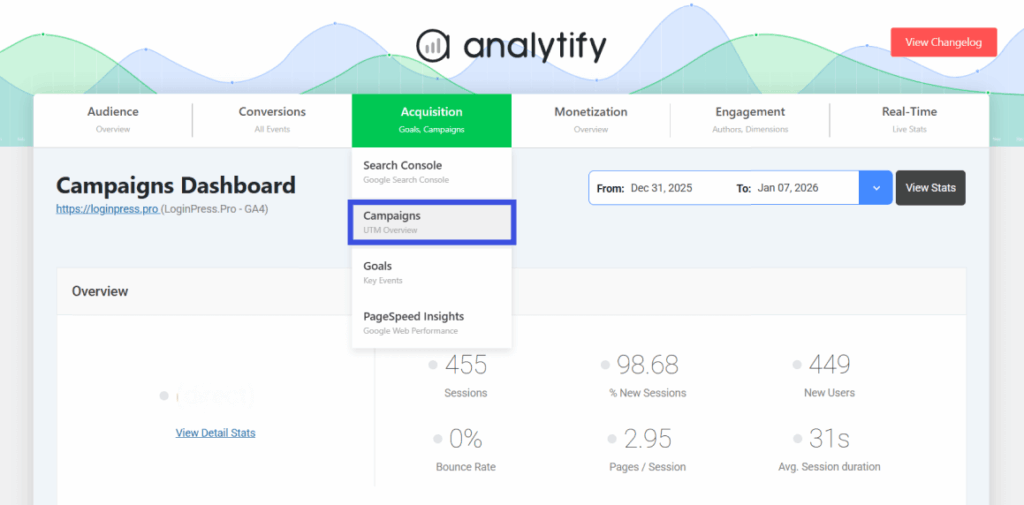
- The Strategy: If users who see reviews convert at a 3x higher rate, you should move your review widgets higher up on your sales page.
3. Tracking the Source of Reviews
Not all marketing channels are created equal. You might find that your SMS requests have a 20% conversion rate, while your email requests have only a 2% conversion rate.
How to track this:
- UTM Parameters: Never send a simple link. Use a URL builder to add source tags: ?utm_source=email&utm_campaign=review_request.
- The Dashboard: Inside Analytify, you can filter your traffic by source/medium. This tells you exactly where to double down on your efforts and where to stop wasting time.
4. Review Velocity vs. Review Sentiment
Finally, track the speed at which you are getting reviews.
- Review Velocity: If you get 50 reviews in one day and then zero for three months, Google’s spam filters might get suspicious.
- The Goal: Aim for consistent drip. A steady stream of 2–3 reviews a week is much better for your brand reputation than a one-time blast.
Pro Tip: Use the Analytify real-time dashboard to monitor traffic spikes to your review links immediately after you send a newsletter. If you don’t see a spike, your subject line failed.
FAQs: Get More Customer Reviews
Get More Customer Reviews: Conclusion
Getting more reviews isn’t about pure luck. It’s about building systems that encourage your buyers and consumers to be satisfied enough to leave a review.
By implementing these creative strategies, from perfecting your timing to using review-generation tools, you’ll build a brand people trust and that Google loves.
Don’t try to implement all 11 strategies at once.
Pick ONE strategy from this list and implement it within the next 24 hours.
Once that’s automated, come back and pick the next one.
Short on time? If you want an expert team to handle the heavy lifting of your technical site optimization, check out WPBrigade’s WordPress Services.
We help brands build high-performance systems to scale their online presence and automatically capture more reviews.
Leave a Reply