


Is your WordPress website meeting modern WordPress accessibility standards?
Today, accessibility is not just a technical requirement; it is part of inclusive design, legal compliance, and better user experience. An accessible website helps people with visual, auditory, motor, or cognitive disabilities use your site without barriers. It also reduces ADA-related risks, improves search visibility, and strengthens your brand reputation.
At WPBrigade, we build WordPress websites that follow WCAG 2.2 and ADA standards. Our goal is to make every design, interaction, and component accessible and easy to use.
In this guide, you’ll learn what accessibility means, why it matters, common issues, practical steps to fix them, tools to use, and enterprise considerations.
Table of contents
- What WordPress Accessibility Means
- Common Accessibility Challenges in WordPress
- How to Make WordPress Websites Accessible
- Accessibility for Enterprise and SaaS WordPress Sites
- How to Measure Accessibility Performance in WordPress with Analytify
- WordPress Accessibility: Common Mistakes to Avoid
- Frequently Asked Questions About WordPress Accessibility
- WordPress Accessibility: Conclusion
What WordPress Accessibility Means
Web accessibility means making your WordPress site usable for everyone, including people with visual, auditory, motor, or cognitive disabilities. It ensures that every user can read content, navigate pages, fill forms, play media, and interact with features without barriers.
Accessibility follows global standards such as WCAG 2.2, ADA guidelines, and Section 508. These standards define how websites should handle text, color contrast, navigation, media, forms, and interactive elements.
Accessible WordPress development relies on clean semantic HTML, proper ARIA roles, and media that includes alt text, captions, and transcripts. When your structure and content follow these basics, assistive technologies like screen readers, keyboard navigation, and voice controls can interpret your website correctly.
Legal and Business Importance of Web Accessibility
Accessibility is not optional anymore. In many countries, including the US, websites must follow ADA compliance standards. If a WordPress site does not meet basic accessibility requirements, businesses can face complaints, lawsuits, or financial penalties. Common violations include unreadable text, missing alt text, keyboard traps, and inaccessible forms.
Beyond legal requirements, accessibility brings strong business benefits. It helps you reach a wider audience, including millions of users who depend on assistive technologies. Accessible websites show professionalism and improve brand trust, especially for enterprise and SaaS companies. When your site is easier to use, more visitors stay longer, complete actions, and return.
Accessibility reduces risk, protects your brand, and supports long-term growth with a better, barrier-free user experience.
SEO and User Experience Benefits
Accessibility improves both search performance and user experience. When your WordPress site uses clear headings, proper structure, descriptive links, and readable content, search engines can understand it better. Google favors pages with clean HTML, organized navigation, and meaningful text, all of which are core accessibility practices.
Accessible pages also create a smoother user journey. Good color contrast, visible focus states, keyboard-friendly menus, and structured content reduce confusion and frustration. As a result, visitors stay longer, bounce rates drop, and engagement increases.
Accessibility directly supports SEO: better structure, clearer content, and improved navigation help search engines crawl your site more accurately. At the same time, users enjoy a website that is simpler, faster, and easier to interact with on any device.
Common Accessibility Challenges in WordPress
Even modern WordPress sites often have accessibility gaps. Some of the most common issues include:
- Missing alt text on images or decorative media – without descriptive text, screen readers cannot explain images to visually impaired users.
- Poor color contrast and unreadable typography – low contrast or small fonts make reading difficult for users with visual impairments.
- Keyboard navigation and focus order issues – users who rely on keyboards may get “stuck” or lose context if menus and forms aren’t properly navigable.
- Forms without labels or ARIA attributes – incomplete forms confuse assistive technologies.
- Plugin or theme incompatibilities – some themes or plugins do not follow accessibility best practices, creating barriers.
Example: A slider that auto-rotates images without pause controls can prevent screen readers or keyboard users from accessing content.
These challenges show why accessibility must be considered in theme selection, content creation, plugin use, and design workflows.
How to Make WordPress Websites Accessible
Making a WordPress site fully accessible requires attention to design, content, and functionality. Accessibility isn’t just a checklist; it ensures all users, including those with disabilities, can navigate, read, and interact with your site effectively. Here’s how to achieve it step by step:
1. Use Accessible Themes and Plugins
The foundation of an accessible site starts with the theme and plugins you choose:
- Accessible Themes: Choose themes built with semantic HTML, which means the code describes content correctly for screen readers. Ensure they support ARIA roles, which give extra context to interactive elements, and keyboard navigation, so users can access every menu, button, and form using the keyboard alone.
- Accessibility-Focused Plugins: Plugins can fill gaps and simplify accessibility improvements:
- LoginPress ensures login forms are accessible with proper labels, keyboard navigation, and visible focus indicators.
- Simple Social Buttons makes social icons easy to read and navigate with screen readers, plus larger clickable areas.
- LoginPress ensures login forms are accessible with proper labels, keyboard navigation, and visible focus indicators.
Using these tools ensures your site avoids many common barriers without heavy coding.
2. Improve Content Accessibility
Accessible content allows all users to understand and navigate your site. Key practices include:
- Descriptive Headings: Organize pages with clear headings (H1, H2, H3) that reflect the content structure. This helps screen reader users navigate quickly.
- Alt Text for Images: Every image should have meaningful alternative text. Decorative images can use empty alt attributes so they are skipped by screen readers.
- Captions for Videos: Provide captions for videos so users with hearing impairments can follow along.
- Readable Text: Use short sentences, clear language, and proper contrast. Avoid tiny fonts or background colors that make reading difficult.
- ARIA Roles for Dynamic Content: Components like sliders, modals, or accordions need ARIA roles so assistive technologies know how to interpret them.
3. Navigation and Interaction Accessibility
Users need to move through your website without barriers:
- Keyboard Accessibility: All menus, buttons, links, and forms should be fully usable via keyboard. Test by navigating with the Tab and Enter keys.
- Logical Tab Order & Focus: Ensure that focus moves in a predictable order and is clearly visible. This is crucial for keyboard-only users.
- Forms & Error Messages: Every input should have a label, and users should see clear error messages when they submit incomplete or incorrect forms.
- Plugin Support: WPBrigade’s LoginPress and Simple Social Buttons provide accessible, interactive elements, ensuring login forms and social buttons meet best practices.
4. Testing and Maintenance
Accessibility is not a one-time task. Ongoing testing ensures your site remains inclusive:
- Automated Testing Tools: Use WAVE, Axe, and Lighthouse to identify issues like missing alt text, color contrast errors, or ARIA problems.
- Manual Testing: Always check with screen readers (NVDA, VoiceOver, JAWS) and keyboard navigation to experience the site like users with disabilities.
- Regular Audits: Update accessibility checks whenever WordPress, themes, or plugins are updated.
- Content Creator Training: Ensure your team knows how to maintain accessibility in new pages, posts, and interactive elements.
Following these steps ensures your WordPress site is usable, inclusive, and compliant, while WPBrigade’s plugins make achieving accessibility simpler and more reliable.
Accessibility for Enterprise and SaaS WordPress Sites
For enterprise and SaaS websites, accessibility is even more critical because these sites often have complex workflows, multiple users, and dynamic content. Ensuring all users, from customers to internal staff, can interact with your platform safely and efficiently is essential for legal compliance, usability, and business growth.
1. Multi-User Content Creation
Enterprise WordPress sites often involve multiple editors, authors, and administrators. Accessibility must extend to:
- Dashboards and backend interfaces: Menus, buttons, and content editing tools should be keyboard-navigable, with clear focus indicators.
- Forms and content submission: Internal users filling out forms or uploading content need guidance and error feedback to ensure compliance.
By designing accessible workflows, enterprises reduce errors, streamline collaboration, and maintain a consistent accessible experience across all public-facing pages.
2. Role-Based Content Workflows
Different user roles should have accessibility safeguards tailored to their responsibilities:
- Editors and admins can be guided by accessibility checklists or plugin tools to ensure headings, alt text, and ARIA roles are added before content goes live.
- Workflow approvals can include accessibility checks to prevent non-compliant content from publishing.
This system ensures that accessibility is built into the process, not just applied after the fact.
3. Accessible Interactive Elements
Enterprise and SaaS sites often use subscription forms, dashboards, trial signups, and reporting tools. These must be keyboard-friendly, screen reader compatible, and easy to navigate:
- LoginPress can be used for accessible login and registration forms.
- Simple Social Buttons ensures social sharing tools are readable and navigable for all users.
- Interactive charts, tables, and dynamic content should include ARIA roles, descriptive labels, and clear focus states.
4. Highlighting WPBrigade Expertise
WPBrigade specializes in building accessible enterprise and SaaS WordPress sites. Our team ensures:
- Compliance with WCAG 2.2, ADA, and Section 508 standards.
- Accessibility checks are integrated into content workflows.
- Plugins and themes are fully tested for compatibility with assistive technologies.
- End-users, editors, and administrators all enjoy an inclusive, seamless experience.
How to Measure Accessibility Performance in WordPress with Analytify
Improving accessibility is only half the job; you also need to measure how users interact with your accessible WordPress site. Analytify helps you track real user behavior so you can see whether your accessibility changes are working.
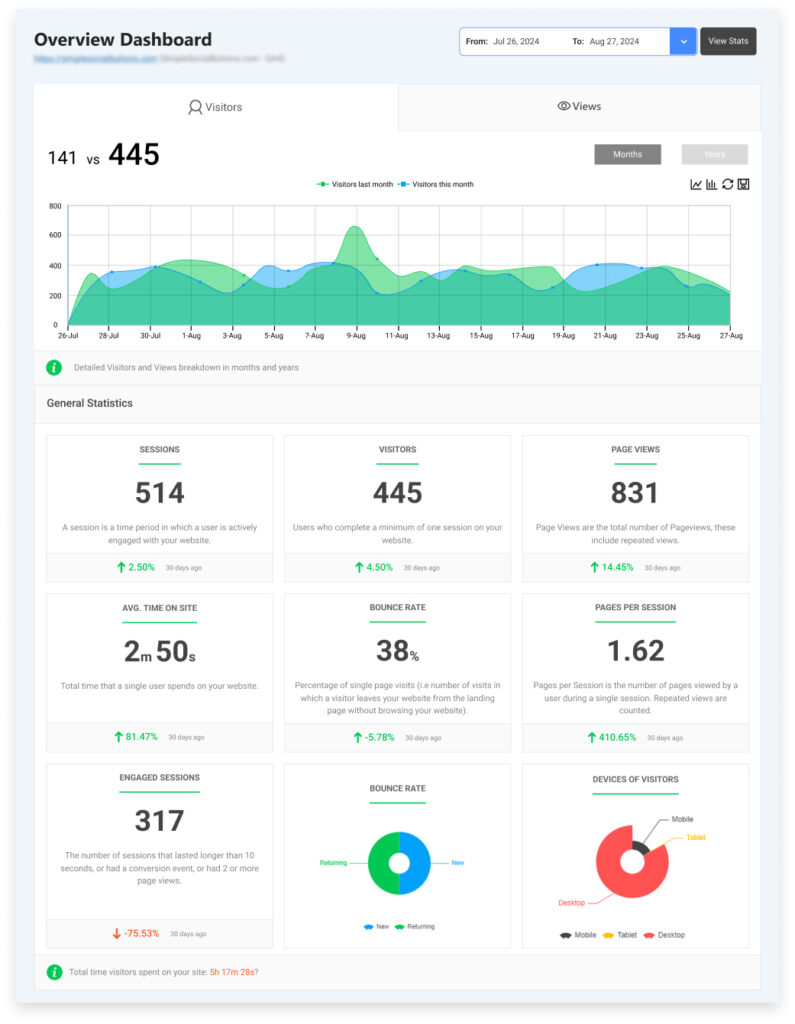
Here’s how to analyze accessibility-related metrics using Analytify and GA4:
By focusing on accessibility at every level, enterprises not only avoid legal risks but also increase usability, customer satisfaction, and engagement.
1. Track Engagement Across Devices

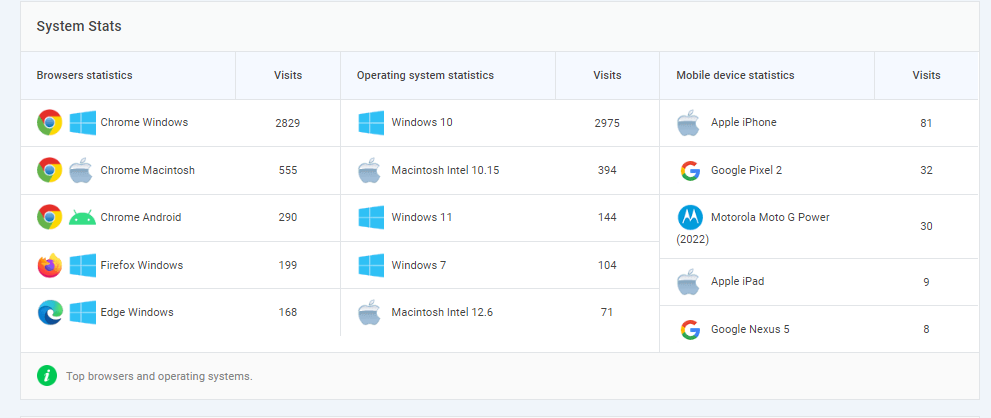
- Accessibility improvements often affect mobile and tablet users.
- Use Analytify >> Devices to view metrics like:
- Sessions per device
- Average time on page
- Bounce rate
- Sessions per device
Comparing before and after accessibility updates can indicate whether content is more usable on various devices.
2. Monitor Page Behavior
- Accessible headings, links, and navigation improve readability and flow.
- In Analytify >> Top Pages, track:
- Top exit pages
- Pages with high bounce rates
- Average engagement time
- Top exit pages

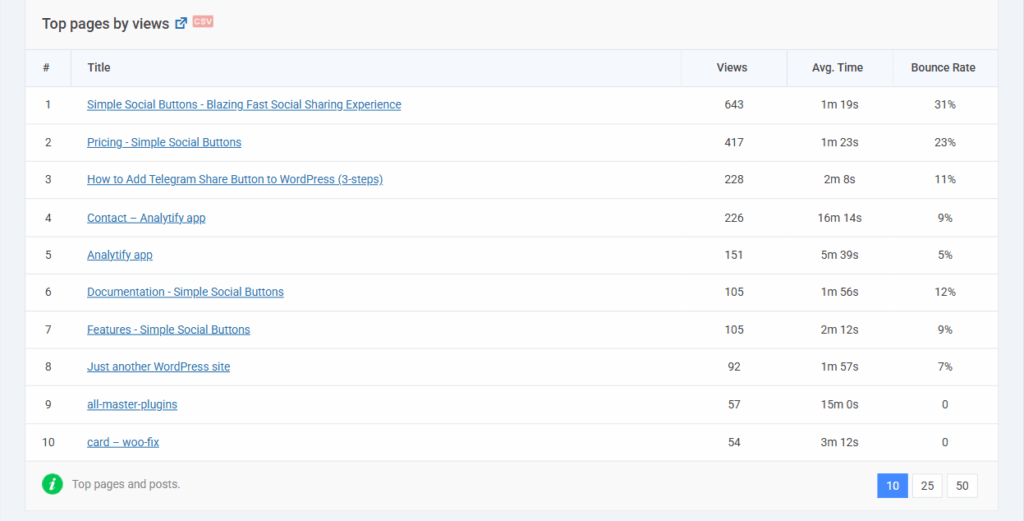
Pages with unusually low engagement may still have usability barriers.
If you use LoginPress for login forms, you can monitor login success rates or form abandonment to see if accessibility changes help.
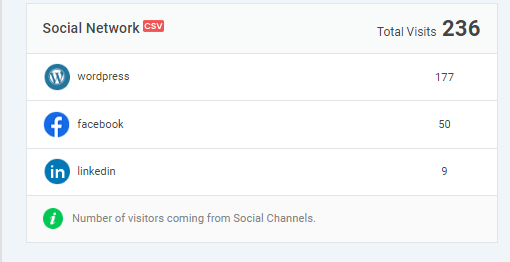
3. Monitor Social Interactions
- Accessible buttons improve usability for all users.
- Track button clicks in Analytify >> Social Stats to see whether more users interact with social sharing buttons (e.g., via Simple Social Buttons).

WordPress Accessibility: Common Mistakes to Avoid
Even with the best intentions, WordPress sites can still fail accessibility tests. Here are frequent mistakes and how to fix them:
1. Ignoring Keyboard Navigation and Focus Order
- Mistake: Users cannot tab through menus, buttons, or forms logically.
- Fix: Ensure all interactive elements are reachable via keyboard and maintain a logical tab order. Use visible focus indicators to show which element is active. Plugins like LoginPress help make login forms keyboard-friendly.
2. Poor Color Contrast or Inaccessible Media
- Mistake: Text is hard to read, buttons blend into backgrounds, or images lack alt text.
- Fix: Use sufficient contrast for text and background, readable fonts, and descriptive alt text for all images. Caption videos to help hearing-impaired users.
3. Relying Solely on Automated Testing
- Mistake: Running only WAVE or Axe and assuming the site is fully accessible.
- Fix: Combine automated tests with manual checks using screen readers (NVDA, VoiceOver, JAWS) and keyboard-only navigation.
4. Using Incompatible Plugins or Themes
- Mistake: Themes or plugins that ignore accessibility best practices can break site usability.
- Fix: Choose themes that follow WCAG 2.2 and test plugins before use. Use accessibility-focused plugins like WP Accessibility, LoginPress, or Simple Social Buttons.
5. Neglecting Maintenance
- Mistake: Accessibility is implemented once but ignored during updates.
- Fix: Perform regular audits whenever WordPress core, themes, or plugins update. Train content creators to maintain accessible practices consistently.
Frequently Asked Questions About WordPress Accessibility
WPBrigade LoginPress – accessible login forms
Simple Social Buttons – accessible social sharing
WP Accessibility and One Click Accessibility – improve headings, forms, and skip links
WordPress Accessibility: Conclusion
Web accessibility is no longer optional; it is a core part of modern WordPress development. Accessible websites reach more users, improve SEO, reduce legal risk, and deliver a smoother experience for everyone, including people with visual, auditory, motor, or cognitive disabilities. By using accessible themes, adding proper labels and alt text, ensuring keyboard navigation, and performing regular testing, you create a site that’s both inclusive and future-proof.
WPBrigade helps businesses build WordPress websites that meet WCAG 2.2, ADA, and Section 508 standards. With tools like LoginPress and Simple Social Buttons, we make accessibility easier across login pages, social interactions, and user workflows.
If you want an accessible, compliant, and high-performing WordPress site, contact WPBrigade to get started with expert accessibility-focused development.
You’ll also like to read 20+ WordPress Best Practices and Tips.
Now over to you. If you could instantly see which accessibility improvements drive the biggest engagement boost on your site, what’s the first thing you’d want to measure?