
If you want related posts with thumbnails under each article, I’d go with Related Posts Thumbnails. It’s free, rated 4.9 out of 5, and works with blocks, widgets and shortcodes.
Pick YARPP for a content-based matching algorithm. Pick Contextual Related Posts for automatic setup with no template edits. Pick Related Posts for WordPress to edit links by hand. Pick Inline Related Posts to place links inside the article text.
Related Posts Thumbnails is one of ours. The other four are here because the right fit depends on your theme, your traffic and how you want related posts to look.
Best WordPress Related Posts Plugins (TOC):
- Best WordPress Related Posts Plugins at a Glance
- Why Use a Related Posts Plugin in WordPress?
- 1. Related Posts Thumbnails: Best Related Posts Plugin for WordPress
- 2. YARPP: Best for Content-Based Matching
- 3. Contextual Related Posts: Best for Automatic Setup
- 4. Related Posts for WordPress: Best for Manual Control
- 5. Inline Related Posts: Best for Links Inside the Content
- Feature Comparison: WordPress Related Posts Plugins
- Which Related Posts Plugin Should You Choose?
- How to Measure Related Posts Clicks
- FAQs: Best WordPress Related Posts Plugins
- Final Verdict
Best WordPress Related Posts Plugins at a Glance
These are the five best related posts plugins for WordPress in 2026. Here is how they stack up on installs and ratings:
| Plugin Name | Best For | Active Installs | Rating |
|---|---|---|---|
| Related Posts Thumbnails | Thumbnail grids under posts | 20,000+ | 4.9/5 |
| YARPP | Content-based matching | 100,000+ | 4.8/5 |
| Contextual Related Posts | Automatic setup | 50,000+ | 4.8/5 |
| Related Posts for WordPress | Hand-editing related links | 10,000+ | 4.6/5 |
| Inline Related Posts | Links inside the article text | 100,000+ | 4.3/5 |
Why Use a Related Posts Plugin in WordPress?
A related posts plugin keeps readers on your site after they finish a post. It suggests the next article to read. More pages per visit means more chances to convert.
- Raises pages per session
- Lowers the share of one-page visits
- Surfaces older posts that get little traffic
- Adds internal links without manual work
- Shows readers your depth on a topic
Read why related posts matter in WordPress for the full case.
1. Related Posts Thumbnails: Best Related Posts Plugin for WordPress
Related Posts Thumbnails is the best related posts plugin for WordPress if you want a clean thumbnail grid. It has 20,000+ active installs and a 4.9 out of 5 rating. Version 5.0 is the current major release.
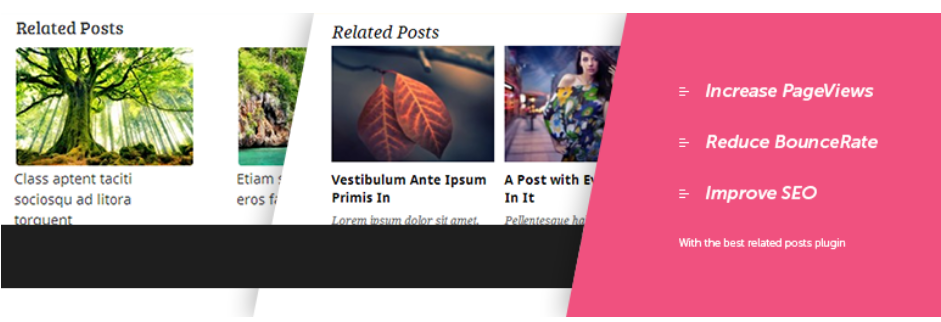
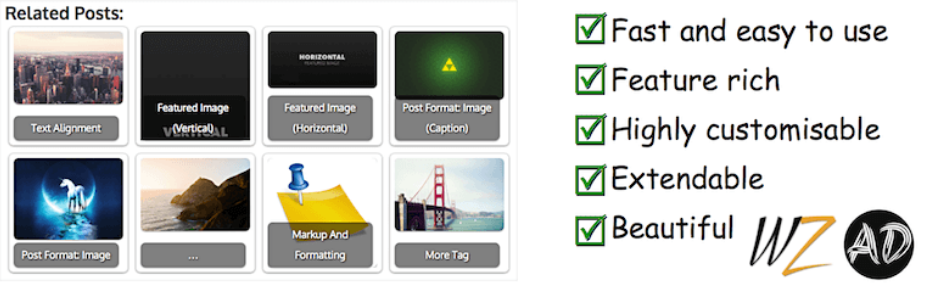
- Set thumbnail size and number of columns
- Relate posts by category, tag, author or custom taxonomy
- Gutenberg block, widget and shortcode
- Built-in caching and lazy loading
- External image and CDN support
- RTL and AMP support
Read the Related Posts Thumbnails 5.0 release notes for what changed.
2. YARPP: Best for Content-Based Matching
YARPP is the best pick if you want related posts matched by content. YARPP scores posts by title, content, tags, categories and custom taxonomies. It has 100,000+ active installs.

- Custom matching algorithm
- List and thumbnail templates
- Block, widget, shortcode and REST API
- WooCommerce and bbPress support
- Last updated on WordPress.org in November 2024
3. Contextual Related Posts: Best for Automatic Setup
Contextual Related Posts is the best choice if you want related posts with zero setup. It starts showing related posts as soon as you activate it. It has 50,000+ active installs.
- Works on activation, no template edits
- Matches by title and content
- Thumbnails and excerpts
- Exclude categories or tags
- Pro adds WooCommerce and page builder support
4. Related Posts for WordPress: Best for Manual Control
Related Posts for WordPress is the best pick if you want to edit related links by hand. A setup wizard links your posts automatically. Then you can add, edit or remove each link per post.

- Setup wizard links posts for you
- Edit related links on any post
- Shortcode and widget
- 10,000+ active installs
5. Inline Related Posts: Best for Links Inside the Content
Inline Related Posts is the best choice if you want related links inside the article text. It inserts styled boxes between paragraphs. It has 100,000+ active installs.
- Boxes placed inside the content
- 20+ style combinations
- Multiple boxes per article
- Check its recent update history before installing
Feature Comparison: WordPress Related Posts Plugins
Related Posts Thumbnails and YARPP cover the most display options. Here are each plugin’s display features side by side:
| Feature | Related Posts Thumbnails | YARPP | Contextual Related Posts | Related Posts for WordPress | Inline Related Posts |
|---|---|---|---|---|---|
| Thumbnails | Yes | Yes | Yes | Not listed | Not listed |
| Gutenberg block | Yes | Yes | Yes | Not listed | Not listed |
| Shortcode | Yes | Yes | Yes | Yes | Not listed |
| Widget | Yes | Yes | Yes | Yes | Not listed |
| Caching | Yes | Yes | Yes | Yes | Not listed |
| Placement | Below post | Below post | Below post | Below post | Inside content |
Check these four things before you install a related posts plugin:
- Last update date on WordPress.org
- Built-in caching for large sites
- Support for your post types
- A block or shortcode for custom placement
Which Related Posts Plugin Should You Choose?
Choose a related posts plugin by where you want links to appear and how they should be matched.
| Your Goal | Best Plugin |
|---|---|
| Visual thumbnail grid under posts | Related Posts Thumbnails |
| Matches based on post content | YARPP |
| Set it and forget it | Contextual Related Posts |
| Pick related links by hand | Related Posts for WordPress |
| Links inside the article body | Inline Related Posts |
How to Measure Related Posts Clicks
Measure related posts by tracking pages per session and clicks in GA4. Check the numbers before and after you install the plugin.
- Note your pages per session in GA4 for the last 30 days.
- Install and set up one related posts plugin.
- Wait 30 days and compare pages per session.
- Check which related links get the most clicks.
- Remove related links that nobody clicks.
Analytify shows GA4 pageviews and top posts inside WordPress, so you can run this check without opening Google Analytics.
FAQs: Best WordPress Related Posts Plugins
Short answers on related posts, speed and SEO:
Related Posts Thumbnails is the best related posts plugin for most WordPress sites. It is free, rated 4.9 out of 5, and shows a thumbnail grid under each post.
They can on large sites if they run new queries on every page load. Pick a plugin with built-in caching. Related Posts Thumbnails, YARPP and Contextual Related Posts all cache results.
Yes, with custom PHP in your theme. A plugin is easier to manage. It survives theme changes and gives you display settings.
Most often the plugin finds no matching posts. Add tags or categories to your posts. Then clear your cache. Also check that the display option is turned on for your post type.
Yes. Related posts add internal links between topic pages. Internal links help search engines find older posts and understand your topic clusters.
Final Verdict
Related Posts Thumbnails is the best related posts plugin for WordPress if you want thumbnails under each post. YARPP is best for content-based matching. Contextual Related Posts is best for zero setup. For the rest of your setup, these are the essential WordPress plugins I’d start with.

Leave a Reply