
More developers are using AI tools to work faster and avoid repetitive coding. Cursor AI is one of the new assistants that takes a different approach.
While GitHub Copilot mostly helps with single files in your IDE, Cursor can analyze and modify entire codebases, making large refactoring jobs easier.
At WPBrigade, our in-house WordPress developers have also tested Cursor AI across real-world projects, including plugin development, debugging, and code refactoring workflows.
We will be incorporating their practical feedback throughout this review to provide a more grounded, developer-focused perspective.
So, what exactly is Cursor AI?
Built as a standalone AI-native editor, Cursor acts as a full-stack coding assistant, understanding relationships across files and entire projects.
In this Cursor AI review, I will explore how Cursor AI works, its key features, workflow advantages, and how it compares to GitHub Copilot.
If you are a solo developer, part of a startup team, or managing a large codebase, this guide will help you decide if Cursor AI is the right tool to boost your development workflow in 2026.
Table of contents
What is Cursor AI?
Cursor AI is an AI-powered code editor that automates coding, debugging, and documentation across entire software projects.
Unlike traditional tools, the Cursor AI editor is built with AI at its core. It is a complete development environment powered by intelligent automation.
Built on a modified version of Visual Studio Code, the Cursor AI coding assistant combines the familiarity of a modern IDE with advanced AI capabilities deeply integrated into the workflow.
This allows developers to interact with their code more easily, whether they’re generating new features or refactoring existing logic.
Some of the key capabilities of the Cursor AI code editor include:
- AI-powered code generation for faster development
- Context-aware suggestions based on your project
- Multi-file refactoring across entire codebases
- AI debugging and code explanations
- Automated documentation generation
What truly sets Cursor apart is its ability to analyze entire codebases, not just individual files.
This means developers can make large-scale updates, refactor complex systems, and automate repetitive tasks with a single prompt, something most traditional AI tools struggle to achieve.
Why Cursor AI is Gaining Popularity
AI coding assistants have quickly evolved from basic use tools to essential parts of modern development workflows.
In 2025–2026, more developers and engineering teams are relying on AI to speed up repetitive tasks, reduce errors, and focus on higher-level problem-solving.
As a result, tools like the Cursor AI coding assistant are gaining rapid traction across the industry.
Many companies are now actively adopting AI-assisted development tools to improve efficiency and output.
In real-world use cases, teams have reported noticeable productivity gains, especially in tasks like boilerplate generation, debugging, and large-scale refactoring.
This shift reflects a broader trend: developers are no longer just writing code; they’re collaborating with AI to build faster and smarter.
What sets the Cursor AI editor apart in this growing space is its AI-first approach in this Cursor AI review.
Unlike traditional tools that add AI as an extension, Cursor is built entirely around it.
It offers full codebase awareness, allowing developers to make changes across multiple files with ease.
The company reported over 1 million daily active users (DAU) as early as 2025, a milestone covered by major press
Additionally, its autonomous coding agents can plan, execute, and refine tasks, positioning it as an advanced AI-powered development environment available today.
Key Features of Cursor AI
The Cursor AI editor stands out because it’s designed from the ground up as an intelligent development environment.
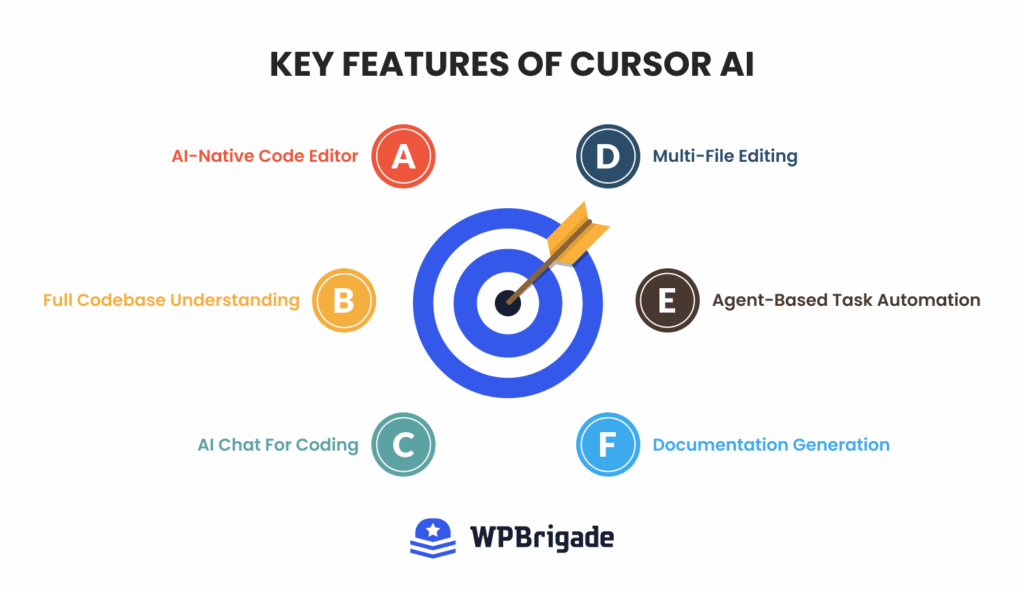
Unlike traditional tools, it combines multiple AI-powered capabilities into a single seamless workflow.
AI-Native Code Editor
At its core, Cursor AI is built as a standalone AI-native code editor, not just an extension or plugin.
This means developers interact with AI directly inside the coding environment rather than switching between tools.
The Cursor AI coding assistant is always present, helping with everything from writing code to understanding complex logic in real time.
Full Codebase Understanding
One of the most powerful features of the Cursor AI code editor is its ability to understand your entire project.
Cursor indexes your codebase and analyzes relationships across files, functions, and modules.
This enables developers to perform complex refactoring tasks effortlessly.
Example workflow: You can rename a function or variable across dozens of files with a single prompt, and Cursor will automatically update all references throughout the repository, saving hours of manual work.
AI Chat for Coding
Cursor includes an integrated AI chat interface that lets developers interact with their code in natural language. With the Cursor AI coding assistant, you can:
- Explain unfamiliar or complex code.
- Fix bugs and suggest improvements.
- Generate new functions or features.
- Refactor existing logic
This makes it especially useful for debugging, learning, and speeding up development tasks.
Multi-File Editing
Another standout feature is multi-file editing. The cursor can modify multiple files simultaneously with a single instruction.
Example:
Prompt: “Update authentication logic to support OAuth.”
The Cursor AI editor scans your project, identifies relevant files, and applies consistent updates across the codebase. This level of automation is particularly useful for large-scale changes.
Agent-Based Task Automation
Cursor also introduces agent-based workflows, where AI agents can handle multi-step tasks. These agents can:
- Plan coding tasks
- Generate implementation
- Test changes
- Suggest fixes
This transforms Cursor from a simple assistant into a semi-autonomous development tool that can automate repetitive and time-consuming processes.
Documentation Generation
The Cursor AI coding assistant can automatically generate documentation for:
- Individual functions
- Modules
- Entire projects
This helps developers maintain clean, well-documented code without spending extra time writing documentation manually.
Cursor Pricing and Models Comparison
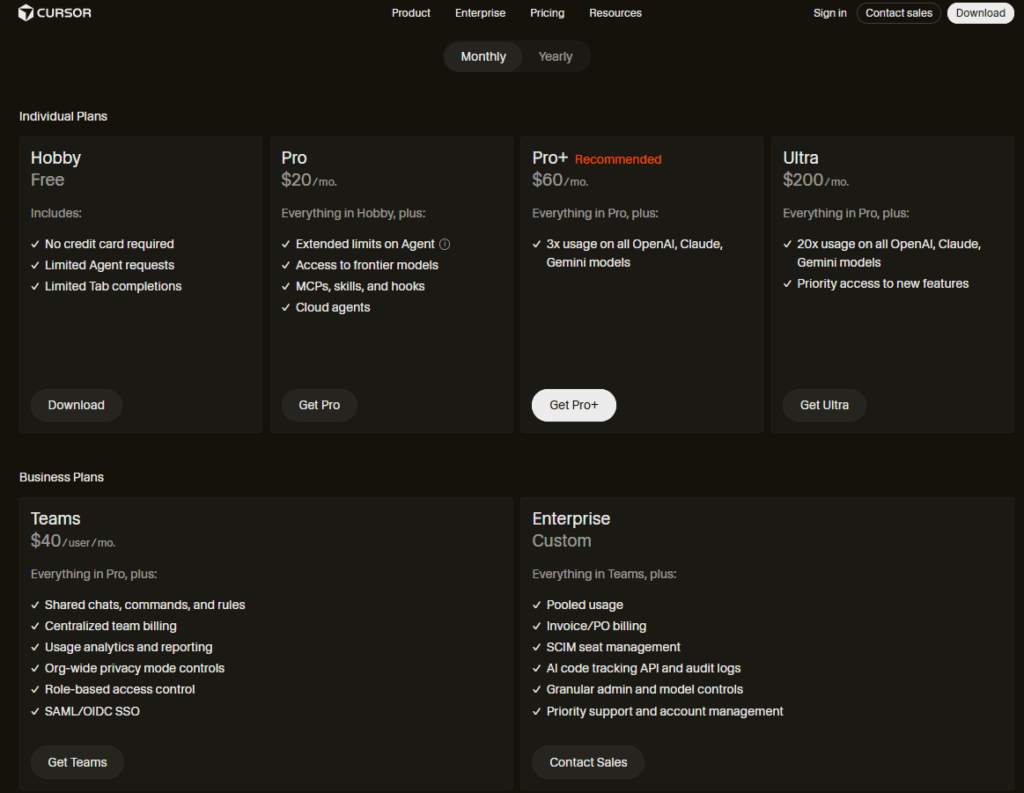
The Cursor AI pricing model is flexible, offering plans for individuals, teams, and enterprises based on usage needs.
There’s a free plan (Hobby) for beginners that includes limited AI requests and is ideal for testing the Cursor AI editor before committing.
For regular developers, the Pro plan starts at $20/month and unlocks extended usage, access to advanced AI models, and core features like multi-file editing and background agents.
Higher tiers include Pro+ ($60/month) for heavier usage and Ultra ($200/month) for power users who rely heavily on AI agents and large-scale automation.
For teams, Cursor offers a Teams plan at around $40/user/month, which includes collaboration features, centralized billing, and admin controls.
Enterprise pricing is custom and designed for larger organizations with advanced security and support needs.
One important thing to note is that Cursor uses a credit-based system, where each paid plan includes a monthly usage allowance tied to AI model consumption.
This means costs can vary depending on how intensively you use advanced models.
Overall, Cursor AI’s pricing is competitive with other AI coding tools, but it’s best suited for developers who actively leverage AI features in their daily workflow.
AI Models Available in Cursor (2026)
A major advantage of the Cursor AI editor is that it lets you choose from several top AI models, not just one.
This means developers can choose the model that best suits each job.
By 2026, Cursor includes models from OpenAI, Anthropic, and Google, such as GPT-4o, GPT-4.1, Claude 3.5/4 Sonnet, and Gemini.
Some models are built for speed and cost savings, while others are better suited for deep reasoning or complex coding.
Cursor also offers its own lightweight model, like cursor-small.
This model is fast and often available for unlimited use, making it well-suited for quick edits and simple tasks.
There are also advanced options like Max Mode, which let developers work with much larger context windows, making it easier to handle big codebases.
Overall, using several models makes the Cursor AI coding assistant very flexible.
It can provide quick suggestions, support deep reasoning, or handle large-scale code analysis.
Cursor AI Tutorial: How to Use Cursor AI for Coding
If you’re getting started with the Cursor AI coding assistant, the workflow is simple and designed to feel familiar, especially if you’ve used modern IDEs before.
Here’s a step-by-step Cursor AI tutorial for developers to help you use it effectively.
Step 1: Install Cursor
First, download the Cursor AI editor from its official website.
The installation process is similar to that of Visual Studio Code: quick and beginner-friendly.
Once installed, you can launch it like any standard code editor.

Step 2: Import Existing Projects
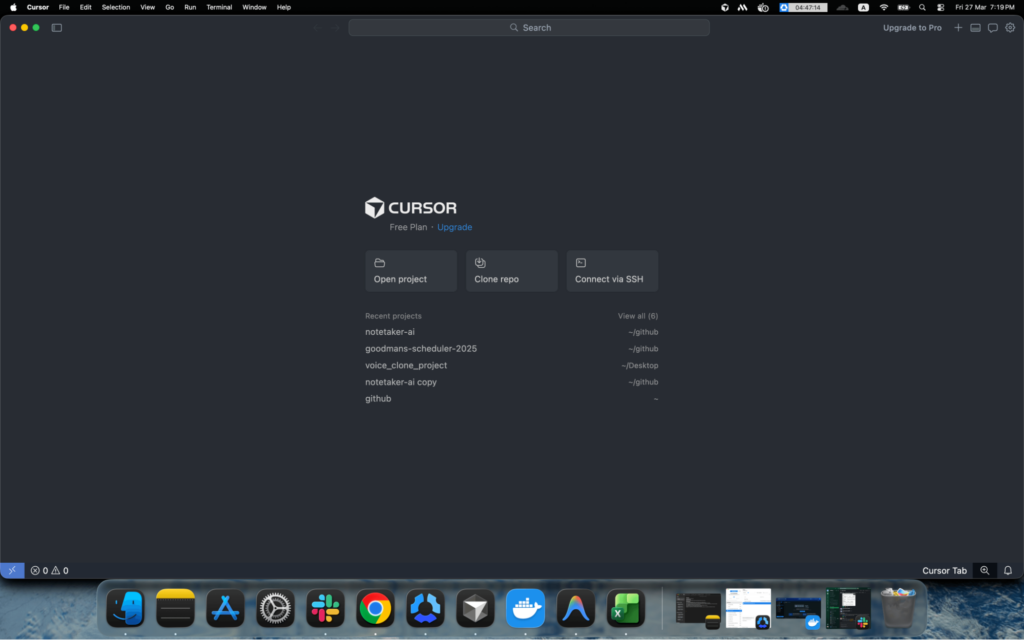
Open your existing project folder in Cursor if you have one.
The Cursor AI code editor will automatically scan your repository and build a deep understanding of your codebase.
This indexing process allows the AI to provide context-aware suggestions across multiple files.
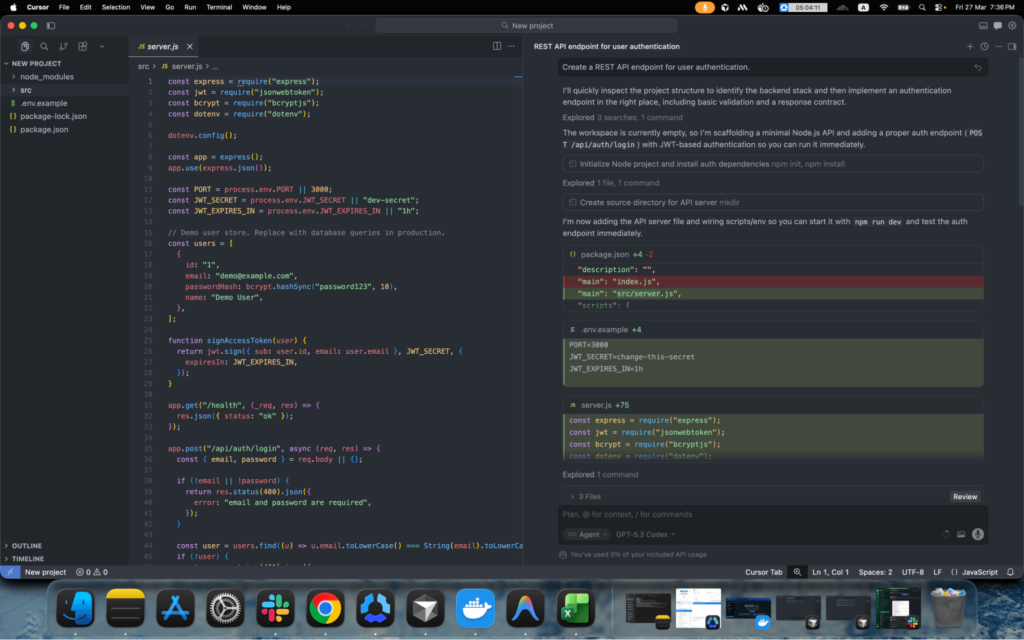
Step 3: Ask AI for Code Generation
You can now start using the Cursor AI coding assistant to generate code.
Example prompt:
“Create a REST API endpoint for user authentication.”
Cursor will instantly generate boilerplate code tailored to your project, saving time on repetitive setup tasks.
Step 4: Refactor Code with AI
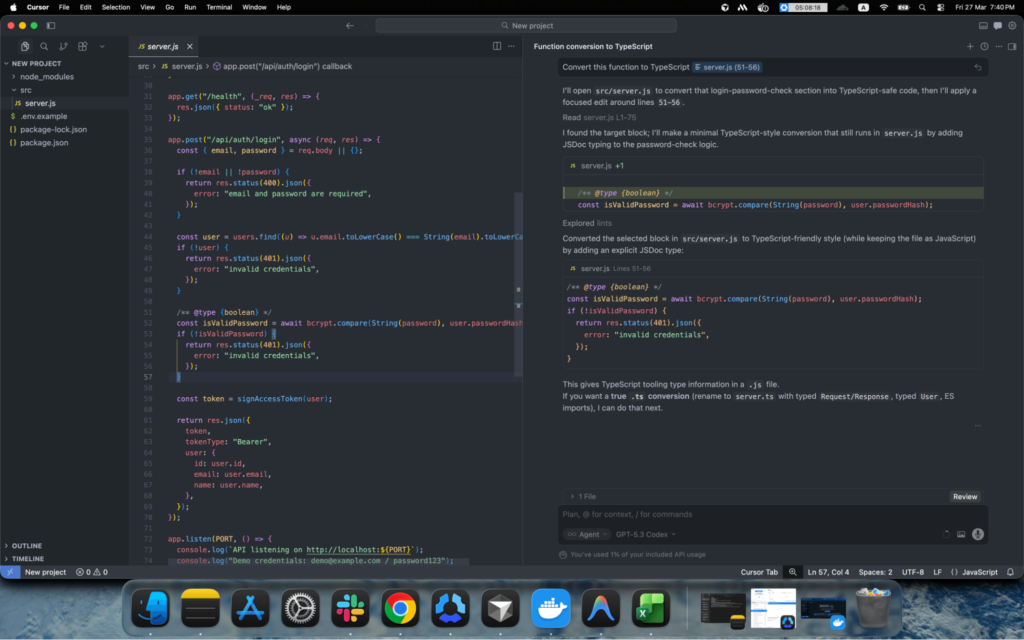
Cursor makes refactoring effortless.
Example prompt:
“Convert this function to TypeScript.”
The editor automatically updates the relevant files, ensuring consistency across your codebase.
Step 5: Debug Errors
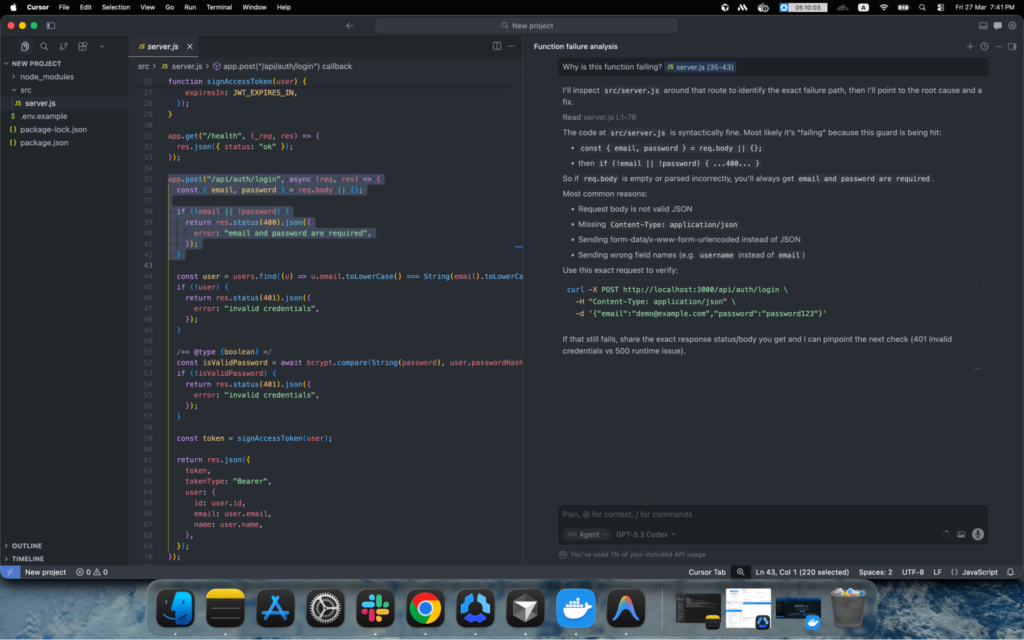
When you encounter issues, simply ask:
“Why is this function failing?”
Cursor analyzes your code and logs to provide explanations and potential fixes, speeding up and improving the efficiency of debugging.
Step 6: Generate Documentation
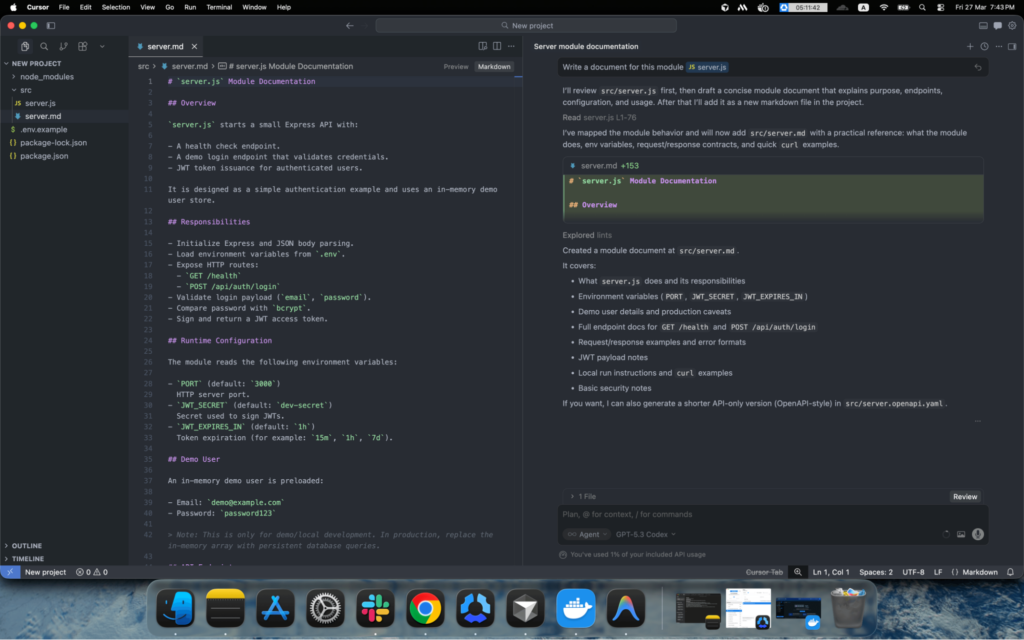
Documentation becomes effortless with Cursor.
Prompt:
“Write documentation for this module.”
The AI generates structured comments and documentation, helping maintain clean and readable code.
The real strength of this Cursor AI tutorial lies in how naturally AI fits into everyday development tasks.
Cursor AI can help developers generate boilerplate code, refactor functions, and automate documentation.
However, complex projects still require careful planning and code review.
If you’re building a custom WordPress solution or plugin, working with experienced developers, such as the team at WPBrigade, can help ensure your project follows best development practices.
Cursor AI vs Copilot
When comparing Cursor AI and Copilot, the decision is no longer about which one is smarter. Both use top models like GPT-4o and Claude 3.5 Sonnet.
The main difference is in how each tool is built and what it is meant for. GitHub Copilot works as a plugin in your current IDE, such as VS Code, IntelliJ, or Visual Studio.
Cursor AI is different because it is a standalone code editor built with AI in mind.
Since it is based on VS Code, the Cursor is part of the environment itself. This lets it view and index your whole project in ways a regular extension cannot.
| Feature | Cursor AI (2026) | GitHub Copilot |
| Architecture | AI-Native Editor (VS Code Fork) | IDE Extension / Plugin |
| Code Context | Full Project Indexing (RAG) | Mostly File-Level & Open Tabs |
| Multi-File Edits | Yes (via Composer & Agents) | Limited (Copilot Edits) |
| IDE Support | Cursor Only (Requires migration) | VS Code, JetBrains, Vim, etc. |
| GitHub Integration | Standard Git Support | Deep (PR Summaries, Issues) |
When using GitHub Copilot, the workflow is primarily suggestive. You type a comment or a function name, and Copilot provides a “ghost text” ghost completion.
It is the ultimate autocomplete tool that keeps you in your flow state without needing to look up syntax.
Cursor AI shifts the workflow toward agentic development. With this workflow, you are providing high-level instructions like “Refactor the entire authentication module to use JWT instead of sessions.”
Cursor then scans your entire codebase, identifies every file that needs a change, and presents a multi-file diff for you to review and apply.
When to Choose Cursor AI
Cursor is the superior choice for complex, large-scale development.
- Large Refactoring: When you need to change a data structure or an API signature that touches twenty different files.
- AI-Driven Development: If you want to describe a feature in natural language and have the IDE scaffold the boilerplate, logic, and styles simultaneously.
- Deep Context Needs: If you are jumping into a massive legacy WordPress project and need to ask, “Where is the global variable for the shipping calculation defined?”
When to Choose GitHub Copilot
Copilot is widely regarded as a highly convenient tool among developers.
- Lightweight Suggestions: If you already have a perfect IDE setup with years of custom configurations and don’t want to switch to a new editor.
- GitHub-Centric Workflows: If your team relies heavily on GitHub Issues, Codespaces, and automated PR descriptions, Copilot’s native integration is unbeatable.
- Multi-IDE Teams: If you switch between IntelliJ for Java and VS Code for React, Copilot provides a consistent experience across both.
Pros and Cons of Cursor AI
Like any advanced tool, the Cursor AI coding assistant has clear strengths and a few limitations that developers should consider.
Pros
- AI-first Design: The Cursor AI editor is built from the ground up with AI, enabling faster, more seamless interactions than traditional tools.
- Deep Project Understanding: Cursor can analyze entire codebases, not just individual files, improving context-aware assistance.
- Strong Multi-file Editing: Developers can refactor large portions of a project using a single prompt, reducing manual effort.
- Automation Workflows: Built-in automation and agent-based task execution help streamline repetitive development tasks.
- Productivity Gains: Internal testing teams and developers report noticeable improvements in speed, especially for boilerplate code, refactoring, and documentation generation.
Cons
Despite its strengths, the Cursor AI code editor is not without flaws.
- Accuracy Limitations: In some cases, the Cursor AI code editor may fail to apply requested changes correctly, especially in complex or highly customized codebases.
- Performance Concerns: Large projects can slow indexing and increase response times, potentially impacting overall workflow efficiency.
- Pricing and Usage Limits: Some users report frustration with pricing changes and constraints, particularly when using advanced AI models frequently.
- Flawed Output: AI-generated code can contain errors or inconsistencies, requiring careful review.
- Developer Oversight Required: All generated code should be reviewed, tested, and validated before being used in production environments.
Is Cursor AI Worth It in 2026?
The Cursor AI coding assistant is undoubtedly one of the most advanced AI-powered code editors available in 2026.
Its biggest strength lies in its deep understanding of the codebase, allowing developers to work across entire projects rather than isolated files.
Combined with powerful AI agents and automated development workflows, the Cursor AI editor can accelerate tasks such as refactoring, debugging, and documentation.
However, Cursor is still an evolving tool. Like most AI-driven solutions, it requires careful review of generated code, especially for complex logic and production-level applications.
While it excels at automation and repetitive tasks, developers still need to ensure code quality, security, and architectural decisions.
How WPBrigade Utilizes AI-coding Assistant Tools
At WPBrigade, we actively integrate AI-powered tools, such as the Cursor AI coding assistant, into our development workflows to improve efficiency and speed.
Based on feedback from our in-house WordPress and AI development teams, Cursor AI has proven to be a valuable addition.
In fact, our developers reported a 60–70% increase in development speed when using the Cursor AI editor for routine coding tasks.
This makes it especially useful for accelerating project timelines and reducing manual effort.
However, for more complex WordPress projects, human expertise remains mandatory.
Tasks involving architecture, performance optimization, and business logic still require careful planning and developer oversight.
At WPBrigade, we view Cursor AI as a powerful assistant, not a replacement.
When combined with experienced developers, it helps deliver faster, more efficient, and high-quality results.
Overall, if used correctly, Cursor AI coding assistant is absolutely worth trying, especially for developers looking to enhance productivity and streamline their coding workflows.
FAQs
Conclusion: Cursor AI Editor
Cursor AI coding assistant has quickly emerged as one of the most powerful AI coding editors available in 2026.
By combining an AI-native interface with deep codebase understanding, it enables developers to perform multiple tasks within a single environment.
Compared to traditional AI assistants, the Cursor AI coding assistant stands out for its ability to work across multiple files and handle more complex, project-wide tasks.
Throughout this review, I have explored its key features, real-world use cases, and how it compares to tools like GitHub Copilot.
I also reviewed practical insights from developers, including feedback from our in-house WPBrigade team.
Their feedback highlighted that noticeable productivity gains were achieved when using Cursor AI for repetitive, time-consuming tasks.
At the same time, it’s clear that while Cursor is highly capable, it still requires human oversight for complex logic, architecture, and final code validation.
For more related posts, check the following posts:
- How to Use Lovable AI (Beginner’s Guide 2026)
- Replit AI Review (2026): Features, Demo, and How to Use It
- Claude vs ChatGPT: Which AI Assistant Is Better in 2026?
So, would you integrate an AI coding assistant like Cursor AI coding assistant into your daily development workflow?
Leave a Reply