
Are you wondering how you can optimize your WordPress website speed?
WordPress speed optimization can be the difference between a bounce and a sale. In 2026, even a minor lag directly hurts your Core Web Vitals and search rankings.
We understand the frustration of a slow site. This guide provides the exact steps needed to slash your page load times and fix code bloat for good.
You will learn how to:
- Configure server-level optimizations for maximum efficiency.
- Use WPBrigade’s automated tools for continuous performance monitoring.
- Build a lightning-fast site that dominates the SERPs and keeps users engaged.
Table of contents
- How Can You Measure Your Current WordPress Website Speed?
- How Does Hosting and Server Configuration Affect WordPress Speed?
- How Can a Lightweight WordPress Theme Improve Website Performance?
- How Can You Optimize Images and Media for Faster WordPress Sites?
- What Caching Strategies Can Speed Up Your WordPress Site?
- How Can You Minimize CSS, JavaScript, and External Requests?
- How Can Database Optimization Improve WordPress Speed?
- How Can a Content Delivery Network (CDN) Boost Website Performance?
- What Advanced Techniques Can Further Optimize WordPress Speed?
- How Can You Monitor and Maintain WordPress Website Speed?
- How Analytify Helps You Monitor and Improve WordPress Speed
- FAQs: Improve Website Performance
- Conclusion : Optimize WordPress Website Speed
How Can You Measure Your Current WordPress Website Speed?
To truly improve website performance, you must first identify the specific blockages slowing down your server and front-end rendering.
Several industry-standard tools provide the data needed for an effective WordPress Performance Guide:
- Google PageSpeed Insights (PSI): The gold standard for core web vitals WordPress tracking. It provides both real-world user experiences and simulated tests.
- GTmetrix: Excellent for visualizing the Waterfall Chart, which shows exactly which script or image is delaying your load time.
- Pingdom: Best for testing Time to First Byte (TTFB) and geographical latency across different global server locations.
- WebPageTest: An advanced tool that allows for deep-dive testing on specific connection speeds (like 4G/5G) and browser types.
When analyzing these reports, focus on the metrics that impact your SEO and UX:
- TTFB (Time to First Byte): Measures how fast your server responds. A high TTFB usually points to poor hosting or a bloated database.
- LCP (Largest Contentful Paint): Marks the point when the main content of a page has likely loaded. Aim for under 2.5 seconds.
- INP (Interaction to Next Paint): The standard for responsiveness. It measures the delay for all clicks, taps, and keyboard interactions.
- CLS (Cumulative Layout Shift): Measures visual stability. If your buttons move while the page is loading, your CLS score will suffer.
To simplify this process, you can use WPBrigade Analytics Tool, Analytify to automatically track site speed and Core Web Vitals in your dashboard, so you can monitor these metrics in real time without leaving WordPress.
By identifying these blocks ahead of time, you ensure your optimization efforts are effective.
How Does Hosting and Server Configuration Affect WordPress Speed?
Your hosting and server setup control your site’s Time to First Byte (TTFB), which sets the upper limit for how much you can improve performance.
Even if your front-end code is perfect, a poor server can slow down your WordPress site by delaying the first data sent to visitors. This can significantly hurt your core web vitals scores.
To optimize your WordPress site, you need to upgrade from shared hosting to a dedicated hosting plan.
Selecting the Appropriate Hosting Tier
While shared hosting is cost-effective, it often leads to resource contention. This is why multiple sites on the same server compete for CPU, and RAM can degrade performance.
- VPS (Virtual Private Server): Offers dedicated resources within a shared environment, providing a more stable baseline for growing sites.
- Managed WordPress Hosting: The gold standard for wordpress speed optimization. These servers are fine-tuned for WordPress, often featuring built-in object caching and enhanced security.
In addition to hardware considerations, server configuration is necessary to achieve compliance with the Core Web Vitals standards for WordPress.
- Upgrade to PHP 8.3+: Each new version of PHP is much faster and more secure than its predecessor. Transitioning from PHP 7.4 to 8.3 can reduce execution times by up to 30%, directly lowering your LCP.
- Enable Server-Level Caching: Moving caching from the application layer (WordPress) to the server layer (Nginx FastCGI or LiteSpeed) lets your site serve pages without ever touching the slow PHP engine.
- HTTP/3 Support: Ensure your host supports the latest internet protocol. HTTP/3 uses QUIC to deliver data packets more efficiently, which is essential for reducing page load time on mobile devices.
A high-performance server setup is the difference between a site that feels instant and one that loses users to a spinning loading icon.
If your current provider is failing these benchmarks, WPBrigade offers consulting to ensure your WordPress site runs efficiently, moving it from a generic environment to a performance-first infrastructure.
High-quality hosting reduces TTFB, stabilizes your LCP, and provides the foundation for all following website speed optimization tips.
How Can a Lightweight WordPress Theme Improve Website Performance?
To optimize WordPress website speed, you must prioritize themes built on a modular philosophy.
Modern, high-performance themes load only the scripts required for the specific elements on a page, reducing the main-thread load on the browser.
A WordPress theme is the structural framework of your site; if that framework is heavy, no amount of optimization can fully compensate for the underlying bloat.
Many premium themes come loaded with excessive features, multiple slider plugins, and massive libraries of CSS and JavaScript that load on every single page.
This excess code increases the number of HTTP requests and inflates the page weight, directly damaging your core web vitals WordPress scores.
Top Lightweight Theme Recommendations
Listed below are some of the minimalist themes that provide the best foundation for a WordPress performance guide:
- GeneratePress: Known for its tiny footprint (less than 10kb zipped) and zero dependencies on jQuery.
- Astra: Highly customizable yet optimized for speed, often loading in under 0.5 seconds out of the box.
- Hello Elementor: A blank canvas theme designed specifically for page builders to minimize redundant styling.
- Default Block Themes: Leveraging the native WordPress Block Editor (Gutenberg) often results in the cleanest HTML output.
Before committing to a design, perform a clean install test. Activate the theme on a staging site and run it through Google PageSpeed Insights.
If the base theme without any content fails to hit a 90+ score, it will only become slower as you add images and plugins.
How Can You Optimize Images and Media for Faster WordPress Sites?
To effectively optimize WordPress website speed, you must move beyond simple file uploads and implement a modern media delivery strategy.
Images and videos are the heaviest elements on any webpage, often accounting for over 60% of total page weight.
Modern Formats and Compression
The first step in WordPress speed optimization is transitioning away from legacy formats like JPEG and PNG.
- WebP and AVIF: These next-gen formats provide superior compression. WebP is roughly 30% smaller than JPEG, while AVIF can reduce file sizes by up to 50% without perceptible quality loss.
- Lossy vs. Lossless Compression: For most websites, lossy compression is the better choice. It removes data invisible to the human eye to achieve the smallest possible file size, which is critical to improve website performance on mobile devices.
- Scaled Images: Never rely on CSS to resize your images. If an image appears at 400px wide on your site, the source file should be 400px, not 4000px.
Intelligent Delivery Techniques
To maintain a high score in your WordPress Performance Guide, here are ways you can control how and when media loads.
- Lazy Loading: This technique ensures that images and videos are loaded only as the user scrolls them into view. This keeps the “above-the-fold” content fast and responsive.
- CSS Aspect Ratio Boxes: Always define width and height attributes for your media. This reserves the correct space on the page, preventing Cumulative Layout Shift (CLS) when the image finally appears.
- Optimize Background Videos and GIFs: Large GIFs are performance killers. Convert them to MPEG4 or WebM video files, which are significantly lighter. For background videos, keep the duration short, remove audio tracks, and compress them to under 5MB.
By combining modern formats with intelligent loading, you can reduce page load time while maintaining a high-end visual experience.
What Caching Strategies Can Speed Up Your WordPress Site?
Implementing a multi-layered caching strategy allows you to serve pre-rendered content instantly, which is necessary to optimize WordPress website speed.
Without caching, WordPress must execute PHP scripts, fetch data from your MySQL database, and assemble HTML files for every single visitor.
This repetitive process inflates your Time to First Byte (TTFB) and slows down your Largest Contentful Paint (LCP).
The Three Pillars of WordPress Caching
To improve website performance, your WordPress Performance Guide must include these three specific types of caching:
- Page Caching: This stores the final HTML version of your page. When a new user visits, the server delivers this static file instead of processing the entire WordPress core. This is the primary driver for reducing page load time.
- Browser Caching: This instructs the user’s browser (Chrome, Safari, etc.) to store static assets, such as your logo and CSS and JavaScript files, locally. On return visits, the browser pulls these files from the user’s hard drive rather than re-downloading them from your server.
- Object Caching (Redis/Memcached): This caches individual database query results. It is particularly powerful for dynamic sites like WooCommerce or membership portals, where the “static” page cache is frequently bypassed.
Recommended Caching Solutions
For those looking for the best ways to speed up WordPress, several plugins offer complete control for caching solutions:
- WP Rocket: Widely considered the best all-in-one premium solution for its ease of use and advanced features like Delay JavaScript Execution.
- W3 Total Cache: A highly technical, free plugin that offers granular control over every caching layer, including CDN integration and fragment caching.
- LiteSpeed Cache: The superior choice if your host uses LiteSpeed server architecture, as it handles caching at the server level for maximum efficiency.
By layering these strategies, you satisfy core web vitals WordPress requirements and provide a frictionless user experience.
How Can You Minimize CSS, JavaScript, and External Requests?
To optimize WordPress website speed, you must reduce the number of files the browser has to fetch and execute.
Unoptimized code and excessive external requests are also primary causes of render-blocking, which delays page load until all scripts are processed.
Techniques for Script Optimization
Effective WordPress speed optimization requires a methodical approach to cleaning up your site’s codebase:
- Minification: Remove unnecessary characters (spaces, comments, and line breaks) from your CSS and JS files. This reduces file size without changing functionality, helping you improve website performance.
- Concatenation (Combining Files): Merge multiple CSS or JS files into a single file to reduce the total number of HTTP requests. Note: This is less critical on HTTP/2 or HTTP/3 servers, but still helps with organization.
- Defer and Async Loading: Use the defer attribute to ensure non-critical JavaScript only loads after the HTML is parsed. Use async for independent scripts (like ads) so they don’t block the rest of the page from rendering.
- Eliminate Third-Party Bloat: Audit your site for unused tracking scripts, heatmaps, or social media widgets. If a script isn’t providing measurable value, remove it to reduce page load time.
How Can Database Optimization Improve WordPress Speed?
To effectively optimize WordPress website speed, you must perform regular digital housekeeping to keep your tables lean:
- Remove Post Revisions: By default, WordPress saves every draft and edit. Capping these revisions prevents your wp_posts table from unnecessarily doubling in size.
- Clear Expired Transients: Transients are temporary cached options. If they aren’t cleared after they expire, they add redundant weight to your wp_options table.
- Delete Unused Tables: Many plugins leave behind data even after being uninstalled. Identifying and dropping these orphaned tables is essential to improving website performance.
- Clean Up Metadata: Remove hidden bloat, such as spam comments, trashed posts, and unused tag relationships.
Maintaining a clean database is a core step in any professional WordPress Performance Guide to ensure peak efficiency.
How Can a Content Delivery Network (CDN) Boost Website Performance?
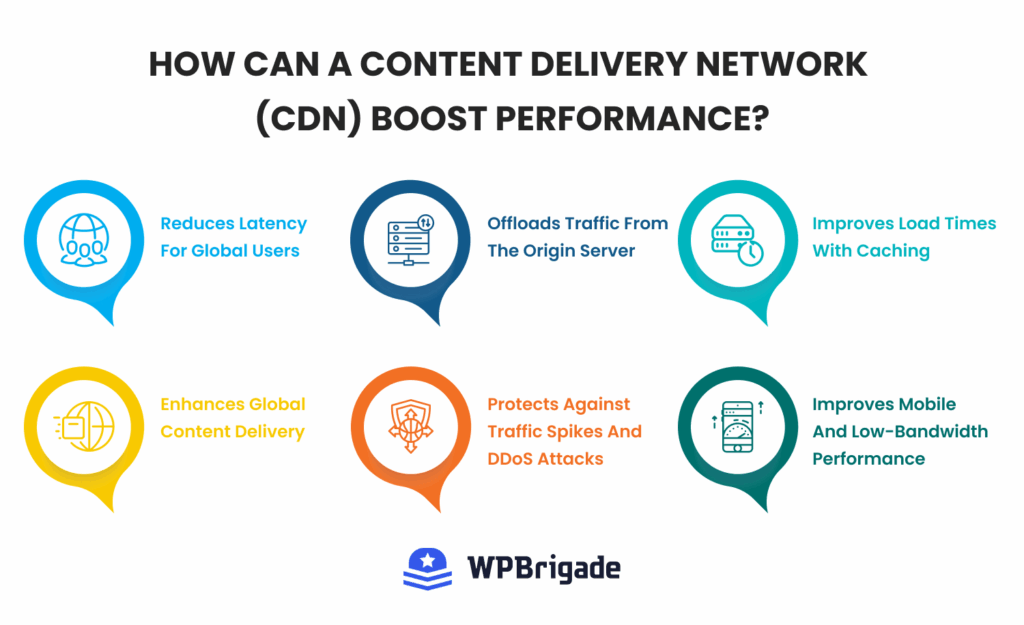
Implementing a Content Delivery Network (CDN) provides several technical advantages for wordpress speed optimization:
- Minimizes Latency: By distributing static assets (images, CSS, and JS) across a global network of “Edge” servers, data travels a shorter physical distance to the user.
- Reduces TTFB: Serving files from the node closest to the visitor prevents the delays caused by transoceanic data travel, significantly lowering your Time to First Byte.
- Offloads Server Resources: Shifting the delivery of heavy static files to the CDN reduces bandwidth and CPU load on your origin server, improving website performance.
- Optimizes Global Delivery: A CDN ensures that a visitor in London receives data from a local UK server rather than a distant US-based origin, which is essential to optimize wordpress website speed.
- Stabilizes Core Web Vitals: Faster asset delivery directly improves your Largest Contentful Paint (LCP) and prevents page-load bottlenecks for a worldwide audience.
Top CDN Recommendations for 2026
To maximize your results, this WordPress Performance Guide suggests the following industry leaders:
- Cloudflare: Offers a massive global network and features like Automatic Platform Optimization (APO) specifically for WordPress.
- BunnyCDN: A high-performance, budget-friendly option known for its exceptional routing and ease of use.
- Quic.cloud: The best choice for sites using LiteSpeed, as it offers unique image optimization and localized caching.
Modern CDNs integrate directly with top-tier caching plugins like WP Rocket or W3 Total Cache, allowing for automatic cache purging across the entire global network whenever you update your content.
What Advanced Techniques Can Further Optimize WordPress Speed?
Using edge-level technologies and adjusting the WordPress core can help you achieve sub-second load times, which are key to top Core Web Vitals rankings.
These methods reduce your file sizes and cut down the time between a user’s request and the server’s response.
Modern Compression and Protocols
To improve website performance in 2026, you must utilize the most efficient data transfer methods available:
- Brotli Compression: GZIP is common, but Brotli (from Google) compresses HTML, CSS, and JS files 15–25% more. Smaller files download faster and help lower your Largest Contentful Paint (LCP).
- HTTP/3: Ensure your server supports HTTP/3. Unlike older protocols, HTTP/3 handles packet loss more efficiently, significantly reducing page load time for users on unstable mobile networks.
Strategically handling resources helps the browser load the most important files first, which directly affects your Interaction to Next Paint (INP).
- Preload and Prefetch: Preload critical assets, such as hero images and fonts, so they load immediately. Prefetch links that users are likely to click next to make the next page load almost instantly.
- Heartbeat API Control: The WordPress Heartbeat API regularly sends requests to the server (admin-ajax.php) to sync data and autosave posts. On busy sites, this can use a lot of CPU resources. Lowering the frequency from 15 to 60 seconds, or turning it off on the frontend, reduces server load and helps keep your Time to First Byte (TTFB) steady.
- Speculation Rules API: This new standard lets the browser pre-render a whole page in a hidden tab when someone hovers over a link. As a result, users experience almost no wait time when they click.
How Can You Monitor and Maintain WordPress Website Speed?
To improve website performance in the long term, you must implement a regular audit schedule using the Core Web Vitals WordPress report in Google Search Console.
Strategies for Long-Term Speed Maintenance
Below are some long-term strategies that you can follow for consistent speed optimization and performance:
- Automated Monitoring: Set up automated alerts using tools such as Pingdom or GTmetrix. These services notify you immediately if a server issue or a bad plugin update causes a sudden spike in page load time.
- Version Control: Always keep your WordPress core, themes, and plugins up to date. Developers frequently release performance patches that further optimize speed and patch security vulnerabilities.
- Monthly Performance Audits: Conduct a deep-dive audit once a month to identify and remove unused assets or orphaned database tables.
Managing these technical requirements manually can be overwhelming for growing businesses.
How Analytify Helps You Monitor and Improve WordPress Speed
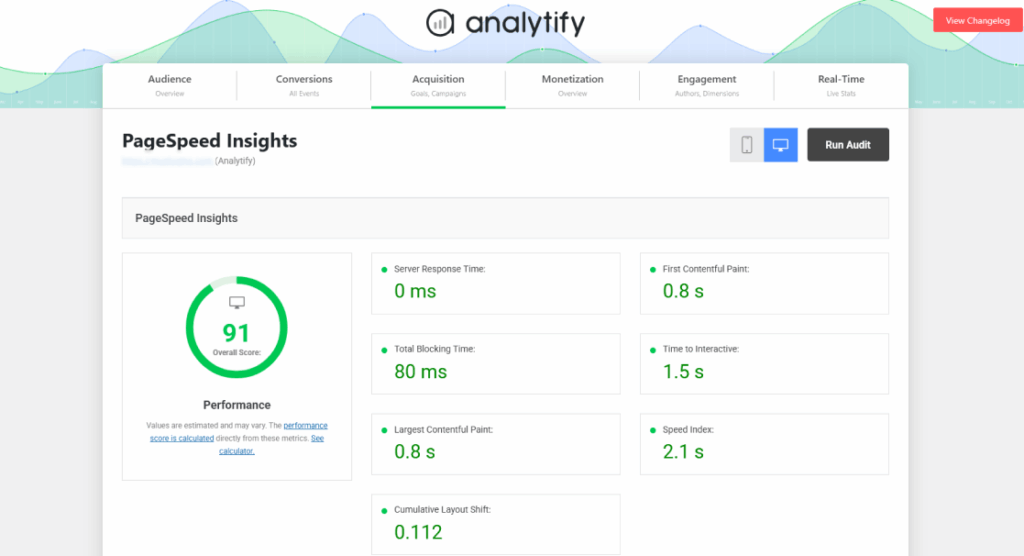
With Analytify’s built-in tools, you can easily monitor and improve WordPress speed. Here’s what the report shows you:
- Overall Performance Score: Your headline grade from Google’s PageSpeed API, with separate scores for mobile and desktop.
- Largest Contentful Paint (LCP): How fast your main content renders. This is Google’s primary Core Web Vitals metric and your most important number to watch.
- Server Response Time: How quickly your server responds before the browser renders anything. A high number here points directly to hosting or database issues.
- Total Blocking Time: The cumulative time JavaScript delays your page’s interactivity. High TBT is usually caused by third-party scripts and deferred JS.
- Time to Interactive: The point at which your page becomes fully usable for a real visitor.
- First Contentful Paint: The first moment anything appears on screen.
- Speed Index: How quickly visible content fills the viewport during load.
Now here’s where it gets genuinely useful.
The PageSpeed report does not exist in isolation inside Analytify. Once you improve your scores, you can cross-reference the results directly with Analytify’s behavioral data.
Ready to see how speed affects your traffic?
Check your Page Speed Report in the dashboard to identify which pages are causing users to leave today.
FAQs: Improve Website Performance
Conclusion: Optimize WordPress Website Speed
To optimize WordPress website speed in 2026, you must move beyond surface-level fixes and address the core technical foundations of your site.
Success starts with high-performance hosting and a lightweight theme to minimize Time to First Byte (TTFB). From there, implementing modern media formats like AVIF, advanced caching layers, and refined script management will ensure you meet the strict Core Web Vitals WordPress standards for LCP, INP, and CLS.
By using WPBrigade’s analytics tracking tool, such as Analytify, you can monitor your site’s health in real time and prevent performance drift.
Implement these tips or let WPBrigade’s expert team optimize your WordPress site for speed, performance, and Core Web Vitals.
That is all for this post. For more related posts, check:
- How to Disavow Toxic Backlinks in Google Search Console (2026)
- 12 Best AI Tools for Business in 2026 to Improve Productivity
- WordPress as a Platform: From CMS to Business Infrastructure
What are the key strategies to optimize WordPress website speed and maintain peak performance? Let us know in the comments below.
Leave a Reply