


Is your WordPress site feeling outdated, slow, or just not converting visitors into leads? You’re not alone. Many businesses think a redesign is just about picking a new theme or changing colors, but a true WordPress website redesign is much more than that. It’s a strategic business decision that impacts user experience (UX), SEO, performance, and, ultimately, your bottom line.
Done right, a redesign can boost engagement, improve conversions, and future-proof your site. Done wrong, it can hurt rankings, frustrate users, and waste time and money.
In this guide, I’ll help you decide when a WordPress Website redesign is necessary, why it matters, and how to execute it properly step by step.
Table of contents
- What is a WordPress Website Redesign?
- When Should You Redesign Your WordPress Website?
- Why Redesigning Your WordPress Site Is Worth It
- Common WordPress Redesign Mistakes to Avoid
- How to Redesign a WordPress Website the Right Way (Step-by-Step)
- Step 1: Audit Your Existing Website
- Step 2: Define Clear Redesign Goals
- Step 3: Decide on the Right Redesign Approach
- Step 4: Information Architecture and Content Planning
- Step 5: Design with UX and Conversion in Mind
- Step 6: Development and Performance Optimization
- Step 7: SEO Migration and Redirect Strategy
- Step 8: Testing Before Launch
- Step 9: Launch and Post-Redesign Monitoring
- Should You Use a WordPress Redesign Agency or Do It In-House?
- How Often Should a WordPress Website Be Redesigned?
- WordPress Redesign Checklist for Businesses (Quick Reference)
- FAQs About WordPress Website Redesign
- Final Thoughts
What is a WordPress Website Redesign?
A WordPress website redesign is more than just swapping a theme or updating visuals. It’s a structured process that improves how your site looks, works, and performs, aligning it with your business goals and audience needs.
Redesign vs Refresh vs Rebuild
Understanding the differences is key:
- Refresh: Minor visual tweaks, like colors, fonts, or images, without changing structure or functionality. Quick, low-risk updates.
- Redesign: A full revamp of design, UX, content layout, and sometimes site structure, aiming to improve performance, conversions, and engagement.
- Rebuild: Starting from scratch, often on a new theme or platform, sometimes with custom development. Usually required for major functional changes or migrations.
Types of WordPress Redesigns
WordPress site redesigns can focus on different aspects depending on your goals:
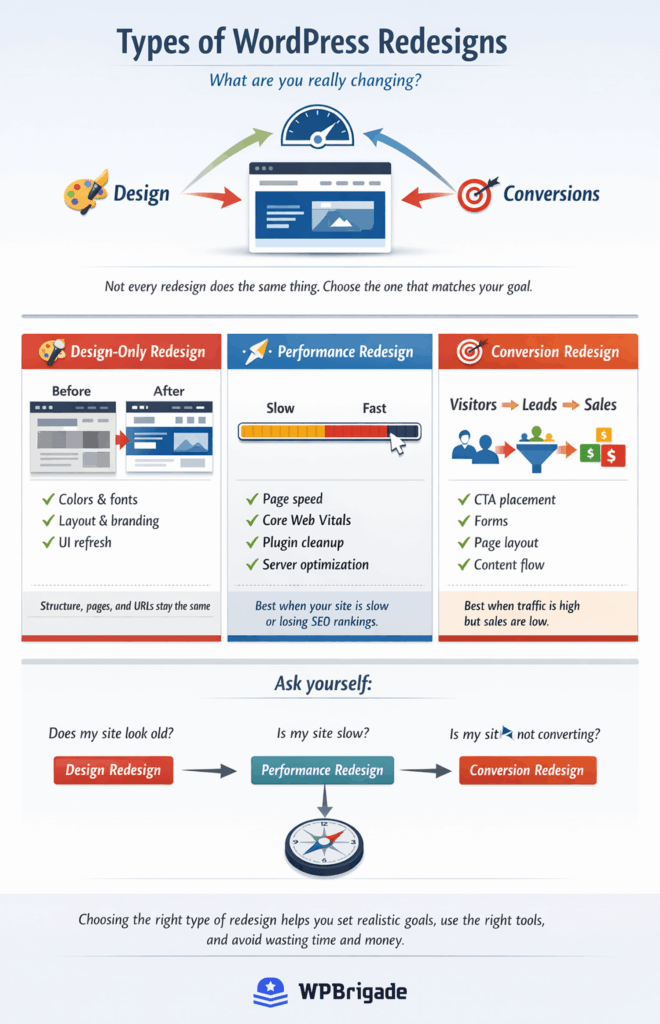
- Design-only changes: Updating visuals and branding without touching site architecture.
- Performance-focused redesign: Optimizing speed, Core Web Vitals, and plugin efficiency.
- Conversion-driven redesign: Rearranging layouts, CTAs, and content to increase leads, sign-ups, or sales.
By defining what kind of redesign you need, you can set realistic goals, allocate the right resources, and avoid common pitfalls.

When Should You Redesign Your WordPress Website?
Not every outdated website needs a full redesign. The key is knowing when a redesign will actually improve your business results. Here are the most common signs it’s time to take action:
1. Outdated Design or Poor User Experience
- Design trends vs usability standards (2026 expectations): A modern look isn’t just about aesthetics. It’s about clarity, readability, and trust.
- Mobile UX issues: Over half of web traffic comes from mobile devices. Poor mobile experiences can drive visitors away.
- Accessibility gaps: WCAG compliance isn’t optional. Accessible sites reach more users and avoid legal risks.
2. Declining Traffic or Rankings
SEO decay can happen due to:
- Old site architecture that confuses search engines
- Poor Core Web Vitals (slow loading, layout shifts, etc.)
- Bloated themes or outdated builders that affect speed
3. Low Conversion Rates
- High traffic but few leads or sales signals a UX or funnel problem.
- Common issues include invisible CTAs, broken funnels, or confusing page layouts.
4. Performance and Speed Issues
- Slow TTFB (Time to First Byte), LCP (Largest Contentful Paint), or CLS (Cumulative Layout Shift) can frustrate users and hurt rankings.
- Heavy plugins, unoptimized themes, or hosting limitations often require a redesign to improve efficiency.
5. Rebranding or Business Model Changes
- New positioning, services, or audiences may require a fresh design to communicate effectively.
- SaaS, membership, or eCommerce pivots, or M&A activities, often trigger the need for a redesign.
6. Security and Maintenance Risks
- Unsupported themes or plugins, legacy PHP versions, or outdated WordPress versions can leave your site vulnerable.
- A redesign often solves these issues while future-proofing your site.
Quick Checklist: Is It Time for a Redesign?
- Is your site outdated visually or technically?
- Are you losing traffic, rankings, or conversions?
- Do performance, UX, or accessibility issues frustrate users?
- Are you changing your branding, audience, or business model?
- Are security risks increasing?
If you answered yes to one or more of these, it’s likely time to plan a WordPress website redesign.
Why Redesigning Your WordPress Site Is Worth It
A well-planned WordPress website redesign isn’t just cosmetic. It delivers measurable business results. Here’s what you stand to gain:
1. Improved User Experience and Engagement
- Lower bounce rates: A clean, intuitive design keeps visitors on your site longer.
- Better navigation and content discovery: Users find what they need quickly, reducing frustration.
- Stronger brand perception: A modern, professional design builds trust.
2. SEO and Performance Gains
- Cleaner HTML and optimized structure: Makes your site easier to crawl and index.
- Core Web Vitals improvements: Faster load times, smoother layouts, and better interactivity improve rankings and UX.
- Better schema and metadata: Enhanced search visibility and rich snippets.
3. Higher Conversion Rates
- UX-led layouts: Clearer page hierarchies and intuitive flows guide visitors to take action.
- Strategic CTA placement: Buttons and forms are positioned for maximum engagement.
- Trust signals: Reviews, testimonials, and social proof help convert visitors into leads or customers.
4. Easier Content and Site Management
- Improved editor experience: Block editor or custom templates make content updates easier.
- Scalable templates: New pages or sections can be added without redesigning the entire site.
- Reduced plugin dependency: Optimized setups improve speed, reduce errors, and lower maintenance headaches.
5. Future-Proofing Your Website
- Compatibility with Full Site Editing (FSE): Ready for WordPress updates and new features.
- Headless or hybrid setups: Supports advanced workflows and integrations.
- AI-assisted content and design workflows: Streamlines updates and personalization.
Strategic redesign ensures your website isn’t just visually appealing; it’s fast, functional, SEO-friendly, and built to grow with your business.
Common WordPress Redesign Mistakes to Avoid
Even experienced teams can stumble during a redesign. Avoiding these pitfalls ensures your redesign is smooth, SEO-safe, and conversion-focused.
1. Redesigning Without Data
- Relying on opinions instead of analytics can lead to poor decisions.
- Use Google Analytics, heatmaps, and user behavior reports to identify real problems before redesigning.
2. Ignoring SEO Redirects and URL Structures
- Changing URLs without proper 301 redirects can kill your search rankings.
- Preserve metadata, internal links, and sitemap structure during migration.
3. Overusing Page Builders and Animations
- Heavy page builders can slow your site and bloat your codebase.
- Excessive animations or unnecessary features distract users from core goals.
4. Copying Competitors Blindly
- Benchmarking is fine, but blindly copying another site rarely fits your unique brand or audience.
- Focus on what works for your users, not what looks trendy.
5. Launching Without QA and Performance Testing
- Cross-browser, mobile, speed, and form testing is essential.
- Missing errors or performance issues can ruin user experience and hurt SEO immediately after launch.
Key Takeaway: A successful redesign balances data-driven decisions, SEO safety, performance, and UX. Skipping any of these steps can turn your redesign into a costly mistake.
How to Redesign a WordPress Website the Right Way (Step-by-Step)
A WordPress website redesign is best approached systematically, from audits to launch.
Follow these steps to ensure a smooth, effective, and SEO-safe WordPress redesign strategy.
Step 1: Audit Your Existing Website
Before making any changes, understand the strengths, weaknesses, and opportunities of your current site.
- UX Audit: Analyze user behavior to identify friction points. Use heatmaps, session recordings, or surveys. Tools like Hotjar help you see where visitors click, scroll, or drop off.
- SEO Audit: Track your site’s organic performance and page-level metrics. Analytify makes Google Analytics 4 (GA4) data WordPress-friendly, showing traffic sources, top-performing pages, and user engagement in an easy dashboard.
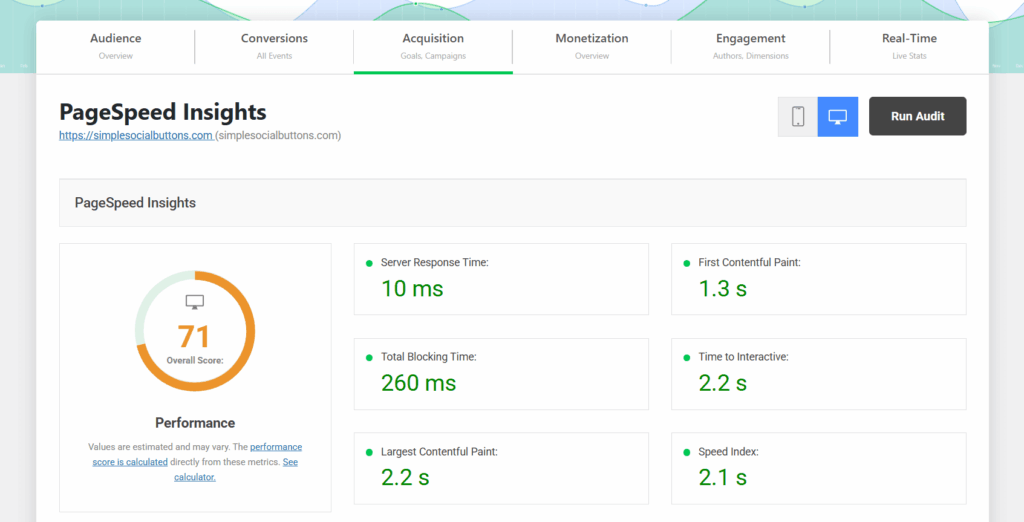
- Performance Audit: Measure page speed, Core Web Vitals (LCP, CLS, FID), and mobile responsiveness. Tools like Analytify, PageSpeed Insights, or GTMetrix provide detailed reports.

- Conversion Audit: Identify weak points in your funnels, forms, or CTAs. If your site includes user logins, LoginPress can help you evaluate login page usability and speed, which is critical for memberships, SaaS, or subscription-based sites.
Tip: Document all findings. It will guide your redesign priorities.
Step 2: Define Clear Redesign Goals
Before redesigning, set specific, measurable objectives.
- Align business goals (e.g., more leads or product sign-ups) with design goals (e.g., improved navigation, modern visuals).
- Use Analytify to see baseline metrics like traffic, engagement, conversions, and popular content.

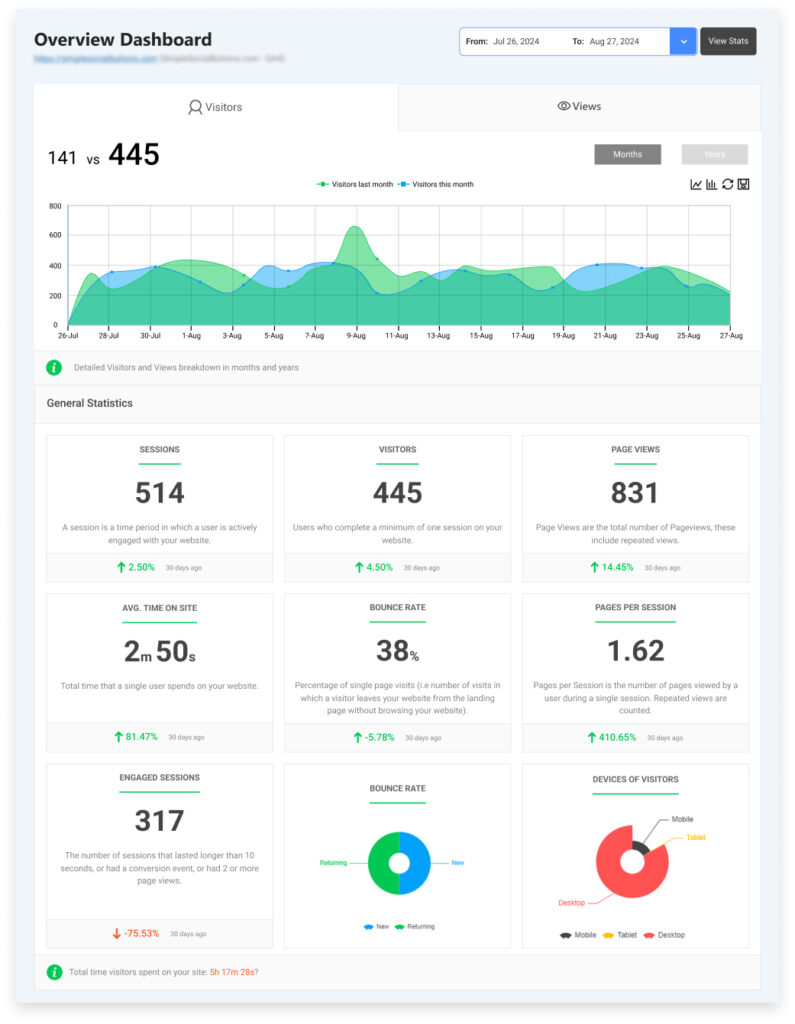
- Define KPIs to track post-redesign, such as bounce rate, page views, conversions, and Core Web Vitals improvements.
Tip: Clear goals help you measure ROI after the redesign.
Step 3: Decide on the Right Redesign Approach
Choose the approach that fits your site’s complexity, audience, and budget.
- Custom Development vs Page Builders: Custom themes offer flexibility and speed optimization; page builders are faster for simpler sites.
- Theme Framework vs Custom Theme: Frameworks provide pre-built layouts and stability; custom themes give full creative control.
- Block Editor vs Classic/Page Builders: Block editor is lightweight and future-proof.
- Headless WordPress: Ideal for complex setups requiring advanced integrations.
- Login Experience: If your site includes user logins, consider LoginPress to enhance usability, security, and branding.
Step 4: Information Architecture and Content Planning
Plan your site structure and content to maximize usability and SEO.
- Page Prioritization: Decide which pages are essential, which need revamping, and which can be removed.
- Content Pruning and Consolidation: Remove duplicate or outdated content.
- SEO-Friendly URL Planning: Keep URLs concise and readable.
- Mapping Old URLs to New URLs: Preserve SEO value by redirecting old URLs properly.
- Analytify Insights: Identify top-performing pages and content to prioritize during redesign.
Tip: A clean, logical structure improves navigation, SEO, and conversions.
Step 5: Design with UX and Conversion in Mind
WordPress UX redesign should serve both users and business goals.
- Mobile-First Design: Over half of website traffic is mobile. Start designing for smaller screens first.
- Accessibility Considerations: Follow WCAG standards to reach all users and avoid legal risks.
- CTA Hierarchy: Position buttons, forms, and links clearly to guide users toward action.
- Trust Elements: Add testimonials, reviews, and social proof strategically.
- Login Pages: If your site has logins, LoginPress allows you to customize and optimize login forms, reducing friction and improving conversions.
Step 6: Development and Performance Optimization
Make your site fast, secure, and scalable.
- Clean Code and Lightweight Assets: Avoid bloated plugins or themes that slow down pages.
- Optimize Images, Fonts and Scripts: Minimize load times.
- Plugin Hygiene: Remove unnecessary plugins and ensure compatibility.
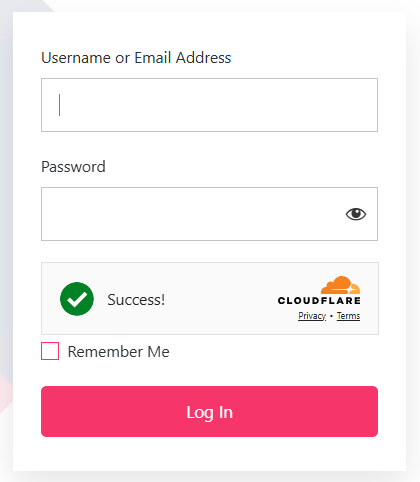
- Security Best Practices: Update PHP, WordPress, and all plugins. For login pages, LoginPress adds extra security features like CAPTCHA, two-factor authentication, and branding without affecting speed.

Tip: Fast-loading pages not only improve UX but also SEO rankings.
Step 7: SEO Migration and Redirect Strategy
Protect your search visibility during the transition.
- Implement 301 redirects for all URL changes.
- Preserve meta titles, descriptions, and structured data.
- Validate sitemap and indexing.
- Use Analytify to monitor traffic, ranking changes, and page performance post-launch.
Step 8: Testing Before Launch
Ensure everything works perfectly across devices and platforms.
- Cross-Browser and Mobile Testing: Chrome, Firefox, Safari, Edge, Android, and iOS.
- Page Speed and Core Web Vitals: Confirm performance improvements.
- Forms and Conversion Testing: Test all CTAs and forms; if using logins, check workflows with LoginPress for smooth user access.
- QA for Functionality and Content: Check internal links, images, and interactive elements.
Step 9: Launch and Post-Redesign Monitoring
Your work continues even after launch.
- Validate Analytics: Ensure Analytify or GA4 tracking is properly installed.
- Monitor Traffic and Conversions: Compare to pre-redesign benchmarks.
- UX and Conversion Feedback: Collect user feedback and iterate if necessary.
- Iterative Improvements: Regularly optimize for speed, engagement, and conversions.
Tip: A redesign is a continuous improvement process, not a one-time project.
Should You Use a WordPress Redesign Agency or Do It In-House?
Deciding whether to tackle a redesign internally or hire an agency depends on your team’s skills, resources, and goals.
When DIY Works
- You have an in-house team skilled in WordPress, design, SEO, and performance optimization.
- The redesign is relatively small, like a design refresh or minor UX improvements.
- You have time to dedicate to planning, testing, and ongoing monitoring.
When to Hire a WordPress Redesign Agency
- You need a full redesign, performance optimization, or complex functionality (e.g., eCommerce, membership portals, headless setups).
- Your team lacks experience in UX, SEO migration, or speed optimization.
- You want a faster timeline and professional guidance to minimize risk.
Cost vs ROI Considerations
- Agencies are an investment, but can save money in the long run by avoiding mistakes that hurt SEO or conversions.
- In-house work may save upfront costs but could delay launch and require more troubleshooting.
What to Look for in a Redesign Partner
- Proven experience with WordPress redesigns and SEO-safe migrations
- Ability to deliver mobile-first, accessible, and conversion-optimized designs
- Clear communication and support before, during, and after launch
Choose the approach that balances your goals, skills, and resources. A strategic decision here can save time, money, and headaches while maximizing the redesign’s impact.
How Often Should a WordPress Website Be Redesigned?
Knowing when to redesign keeps your website fresh, relevant, and effective without unnecessary overhauls.
Typical Redesign Cycles
- Most businesses redesign every 2–4 years.
- This timeline balances technology updates, UX trends, and business growth.
Continuous Optimization vs Full Redesign
- Continuous optimization: Small, ongoing updates to design, content, and functionality. Helps delay a full redesign while keeping your site current.
- Full redesign: Needed when major issues accumulate, such as outdated UX, declining SEO, slow performance, or a change in business goals.
Signs You Can Delay a Redesign
- Your site is technically sound, mobile-friendly, and fast.
- Traffic and conversions are stable or growing.
- Incremental UX and content updates can address minor issues without a full overhaul.
Redesign isn’t just a schedule. It’s triggered by business needs, user experience, and performance metrics. Continuous monitoring ensures you act only when necessary.
WordPress Redesign Checklist for Businesses (Quick Reference)
Below is a quick website redesign checklist for your business to help your redesign stay on track and cover all critical areas.
Pre-Redesign
✅ Conduct UX, SEO, performance, and conversion audits
✅ Define clear redesign goals and KPIs
✅ Choose redesign approach (DIY, agency, custom vs builder)
✅ Plan content strategy and site architecture
✅ Map old URLs → new URLs for SEO preservation
During Redesign
✅ Design mobile-first and with accessibility in mind
✅ Optimize CTA placement and trust elements
✅ Maintain clean code and lightweight assets
✅ Implement plugin hygiene and security best practices
✅ Test page speed, Core Web Vitals, and responsiveness
Post-Launch
✅ Validate analytics, tracking, and forms
✅ Monitor traffic, rankings, and conversions
✅ Fix bugs and iterate based on user feedback
✅ Submit updated sitemap and ensure indexing
✅ Plan ongoing optimization and content updates
Tip: Use this checklist as a step-by-step guide to avoid common pitfalls, protect SEO, and ensure your redesign drives measurable results.
FAQs About WordPress Website Redesign
Map old URLs to new URLs using 301 redirects
Preserve meta titles, descriptions, and schema
Test indexing and sitemap updates after launch
Following these steps ensures your traffic and rankings stay intact.
Use data-driven insights from analytics and heatmaps
Prioritize UX and conversion optimization
Optimize performance and Core Web Vitals
Test thoroughly on all devices before launch
Avoid overloading with heavy plugins or unnecessary animations
Traffic and SEO rankings
Bounce rate and engagement metrics
Conversion rates (leads, sales, sign-ups)
Page speed and Core Web Vitals
Compare results to your pre-redesign benchmarks and iterate as needed.
Final Thoughts
A WordPress website redesign is more than a visual update. It’s a business decision. Done strategically, it improves user experience, boosts conversions, strengthens SEO, and future-proofs your site.
Key takeaways:
- Redesigns should be data-driven, based on audits and analytics.
- Protect SEO and performance with proper planning, redirects, and testing.
- Focus on UX, accessibility, and conversion optimization, not just looks.
- Use a clear roadmap and checklist to guide each step, from audits to post-launch monitoring.
Remember: a redesign done thoughtfully is an investment that pays off in engagement, leads, and long-term growth. Don’t just redesign, but redesign with purpose and measurable results.
Further readings:
Have you recently redesigned your WordPress website, or are you planning to do so soon? Share your experiences or questions in the comments below. We’d love to hear what worked for you and what challenges you faced!”