
Want to learn how to use Lovable AI to build apps without writing code?
AI app builders are changing how software is created, but most tools still require time, effort, or technical skills. Lovable AI solves this by turning simple text prompts into fully functional applications.
In this guide, you’ll learn exactly how to use Lovable AI step by step, along with real examples, use cases, and tips to build better apps faster.
Table of contents
- What is Lovable AI and How Does it Work?
- Why Use Lovable AI in 2026
- Key Features of Lovable AI
- How to Use Lovable AI (Step-by-Step Tutorial)
- What You Can Build With Lovable AI (Lovable Examples)
- Real Lovable AI Project Examples
- Lovable AI vs Other AI App Builders
- Common Mistakes When Using Lovable AI
- Limitations of Lovable AI
- Best Practices for Using Lovable AI
- FAQs About Lovable AI
- Final Thoughts
What is Lovable AI and How Does it Work?
Lovable AI is an AI-powered platform that lets you create apps using simple text prompts.
Instead of writing code, you describe what you want to build, and the platform generates the app’s interface, structure, and basic logic automatically.
It sits between no-code tools and traditional development platforms, making it ideal for rapid prototyping and fast app creation.
Lovable is an AI app builder that turns natural language instructions into working applications.
For example, you could enter a prompt like:
“Create a project management app with user login, task tracking, and a dashboard showing progress.”
Lovable dev AI app would then generate the core structure of the app, including pages, UI components, and data models. From there, you can customize layouts, adjust features, and expand functionality based on your needs.
Because of this approach, many users rely on the Lovable platform to prototype ideas quickly, build internal tools, or create early-stage SaaS products.
How Lovable AI Works
The workflow of Lovable AI is simple and designed for fast app creation.
1. Describe your app idea
You start by writing a prompt explaining the type of app you want to build.
2. AI generates the application
The platform creates the interface, pages, and logic based on your description.
3. Customize the generated app
You can edit layouts, add fields, change workflows, and refine features.
4. Deploy or export the project
Once everything looks good, you can test and deploy the application or continue improving it.
This prompt-based workflow is what allows users to build apps with lovable much faster than traditional development methods.
Why Use Lovable AI in 2026
If you’re deciding whether to use Lovable AI, the biggest advantage is speed. Instead of spending weeks building an app, you can generate Lovable projects in minutes using simple prompts.
Here’s why Lovable stands out:
Faster App Development
Lovable dev turns your idea into a functional app almost instantly. You don’t need to design layouts, set up databases, or write backend logic from scratch.
No Coding Required
You can build apps without technical skills. Just describe what you want, and the platform handles the structure, UI, and workflows.
Perfect for MVPs and Prototyping
If you’re testing a startup idea, Lovable dev helps you launch a minimum viable product quickly. This makes it easier to validate ideas before investing time or money.
Built for Both Beginners and Developers
Beginners can rely on prompts and visual editing, while developers can modify and extend the generated code for more control.
Saves Time and Development Costs
By automating most of the development process, Lovable dev reduces the need for large development teams and long timelines.
Lovable AI is ideal if you want to build apps quickly, test ideas, or create internal tools without dealing with complex development workflows.
Key Features of Lovable AI
One of the reasons Lovable is gaining attention is its ability to simplify app development. Instead of handling complex coding tasks, users interact with the platform using prompts and visual editing tools.
As a lovable ai app builder, it provides several features that help users quickly create and customize applications.
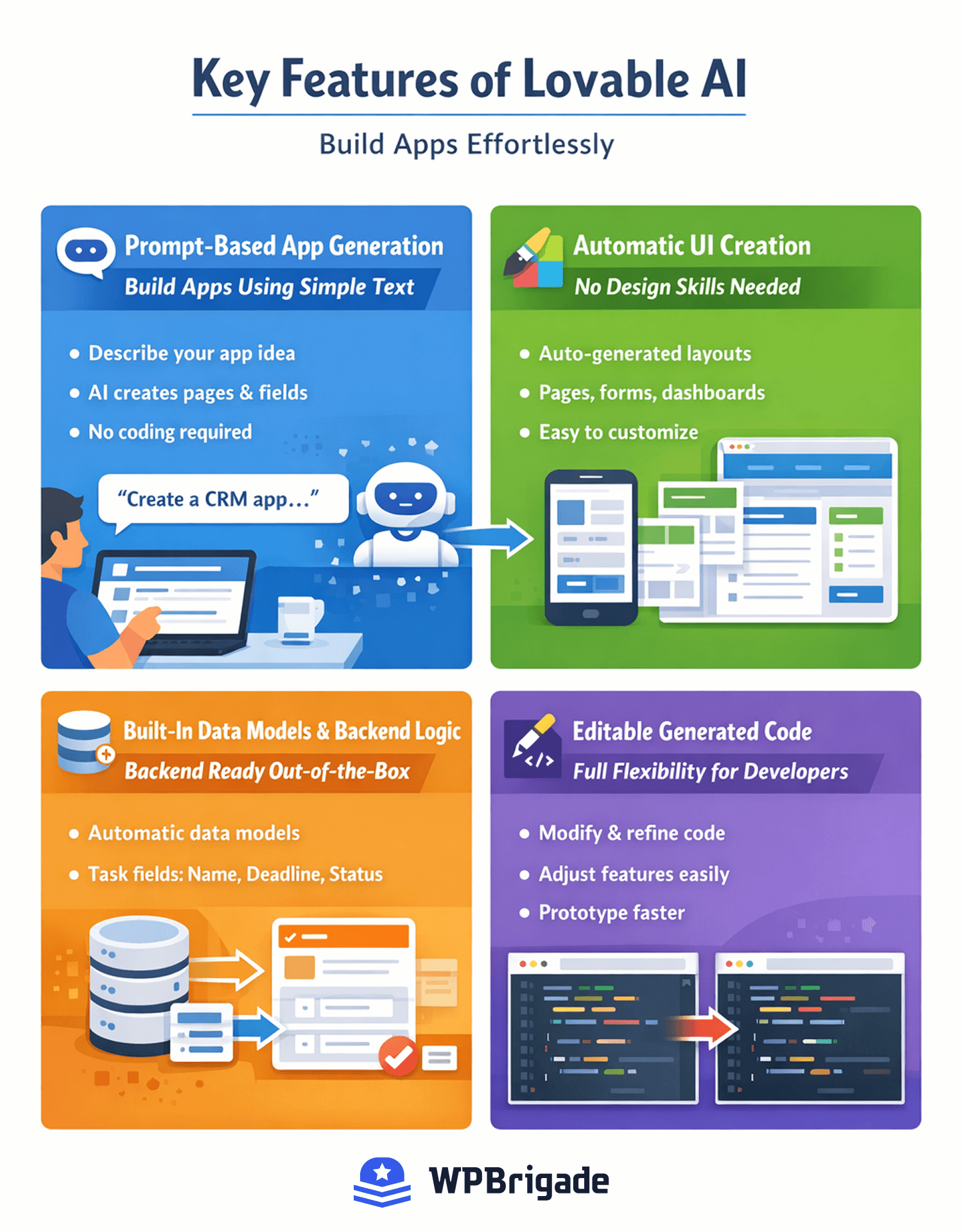
Prompt-Based App Generation (Build Apps Using Simple Text)
The core feature of lovable dev is prompt-based development.
Instead of writing code, you simply describe the app you want to build. The AI then generates the initial version of the application based on your instructions.
For example, a prompt like:
“Create a CRM app that stores customer details and tracks sales deals.”
can generate the main structure of the app, including pages, forms, and data fields.
This makes it easier for beginners to build apps with lovable without technical complexity.
Automatic UI Creation (No Design Skills Needed)
Another helpful feature is automatic interface generation.
The platform can create:
- app pages
- navigation menus
- forms and input fields
- dashboards and layouts
This means you don’t have to manually design every screen. The AI suggests a basic structure that you can adjust later.
Built-In Data Models and Backend Logic
Most apps require a database and some backend logic. Lovable helps with this by automatically creating data models and workflows based on your prompt.
For example, if you describe a task manager, the system may create fields such as:
- task name
- description
- deadline
- status
This built-in functionality helps users develop apps faster without setting up a backend from scratch.
Editable Generated Code
Even though the platform focuses on AI generation, developers still have flexibility.
Users can review and modify the generated structure, adjust components, and extend functionality if needed. This makes the lovable dev platform useful for both beginners and experienced developers who want to prototype quickly.
How to Use Lovable AI (Step-by-Step Tutorial)
Now, let’s see how to use lovable to build your first app. In this Lovable tutorial, you’ll learn to create apps in minutes using simple prompts.
Step 1: Create a Lovable Account
First, visit the Lovable dev website and sign up. Once you confirm your email, log in to access the project dashboard.
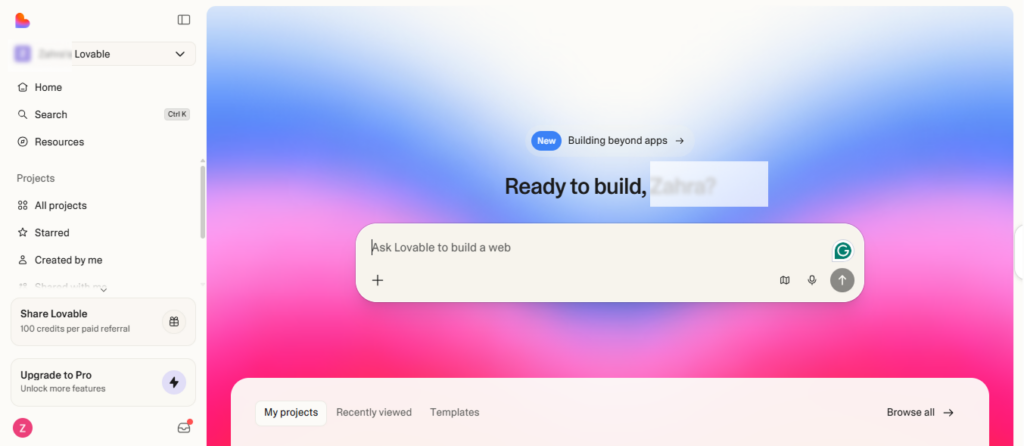
Here, you’ll see:
- Your existing projects (if any)
- Option to start a new project
- Tutorials and documentation
The dashboard is designed to be intuitive, so you can jump straight into app creation.
Step 2: Start a New Project
Click “New Project” and choose:
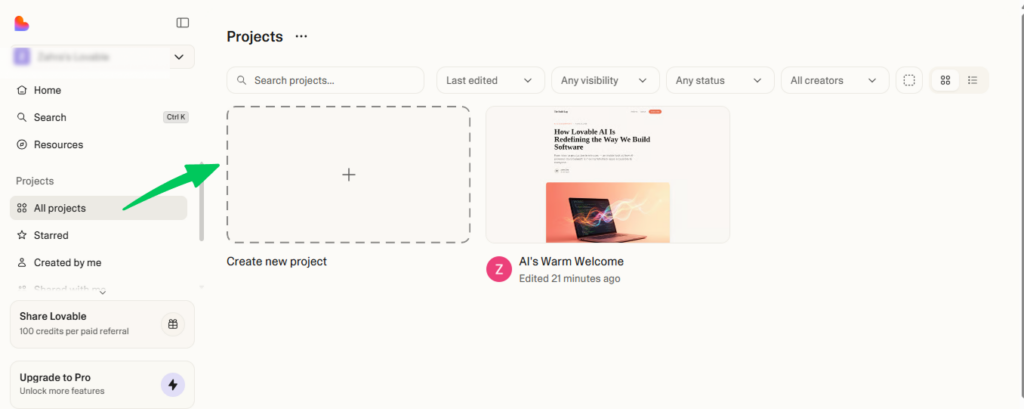
- Project Name – pick something descriptive, like “Task Manager.”
- App Type – e.g., internal tool, SaaS MVP, or automation app
- Prompt-Based Generation – this tells Lovable to generate the app from your description
After this, you’ll enter the workspace where the AI will build your app.
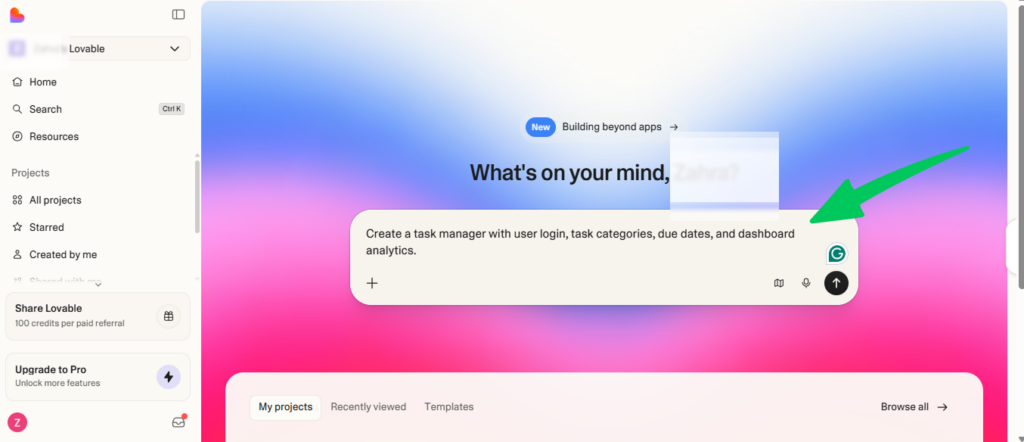
Step 3: Describe Your App With a Prompt
Here’s where you tell Lovable what you want: write a clear, structured prompt. Examples:
Task Management App Prompt:
“Create a task manager with user login, task categories, due dates, and dashboard analytics.”
Simple CRM Prompt:
“Build a CRM app that stores customer data, tracks deals, and shows a sales pipeline dashboard.”
Tips for prompts:
- Be specific about features
- Include the type of app and users
- Mention essential fields and workflows
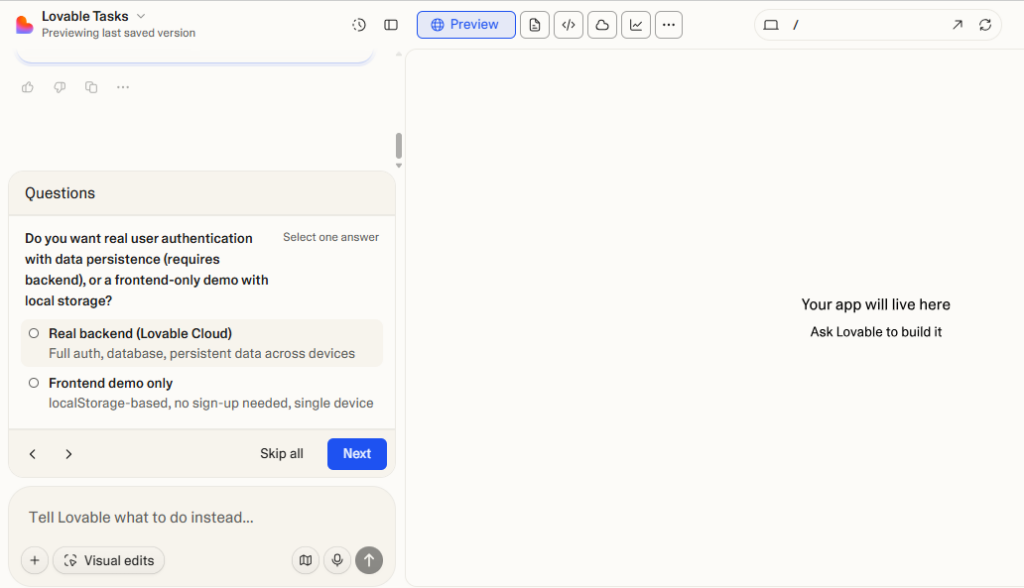
The AI will use this to generate the app’s structure, pages, and data models.
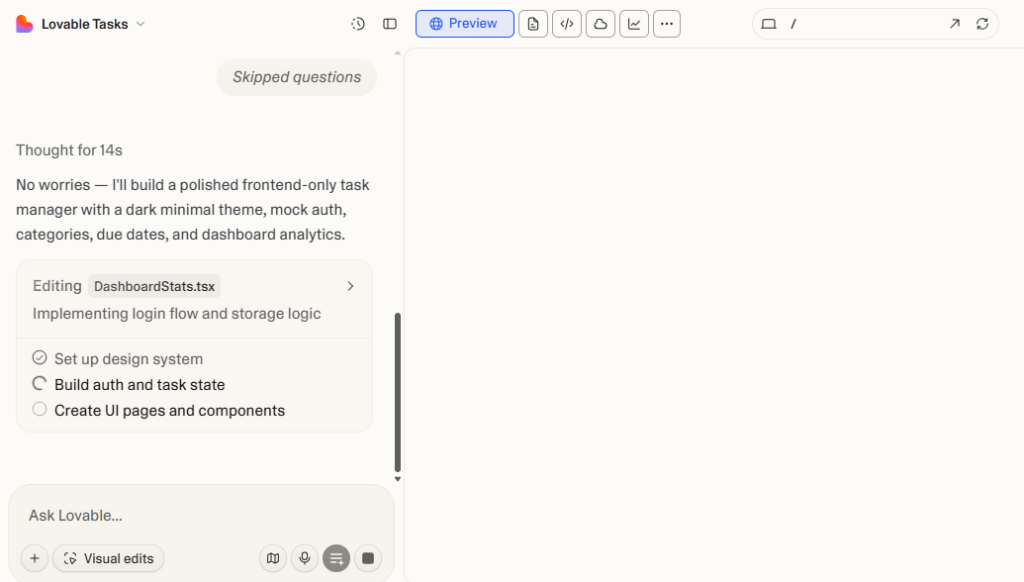
Step 4: Review the Generated App Structure
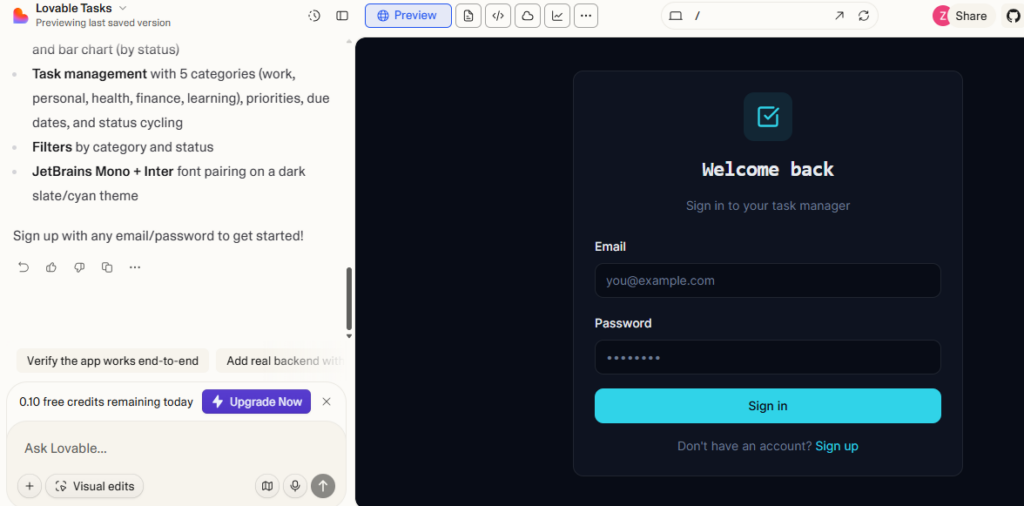
Once the AI finishes, check your app structure:
- Pages and navigation menus
- UI components (forms, dashboards, buttons)
- Data models and backend workflows
The interface allows you to see all components clearly and understand how your app works.
Step 5: Customize Features and UI
Now you can personalize your app:
- Modify layouts and page order
- Add or remove fields
- Adjust workflows and automation
- Change UI components like buttons, colors, or tables
This step ensures the app fits your exact needs before testing.
Step 6: Test and Deploy the Application
Finally, it’s time to test and launch:
- Preview the app to interact with it as a user
- Test all features like forms, dashboards, and workflows
- Deploy or export – publish your app online or integrate it with other tools
After this, your app is live and ready to use.
What You Can Build With Lovable AI (Lovable Examples)
One of the best things about Lovable dev is its versatility. Whether you’re a founder, a developer, or a beginner, lovable uses go beyond simple prototypes. Here are some practical ideas:
Build Internal Business Tools Faster
Lovable is perfect for creating apps that improve team workflows. Examples include:
- Dashboards to track KPIs
- Inventory trackers for products or assets
- Project management tools to monitor tasks and deadlines
These tools help teams stay organized without relying on expensive custom software.
Launch SaaS MVPs Without Development
Startup founders can use Lovable AI to quickly build early product versions. You can create:
- Subscription-based apps
- Customer dashboards
- MVPs with user authentication and core features
This allows you to test ideas without investing weeks in development.
Automation Apps
You can also build apps that connect different systems and automate workflows, such as:
- Syncing data between platforms
- Generating reports automatically
- Triggering notifications or updates
These apps save time and reduce repetitive tasks for businesses.
Productivity Tools
Lovable AI is great for personal or team productivity tools:
- Task managers for daily work
- Planning apps for project schedules
- Team dashboards for collaborative tracking
By using Lovable AI, you can prototype and deploy these apps faster than traditional coding.
Real Lovable AI Project Examples
To better understand how Lovable AI works in real scenarios, here are practical examples you can build. These are more specific and reflect real user needs, not just generic ideas.
Task Management App for Freelancers
A simple app designed for freelancers to manage multiple clients and deadlines. Features can include:
- Client-based task organization
- Deadlines and priority levels
- Progress tracking dashboard
- Notifications for upcoming tasks
This helps freelancers stay organized without using multiple tools.
Content Planning Dashboard for Marketing Teams
A collaborative app for content teams managing blogs, social media, or campaigns. Features include:
- Content calendar with deadlines
- Task assignment for writers and editors
- Status tracking (draft, review, published)
- Performance tracking dashboard
Useful for agencies or in-house marketing teams.
SaaS MVP for a Subscription-Based Tool
A basic startup product to validate an idea before full development. Features include:
- User authentication (signup/login)
- Dashboard for users
- Core feature (e.g., simple analytics or tracking tool)
- Subscription or access control
Ideal for founders who want to test ideas quickly.
Customer Management Tool for Small Businesses
A lightweight CRM for managing leads and customers. Features include:
- Customer database with contact details
- Deal or inquiry tracking
- Notes and interaction history
- Simple reporting dashboard
Perfect for small teams that don’t want complex CRM software.
Internal Inventory Tracker for Retail Shops
An app to manage stock levels and product movement. Features include:
- Product listings with quantities
- Stock updates and alerts
- Supplier tracking
- Basic reporting for inventory usage
Helps small businesses manage inventory without expensive tools.
Lovable AI vs Other AI App Builders
When choosing an AI app builder, it’s important to understand how Lovable AI compares to other popular tools like Bubble, Glide, and Replit. Each platform has a different approach to building applications.
AI Generation Capabilities
- Lovable AI: Built for prompt-based development. You describe your app, and the platform generates UI, structure, and workflows automatically.
- Bubble: Primarily a visual builder. You manually design pages and workflows with limited AI assistance.
- Glide: Generates apps from spreadsheets, but lacks deeper AI-driven logic and customization.
- Replit: AI helps with coding, but you still need to write and manage most of the application yourself.
Ease of Use
- Lovable AI: Beginner-friendly with minimal setup. Ideal for non-developers and fast prototyping.
- Bubble: Requires time to learn workflows and logic.
- Glide: Very easy to use, but limited in flexibility.
- Replit: Best suited for developers with coding experience.
Flexibility and Customization
- Lovable AI: Offers editable generated code, balancing ease of use with some flexibility.
- Bubble: Highly customizable but requires manual setup.
- Glide: Limited customization beyond templates.
- Replit: Full flexibility, but entirely code-driven.
Speed of Prototyping
- Lovable AI: Extremely fast: Apps can be generated in minutes using prompts.
- Bubble: Slower due to manual configuration.
- Glide: Fast for simple apps only.
- Replit: Slower since development is code-based.
Unlike tools like Bubble or Glide, Lovable AI focuses on AI-first app generation rather than manual building, making it significantly faster for idea validation, MVP creation, and rapid prototyping.
Common Mistakes When Using Lovable AI
Even though Lovable AI makes app development easy, beginners often make mistakes that slow them down or produce less useful apps. Knowing these can save you time and frustration.
Writing Vague Prompts
Your prompt is the foundation of the app. Vague prompts like:
“Build an app for my business”
…don’t give the AI enough information. The result may be incomplete or generic.
Tip: Be specific. Include features, user roles, and workflows.
Skipping App Structure Planning
Some users jump straight to generating an app without planning. This can lead to a messy structure and missing functionality.
Tip: Sketch your app’s main pages, data needs, and workflows before using Lovable AI.
Not Iterating on AI Output
Lovable AI generates the first version automatically, but it rarely matches your exact vision on the first try. Not refining the output is a common mistake.
Tip: Customize UI, fields, and workflows after generation, and test frequently.
Overloading Features
Adding too many features at once can make the app confusing or slow.
Tip: Start small and focus on core functionality, then expand gradually.
By avoiding these mistakes, you can build better apps with lovable and get faster results.
Limitations of Lovable AI
While Lovable AI makes app development faster and more accessible, it’s important to understand its limitations before relying on it for complex projects.
Limited Control Compared to Full Coding
Lovable AI generates apps automatically, which means you may not have complete control over every detail. Advanced customization can be harder compared to building an app from scratch.
AI Output Isn’t Always Perfect
The generated app depends heavily on your prompt. If the input is unclear or incomplete, the output may require significant adjustments.
Not Ideal for Complex Enterprise Applications
Lovable AI works best for MVPs, internal tools, and simple apps. Large-scale or highly complex applications may still require traditional development.
Requires Iteration and Refinement
You won’t get a perfect app on the first try. Most projects need multiple rounds of editing, testing, and improving before they’re ready to use.
Learning Curve for Better Results
Even though it’s beginner-friendly, writing effective prompts and structuring apps properly takes some practice.
Best Practices for Using Lovable AI
To get the most out of Lovable AI, follow these practical tips. They help you create functional apps faster and avoid common pitfalls.
Start With Small Apps
Begin with a simple project instead of a large, complex app. Small apps are easier to manage, test, and improve.
Write Structured Prompts
The clearer your prompts, the better the AI output. Include:
- App type and purpose
- User roles
- Key features and fields
- Expected workflows
Example:
“Create a task manager with login, categories, due dates, and a dashboard showing completed tasks.”
Test Frequently
Preview your app often to check if features work as expected. Early testing helps identify issues before they grow.
Refine Generated Components
The AI gives you a starting point, but refinement is key. Adjust layouts, workflows, and data fields to suit your exact needs.
Use Iteration to Improve
Don’t expect perfection on the first try. Generate, test, refine, and repeat. Iteration ensures the final app meets your requirements.
By following these tips, you can build apps with lovable that are functional, polished, and ready to use.
How WPBrigade Helps You Build and Scale Apps with Lovable AI
While learning how to use Lovable AI makes app creation faster, turning a simple prototype into a fully functional product often requires additional development, optimization, and integrations.
This is where WPBrigade adds value.
WPBrigade helps businesses, founders, and developers build, improve, and scale applications by combining AI tools like Lovable AI with proven development practices. Whether you’re creating a simple internal tool or a SaaS MVP, expert support ensures your app performs well in real-world use.
WPBrigade Services for AI App Development
Custom WordPress Development
Build scalable websites and applications tailored to your business needs, with clean architecture and optimized performance.
Plugin Development and Customization
Extend functionality with custom plugins or improve existing ones for better usability and efficiency.
Automation and API Integrations
Connect your Lovable AI apps with third-party tools, CRMs, and workflows to automate processes and improve productivity.
Performance and Security Optimization
Ensure your application is fast, secure, and reliable for users at scale.
AI Development Consulting
Get practical guidance on how to use Lovable AI effectively, from writing better prompts to structuring scalable applications.
FAQs About Lovable AI
Create a Lovable account
Start a new project
Describe your app with a prompt
Review the generated structure
Customize features and UI
Test and deploy your application
Internal business tools (dashboards, project trackers)
SaaS MVPs
Automation apps connecting APIs or workflows
Productivity apps like task managers and planning tools
Final Thoughts
If you’ve ever wondered how to use lovable to create apps without coding, you now have a clear roadmap. Lovable AI allows beginners and developers alike to turn ideas into working applications quickly.
With Lovable AI, you can:
- Prototype startup MVPs in minutes
- Build internal tools for your team
- Create productivity and automation apps
By following a simple prompt-based workflow, customizing features, and testing regularly, you can build apps with Lovable that are functional, polished, and ready to deploy.
Whether you’re a beginner exploring AI app development or a developer looking to speed up prototyping, Lovable AI makes app creation accessible, fast, and efficient.
You may also like to read:
If you could turn any idea into an app in minutes, what would you build today?
Leave a Reply