
A WordPress technical audit is the first step agencies take before scaling a website. Growth exposes weaknesses that small sites can hide, such as slow performance, plugin conflicts, security gaps, and infrastructure limits. Without an audit, scaling traffic or adding features can amplify these issues, causing downtime, lost revenue, and frustrated users.
WordPress agencies perform technical audits to evaluate your site’s architecture, code quality, hosting, security, and scalability risks. This is not a one-time maintenance check or a plugin scan. It’s a strategic review that informs decisions before migrations, redesigns, or enterprise-level growth.
In this guide, I’ll share how to conduct an agency-level WordPress technical audit for scalability, showing how a structured audit protects your site, reduces technical debt, and ensures growth doesn’t break your WordPress stack.
Table of contents
- What is a WordPress Technical Audit?
- Agency Method: How Agencies Approach WordPress Technical Audits
- Audit Areas: The WordPress Technical Audit Checklist
- Scaling Risk: What Breaks First Under Growth
- Audit Deliverables: What a Real Agency Audit Should Produce
- How WPBrigade Uses Technical Audits to De-Risk Scaling Projects
What is a WordPress Technical Audit?
A WordPress technical audit is a comprehensive evaluation of your website’s underlying systems, designed to identify risks, inefficiencies, and scalability issues before they become critical. A WordPress technical audit looks at how the site is built, not just how it ranks or how fast it loads.
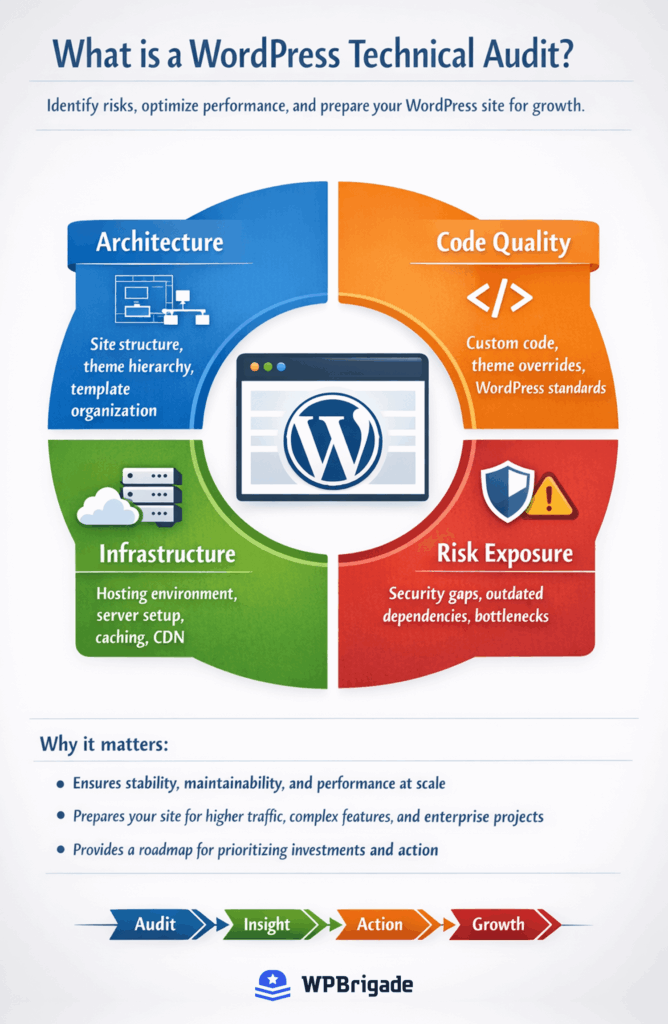
Key components include:
- Architecture: Site structure, theme hierarchy, and template organization
- Code quality: Custom code, theme overrides, and adherence to WordPress standards
- Infrastructure: Hosting environment, server configuration, caching, and CDN setup
- Risk exposure: Security gaps, outdated dependencies, and bottlenecks that can fail under growth
Agencies conduct these audits not only to address current problems but also to prepare your site for future growth. The goal is to ensure stability, maintainability, and performance at scale, making the website ready for higher traffic, complex features, or enterprise-level projects.
By performing a structured WordPress technical audit, businesses gain a clear roadmap of what needs attention, what can wait, and how to prioritize investments, turning technical insight intoan actionable strategy.
When Do You Actually Need a WordPress Technical Audit?
Not every website needs a full WordPress technical audit right away. But the moment a site starts to grow, generate revenue, or support business-critical operations, technical risk increases rapidly. The purpose of a technical WordPress audit is to surface those risks before they cause downtime, lost conversions, or failed projects.
Agencies typically require a WordPress website audit whenever a site is about to move from “working” to “scaling.”
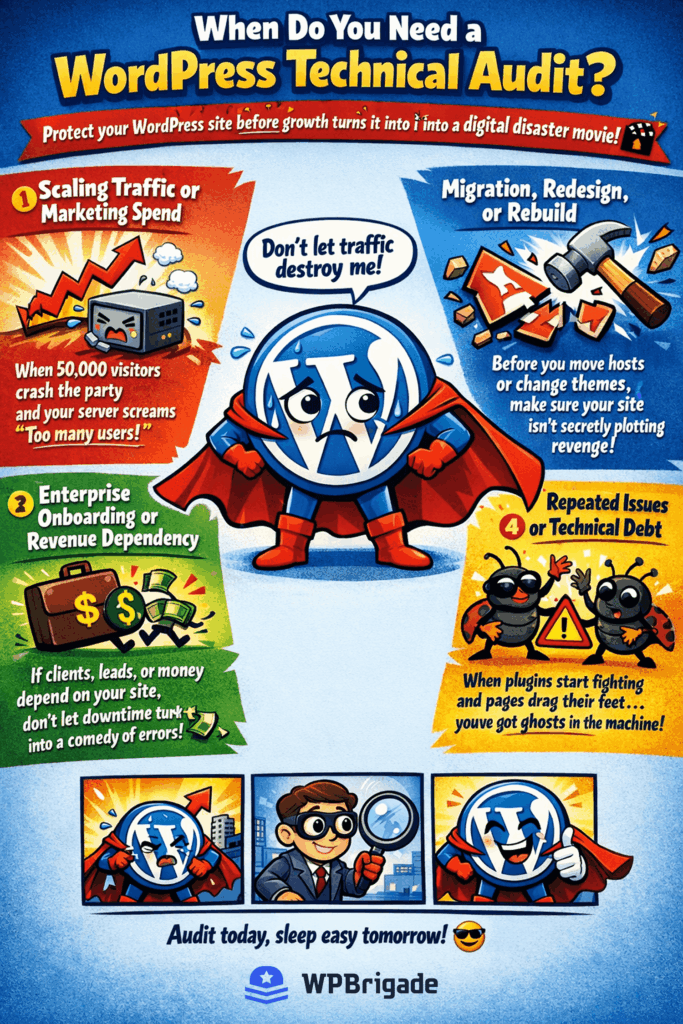
You need a WordPress technical audit when:
You are planning to scale traffic or marketing spend
If paid ads, SEO, or product launches are expected to drive more users, your hosting, database, and plugins will be tested in ways they never were before. What works at 1,000 visits per day often breaks at 50,000.
You are migrating, redesigning, or rebuilding the site
Before moving hosts, changing themes, or re-architecting content, agencies run a technical WordPress audit to uncover hidden issues that could carry over into the new build or become much harder to fix later.
You are onboarding enterprise clients or selling through the website
When revenue, lead generation, or client portals depend on WordPress, uptime, security, and performance become business risks. A WordPress scalability audit ensures the site meets the stability, security, and performance standards required for enterprise use.
You are experiencing repeated issues
Slow pages, plugin conflicts, failed updates, security alerts, or broken features are not isolated problems. They are symptoms of deeper architectural or infrastructure weaknesses that a WordPress audit checklist is designed to expose.
Warning Signs Your Site is Already at Risk
You may already need a WordPress technical audit if you see:
- Pages slowing down as traffic increases
- Plugins breaking after updates
- Frequent hosting or database errors
- Security warnings, malware scans, or failed backups
- Developers afraid to touch the site because “something might break”
These are classic indicators of technical debt, the kind that becomes expensive and dangerous once a site starts scaling.
Why Timing Matters For WordPress Technical Audits
Running a WordPress website audit before growth is far cheaper than fixing failures after growth. Agencies use audits to identify what must be fixed now, what can wait, and what will break first under higher traffic, more users, and more complex features.
Agency Method: How Agencies Approach WordPress Technical Audits
A WordPress technical audit is a strategic, discovery-driven process. Agencies perform audits to understand not just what’s broken today, but what will fail first when traffic, users, or new features increase.
Instead of asking “What’s wrong?”, agencies ask:
“What risks could disrupt growth, revenue, or user experience?”
This mindset shapes every stage of an audit.
Discovery-First Approach
Before opening the code editor or running scans, agencies start by analyzing the business and growth goals:
- Projected traffic and marketing plans
- Upcoming feature releases or integrations
- Enterprise clients or high-value workflows
This ensures that the audit focuses on the systems that matter most for scalability, performance, and security.
Risk Prioritization Over Checklists
Not all issues are equal. A minor CSS conflict is far less urgent than:
- A plugin vulnerability affecting checkout pages
- Database queries slowing key landing pages
- Hosting limits that fail under traffic spikes
Agencies rank issues by severity, business impact, and scalability risk, turning a long list of technical problems into a prioritized action plan.
Contextual Analysis vs Automated Tools
Automated tools can identify obvious issues, but they cannot:
- Interpret how plugins interact under load
- Assess the impact of slow pages on revenue
- Understand custom code and theme structure
- Predict failure points during traffic surges
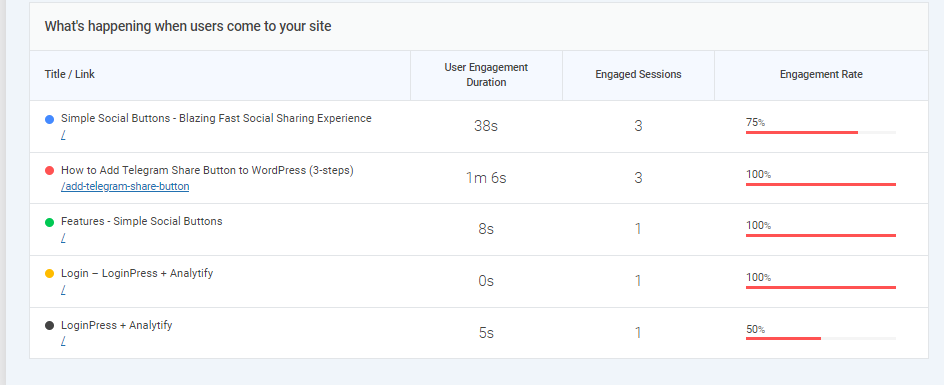
Agencies use tools like Analytify to add context by tracking which pages drive traffic, conversions, or revenue. This ensures that audit findings link directly to business outcomes, rather than just scores or alerts.
Pre-Project Discovery for Scaling Projects
Audits are often the first step in migrations, redesigns, or enterprise onboarding. Findings are used to:
- Identify technical debt that could block growth
- Inform hosting, caching, and database improvements
- Plan phased, risk-free scaling strategies
So that’s how agencies audit WordPress websites. By positioning the audit as a discovery phase, agencies turn technical checks into a roadmap for safe, predictable growth.
A professional WordPress audit is strategic, risk-driven, and context-aware. Agencies combine discovery, prioritized risk analysis, and human insight supported by tools like Analytify to ensure that growth decisions are backed by actionable, real-world technical data.
Audit Areas: The WordPress Technical Audit Checklist
A WordPress technical audit is more than finding broken features. It’s about understanding whether your site can scale safely, perform reliably, and remain secure as traffic and features grow.
Agencies rely on a structured audit checklist to ensure every critical area is evaluated. Here’s how the key audit areas break down:
1. Infrastructure and Hosting
What to audit:
- Server type and configuration (shared, VPS, cloud, dedicated)
- PHP version, memory limits, CPU allocation, and storage
- CDN and caching layers for global traffic delivery
- Backup systems and disaster recovery plans
Hosting is the foundation of your website. Without scalable infrastructure, even the best-coded site can crash under traffic spikes, causing downtime and lost revenue.
Beginner tip: If pages slow down during peak traffic, your hosting is likely the bottleneck, not your theme or plugins.
2. Codebase and Theme Architecture
What to audit:
- Custom code quality and adherence to WordPress standards
- Theme structure, modularity, and use of child themes
- Proper use of hooks, filters, and overrides
- Update safety: Can themes and plugins be updated without breaking the site?
Poorly structured code increases maintenance costs, risks updates breaking functionality, and slows development for new features.
Beginner tip: Even if you are not a developer, knowing your code is clean ensures future updates and redesigns are safer.
3. Plugin Ecosystem and Dependencies
What to audit:
- Plugin necessity and potential overlaps
- Performance impact of each plugin
- Security and update history
- Compatibility with other plugins and theme functions
Plugins are a common source of conflicts, slowdowns, and vulnerabilities. Auditing them ensures your site can scale without crashes or security risks.
Useful tip: Keep only essential, actively maintained plugins. Remove unused or redundant ones.
4. Database and Content Structure
What to audit:
- Database size, indexing, and optimization
- Query efficiency and bottlenecks
- Content organization: post types, taxonomies, and metadata
- Ability to handle additional content and user activity
Even with good hosting and code, a poorly optimized database can make your site slow or unstable as traffic grows.
Helpful tip: Regularly clean spam comments, revisions, and unused tables to improve performance immediately.
5. Performance and Core Web Vitals
What to audit:
- Page load times under normal and peak traffic
- Core Web Vitals: Largest Contentful Paint (LCP), Cumulative Layout Shift (CLS), First Input Delay (FID)
- Server vs front-end performance bottlenecks
Slow or unstable sites hurt user experience, SEO rankings, and conversion rates. Performance issues often appear only as traffic grows.
Beginner tip: Tools like PageSpeed Insights or Analytify can identify problem areas, but a full audit ties metrics to actionable fixes.
6. Security and Access Control
What to audit:
- User roles and permissions
- Authentication methods and login hardening
- Plugin, theme, and server vulnerabilities
More users and integrations increase the attack surface. Poor security can lead to hacks, data loss, or downtime.
Beginner tip: Regularly review admin access, remove unused accounts, and ensure all users follow secure login practices.
This pre-scaling WordPress audit checklist gives agencies and site owners a clear map of where risks live, what to fix first, and how to plan for growth. Following it ensures your WordPress site remains fast, secure, and scalable as traffic increases without repeating tasks or overlapping with other audit sections.
Scaling Risk: What Breaks First Under Growth
Scaling a WordPress website isn’t just about attracting more visitors; it’s about ensuring every part of your site can handle increased traffic, users, and transactions without failing.
A WordPress scalability audit identifies which systems are most likely to break first so you can proactively fix them before real users are affected.
1. Hosting and Server Limits
What usually fails first: CPU, memory, and concurrent connection limits.
Even the cleanest code cannot prevent crashes if the hosting environment cannot handle traffic surges. Agencies test:
- Hosting type and capacity (shared, VPS, cloud, dedicated)
- CPU and memory allocation
- Load handling under simulated traffic spikes
Tip: Frequent slowdowns or crashes during peak visits indicate your infrastructure needs upgrades before scaling.
2. Database Performance Under Load
What usually fails first: Slow queries, table locks, and large datasets.
As traffic grows, databases handle more reads and writes. Bottlenecks here slow the entire site, regardless of code quality or hosting. Agencies focus on:
- Database size and indexing
- Query efficiency
- Cleanup of unnecessary revisions, spam comments, or unused tables
Tip: Regularly optimizing your database can prevent performance degradation during high traffic.
3. Plugins and Third-Party Dependencies
What usually fails first: Poorly coded, outdated, or overlapping plugins.
Resource-heavy or conflicting plugins can slow the site or cause errors under load. Audits examine:
- Plugin performance under stress
- Security history
- Redundancy and necessity
Tip: Keep only essential plugins and ensure they are updated regularly.
4. Caching and Content Delivery
What usually fails first: Misconfigured caching and missing CDN layers.
Without proper caching, every request hits the server, creating slowdowns or crashes during traffic spikes. Audits cover:
- Page and object caching
- CDN setup for global delivery
- Cache invalidation rules
Tip: A properly configured cache and CDN can dramatically reduce server load and maintain site speed.
5. Security and Access Control Under Load
What usually fails first: Login bottlenecks, permission errors, and vulnerability exposure.
As your user base and integrations grow, weak access control or outdated software can be exploited. Audits review:
- User roles and admin accounts
- Login throttling and two-factor authentication
- Vulnerability scanning
Tip: Limit admin accounts and enforce secure login practices to reduce the attack surface as traffic scales.
Most WordPress sites don’t fail because they are poorly built. They fail because growth exposes hidden bottlenecks in hosting, database, plugins, caching, and security.
A WordPress scalability audit identifies these weak points before they affect users, making your site reliable, secure, and fast under increased traffic.
Audit Deliverables: What a Real Agency Audit Should Produce
A WordPress technical audit only delivers value when it translates findings into clear, actionable decisions. Agencies do more than point out problems. They provide a roadmap that helps you prioritize fixes, plan growth, and reduce risk.
A professional audit typically produces four key outputs:
1. Risk-Ranked Findings
Agencies categorize issues by severity and business impact:
- High-risk items that could cause downtime, data loss, or revenue loss
- Medium-risk issues that affect performance or security under growth
- Low-risk items for future optimization
You know exactly what to fix first and avoid wasting resources on minor problems.
Tip: Focus on high-priority issues first, such as server bottlenecks, plugin vulnerabilities, or database inefficiencies.
2. Scalability Roadmap
This roadmap shows how your site can safely grow. It connects the audit checklist to real-world implementation:
- Infrastructure and hosting upgrades
- Database and caching improvements
- Plugin and code updates
- Phased, strategic enhancements
Scaling isn’t just traffic. It’s making your site resilient, performant, and secure as content, features, and users increase.
Tip: Treat the roadmap as a phased plan rather than trying to fix everything at once.
3. Cost and Effort Estimates
Each recommended fix includes:
- Expected effort
- Technical complexity
- Budget estimates
Agencies help you plan resources effectively and avoid surprises, ensuring that improvements are feasible and strategically prioritized.
Tip: Use estimates to focus on changes with the biggest immediate impact first.
4. Go / No-Go Recommendations
Audits provide a clear recommendation on whether the site is ready for:
- Scaling traffic
- Migrations or redesigns
- Enterprise-level projects
Some sites require critical fixes before growth. Agencies prevent risky launches by flagging high-impact issues.
Tip: Treat these recommendations as a final checkpoint; don’t ignore critical risks to move faster.
A WordPress audit checklist tells you what to look at.
A professional technical audit turns those findings into a strategy for growth, linking each checklist item to risk, cost, and action.
By following audit deliverables, even non-technical teams can:
- Identify urgent vs optional fixes
- Plan budgets and timelines
- Scale their site safely and predictably
How WPBrigade Uses Technical Audits to De-Risk Scaling Projects
At WPBrigade, a WordPress technical audit is not a one-off report. It is the foundation of every growth, migration, and enterprise engagement we take on.
We use audits to eliminate uncertainty, expose hidden risks, and ensure that every scaling decision is backed by technical reality, not assumptions.
1. Audit-Led Project Discovery
Every WPBrigade engagement starts with a technical WordPress audit.
We analyze:
- Hosting and infrastructure
- Code and theme architecture
- Plugins and integrations
- Database and content structure
- Performance and security
This allows us to identify risks before any redesign, migration, or feature development begins — preventing expensive surprises later.
WPBrigade combines infrastructure testing with behavioral data from Analytics tools like GA4 and Analytify, so we can see not just what is slow, but which slow pages actually hurt conversions.
2. Migration and Performance Planning
Audits reveal where performance and stability will break under growth.
WPBrigade uses audit data to:
- Plan hosting upgrades
- Design caching and CDN strategies
- Optimize databases
- Remove performance-heavy plugins
This ensures your site stays fast and stable as traffic and usage increase.
3. Enterprise and Client-Facing Readiness
For high-traffic, revenue-generating, or client-facing sites, failure is not an option.
A WordPress scalability audit confirms that:
- Infrastructure can handle real-world load
- Plugins and custom code will not fail
- Security meets enterprise standards
This protects uptime, brand reputation, and customer trust.
4. Long-Term Technical Roadmaps
WPBrigade does not just fix problems. We plan for growth.
Every audit produces a roadmap that includes:
- Phased technical improvements
- Infrastructure upgrades
- Performance and security enhancements
- Plugin and architecture governance
This gives growing businesses a clear, predictable path forward.
5. Audits That Power Consulting and Retainers
Our audits do not live in a folder. They drive the ongoing strategy.
They inform:
- Consulting decisions
- Retainer priorities
- Development roadmaps
- Infrastructure investments
In short, WPBrigade uses WordPress technical audits to turn risk into clarity and growth into something that can be safely engineered instead of guessed.
Frequently Asked Questions
Assessing business goals and growth plans before checking technical details
Reviewing infrastructure, hosting, and server capacity
Evaluating code quality, theme architecture, and plugin dependencies
Testing database performance, queries, and content structure
Checking performance metrics like Core Web Vitals and page load speed
Auditing security, access control, and vulnerabilities
By prioritizing risks and linking findings to business impact, agencies ensure audits produce actionable strategies for scaling safely.
Infrastructure and Hosting: Server limits, caching, CDN, and backups
Code and Theme Architecture: Custom code quality, hooks, and update safety
Plugins and Dependencies: Necessity, performance, security, and redundancy
Database and Content: Size, optimization, queries, and taxonomy structure
Performance and Core Web Vitals: Load times, bottlenecks, and front-end speed
Security and Access Control: User roles, authentication, and vulnerability exposure
Following this checklist ensures that every part of your website is prepared to handle higher traffic, new features, and long-term growth.
Before site migrations, redesigns, or new feature launches
After repeated performance or security issues
Regular audits help ensure your site remains scalable, secure, and high-performing.
Identifies which parts of your site will fail under growth
Prioritizes fixes for maximum impact
Provides a roadmap for future updates, migrations, or enterprise readiness
Protects revenue, user experience, and reputation
WordPress Technical Audit: Final Takeaway
Scaling a WordPress website is excitingbut growth can also expose hidden weaknesses. Without a WordPress technical audit, small problems like slow-loading pages, plugin conflicts, or database inefficiencies can quickly become major issues, affecting performance, security, and revenue.
A professional audit goes beyond tools. It evaluates your site’s architecture, code, hosting, plugins, database, performance, and security, then ranks risks, provides a WordPress audit checklist, and delivers a roadmap for safe growth. Agencies like WPBrigade turn this technical insight into actionable strategies, ensuring your website remains fast, secure, and scalable as traffic increases.
Key points to remember:
- Growth magnifies hidden problems. Don’t wait until your site breaks.
- A structured audit identifies risks and prioritizes fixes based on impact.
- Automated tools are helpful, but context and strategy are critical for long-term success.
- Agencies link audits to planning, migrations, and performance improvements, giving you confidence in scaling.
Further Readings:
- WordPress Website Redesign: When, Why, and How to Do It Right
- 7 Best WordPress Maintenance Services for 2026
- How to Plan a WordPress Project (From Brief to Launch)
- How to Optimize WordPress Performance for Growing
If your traffic doubled tomorrow, which part of your WordPress stack would break first, and do you have a plan to prevent it?
Leave a Reply