
You built a WordPress site. Maybe even a good one. But it still works the same way a freelancer does: you put in effort, you get output. No leverage. No compounding.
WordPress isn’t just a website builder. It’s infrastructure for platform businesses systems that connect multiple user groups and scale without proportional effort.
In this guide, you’ll see the five platform business models you can build on WordPress in 2026, the exact plugin stack each one requires, and how to measure whether your platform is actually working.
Table of Contents
- What is a WordPress Platform Business?
- How to Build a WordPress Platform (Quick Start)
- Which Platform Business Model Is Right for You?
- Model 1: What Is a Multi-Vendor Marketplace on WordPress?
- Model 2: What Is a WordPress Membership Platform?
- Model 3: What Is a WordPress Learning Platform (LMS)?
- Model 4: What Is a WordPress Plugin or Software Product Business?
- Model 5: What Is a WordPress Community or Network Platform?
- How Do You Track Performance Across Your WordPress Platform?
- WordPress vs Hosted SaaS Platforms: Which Should You Choose?
- What Are the Biggest Mistakes When Building a WordPress Platform?
- Frequently Asked Questions
- Conclusion
What is a WordPress Platform Business?
A WordPress platform business is a website that connects multiple user groups and earns revenue from their interactions (transactions, memberships, or access), rather than selling a single product or service directly.
The value comes from the interactions your infrastructure enables between participants, not from what you make yourself.
That difference changes how you design the business infrastructure WordPress:
- You optimize interactions, not output
- You build systems, not deliverables
A linear business (a product store, a service firm) trades time or inventory for revenue. A platform business earns from the transactions, memberships, and relationships that happen on the infrastructure it operates.
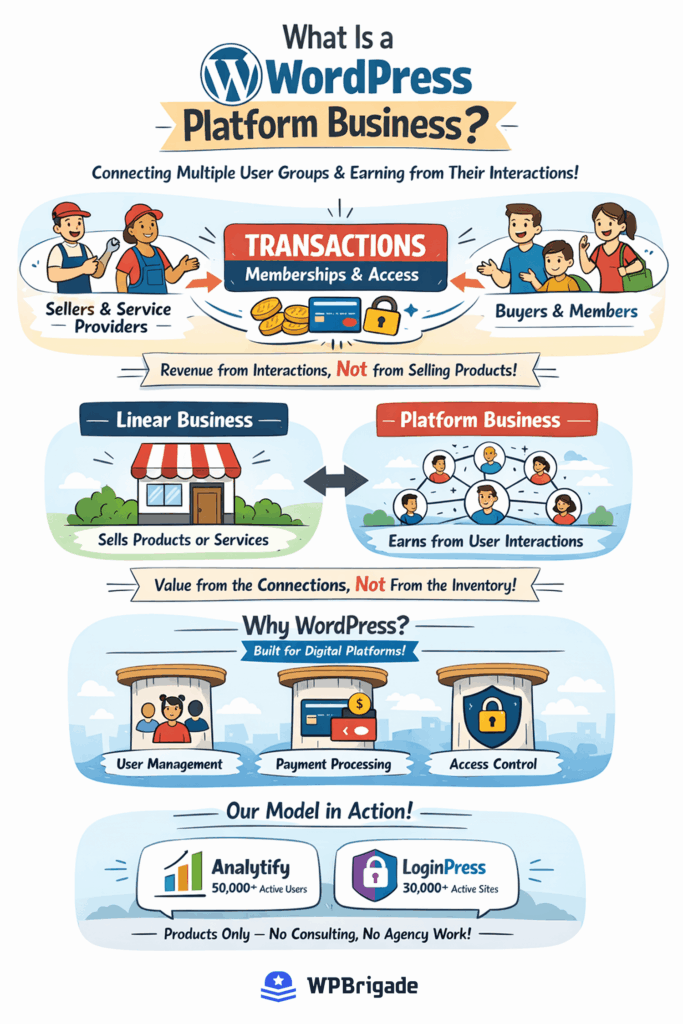
WordPress is structurally suited for digital platform development. The core software is itself a platform: it connects over 73,000 plugin and theme builders to millions of site owners worldwide, according to WordPress.org. That same extensible, multi-user, role-based architecture is available to any operator who wants to build on top of it. WordPress handles user management natively, supports payment processing through plugins, and allows fine-grained access control. These are the three pillars every platform business requires.
This is not a theory. WPBrigade runs exactly this model: two software products: Analytify (50,000+ active users) and LoginPress (30,000+ active sites), built and distributed entirely through the WordPress ecosystem. Products only. No consulting, no agency work.
How to Build a WordPress Platform (Quick Start)
Let’s see how to build platforms on WordPress:
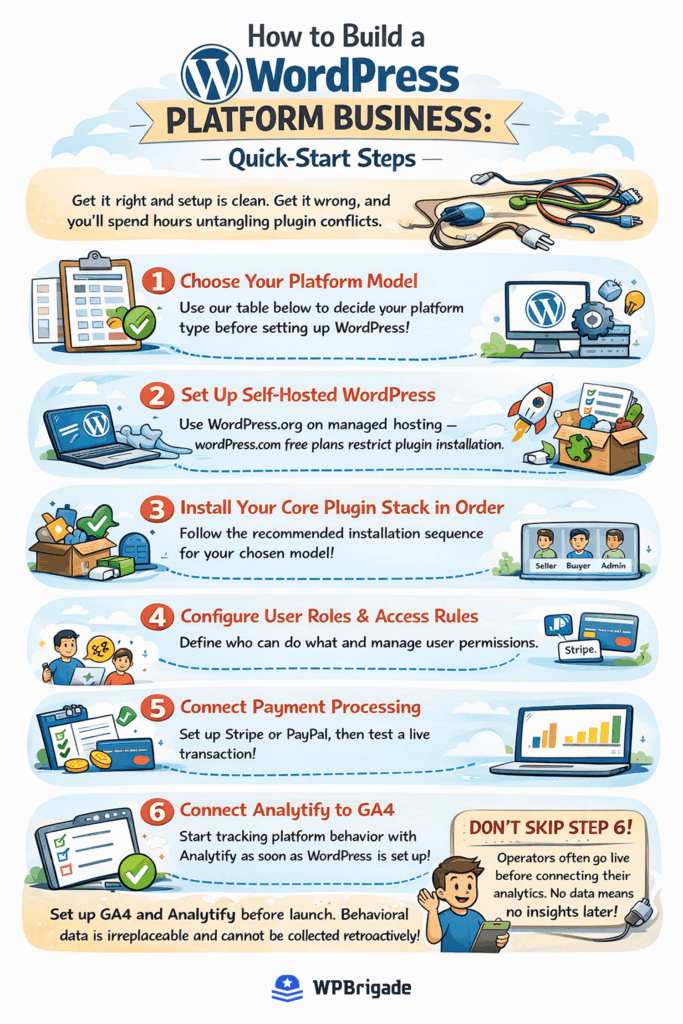
- Choose your platform model
- Set up self-hosted WordPress (wordpress.org)
- Install your plugin stack in order
- Configure user roles and permissions
- Connect payment processing (Stripe/PayPal)
- Connect Analytify to GA4 before launch
Installation order matters in WordPress platforms. Most plugin conflicts happen when this sequence is ignored.
The most common launch mistake is skipping step 6.
Operators go live, real users arrive, and there is no behavioral data to act on. You cannot retroactively see where users dropped off or which content converted.
Which Platform Business Model Is Right for You?
Before choosing plugins or hosting, identify which WordPress platform model matches your business idea.
All digital platforms on WordPress have different value exchanges, different plugin stacks, and different primary growth challenges.
WordPress Platform Business Models Comparison
Here’s the decision table to help you choose the best among WordPress platform models:
| If your platform connects… | Your model is… | MVP launch time |
|---|---|---|
| Buyers to multiple independent sellers | Multi-vendor marketplace | 3-6 weeks |
| Members to gated content or tools | Membership platform | 1-2 weeks |
| Learners to structured courses | Learning platform (LMS) | 2-4 weeks |
| Businesses to recurring software | Plugin or SaaS product | 6-12 weeks |
| Community members to each other | Community or network platform | 2-3 weeks |
Pick the model that describes how value flows on your WordPress platform. Then jump to that section.
Model 1: What Is a Multi-Vendor Marketplace on WordPress?
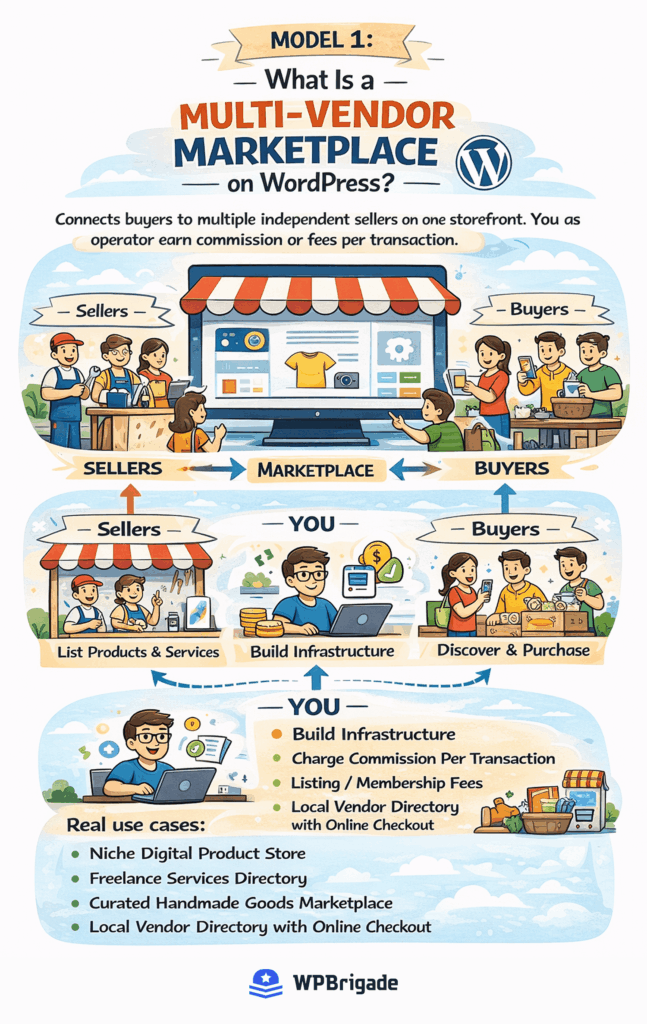
A multi-vendor marketplace on WordPress is a site where multiple sellers list products, and you earn a commission on each transaction, charge listing fees, or both. You build the infrastructure and attract sellers. Buyers come to discover them.
Real use cases: a niche digital product store, a freelance services directory, a curated handmade goods marketplace, and a local vendor directory with online checkout.
What Does a Multi-Vendor Marketplace on WordPress Actually Require?
Three components make this model work:
Vendor management: each seller needs their own dashboard to list products, track orders, and manage payouts. Standard WooCommerce does not include this.
Payment splitting: when a buyer pays, funds must split automatically between the vendor and your platform fee. Manual payouts at scale are not sustainable.
Storefront consistency: vendor storefronts need uniform presentation so the marketplace feels like one brand, not a directory of disconnected shops.
Plugin stack, in installation order:
| Step | Component | Plugin | Key note |
|---|---|---|---|
| 1 | Base e-commerce | WooCommerce | Complete the setup wizard before adding anything else |
| 2 | Multi-vendor layer | Dokan or WC Vendors | Both active on wordpress.org; install after WooCommerce is live |
| 3 | Payment gateway | Stripe or PayPal | Handles automatic split payouts between vendor and platform |
| 4 | Vendor dashboard | Included in Dokan / WC Vendors | Frontend vendor management; no WP admin access needed |
Install WooCommerce first and complete its full setup wizard before installing Dokan or WC Vendors. Dokan requires WooCommerce to be fully configured. Installing both together causes settings conflicts that are time-consuming to debug.
Here’s what most product platforms wordpress guides skip: the plugin stack is the easy part. The harder problem is vendor acquisition. A marketplace with no sellers is a storefront with no products.
Before building a WordPress business platform, answer two questions: Do you have a clear path to recruit your first 10 vendors? And are those vendors willing to transact on your platform rather than direct? If both answers aren’t yes, solve supply-side acquisition before you touch a plugin.
When Does the Marketplace Model Make Sense?
This model works when both conditions are true. First, you have a specific niche with enough potential sellers to create real supply-side value. Second, transactions happen on your platform, not by referral that sends buyers and sellers off-platform to close directly. If the second condition isn’t met, you have a directory, not a marketplace.
Hosting note: Multi-vendor marketplaces generate significantly more database load than standard WordPress sites. Use managed WordPress hosting (Kinsta, WP Engine, or Cloudways) on at least a mid-tier plan. Shared hosting is not suitable once you have active vendor transactions.
Model 2: What Is a WordPress Membership Platform?
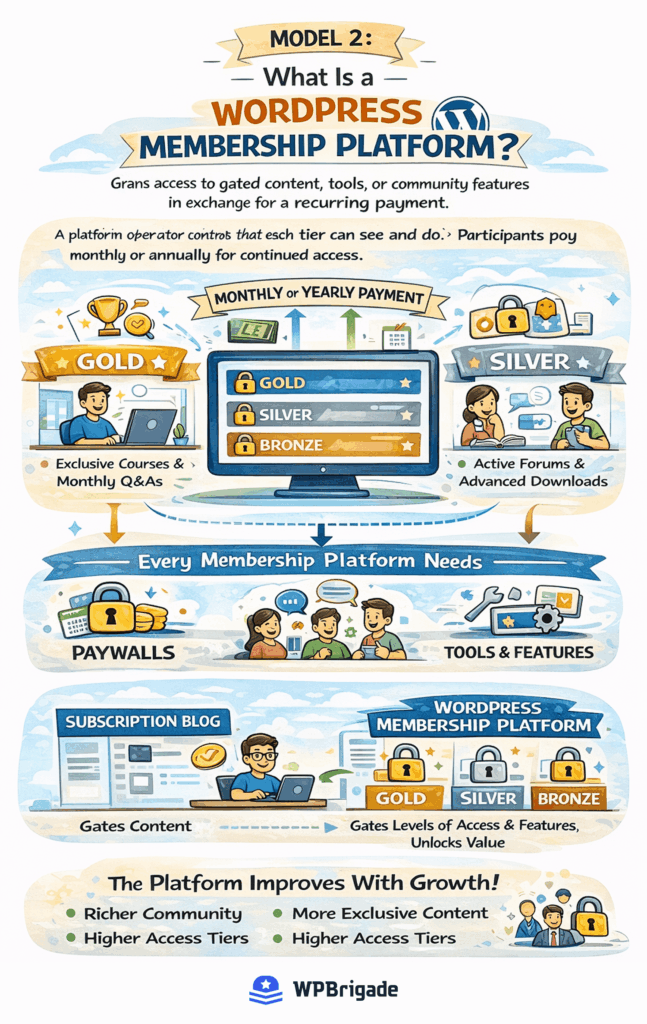
A WordPress membership platform uses plugins to restrict content and charge users recurring fees for access.
The platform operator controls what each tier can see and do. Participants pay monthly or annually for continued access.
This model is architecturally different from a subscription blog. A subscription blog gates articles. A membership platform gates access levels, creates tiered value, and ideally improves as membership grows, through richer community, more exclusive content, or higher-tier access to the operator.
How Do You Structure Membership Tiers on WordPress?
Three tiers cover most membership businesses:
Free tier: entry point. Captures email, gives partial access, and creates familiarity with your content. Use it to build a conversion pipeline to paid membership.
Paid tier: core value. Full content access, community participation, or tool use. This is your primary revenue tier.
Premium tier: high-touch access. Live sessions, one-on-one elements, early access, or direct community with you. Price this at 3-5x the paid tier.
Plugin stack, in installation order:
| Step | Component | Plugin | Key note |
|---|---|---|---|
| 1 | Access control and billing | MemberPress or Paid Memberships Pro | Set up all membership levels before publishing any gated content |
| 2 | Recurring payments | Stripe integration | Built into both plugins; activate in the payment settings panel |
| 3 | Community layer (optional) | BuddyBoss or bbPress | Add only after membership tiers are configured and tested |
| 4 | Course delivery (optional) | LearnDash | Separate plugin with separate pricing; not native to MemberPress |
Configure your membership tiers and access rules before publishing any gated content. Content published before access rules are active is publicly accessible by default. Anyone can read it without a membership.
What Is the Difference Between a Membership Platform and a Subscription Blog?
A membership platform creates network value or an access-gated utility that improves as membership grows. A subscription blog delivers content regardless of member count. Here is the test: if you removed all your members except one, would that remaining person have the same experience? If yes, you have a content subscription, not a platform. That distinction determines whether the model scales.
Model 3: What Is a WordPress Learning Platform (LMS)?
A WordPress LMS is a system that delivers structured courses, lessons, and quizzes to enrolled learners.
The platform operator creates the curriculum. Learners progress through it on a defined or self-paced path.
This model differs from a membership platform. The primary value is structured transformation, not ongoing access. A course has a beginning, a middle, and a specific outcome. Membership is continuous.
LMS on WordPress suits coaches, educators, training companies, professional development providers, and plugin developers who want to teach customers how to use their product effectively.
What Should You Do Before Building Your First WordPress Course?
Do this before touching a plugin:
Step 1: Define the transformation. What can a learner do after completing your course that they could not do before? State this in one specific sentence. If you cannot state it clearly, the course is not ready to build.
Step 2: Outline the curriculum structure. Break the transformation into modules, then break each module into lessons. A standard course has 4-8 modules with 3-6 lessons each. Map this on paper before building in WordPress.
Step 3: Set your pricing model. Three options: one-time payment (learner owns the course permanently), subscription access (learner pays monthly), or cohort-based (learners move through together with live support). Each requires a different plugin configuration.
Plugin stack, in installation order:
| Step | Component | Plugin | Key note |
|---|---|---|---|
| 1 | Course delivery | LearnDash or LifterLMS | Both active on wordpress.org; install and activate first |
| 2 | Payment | WooCommerce | Detects active LMS plugin, install after step 1 |
| 3 | Gateway | Stripe | Handles recurring billing for subscription pricing model |
Install LearnDash or LifterLMS before connecting WooCommerce. WooCommerce detects the active LMS plugin to integrate with its course post types. Install in reverse order, and the integration breaks.
Of the five models, the LMS delivers the highest revenue leverage. You build the course once, and every new student generates income with zero additional delivery cost.
Model 4: What Is a WordPress Plugin or Software Product Business?
A WordPress plugin business is a model where you build and sell software that extends WordPress functionality.
This is the product platform model WPBrigade runs for Analytify and LoginPress.
The platform element is this: once you publish on wordpress.org, you are not just selling a product. You are entering an ecosystem. Your active install count builds social proof. User reviews generate trust signals. Support interactions generate documentation and knowledge base content. Each element compounds over time without requiring proportional additional input from you.
How Does a WordPress Plugin Business Create Platform Value?
The wordpress.org repository is itself a platform: a discovery and distribution channel where over 73,000 free plugins compete for visibility and installs. Publishing a free version there gives you access to that channel at no cost. Your plugin page, star rating, and active install count function as your platform’s storefront.
The standard model: publish a free version on wordpress.org with core functionality, and sell a Pro upgrade with advanced features directly from your site. Annual renewals create recurring revenue. The free version drives discovery. The Pro version drives revenue.
What you need to run this model:
- A free plugin published on wordpress.org (your discovery and distribution channel)
- A Pro version sold from your own site (your revenue engine)
- Easy Digital Downloads or WooCommerce for license management and checkout
- A licensing plugin, such as EDD Software Licensing, to issue and validate Pro licenses
The plugin model is the only one in this list where value accrues through distribution, not participation. The next model flips that entirely.
Model 5: What Is a WordPress Community or Network Platform?
A WordPress community platform connects members through profiles, discussions, and interactions that create value over time.
The more members participate, the more valuable membership becomes. That compounding quality is what separates a community platform from a content site.
This model suits niche professional communities, alumni networks, B2B peer groups, and creator communities where the primary benefit is the people, not the content.
When Is a WordPress Community Platform the Right Model?
Two criteria must both be true. First, your audience benefits more from connecting with each other than from accessing your content or tools. Second, you have an existing audience or distribution channel to seed initial membership.
The cold-start problem is the defining challenge of this model. Starting from zero members means starting from zero value; no one joins an empty community. The fix is not launching publicly first. Recruit 20-30 founding members privately before any public launch. Give them early access, recognition, or reduced pricing. Let them generate the first discussions, posts, and activity. When you open publicly, there is already something to join.
Plugin stack, in installation order:
| Step | Component | Plugin | Key note |
|---|---|---|---|
| 1 | Social layer | BuddyPress | Free and active on wordpress.org; install first |
| 2 | Forum functionality | bbPress | Free; reads BuddyPress member data for profile integration |
| 3 | Access control | MemberPress or Paid Memberships Pro | Gates community access by membership tier |
| 4 | Payment | Stripe | Handles recurring membership billing |
Install and configure BuddyPress before bbPress. bbPress reads BuddyPress member data for profile integration; installation order matters here, and reversing it requires manual reconfiguration.
Bottom line: the community model has the highest retention potential of the five. Members stay for the people, not just the content. But it also requires the most active ongoing management. A dead forum drives more churn than no forum at all.
How Do You Track Performance Across Your WordPress Platform?
You track performance on a WordPress platform using analytics tools like GA4 to measure user behavior, conversions, and engagement.
Checking performance means:
- leaving the WordPress dashboard,
- navigating a separate GA4 interface,
- and trying to match what you see there with what users are actually doing on your platform. That context-switching slows every decision.
Platform businesses have different success metrics than standard websites. Active member count, vendor transaction volume, course completion rates, returning user cohorts, and per-tier engagement are the numbers that determine whether your platform is healthy. These are not surface metrics; they are behavioral signals that tell you what to fix and what to scale.
Track Performance of Your WordPress Platform with Analytify
This is where Analytify solves a real problem for platform operators. Analytify surfaces GA4 data directly inside your WordPress dashboard, so you can see how individual pages, content tiers, or vendor storefronts are performing without switching tools. No separate login. No context loss. The data is where your workflow already is.
Here is what Analytify shows you, mapped to each platform model:
| Platform Model | What Analytify Shows You | What to Act On |
|---|---|---|
| Multi-vendor marketplace | Vendor page sessions, product page conversion rate, cart abandonment by page through Analytify WooCommerce Tracking Addon | High sessions with low conversion signals copy or UX problems |
| Membership platform | Per-tier page views, content engagement by access level, and renewal traffic sources | Low engagement on paid-tier content signals churn risk |
| LMS | Module completion rate, lesson-level drop-off point, page dwell time | High drop-off on a specific lesson signals a content or pacing problem |
| Plugin or SaaS product | Plugin landing page traffic, upgrade page conversion, license renewal rate | Low upgrade conversion signals a pricing or feature framing issue |
| Community platform | Active member sessions, forum post frequency, and return visit rate | Declining return visits signal the community needs moderation or programming |
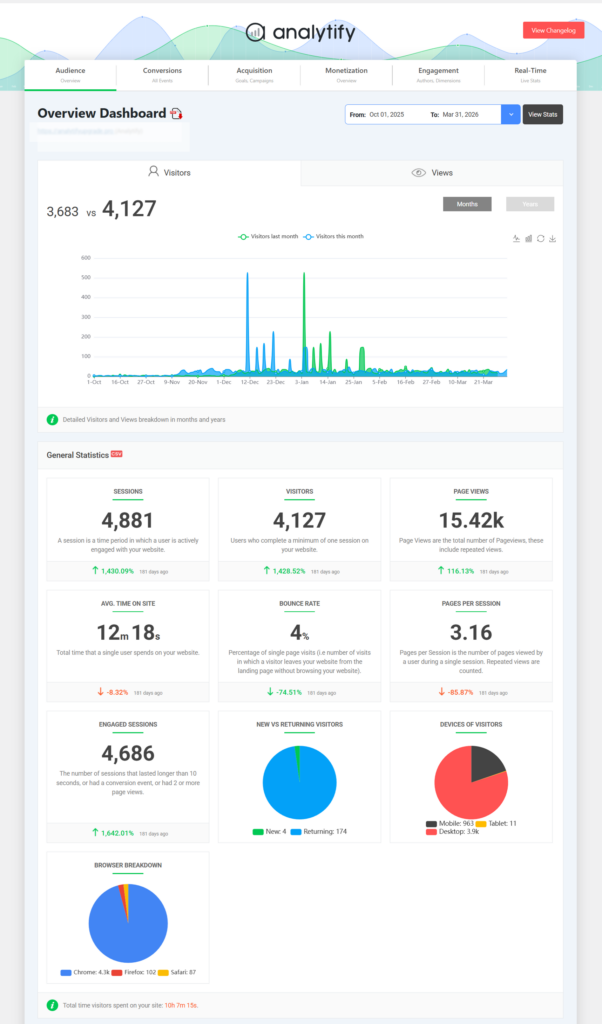
Analytify presents GA4 data inside WordPress. It does not replace GA4 or store its own analytics database. You still need an active GA4 property connected to your site. Analytify makes the data readable and actionable without requiring you to leave WordPress to check it.
Join 50,000+ WordPress users who use Analytify to see their Google Analytics data without the complexity.
You may need to explore Custom WordPress Development from WPBrigade.
WordPress vs Hosted SaaS Platforms: Which Should You Choose?
You should choose WordPress if you want full control and ownership, and SaaS if you prioritize speed and simplicity.
Hosted SaaS platform tools (dedicated course builders, managed membership software, marketplace-as-a-service) offer fast setup and zero maintenance overhead. You pay a monthly fee and get a working product without touching hosting or plugins.
WordPress platform infrastructure gives you what those platforms cannot: full ownership of your data, your users, and your business logic. There is no platform fee on transactions beyond standard payment gateway rates. There is no forced migration if the SaaS provider changes pricing. And there is no vendor relationship standing between you and your platform data.
Most platform operators underestimate the long-term exit cost of SaaS platforms. Here’s the full comparison.
| Factor | WordPress (Self-Hosted) | Hosted SaaS Platform |
|---|---|---|
| Data ownership | Full, you own everything | Partial, stored on their servers |
| Annual cost (MVP stage) | $300-$800/year | $500-$3,600+/year |
| Transaction fees | 0% beyond payment gateway | 2-12% on some platforms |
| Flexibility and customization | Unlimited via plugins and code | Limited to platform feature set |
| Maintenance responsibility | You manage (or pay for managed hosting) | Handled by the platform |
| Exit cost if you switch | Low, your data is portable | High, migration is painful |
| Best for | Operators who want control and long-term ownership | Operators who want speed to validate |
The deciding question is this: do you plan to own this platform as a long-term business asset, something you could sell, scale, or modify freely? If yes, WordPress. If you want to validate an idea quickly with minimal technical involvement, a hosted platform gets you live faster.
Most serious platform businesses that start on a hosted SaaS tool eventually migrate to WordPress once the model is proven. That migration is painful. Starting on WordPress from the beginning, even if setup takes longer, protects your long-term position.
What Are the Biggest Mistakes When Building a WordPress Platform?
Most WordPress platform businesses that fail do not fail because of the technology. They fail because of decisions made before the first plugin is installed.
Mistake 1: Building before validating supply and demand.
A marketplace with no vendors and a community with no members share the same root cause: the operator built infrastructure before confirming that participants want to join. Before you install anything, confirm that at least 10 real people will use your platform on day one. A waiting list, a private beta, a direct conversation, any of these counts. An empty platform is a validation problem, not a launch problem.
Mistake 2: Choosing the wrong model for your actual value proposition.
A creator who gates their articles and calls it a “membership platform” is running a subscription blog. A freelancer who builds a portfolio directory and calls it a “marketplace” is running a listing site. The model determines the infrastructure, the pricing structure, and the growth strategy. Getting the model wrong means building the wrong thing and discovering it after six weeks of setup.
Mistake 3: Launching without behavioral data.
Going live without GA4 and Analytify connected means your first 30-90 days of real user behavior are lost permanently. You cannot retroactively see where users dropped off, which content engaged them, or which pages converted. Connect Analytify to GA4 before your first user arrives, not after you have “enough traffic to make it worth setting up.”
Mistake 4: Ignoring the cold-start problem.
Every platform model has a version of this challenge: the marketplace with no sellers, the membership with no community, the LMS with no students. The universal fix is the same, seed the supply side privately before opening to the demand side publicly. Each model section above addresses the specific cold-start tactic for that model.
Read in further detail: How to Build Secure WordPress Sites for SaaS Products.
Frequently Asked Questions
Conclusion
WordPress is not a limitation for platform businesses. It is a proven business infrastructure for five distinct platform business models, used by operators who prioritize data ownership, cost control, and extensibility over the simplicity of purpose-built hosted alternatives.
The model you choose determines everything: your plugin stack, your hosting spec, your revenue structure, and your growth challenges. Choose based on the value exchange your platform creates. Not based on what seems technically easiest to set up.
Three things to do next:
- Identify which of the five platform models matches your business, marketplace, membership, LMS, community, or plugin product.
- Set up a self-hosted WordPress site on managed hosting and install the plugin stack for your chosen model in the order listed above.
- Connect Analytify to GA4 before you launch so you can track how your platform users actually behave from day one, not after you have already scaled blind.
If your platform includes a user login flow, LoginPress lets you brand that experience so it matches the rest of your platform, not the default WordPress screen.
Further Readings:
Leave a Reply