
WordPress 7.0 introduces a new AI infrastructure layer called AI Connectors, designed to standardize how plugins connect to services such as OpenAI, Anthropic, and Google Gemini.
Instead of entering API keys separately for every plugin, site administrators can manage provider connections from a centralized framework.
For agency owners, this is an operational shift. Instead of juggling separate API keys and inconsistent integrations across every AI plugin on a client site, core now centrally handles authentication and provider connections.
Paired with the new Abilities API and MCP support, WordPress sites can also expose structured, permission-controlled actions that AI agents can discover and call directly.
In this guide, I will break down how AI Connectors actually work, what’s changed under the hood, and what it means for planning AI integrations going forward.
Table of Contents:
- What Is a WordPress AI Connector?
- How to Configure AI Connectors in WordPress
- How Do the Abilities API and MCP Adapter Make WordPress Agentic?
- What Changes When You Migrate From Legacy AI Plugins to Core AI?
- What Are the Technical Requirements for WordPress 7.0 AI Architecture?
- What AI Capabilities Are Missing From WordPress 7.0 Core?
- How Can Teams Deploy the New AI Connectors?
- FAQs: AI Connectors For WordPress Users
- Final Thoughts on AI Connectors in WordPress
What Is a WordPress AI Connector?
The Connectors API is the main framework that makes it easier for WordPress to work with external AI services.
It gives administrators a single dashboard to enter API credentials just once.
Imagine your WordPress site uses three different plugins for AI writing, translation, and image editing. Before, you had to copy and paste your secret API keys into three separate settings screens. It was repetitive and messy.
The Connectors API fixes this by creating a single locked box for your keys.
Here is how it works:
- One Central Dashboard: You go to Settings >> Connectors and enter your key just once.
- Global Access: The core system securely stores and hides the key, then shares it with any plugin that needs it.
- No More Duplicate Work: Individual plugins no longer need to build their own key fields or password validation logic.
Important Note: Core only manages data routing and does not run any artificial intelligence models on your site. WordPress simply acts as a gateway, while your installed plugins handle all data processing, UI creation, and creative logic.
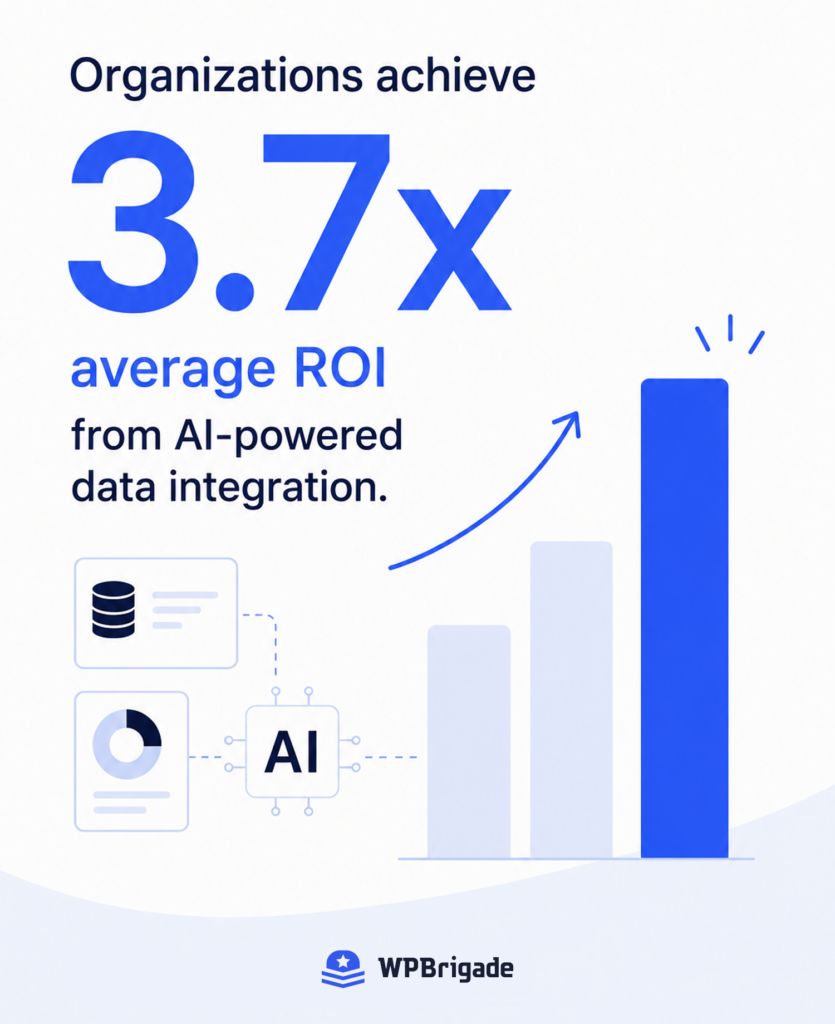
According to recent benchmarks, organizations achieve 3.7x average ROI from AI-powered data integration.
The Connectors API helps you build a secure bridge so that external AI tools can work with your data without compromising your site’s security.
How to Configure AI Connectors in WordPress
You can set up your centralized AI connectors dashboard in only a few minutes from Settings >> Connectors. Since WordPress 7.0 consolidates credential storage, you configure your connection settings once globally rather than inside individual plugin menus.
Step 1: Locate the Connections Dashboard
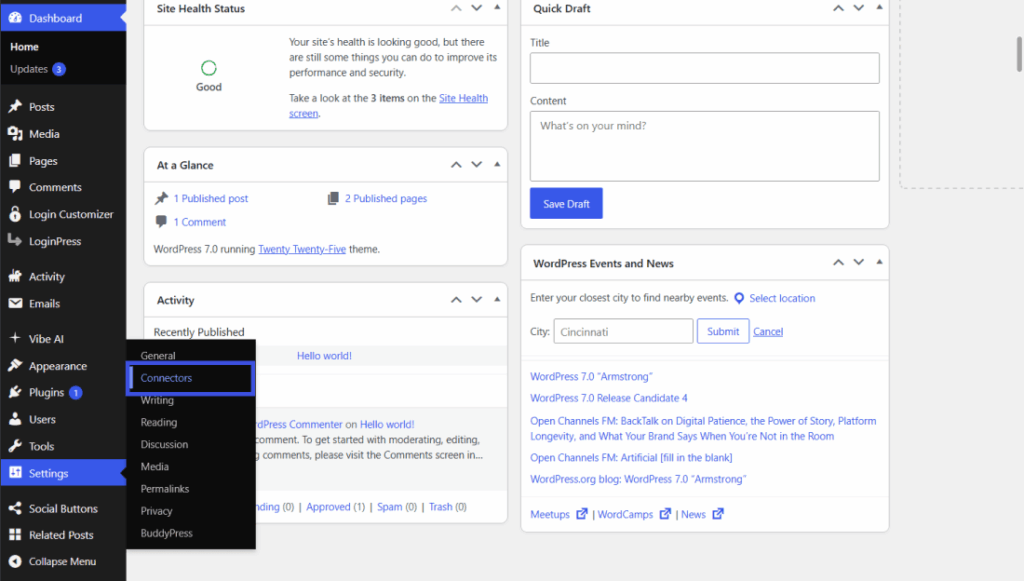
Log in to your administration panel and navigate to Settings >> Connectors in the left-hand sidebar menu. This dedicated management screen acts as your secure credential vault.
Here, the system lists the three default providers: OpenAI, Anthropic’s Claude, and Google.
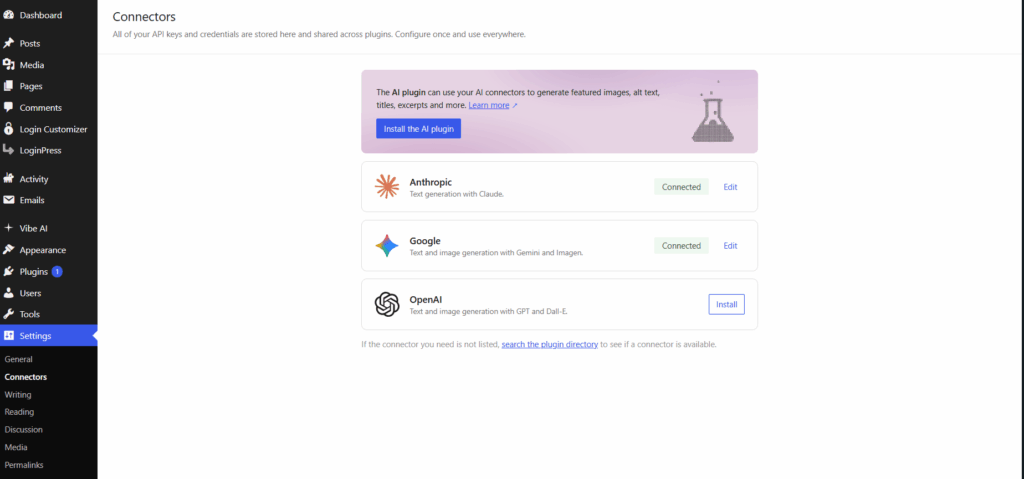
Step 2: Input and Mask Your Provider Keys
Click your preferred AI provider to expand its settings. Paste your secret API key into the input field.
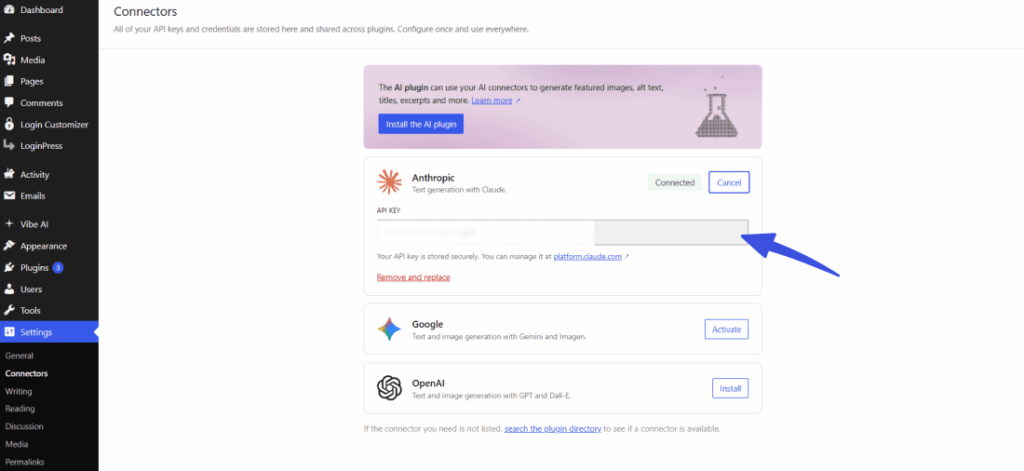
The core security layer instantly hashes and masks the input string, showing only the final four digits of your active key to prevent accidental administrative exposure.
Once the key is validated, compatible plugins can use the connection.
What Features Do the Default AI Connectors Support?
| Connector Provider | Primary Input Types Supported | Core Result Methods Available | Default Credential Constant |
| OpenAI | Text, Images, Audio | generate_text_result(), generate_image_result() | OPENAI_API_KEY |
| Anthropic | Text, Images | generate_text_result() | ANTHROPIC_API_KEY |
| Text, Images, Audio, Video | generate_text_result(), generate_image_result(), generate_video_result() | GOOGLE_API_KEY |
Core Requirements to Activate AI Connectors
- WordPress Version: Your production environment must run WordPress 7.0 or greater.
- Valid Provider Keys: You must obtain live API secret keys from OpenAI, Anthropic, or Google.
- Environment Configuration: Secure installations should define keys inside wp-config.php using standard PHP constants to prevent direct database writes.
How Do the Abilities API and MCP Adapter Make WordPress Agentic?
Before, external AI could only read your text. The Abilities API lets AI agents safely perform actions on your site.
Here is how it works:
- The Rule Book (Abilities API): Plugins list exactly what they can do (such as “Publish a Draft” or “Delete a Comment”) in a secure, central registry. The system checks permissions and passwords before letting the AI run any task. This stops external AI tools from running wild on your site.
- The Bridge (MCP Adapter): A built-in tool called the Model Context Protocol (MCP) acts like a translator. It lets external AI agents (such as Claude or ChatGPT) communicate directly with your WordPress site in a universal language.
With the middleware gone, developers no longer have to build custom code bridges. External AI tools can now safely perform tasks on your site under your strict control.
Real-World Actions You Can Execute Securely
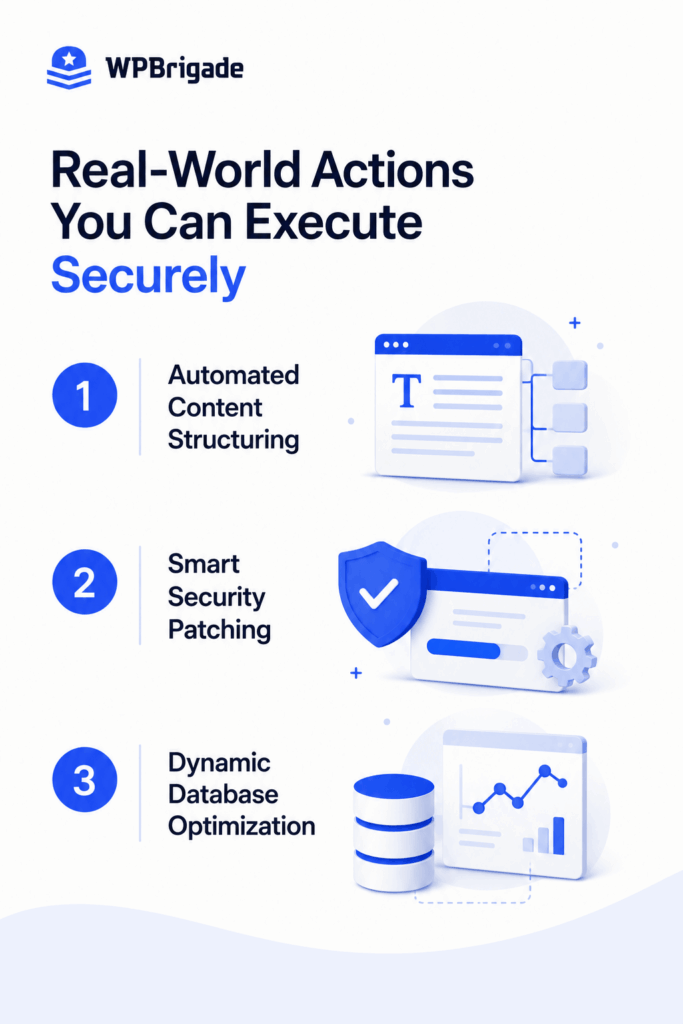
- Automated Content Structuring: External AI reads messy drafts, automatically assigns the correct categories or tags, and fills out hidden SEO meta fields securely.
- Smart Security Patching: Remote tools scan your site logs for errors, quarantine broken or compromised plugin files, and flush your server cache to fix issues instantly.
- Dynamic Database Optimization: AI agents find leftover temporary data, analyze database speed, and run standard cleanup scripts to keep your site running fast.
What Changes When You Migrate From Legacy AI Plugins to Core AI?
The old way of managing AI on WordPress was fragmented and risky for agencies. Every AI plugin required you to paste an individual API key into its own separate settings screen.
Keys were scattered across multiple plugin settings, which made management frustrating and raised the risk of data leaks and vendor lock-in.
With a growing catalog of over 1,400 AI plugins on WordPress.org, artificial intelligence is quickly becoming a core requirement for building and managing modern websites.
The WordPress 7.0 Core Solution
WordPress 7.0 unifies everything into a single, secure database layer under the Connectors API.
Instead of dealing with plugin sprawl, you get a clean, streamlined workflow:
- One Key to Rule Them All: You input your API keys exactly once in a central dashboard. Core securely masks them and shares them with your approved plugins.
- Zero Vendor Lock-In: The agency controls the AI providers (like OpenAI or Anthropic), not the plugin developers. If you want to switch models, you change it once globally.
- Standardized Developer Tools: Developers use clean, reusable code helpers, such as using_temperature(), to instantly control AI behavior across the entire site.
| Integration Method | Credential Storage Location | Code Extension Style | Vendor Lock-in Risk |
| WordPress 7.0 Core AI | Central Settings Console | Standard chainable functions | Zero risk |
| Legacy AI Plugins | Individual plugin tables | Custom developer functions | Extreme risk |
Common Conflicts and Asset Caching Troubleshooting
- Authentication Timeout Errors: Objects cached in object storage platforms can conflict with newly defined database constants.
- Array Mapping Failures: Older software tools may fail to pass prompt payloads due to mismatched core array signatures.
- Asset Minification Dropping: Optimization systems occasionally strip out the scripts needed to populate the new administrative panels.
What Are the Technical Requirements for WordPress 7.0 AI Architecture?
Modern AI tools require the latest server software to process complex, multi-step requests without crashing. If your hosting uses outdated settings, it will completely block these new native tools.
The biggest technical shift involves WebSockets. WordPress 7.0 uses this protocol to create a live, constant connection between your database and external AI agents.
Because this background processing requires high-performance server power, standard, cheap shared hosting plans cannot handle it.
Teams must check their server configurations before upgrading to prevent timeouts.
Essential Pre-Upgrade Verification Checklist
- Audit Existing Plugin Scripts: List all installed tools that manage their own API keys.
- Configure Sandbox Testing Pools: Spin up a virtual sandbox environment inside WordPress Playground to safely evaluate new Model Context Protocol connections.
- Validate Server Language Defaults: Verify that your active server runs a modern PHP version to support advanced cloud routing calls.
What AI Capabilities Are Missing From WordPress 7.0 Core?
WordPress 7.0 does not come with built-in language models. It provides a data routing layer, not direct AI features.
To add AI capabilities, you need to install specialized plugins that use the native AI Client. If you want to use text generation or automated image editing, you will need to add separate extensions.
This version does not include advanced connector filtering. The team has postponed data filters until WordPress 7.1, scheduled for August 2026.
For now, site administrators cannot limit user roles from accessing specific models. To manage access, you will need to use custom code hooks or third-party tools.
| Feature Component Name | Current Core Readiness State | Native Management Layer | Planned Feature Upgrades |
| LLM Connection Core | Fully Production Ready | Settings >> Connectors Dashboard | Extended provider options in late 2026. |
| Real-Time Co-Editing | Experimental Framework | Background Socket Layer | Full editor block parity deferred. |
| Advanced Key Filtering | Completely Absent | Developer Hook Architecture | Official implementation set for version 7.1. |
Constraints for Site Administrators
- No Automated Content Generation: Core lacks user-facing content blocks for automatically writing or summarizing page text.
- Limited Role Restrictions: The system cannot natively filter API model usage by specific user profiles or access tiers.
- Experimental Collaborative Editing: The underlying multiplayer database coordination layer remains optional and unpolished in this build.
How Can Teams Deploy the New AI Connectors?
Enterprise leaders and SMB owners should take a step-by-step approach to securely integrate this new framework.
You can start by reviewing your current digital assets and checking for any AI tools that use their own API keys. Bringing these access points together helps reduce security risks across your company’s digital systems.
Next, review your daily operations using the Abilities API documentation for developers as a guide. Find routine editorial tasks that remote tools can handle safely with the right permissions.
Also, check the PHP version on your staging environment. Keeping it current helps your site stay stable under heavy traffic.
Action Plan: Safe Staging Deployment for AI Connectors
- Inventory Existing Extensions: Document every installed component that connects to external cloud language models.
- Launch a Sandbox Instance: Create an isolated test platform to verify compatibility with version 7.0 protocols.
- Map Operational Capabilities: Define specific site management tasks you want to safely delegate to autonomous agents.
FAQs: AI Connectors For WordPress Users
Final Thoughts on AI Connectors in WordPress
WordPress 7.0 lays the groundwork: a unified Connectors API with connectors for OpenAI and Claude, a provider-agnostic AI Client, and an Abilities/MCP layer that lets agents act on your site under permission controls, replacing the old scattered API keys and one-off integrations.
But this is infrastructure, not a finished feature set for AI connectors.
WordPress 7.1, expected in August 2026, is set to introduce more granular permissions and advanced connector filtering, refining the level of control you have over what AI agents can see and do on your site.
For decision makers and owners, the smart move isn’t to wait for the “finished” version of AI Connectors; it’s to start building on this foundation now, while the ecosystem is still taking shape.
Related posts:
- Everything New in WordPress 7.0 (A Complete Guide)
- WordPress API Integrations: Explained for Beginners
- Custom WordPress vs No-Code Builders: Which to Choose (2026)
When AI agents can read, write, and act on your WordPress site directly, what’s the first workflow you’d hand over to them? Let us know your thoughts in the comments below!
Leave a Reply