

Disclaimer: If you face any issues with our new update and need timely assistance, contact our dedicated support team or explore our WordPress.org support section.
Related Posts Thumbnails 5.0 adds author-based related posts, cached results for faster loading, deferred CSS and JavaScript, a remote URL option for the default thumbnail, and two bug fixes. Your existing settings stay as they are. I don’t usually sit down to write release notes myself. Usually that’s a team job, and most of the time it should be. But this release has a few changes that came straight out of feedback we’d been sitting on for a while, and one habit I’ve never grown out of from my architecture days is wanting to explain the “why,” not just the “what.” So here it is, in my own words.
Here is what changed in Related Posts Thumbnails 5.0, at a glance and then in detail.
Table of contents
| Change | What It Does | Turned On by Default? |
|---|---|---|
| Author-based related posts | Matches related posts by author, next to categories and tags | No, opt-in |
| Cached results | Stores related-post results instead of recalculating on every page load | Yes |
| Deferred CSS and JavaScript | Loads the plugin’s files later so pages render faster | Yes |
| Remote default thumbnail URL | Lets you paste an image URL instead of uploading a file | No, opt-in |
| Bug fixes | Fixes two issues, including translations not loading | Yes |
Author-Based Related Posts
We added a fifth way to match related posts: by author. It sits in the Relation Builders tab next to Categories, Tags, Both, and Custom.
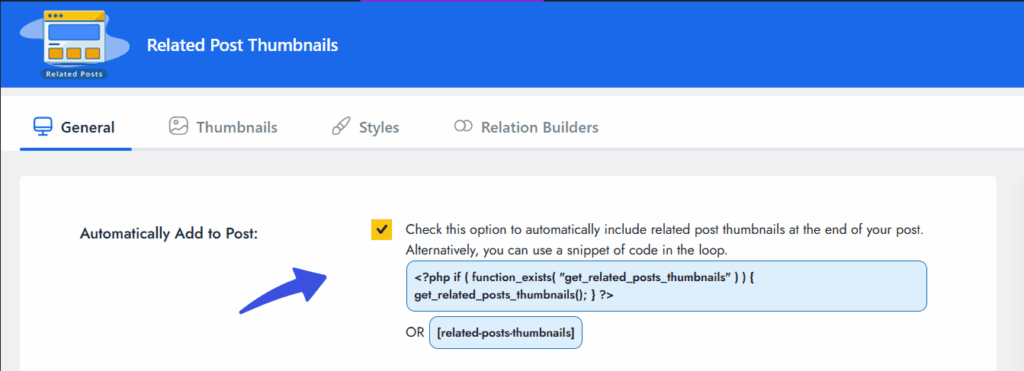
Here’s where this came from. Category and tag matching work fine for single-topic blogs, but the moment you’re running a site with more than one contributor, they start missing something obvious: readers who like a specific writer don’t always care what that writer wrote about. They just want more of them. I’ve noticed this in my own reading habits too, honestly. I’ll follow a person more than a beat.
So if your site has multiple authors, turn it on. If it’s just you writing, skip it; it won’t do much. That’s why we shipped it off by default. No point cluttering a setting nobody on a single-author site will ever need.
Related Posts Load Faster Now
We started caching related-post results instead of recalculating them on every page load.
I’ll be honest, this is the kind of fix that’s easy to overlook because nobody sees it happen. But think about what was going on before: every single visitor triggered a fresh calculation of what’s related to what. On a small blog, you’d never notice. On a site running a few thousand posts, that calculation was doing real work every time, for every visitor, on repeat.
Now it runs once and gets reused. Nothing for you to configure. It’s just faster, starting the moment you update.
Faster Front-End Loading Too
Separately, we changed how the plugin’s CSS and JavaScript load. They’re deferred now, meaning they load a little later in the page instead of immediately, and they’re minified, meaning smaller file sizes.
Before this, those files were competing for attention the second your page started rendering. Now they wait their turn. Your page loads faster, and once related posts load, they behave exactly as they always have.
You won’t see any visual difference here. This one’s purely for your load times.
A Remote URL Option for Your Default Thumbnail
Head to General >> Default Image and you’ll see a new option: paste in a URL instead of uploading a file.
A few of you run multiple sites or keep images on a CDN, and told us re-uploading the same fallback thumbnail into every single Media Library felt like busywork. Fair point, honestly. Now you can point at one hosted image and every post without a featured image will pull from it.
Uploading directly still works too. We didn’t remove anything, just gave you a second way to do it.
Two Bugs We Fixed
Translations weren’t loading properly. If you’re running the plugin in a language other than English, you might have seen your translated text quietly falling back to English even with the right files installed. That was a real bug, not user error. WordPress changed how plugins are supposed to load translations, and the current recommended approach is to load them later in the page lifecycle than most plugins used to. We rebuilt ours to match, and it should be resolved now.
Styling broke in 4.3.0. A previous update introduced inconsistent rendering in the related posts section, where it could look slightly off depending on the site. That’s fixed too. If either of these was affecting your site and you’re still seeing something wrong after updating, tell us. That’s not expected, and I’d want to know.
Nothing Gets Reset
Updating to 5.0 won’t touch your existing settings. Author-based matching and the remote image URL are both opt-in, so your site behaves exactly as it did yesterday until you decide to change something. Everything else (the caching, the faster loading, the bug fixes) just works quietly in the background without asking you first.
Final Thoughts
If you run more than one author on your site, turn on author-based matching first. That’s the change I think will surprise people the most. If your fallback thumbnail already lives on a CDN, switch to the remote URL option and stop double-uploading it. Everything else is already working in the background, so really, just update and let it run.
If something’s not working the way I described here, don’t sit on it; reply or reach out to support.

Leave a Reply