
For most WordPress sites, I’d recommend Analytify as the Google Analytics plugin. It shows your GA4 reports inside the WordPress dashboard: traffic, top posts, WooCommerce sales and Search Console data, without opening Google Analytics.
Pick Site Kit by Google if you only need free basic stats. Pick GA Google Analytics if you only need the tracking code. Pick MonsterInsights if you already use its add-ons. Pick Jetpack Stats if you do not want Google Analytics at all.
We make Analytify here at WPBrigade, so I’ve kept this comparison to things you can check yourself: features, pricing and what each plugin is best for.
Best Google Analytics Plugins for WordPress (TOC):
- Best Google Analytics Plugins for WordPress at a Glance
- What Does a Google Analytics Plugin for WordPress Do?
- 1. Analytify: Best Google Analytics Plugin for WordPress
- 2. MonsterInsights: Best for Sites Already Using Its Add-ons
- 3. Site Kit by Google: Best Free Option for Basic Stats
- 4. GA Google Analytics: Best for Adding the GA4 Tag Only
- 5. Jetpack Stats: Best for Stats Without Google Analytics
- Which Google Analytics Plugin for WordPress Is Best for You?
- Feature Comparison: Google Analytics Plugins for WordPress
- How to Choose a Google Analytics Plugin for WordPress
- How We Compared These Plugins
- FAQs: Best Google Analytics Plugins for WordPress
- Final Verdict
Best Google Analytics Plugins for WordPress at a Glance
Five Google Analytics plugins for WordPress are worth installing in 2026. This table shows what each one does best.
| Plugin Name | Best For | Dashboard Included | Price Range |
|---|---|---|---|
| Analytify | GA4 reports and WooCommerce tracking inside WordPress | Yes, full GA4 dashboard plus per-post stats | Free version; Pro from $99/year |
| MonsterInsights | Sites already using its add-ons | Yes | Free Lite version; Pro plans from $99.50/year |
| Site Kit by Google | Free basic GA4 and Search Console stats | Yes, summary widgets | Free |
| GA Google Analytics | Adding the GA4 tag only | No, reports stay in Google Analytics | Free; Pro available |
| Jetpack Stats | Simple stats without Google Analytics | Yes, Jetpack’s own stats | Free for personal sites; commercial from $8.33/month |
Prices were checked on each vendor’s pricing page in October 2026. Most first-year prices are discounted, and renewals usually cost more.
What Does a Google Analytics Plugin for WordPress Do?
A Google Analytics plugin for WordPress connects your site to GA4. Some plugins only add the tracking tag. Others also show your GA4 reports in the WordPress admin.
The difference matters for your time. A tag-only plugin sends data to Google. You still log in to Google Analytics to read it. A dashboard plugin brings the reports to you.
- Tracking: adds the GA4 tag to every page.
- Reporting: shows traffic, sources and top content in WordPress.
- Events: tracks clicks, forms, downloads and video plays.
- Ecommerce: tracks orders, revenue and products.
- Privacy: handles consent and IP anonymization.
1. Analytify: Best Google Analytics Plugin for WordPress
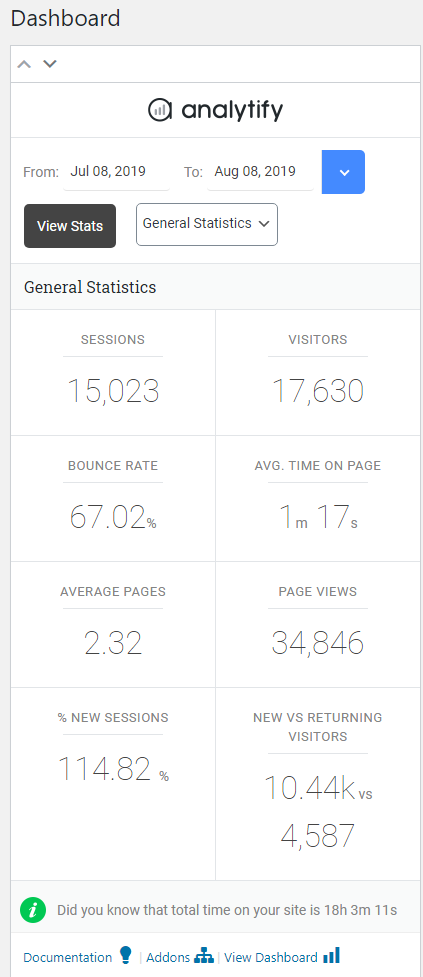
Analytify is the best Google Analytics plugin for WordPress if you want GA4 reports without leaving the dashboard. Analytify shows GA4 traffic, sources, top pages and Search Console data inside WordPress. It also shows stats for each post and page.
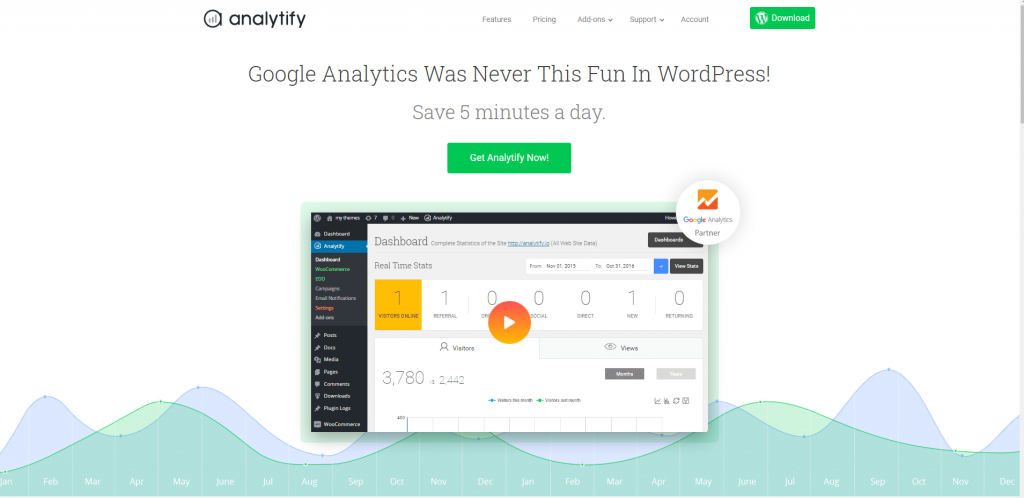
Analytify Pro adds WooCommerce and Easy Digital Downloads tracking. You see revenue, orders, coupons and refunds per product. Add-ons also cover forms, LearnDash, LifterLMS and scheduled email reports.
Analytify has 20,000+ active installs on WordPress.org and a 4.7 out of 5 rating. Analytify is built and maintained by WPBrigade.
Analytify Key Features
- GA4 dashboard inside WordPress
- Per-post and per-page analytics in the editor
- Real-time visitors
- Search Console keywords in WordPress
- WooCommerce and EDD revenue tracking (Pro)
- Form tracking for Contact Form 7, Gravity Forms and WPForms (Pro)
- LearnDash, LifterLMS and Paid Memberships Pro tracking (Pro)
- Scheduled email reports (Pro)
- Ad-blocker resistant first-party tracking
Analytify Pros and Cons
| Pros | Cons |
|---|---|
| Full GA4 reports in WordPress | Ecommerce tracking needs Pro |
| Per-post stats for writers and editors | Needs a GA4 property connected first |
| WooCommerce, EDD and LMS tracking | Advanced add-ons are Pro only |
Analytify Pricing
Analytify has a free version on WordPress.org. Analytify Pro costs $99/year for 2 sites, $199/year for unlimited sites, or $499 for a lifetime plan. Every plan has a 14-day refund window.
2. MonsterInsights: Best for Sites Already Using Its Add-ons
MonsterInsights is a good fit if your site already runs its add-ons. MonsterInsights adds GA4 to WordPress and shows a report dashboard in the admin. The free Lite version covers basic reports.
- GA4 setup wizard
- Dashboard reports in WordPress
- Ecommerce and form tracking on paid plans
- Plans from $99.50/year in the first year
3. Site Kit by Google: Best Free Option for Basic Stats
Site Kit by Google is the best free option for basic GA4 stats in WordPress. Site Kit is built by Google and has 5+ million active installs. It shows summary widgets from GA4, Search Console, AdSense and PageSpeed Insights.
- Free and official
- GA4, Search Console, AdSense and PageSpeed in one place
- Summary widgets only, not full reports
- No WooCommerce revenue reports
4. GA Google Analytics: Best for Adding the GA4 Tag Only
GA Google Analytics is the best choice if you only need the GA4 tag on your site. GA Google Analytics adds the tracking code and nothing else. You read all reports in Google Analytics.
- Lightweight and fast
- Supports GA4 by default
- No reports in WordPress
- 400,000+ active installs
5. Jetpack Stats: Best for Stats Without Google Analytics
Jetpack Stats is the best pick if you do not want Google Analytics. Jetpack Stats uses its own tracking, not GA4. It is free for personal sites and paid for commercial sites.
- Simple traffic stats in WordPress
- No Google Analytics account needed
- Commercial plan from $8.33/month billed yearly
- Limited event and ecommerce tracking
Which Google Analytics Plugin for WordPress Is Best for You?
The best Google Analytics plugin for WordPress depends on what you need to see. Match your goal to the plugin in this table.
| Your Goal | Best Plugin | Why |
|---|---|---|
| See full GA4 reports in WordPress | Analytify | Full GA4 dashboard and per-post stats |
| Track WooCommerce revenue | Analytify Pro | Product, order, coupon and refund reports |
| Free basic stats from Google | Site Kit by Google | Free summary widgets |
| Add the GA4 tag only | GA Google Analytics | Tag only, no reports |
| Avoid Google Analytics | Jetpack Stats | Own tracking system |
| Track LearnDash or LifterLMS courses | Analytify Pro | LMS tracking add-ons |
Feature Comparison: Google Analytics Plugins for WordPress
Analytify covers the most GA4 reporting features of the free and freemium options. This table compares the features buyers ask about most.
| Feature | Analytify | Site Kit by Google | GA Google Analytics | Jetpack Stats |
|---|---|---|---|---|
| Uses GA4 | Yes | Yes | Yes | No (own stats) |
| Reports in WordPress | Full reports | Summary widgets | No | Yes |
| Search Console data | Yes | Yes | No | No |
| WooCommerce revenue reports | Pro | No | No | No |
| LMS course tracking | Pro | No | No | No |
| Free version | Yes | Yes | Yes | Yes |
How to Choose a Google Analytics Plugin for WordPress
Choose a Google Analytics plugin by checking five things. Each check takes under a minute.
- Reports: do you want reports in WordPress, or only the tag?
- Ecommerce: do you sell with WooCommerce or EDD?
- Team: do writers need per-post stats?
- Privacy: do you need consent mode support?
- Speed: test page load before and after install.
Read our guide on how to choose WordPress plugins without hurting performance for a full checklist. See our list of essential WordPress plugins for the rest of your stack.
How We Compared These Plugins
We compared each plugin on four things: GA4 support, reports inside WordPress, ecommerce tracking and price. Data comes from each plugin’s WordPress.org listing and pricing page, checked in October 2026.
- GA4 support and setup method
- Which reports appear inside WordPress
- WooCommerce and EDD tracking
- Free version and paid plan prices
FAQs: Best Google Analytics Plugins for WordPress
Quick answers to the Google Analytics plugin questions that come up most:
Analytify is the best Google Analytics plugin for WordPress for most sites. It shows full GA4 reports, per-post stats and WooCommerce data inside the WordPress dashboard.
Yes. Analytify, Site Kit by Google, GA Google Analytics and MonsterInsights all have free versions. Analytify’s free version includes the GA4 dashboard and per-post stats.
No, you can paste the GA4 tag into your theme. A plugin is safer. It keeps the tag after theme updates and can show reports in WordPress.
Yes. Analytify Pro tracks WooCommerce revenue, orders, products, coupons and refunds in GA4. You see the reports inside WordPress.
GA4 data usually takes 24 to 48 hours to appear after setup. Also check that the right GA4 property is connected. Ad blockers and missing consent can also block tracking.
Usually not by much. Dashboard plugins build their reports in the admin area, not on the pages visitors see. Visitors mostly load the GA4 tag. Test your page speed before and after install to confirm.
Final Verdict
Analytify is the best Google Analytics plugin for WordPress if you want GA4 reports in your dashboard. Site Kit is the best free option for basic stats. GA Google Analytics is best if you only need the tag.
Leave a Reply