
AI coding assistants are changing how developers build applications.
Tools like Replit AI enable developers and beginners to generate code, debug errors, and deploy applications directly in a browser.
With the launch of Agent 4, the question is no longer “Can AI help me code?” but “Can I build an entire business without touching the source code?”
In this Replit AI review, I will break down the new features for Replit coding, the credit-based pricing model for Replit code, and show you exactly how to build a full-stack app in minutes.
Table of Contents
What is Replit AI?
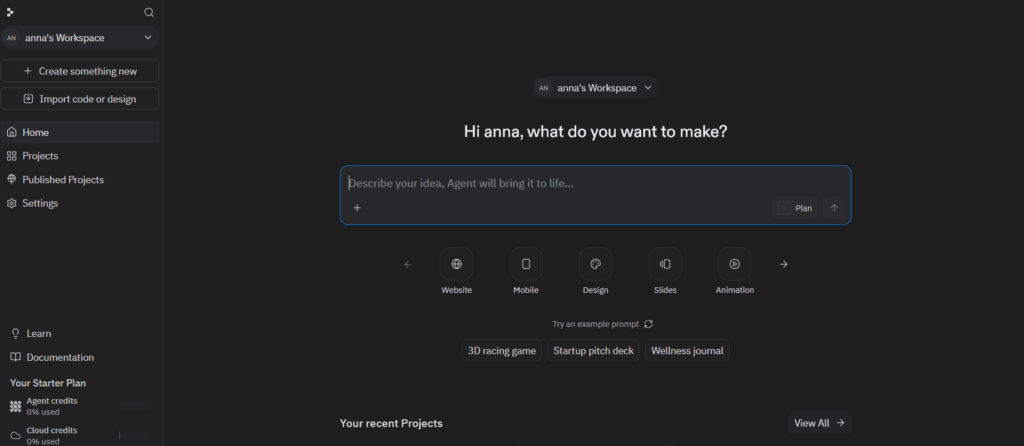
Replit AI is an AI-powered coding assistant built into the Replit cloud IDE.
It helps developers generate code, debug programs, and deploy applications directly from the browser using natural language prompts.
Replit AI isn’t just a feature; it is the engine. It combines a powerful LLM-driven Agent with Ghostwriter (inline assistance) and a new Design Canvas that converts sketches into functional React components.
How Replit AI Works
The Replit code AI workflow is defined by autonomous sessions. Here is the typical path:
- Describe: You type a prompt in the Agent chat (e.g., “Build a subscription SaaS for pet sitters”).
- Plan: The Agent enters Plan Mode, breaking the request into a Kanban board of tasks.
- Execute: The AI writes the code, creates the database schema, and installs dependencies.
- Self-Debug: If an error occurs, the Agent reads its own logs and automatically applies a fix.
- Deploy: With one click, your app is live on a .replit.app domain.
Key Features of Replit AI Coding
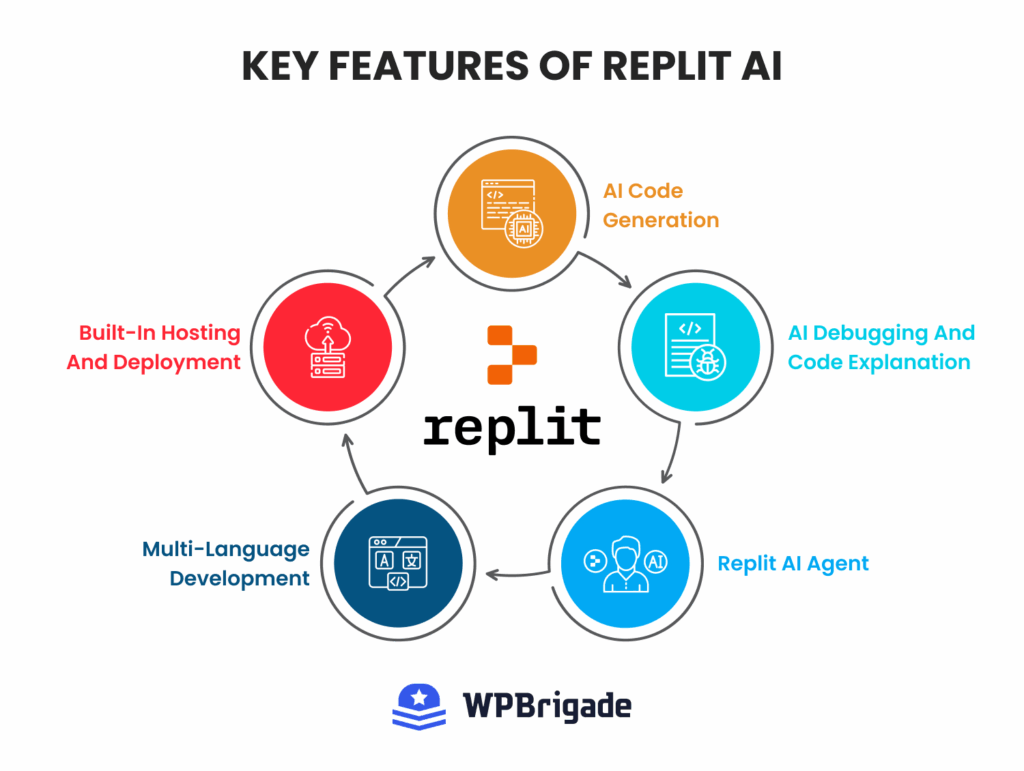
Replit has become popular in the growing trend of AI-assisted software development. Replit has evolved from a simple code editor into an AI-powered development environment. Here are the core features of the Replit AI coding assistant that you will interact with daily:
- AI Code Generation
Replit’s code generation has evolved beyond simple snippets. Using the Ghostwriter interface, you can generate entire files or complex logic blocks using natural language.
- Inline Suggestions: As you type, the AI predicts not just the next word, but the next several lines of logic based on your project’s context.
- Prompt-to-Code: You can trigger a global command (Cmd+K or Ctrl+K) to describe a feature, and the AI will write and insert the code directly into the correct file.
- AI Debugging and Code Explanation
Debugging is often the most frustrating part of development, but Replit AI acts as a 24/7 senior developer.
- Proactive Debugging: If your code fails to run, the console doesn’t just show a red error; it provides a “Fix with AI” button. The AI analyzes the stack trace, identifies the root cause, and offers a one-click patch.
- Explain Code: If you encounter a complex legacy function or a snippet the AI generated that you don’t understand, you can highlight it and ask for an explanation. It breaks down the logic into plain English, an invaluable feature for beginners learning to code on Replit.
- Replit AI Agent
The Replit AI Agent is the platform’s main feature. Unlike the coding assistant that waits for you to type, the Agent is autonomous.
- Project Scaffolding: Tell the Agent, “Build me a crowdfunding site for local artists,” and it will create the folders, install the Node.js packages, set up the database schema, and write the initial boilerplate.
- Automatic Debugging: If the Agent reviews the error, updates the code, and then tries the fix again, without you having to intervene.
- Multi-Language Development
Replit remains one of the most versatile platforms in 2026, supporting over 50 programming languages.
- Seamless Switching: You can build a Python data analysis script in one Repl and a TypeScript React frontend in another without ever leaving your browser or installing a single local dependency.
- Framework Support: It comes pre-configured for modern frameworks such as Next.js, Flask, and Django, as well as mobile-centric languages such as Swift and Kotlin.
- Built-In Hosting and Deployment
The “Zero-to-Live” promise is realized through integrated infrastructure.
- One-Click Deploy: Once the AI finishes your app, you click “Deploy.” Replit handles the server provisioning, SSL certificates, and global CDN.
Replit AI Pricing Comparison
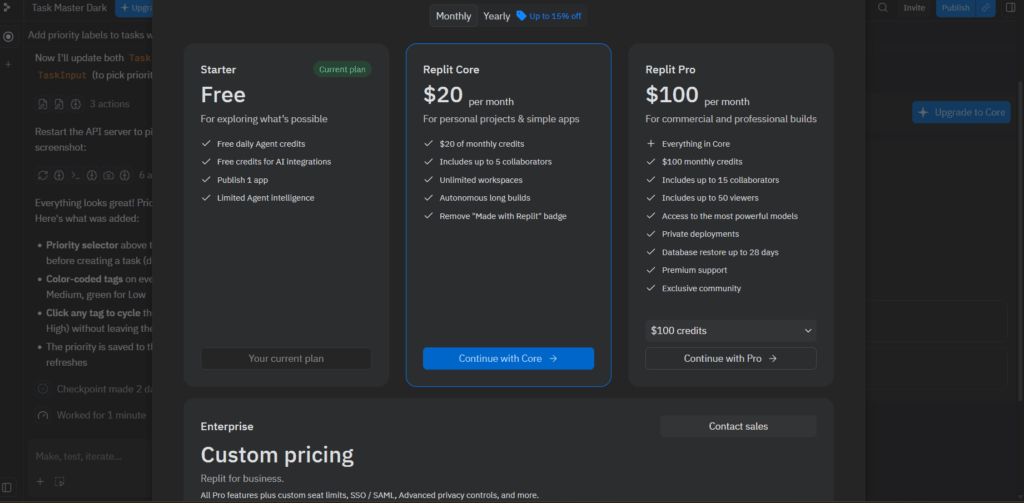
In February 2026, Replit revised its subscription model to better align with the AI-assisted development movement.
The updated structure is based on a Credit Economy, a usage-based system in which users are charged according to the computational effort expended by the AI and the resources consumed by their applications.
The following section provides a detailed breakdown of the Replit subscription plans and strategies for effective cost management:
| Plan | Price (Monthly / Annual) | Included Monthly Credits | Best For |
| Starter | Free | Limited Daily Amount | Students and hobbyists are testing the waters. |
| Core | $17/month | $20/monthly credits | Solo developers building MVPs. |
| Pro | $100 / $95 | $100/monthly credits | Small teams (up to 15) needing high-speed mode. |
| Enterprise | Custom | Custom | Large organizations require SSO and SCIM security. |
Understanding the Credit System
Instead of simple monthly quotas, Replit now uses Effort-Based Billing. Every interaction with the Replit AI coding assistant or Agent consumes credits from your monthly pool.
On paid plans, you can toggle between three modes to control how fast you burn through your credits:
- Economy Mode: Uses smaller, cost-optimized models. Ideal for simple bug fixes or CSS tweaks.
- Power Mode: Uses high-end models like Claude 3.5 Sonnet for complex logic and database architecture.
- Turbo Mode (Pro/Enterprise Only): The fastest experience, optimized for rapid AI-assisted development. It uses the most capable models and responds 2.5x faster, but can consume credits up to 6x as fast as Economy.
Managing Your Spend
To avoid price shock later on from the Agent getting stuck in a coding loop, follow these three best practices:
- Set Budget Limits: In Settings >> Billing option, you can set a hard monthly cap. If you hit this limit, Replit will pause AI services to prevent overages.
- Monitor the Usage Dashboard: This tool provides real-time insights into which projects or specific Agent sessions are consuming the most resources.
- Use Lite Mode for Edits: For small, scoped changes to a single file, switch to Lite Mode. It provides near-instant edits while consuming significantly fewer credits than a full Agent session.
How to Use Replit AI (Step-by-Step Demo)
In this section, I will walk you through the Replit AI tutorial to build a simple app using Replit AI.
Step 1: Create a Replit Account
Visit Replit and register for an account. The Starter plan is sufficient for beginners to explore the interface.
The Core plan is recommended for those seeking to utilize the full capabilities of the Replit Agent.
Note: For this Replit demo, I will be using the free plan, so you can check out its limitations and capabilities.
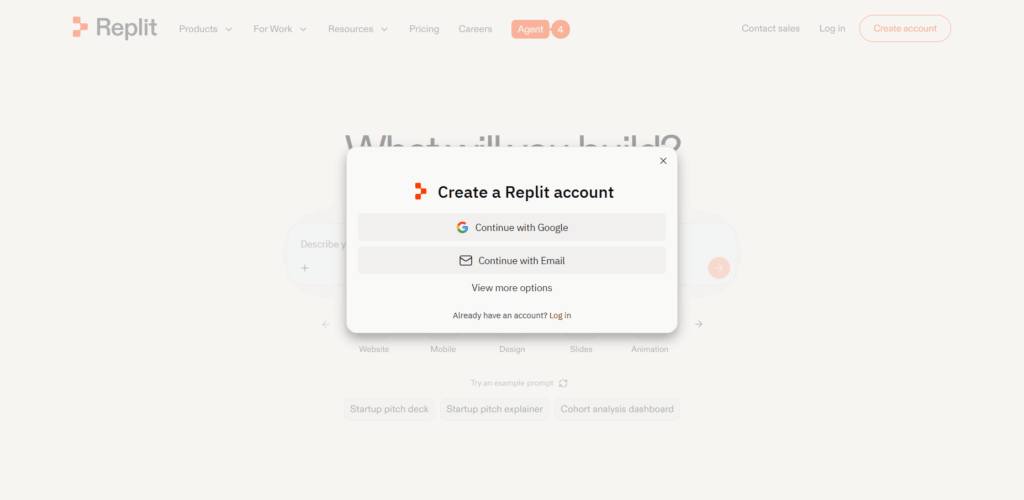
Step 2: Start a New Project
From the dashboard, select the Create Something New button for Replit Demo.
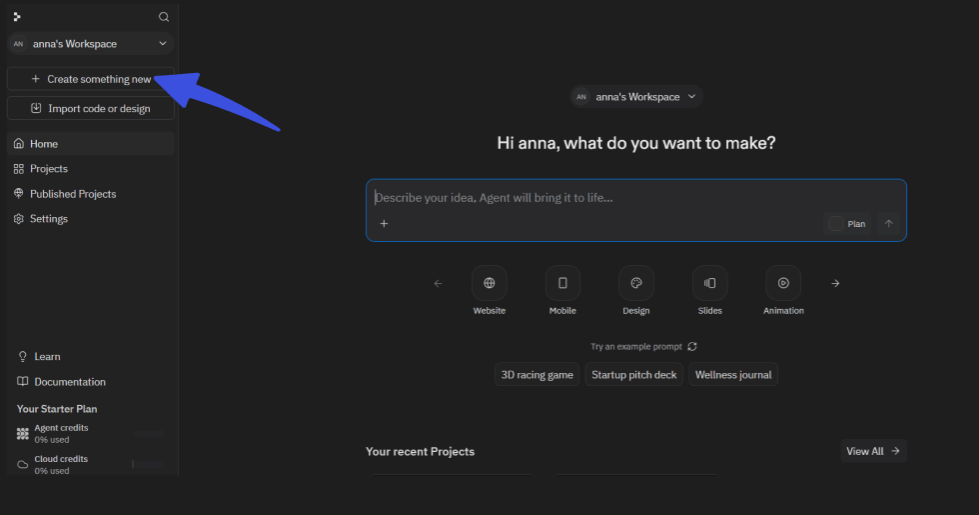
Unlike traditional integrated development environments (IDEs), manual selection of language or framework is unnecessary; users may describe their goals directly in the chat interface.
Step 3: Use the AI Assistant
Within the project, utilize the chat panel to interact with the Replit AI coding assistant.
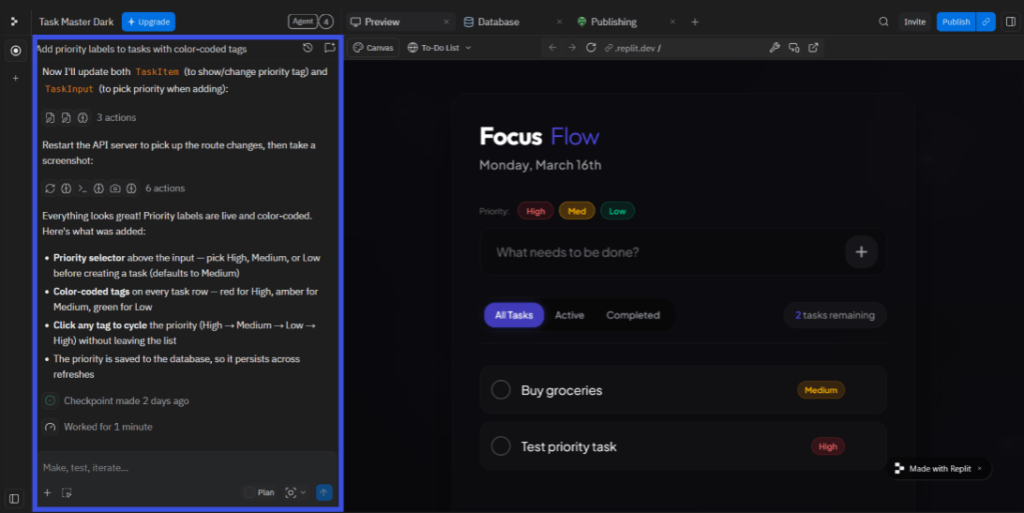
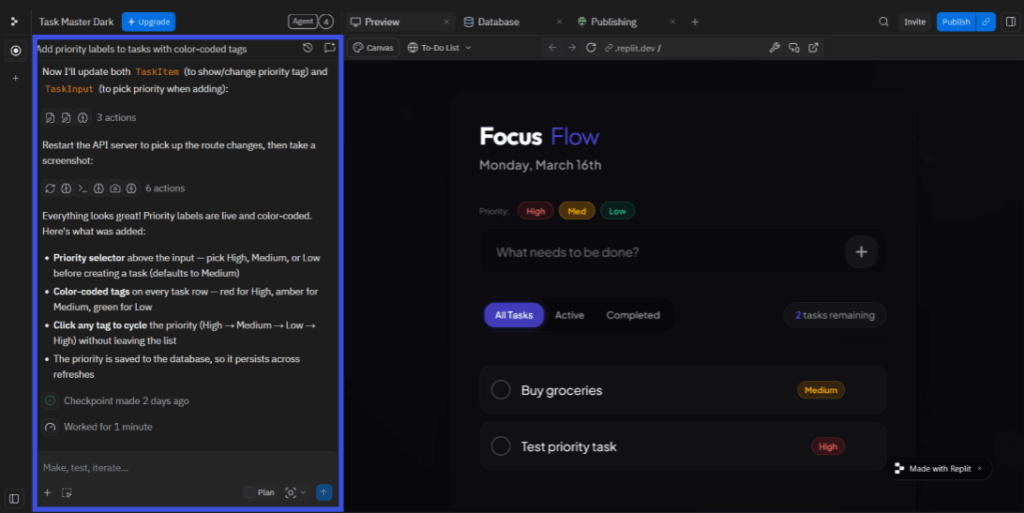
- To generate code, enter a natural language prompt. Here is the prompt I am using to build a task app.
Prompt: “Build a modern To-Do list app with a dark-mode UI, use React for the frontend, and a PostgreSQL database to save the task so they don’t disappear on refresh.”
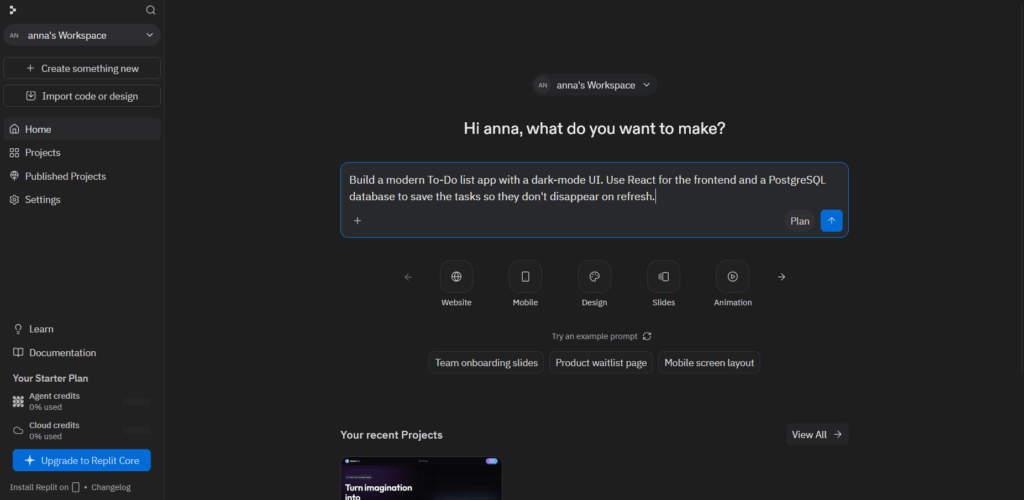
Step 4: Run and Test Your Code
Click Enter to start the development process. Replit will provide a live URL and a console for error checking.
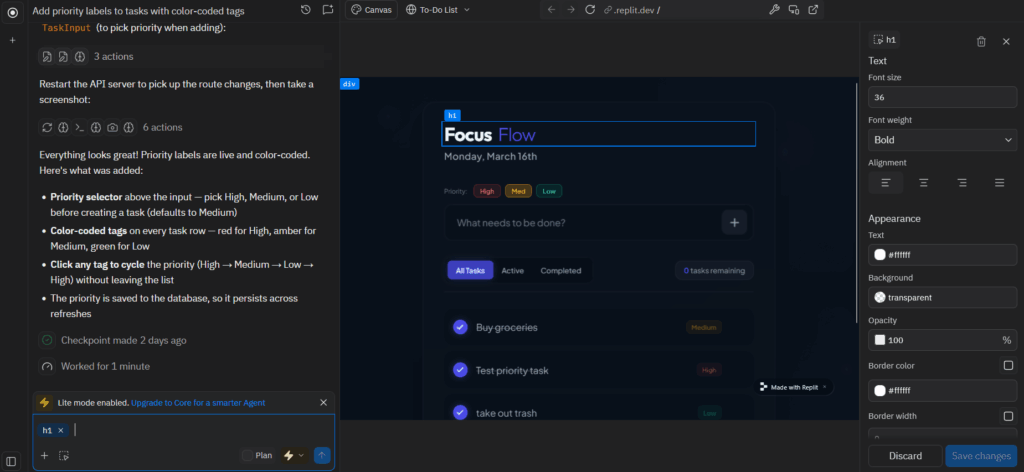
Drag-and-drop tools streamline the design phase, allowing non-technical users to create professional user interfaces with ease.
Step 5: Deploy Your Application
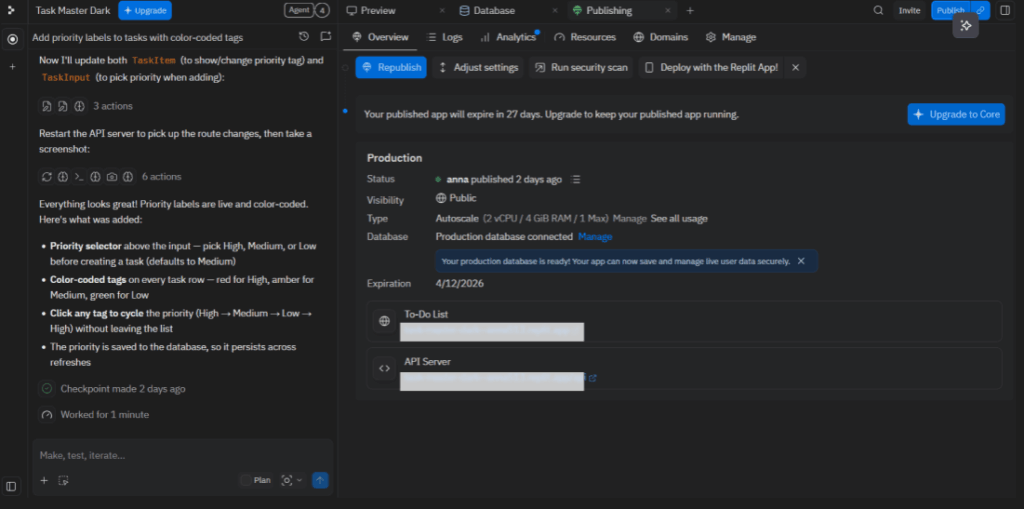
When the project is ready for deployment, click the Publish button. The following options are available:
- Autoscale: Suitable for applications with the potential for rapid user growth.
- Reserved VM: Recommended for persistent services such as bots.
- Static: Intended for simple HTML and JavaScript sites.
Recommendation: After deployment, consider enhancing analytics on WordPress websites with Analytify. This tool provides insights into user activity and traffic patterns without requiring modifications to the AI-generated code.
What the Generated Project Includes
In contrast to basic templates, a Replit AI project constitutes a professional-grade technology stack:
- Backend: Node.js or Python server responsible for handling API requests.
- Database: A fully provisioned Neon PostgreSQL instance (accessible via the “Database” tab).
- Frontend: Modern React or Next.js user interface styled with Tailwind CSS.
- Authentication: Built-in Replit Auth for user sign-ins, if requested.
- Infrastructure: An automatically generated Replit.nix file that ensures your environment is reproducible and scalable.
What You Can Build With Replit AI (Examples)
The versatility of Replit coding lies in its ability to handle both simple front-end designs and complex, data-heavy systems.
Because the AI agent can manage databases and APIs automatically, even non-technical founders can now build full applications.
Here are the most common practical applications being built on the platform today:
- Web Applications
From sleek landing pages to complex SaaS platforms, Replit AI excels at building interactive web apps.
- Custom Dashboards: You can build real-time data visualizers that pull information from Google Sheets or Stripe.
- Blogs and CMS: Create a personal blogging platform with a Markdown editor and a PostgreSQL backend for post storage.
- Productivity Tools: Beyond simple to-do lists, users are building shared team calendars, inventory management systems, and project trackers with built-in email notifications.
- APIs and Backend Services
For those focusing on Replit coding for the engine of their business, the platform provides robust server-side support.
- REST and GraphQL APIs: Easily build endpoints using Express (Node.js) or FastAPI (Python) to serve data to other applications.
- Automated CRON Jobs: Set up “set-and-forget” scripts that scrape data, send weekly newsletters, or clean up database records every midnight.
- Webhooks: Create endpoints to receive data from platforms such as Shopify or GitHub and trigger custom business workflows.
- AI Tools and Chatbots
Given that Replit is an AI-first environment, it is the premier place to build applications that leverage other AI models.
- LLM-Powered Chatbots: Integrate with OpenAI, Anthropic, or local models to create customer support bots that “read” your company’s documentation.
- AI Image Generators: Build a web interface that connects to Stable Diffusion or Midjourney APIs to generate art on the fly.
- Content Summarizers: Create tools that take a long URL or PDF and provide a 3-sentence summary using GPT-4o.
- Learning and Coding Projects
Replit remains the best choice for students and hobbyists.
- Algorithm Visualization: Use the AI to help write Python scripts that visually demonstrate how sorting algorithms or neural networks work.
- Interactive Tutorials: Educators use Replit to build guided coding environments where the AI helps students fix syntax errors in real time.
- Game Development: Build 2D browser-based games using Pygame or JavaScript libraries like Phaser, with the AI handling the math-heavy physics logic.
Replit AI Pros and Cons
To provide a balanced Replit AI review, it’s essential to look past the demos.
The platform has become a production environment, but the shift to an Agent-first model has introduced new trade-offs, particularly in terms of costs and project complexity.
Pros
- Zero-Setup Cloud Environment: You can go from a blank browser tab to a running server in seconds. There is no need to install Docker, manage PATH variables, or struggle with local Node.js versions.
- Rapid AI-assisted Development Workflow: The Replit Agent lets you build functional MVPs by simply describing them. handles the “boring” parts, database migrations, API boilerplate, and CSS resets, so you can focus on the product idea.
- Autonomous Self-Healing: One of the strongest pros is the Agent’s ability to test itself. If a deployment fails, the AI reads the logs and applies a fix autonomously, often solving bugs before you even notice them.
- All-in-One Deployment: Integrated hosting, PostgreSQL databases, and authentication (Replit Auth) are built directly into the IDE. You don’t need to juggle AWS, Supabase, and GitHub separately.
- Mobile-First Development: Replit’s mobile app is widely considered the best in the industry, allowing for full-stack development on iPads and smartphones with near-desktop parity.
Cons
- Unpredictable Credit Costs: With the Credit Economy, costs can scale quickly. A complex Agent Loop, where the AI tries and fails to fix a bug multiple times, can burn through several dollars’ worth of credits in minutes if not monitored.
- Agent Loops and Hallucinations: While the AI is powerful, it can occasionally become overconfident. It might suggest an outdated library or getting stuck in a cycle of fixing one bug while inadvertently breaking another feature.
- Performance Caps on Large Projects: While great for MVPs, very large monorepos can suffer from browser-based latency. Professional teams often find that the AI’s “thinking time” increases as the codebase grows more complex.
- Vendor Lock-in: Moving a project off Replit can be difficult. Because the AI often uses Replit-specific configurations (such as replit.nix or built-in Auth), ejecting to a local VS Code or AWS environment usually requires significant manual refactoring.
- Requires Constant Connectivity: Unlike local editors like Cursor or VS Code, you cannot use Replit AI offline. If your internet drops, your development environment effectively disappears.
| Feature | Replit AI (Cloud) | Cursor / VS Code (Local) |
| Setup Time | < 1 Minute | 15-30 Minutes |
| Autonomy | Full (Builds entire apps) | Partial (Assists line-by-line) |
| Deployment | 1-Click Integrated | Manual CI/CD Required |
| Offline Mode | No | Yes |
| Best For | Prototyping & MVPs | Large Production Repos |
Best Replit AI Prompts for Building Apps
The success of your project depends less on your knowledge of syntax and more on the clarity of your instructions.
If you provide a vague prompt, the AI might waste your credits on a hallucinated structure. If you are specific, you can build a production-ready app in minutes.
How to Prompt Like a Pro
To get the best results from the Replit AI coding assistant, follow the C.A.S.E. framework:
- Context: Tell the AI what you are building (e.g., “a SaaS for fitness”).
- Action: Use verbs like “Create,” “Connect,” or “Deploy.”
- Stack: Specify the languages (e.g., “use Python and Tailwind CSS”).
- Examples: Describe the exact features you want to see.
Prompt to Build a Simple Web App
Example Prompt:
“Create a responsive, mobile-friendly web application using HTML, CSS, and JavaScript that allows users to add, edit, and delete tasks in a to-do list. Use local storage so the data persists.”
What Replit Generates:
- Frontend Layout: A clean, centered UI with a modern input field and action buttons.
- JavaScript Logic: The “CRUD” (Create, Read, Update, Delete) functionality.
- Interactive UI Elements: Hover effects on buttons and a “strike-through” animation for completed tasks.
Prompt to Build a Python API
Example Prompt:
“Create a Python Flask API that stores user data. Include RESTful endpoints for adding, viewing, and deleting users. Use a SQLite database for simplicity.”
What Replit Generates:
- Backend Routes: A main.py file with @app.route decorators for each action.
- Server Logic: Error handling for invalid requests (e.g., trying to delete a user that doesn’t exist).
- Data Handling: Automatic database initialization and schema creation.
Prompt to Create a Chatbot
Example Prompt:
“Build a simple chatbot web app with a chat-bubble interface. The bot should take user input and respond with predefined messages based on keywords like ‘help’, ‘pricing’, and ‘features’.”
This prompt creates the Shell of an AI tool. For beginners, this is the perfect starting point. You can later expand this by asking the Replit Agent to: “Connect this chatbot to the OpenAI API so it can answer any question dynamically.”
Prompt to Build a Startup MVP
Example Prompt:
“Build a minimal SaaS web application. Include a landing page, a user authentication system (Replit Auth), a dashboard interface, and a basic task management system for logged-in users. Style it with Tailwind CSS.”
What Replit Generates:
- Project Structure: A multi-file architecture including protected_routes.
- Authentication Flow: Redirection logic that prevents non-logged-in users from seeing the dashboard.
- Database Integration: Tables for both Users and Tasks linked by a foreign key.
Replit AI vs. Other AI Coding Tools
The market for AI coding assistants has split into two distinct philosophies: “Code-Assist” (improving your typing speed) and “Outcome-Assist” (building the app for you). Replit has firmly planted its flag in the latter.
To help you choose the right tool for your workflow, here is how Replit AI compares to the industry’s other heavy hitters: GitHub Copilot, Cursor, and Codeium (Windsurf).
Comparison at a Glance (2026 Rankings)
| Feature | Replit AI | GitHub Copilot | Cursor | Codeium (Windsurf) |
| Primary Environment | Browser-Based (Cloud) | IDE Extension (Local) | AI-Native IDE (Local) | AI-Native IDE (Local) |
| Best For | Ai-assisted Development” & MVPs | Enterprise Workflows | Professional Refactoring | Budget-Conscious Devs |
| Deployment | 1-Click (Built-in) | External (AWS/Azure) | External (Manual) | External (Manual) |
| Pricing Model | Effort-Based (Credits) | Flat Monthly Fee | Flat Monthly + Model Cap | Generous Free Tier |
1. Replit AI vs. GitHub Copilot
GitHub Copilot remains the Industry Standard for professional developers working in established companies.
- Environment: Copilot lives inside your existing editor (VS Code, JetBrains). Replit is the editor.
- AI Capabilities: Copilot excels at granular, line-by-line suggestions and opening Pull Requests from GitHub issues. Replit Agent excels at “fire-and-forget” delegation, where it builds the entire project structure.
- Deployment: Replit wins here. Copilot suggests CI/CD configs, but Replit actually hosts the code.
2. Replit AI vs. Cursor
Replit is currently Cursor’s biggest rival among power users.
- Ease of Use: Replit is easier for beginners because there is no local setup. Cursor requires you to manage your own local files and compilers.
- AI Capabilities: Cursor has deeper Codebase Awareness. Because it indexes your local files more aggressively, it is better at finding bugs in massive, 100-file repositories.
- Autonomy: Replit’s “Agent 4” is more autonomous for web apps. Cursor’s Composer mode is a powerful multi-file editor, but it still expects the human to lead.
3. Replit AI vs. Codeium (Windsurf)
Codeium’s “Windsurf” editor is the choice for those who want a Cursor-like experience without the $20/month price tag.
- Environment: Both are incredibly fast, but Windsurf is a local application.
- Ease of Use: Windsurf’s Cascade agent is very beginner-friendly and great at explaining code. However, it doesn’t offer the integrated database and hosting that make Replit an all-in-one solution.
- Cost: Codeium offers the most generous free tier in 2026, making it better for students on a strict $0 budget.
The Verdict: Which Should You Choose?
- Choose Replit AI if: You want to go from an idea to a live, hosted URL in under 10 minutes without installing anything on your computer. It is the king of production speed.
- Choose Cursor if: You are a professional software engineer working on a complex, large-scale repo and need the absolute smartest AI for refactoring.
- Choose GitHub Copilot if: Your team is already deep in the GitHub/Azure ecosystem and you want a stable, predictable tool that works in any IDE.
- Choose Codeium if: You want high-end AI features for free or at a lower price point and prefer working locally.
FAQs: Replit AI Review
Create an Account: Sign up at Replit.com and start a new project (Repl).
Prompt the Agent: Open the “Replit Agent” chat and describe what you want to build (e.g., “Build a personal portfolio website with a contact form”).
Iterate and Deploy: Review the code the AI generates, ask for changes like “Make the header blue,” and hit Run to see your app live. No local installation or environment setup is required.
Web: HTML/CSS, JavaScript, TypeScript, and React.
Backend: Python, Node.js, Go, and Ruby.
Systems & Data: C, C++, C#, Java, Rust, and R. Because it runs in the cloud, you can switch between these languages instantly without ever needing to configure a local compiler or interpreter.
Final Remarks
Replit AI has successfully redefined software development by shifting the focus from manual syntax to creative intent.
Its core strengths lie in its Zero-to-Live ecosystem, which combines a world-class mobile IDE, autonomous agents that handle complex database migrations, and instant cloud deployment.
However, it does have limitations, specifically the potential for high credit burn during complex debugging loops and a degree of vendor lock-in that makes migrating to local environments a manual chore.
Ultimately, Replit remains the most accessible AI coding platform today because it removes the gatekeeping of environment configuration. It allows anyone with a browser and an idea to function as a full-stack engineer.
Its best use cases include building startup MVPs, automating internal business tools, and serving as an elite educational sandbox for students.
Whether you are a developer using AI coding tools or a seasoned pro, Replit AI scales with your ambition rather than your technical setup.
That is all for this article. For more related posts, check:
- Claude vs ChatGPT: Which AI Assistant Is Better in 2026?
- Hubstaff Review: Features, Benefits, Pros & Cons for Remote Teams (2026)
- Shopify vs WordPress: How to Choose the Right Platform (2026)
If you had the Replit Agent at your disposal for the next 24 hours, what is the first “million-dollar app” idea you would ask it to build?
Leave a Reply