
If you want to launch a store fast with no technical work, I’d choose Shopify. If you want full control, deeper SEO and lower long-term costs, I’d lean toward WordPress with WooCommerce. Shopify plans start at $29 a month billed annually ($39 monthly). WordPress itself is free, but you pay for hosting, a domain and plugins.
Pick Shopify if you want hosting, security and updates handled for you. Pick WordPress if your store grows through content and SEO, or needs custom features.
We build WordPress plugins and stores at WPBrigade, and we also do Shopify development, so this comparison comes from the builder’s side of both platforms.
This Shopify vs WordPress guide compares ease of use, customization, cost, SEO, performance, security and ecommerce features.
Shopify vs WordPress (TOC):
- What is Shopify?
- What is WordPress for eCommerce?
- Shopify vs WordPress: Quick Comparison
- Ease of Use: Which Platform Is Beginner-Friendly?
- Customization and Development Flexibility
- Cost Breakdown: Shopify vs WordPress
- SEO and Marketing Capabilities
- Performance and Scalability
- Security and Maintenance
- eCommerce Features Comparison
- Real-World Use Cases
- Shopify vs WordPress for Small Businesses
- Common Mistakes When Choosing an eCommerce Platform
- How WPBrigade Can Help You Build the Right Store
- FAQs
- Ecommerce Solutions: Shopify vs WordPress
What is Shopify?

Shopify is recognized as a leading provider of Commerce-as-a-Service solutions.
It operates on a hosted Software-as-a-Service (SaaS) model, providing a closed, secure environment in which the platform manages technical complexities.
- Turnkey Infrastructure: Hosting, SSL security, and PCI compliance are included with the monthly subscription.
- The Shopify Ecosystem: Shopify e-commerce solutions provide users with a streamlined dashboard that manages functions from inventory control to global shipping.
- Optimized Performance: As Shopify maintains control over its servers, the platform typically delivers high site speed and uptime without additional configuration.
Who is it for?
It’s the premier choice for brands that want to focus 100% on retail and 0% on software maintenance. If you need a fast launch and a reliable checkout, Shopify is the standard.
What is WordPress for eCommerce?
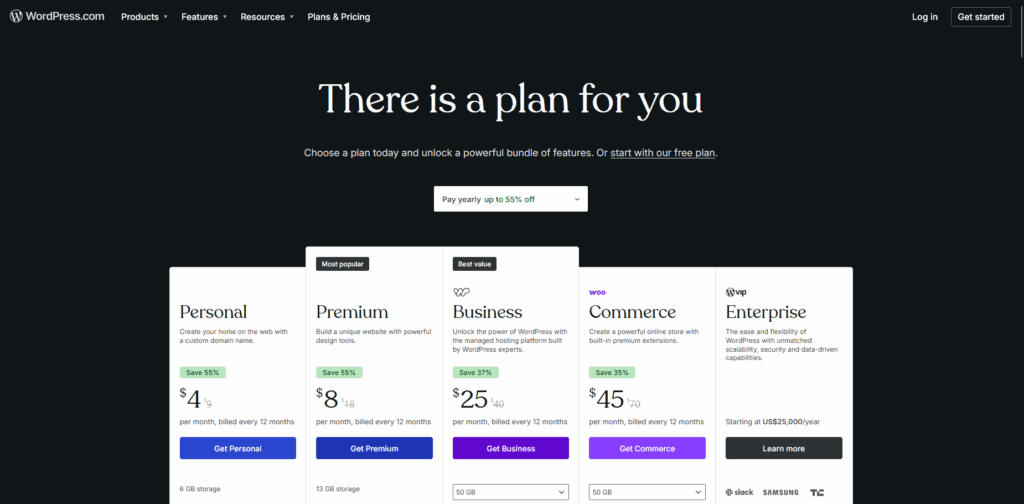
When integrated with the WooCommerce plugin, WordPress serves as an open-source platform.
This model emphasizes complete ownership and creative autonomy, distinguishing it from solutions based on standardized templates.
- Ultimate Flexibility: Users receive unrestricted access to the source code, enabling advanced custom integrations that are not feasible with most SaaS platforms.
- Content-First Commerce: WordPress is widely recognized as a leading content management system (CMS). It is particularly advantageous for strategies that prioritize extensive blogging or organic search optimization.
- Data Sovereignty: Users retain full ownership of their databases, unlike models in which stored data is effectively leased from a third-party provider.
Who is it for?
It suits enterprises and niche brands that need custom functionality, specific SEO goals, or a scalable long-term setup.
Shopify vs WordPress: Quick Comparison
Shopify wins on ease of use and managed hosting, while WordPress wins on flexibility, SEO control and ownership. This table compares the pillars that matter most for a store:
| Feature | Shopify | WordPress + WooCommerce |
| Setup Speed | Instant/Hours | Days/Weeks |
| Maintenance | Automated | User-Responsible |
| Transaction Fees | Yes (unless using Shopify Payments) | None (standard gateway fees only) |
| SEO Depth | Standard/Locked | Advanced/Granular |
| Scalability | Tiered Subscription | Server-Based |
| Ownership | Proprietary | Open-Source |
Ease of Use: Which Platform Is Beginner-Friendly?
Shopify is the more beginner-friendly platform. WordPress takes longer to set up, but it gives you more control after launch.
Shopify: A Plug-and-Play Platform
Shopify is designed as a closed ecosystem where users never have to see a single line of code.
The Shopify setup process is a guided experience. From the moment you sign up, a setup wizard walks you through adding your first product, configuring taxes, and setting up shipping zones.
- Dashboard Experience: The Shopify admin is remarkably clean and focused solely on commerce. Everything you need (orders, analytics, and marketing) is right where you expect it to be.
- Technical Skill Required: Zero. You don’t need to worry about servers, security patches, or database management.
- Time to Launch: Extremely fast. A determined entrepreneur can have a functional, professional-looking store live in a single afternoon.
WordPress: A Build-and-Grow Architecture
WordPress with WooCommerce offers a build-and-grow approach.
While modern drag-and-drop builders like Elementor or Gutenberg have made design much easier, the administrative side still requires more oversight.
- Dashboard Experience: The WordPress dashboard is a complete CMS, with one central place for admins to handle everything from blog posts to complex plugin settings.
- Setup Complexity: You are responsible for procuring your own hosting, installing WordPress, and activating the WooCommerce plugin. This setup is what gives WordPress its steeper learning curve.
- Technical Skill Required: Low to Moderate. While you don’t need to be a developer, you do need to feel comfortable managing a stack and ensuring that your hosting, theme, and plugins play nice together.
Expert Tip: WordPress or Shopify for a small business?
If your primary goal is to start selling immediately with zero technical overhead, Shopify is your winner. However, if you view your website as a long-term digital asset and want full control over it, WordPress is the better path.
Customization and Development Flexibility
WordPress offers far more customization than Shopify, because you get full access to the code. Shopify customization runs through themes and apps.
Shopify: The Theme-First Framework
Shopify is engineered for speed and consistency.
Customization mainly runs through themes and the Shopify App Store. Although this approach creates a stable environment, it imposes inherent limitations.
- Theme-Based Customization: Most modifications are implemented through a visual editor. Although Shopify’s templating language enables certain backend adjustments, users ultimately operate within a proprietary framework.
- App Ecosystem Reliance: If you need a specific feature, like a tiered discount system or a custom loyalty program, you usually have to “rent” it from the App Store. This can lead to app creep, where monthly subscription costs stack up and potentially slow down your site’s load speed.
- API and Backend Limitations: As a closed SaaS platform, Shopify restricts modifications to the core checkout code to the Shopify Plus plan and limits changes to database management.
- Shopify Development Services: Professional developers primarily optimize the frontend and integrate third-party APIs, ensuring that stores maintain a premium appearance while operating within Shopify’s secure infrastructure.
WordPress: The No-Limits Architecture
WordPress ecommerce development has very few limits.
Because it is open-source, you control everything. You have full code access to both the frontend and the backend database.
- Full Code Access: WordPress enables modifications to checkout functionality and supports the creation of unique interfaces, such as custom “Build-Your-Own-Bundle” solutions. The platform allows for advanced, bespoke PHP and JavaScript development.
- Custom Themes and Plugins: Unlike Shopify, which often restricts users to predefined theme layouts, WordPress enables the creation of entirely unique visual identities. Additionally, private plugins can be developed to address specific business logic without incurring recurring app fees.
- Advanced Integrations: WordPress is highly effective at integrating with niche enterprise resource planning (ERP) systems, custom customer relationship management (CRM) platforms, and complex third-party fulfillment centers. If an API is available, WordPress can connect to it directly without platform-imposed restrictions.
- WordPress Ecommerce Development Flexibility: This approach is considered the gold standard for businesses with unique workflows, including multi-vendor marketplaces, complex subscription models, or high-end service bookings.
Cost Breakdown: Shopify vs WordPress
Shopify costs a predictable monthly fee plus app and transaction fees. WordPress has no license fee, but you pay for hosting, plugins and maintenance.
The Shopify Expense Profile
Shopify’s pricing is based on tiered plans. It is designed for predictability, but it can become expensive for high-volume stores that don’t use Shopify’s native tools.
- Monthly Fees ($29 to $2,300+): As of October 2026, Basic costs $29/mo billed annually ($39 monthly), Grow costs $79/mo ($105 monthly) and Advanced costs $299/mo ($399 monthly). Shopify Plus starts at $2,300/mo.
- The App Tax: Most professional stores require 5–10 apps for loyalty programs, advanced filters, or upsells. Unlike WordPress plugins, these are almost exclusively monthly subscriptions, which can easily add $100–$500/mo to your overhead.
- Transaction Penalties: If you don’t use Shopify Payments, you are charged a third-party transaction fee of 0.5% to 2% in addition to your payment processor’s rates. This is a significant factor in the WordPress vs Shopify debate for international sellers.
The WordPress Expense Profile
The cost of WordPress ecommerce development is modular. You have control over every line item, allowing you to scale your costs in direct proportion to your revenue.
- Upfront Investment: Unlike the $0 setup of a template-based Shopify store, a professional WordPress store usually requires an initial investment in WordPress ecommerce development and design, typically ranging from $3,000 to $15,000+ for a custom build.
- Operational Costs: You are responsible for hosting and domain registration. However, many powerful plugins are one-time purchases rather than recurring monthly fees.
- Long-Term ROI: Because WordPress does not charge platform transaction fees, high-volume stores can save tens of thousands of dollars annually. Over a 3-year period, the lower recurring fees often make WordPress the more profitable choice for established brands.
The Hidden Costs: For a small business, Shopify’s low entry cost is unbeatable. But as you scale, Shopify’s convenience tax (transaction fees + app subscriptions) eventually overtakes the maintenance cost of a WordPress site.
| Cost Category | Shopify (Basic) | WordPress (Mid-Level) |
| Platform/Hosting | $348/year | $420/year (Managed) |
| Theme and Design | $0 – $300 | $2,000 – $8,000 (Custom) |
| Apps/Plugins | $1,200/year (Estimated) | $400/year (Premium) |
| Transaction Fees | 2% (if 3rd party) | $0 |
| Total Year 1 | ~$1,550+ | ~$3,000 – $9,000 |
SEO and Marketing Capabilities
WordPress gives you more SEO control than Shopify, while Shopify gives you solid SEO basics with less setup.
Shopify SEO: Standardization and Simplicity
Shopify offers a strong foundation for users seeking straightforward SEO functionality. The platform includes built-in settings for editing title tags, meta descriptions, and alt text.
However, Shopify enforces a rigid URL structure, requiring specific paths such as /products/ and /collections/, which may hinder technical SEO strategies that prioritize a flat site hierarchy.
Additionally, while Shopify’s blogging capabilities are functional, they lack the depth necessary for advanced content clustering.
WordPress SEO: Technical Flexibility and Precision
For brands that prioritize organic search as a primary growth strategy, WordPress e-commerce development is considered the industry standard.
The platform provides complete technical SEO flexibility, enabling modification of all aspects of site code and structure.
- Advanced SEO Plugins: Tools like Yoast SEO or Rank Math provide fine control over schema markup, sitemaps, and indexing rules.
- Content Marketing Advantage: Since WordPress was born as a blogging platform, it has an unmatched ability to manage large-scale content marketing campaigns.
An advantage of WordPress e-commerce development is its flexibility in analytics.
Unlike Shopify, which imposes limitations on its built-in reporting, WordPress supports integration with advanced tracking tools and enables real-time insights in the dashboard via analytics plugins such as Analytify.
This functionality enables comprehensive monitoring of product-level performance and user behavior without leaving the site.
Shopify is an efficient choice for a fast launch.
However, WordPress is stronger for long-term organic growth, because it supports complex content strategies and deeper analytics.
Performance and Scalability
Shopify is faster out of the box, because it manages hosting and the CDN for you. WordPress can match or beat it at scale, but only with good hosting and tuning.
Shopify: The Managed Highway
Shopify’s greatest strength is its managed infrastructure. As a SaaS platform, Shopify bears the full burden of server maintenance and uptime.
- Automatic Scaling: Shopify’s servers adjust automatically to traffic spikes, preventing crashes during flash sales.
- CDN Included: A global Content Delivery Network is built in, ensuring fast load times for international customers.
- Predictability: You don’t have to worry about server limits; the platform is built to absorb massive volume out of the box.
WordPress: The High-Performance Engine
With WordPress ecommerce development, performance is hosting-dependent.
While this requires more configuration, it offers a higher ceiling for enterprise scalability because you aren’t sharing resources on a generic public cloud.
- Custom Optimization: You can choose specialized eCommerce hosting and implement advanced caching layers (like Redis) tailored to your store.
- Database Control: For massive inventories, WordPress offers deep optimization that keeps the backend snappy, even with tens of thousands of SKUs.
- Platform Independence: High-growth brands often prefer WordPress to avoid platform lock-in and maintain full control over their tech stack.
For a small business, Shopify offers the easiest path to a fast-enough store without the technical overhead.
However, as you scale toward an enterprise level, Shopify pushes you to increasingly expensive plans. In contrast, scaling a WordPress store involves upgrading your infrastructure and refining your code.
WordPress takes more management, but it gives a stronger base for a global, custom-built store.
Security and Maintenance
Shopify handles security for you, while WordPress makes you responsible for updates, backups and hardening.
Shopify: A Managed Security Model
Shopify operates as a closed system, managing security on its users’ behalf.
The platform employs a managed security model in which core software and server-side vulnerabilities are continuously monitored by internal security teams.
- Automatic Updates: Updates to the core engine are applied automatically in the background, eliminating the need for store owners to intervene.
- PCI Compliance: Shopify is Level 1 PCI DSS-compliant by default, ensuring that sensitive credit card data is managed in accordance with global standards without additional configuration.
WordPress: A Customizable Security Approach
With WordPress ecommerce development, you have more control but also bear more responsibility for hosting.
Security is an active process rather than a background service.
- Plugin-Based Security: Users may add enterprise-grade firewalls and malware scanners, such as Wordfence or Sucuri, tailored to specific requirements.
- Update Management: Users are responsible for keeping WordPress core, themes, and plugins up to date. While many store owners choose Shopify development services for simplicity, those opting for WordPress often use managed hosting to automate updates.
Risk Comparison for Business Owners
The primary risk associated with Shopify is platform dependency; if the system experiences issues, users must wait for the provider to resolve them.
In contrast, the main risk in WordPress arises from user neglect, as most vulnerabilities result from outdated plugins.
For business owners, Shopify provides peace of mind through automation, whereas WordPress offers security through customization, granting full control over the security infrastructure.
eCommerce Features Comparison
Shopify and WooCommerce both cover the core selling tools. Shopify builds them in, while WordPress adds them through plugins.
Core Selling Tools
Both platforms handle the essentials of modern retail with ease:
- Inventory & Variations: Shopify handles unlimited variations per product, while WordPress has no hard limit, making it ideal for highly complex products.
- Payment & Shipping: Shopify offers its own Shopify Payments and built-in shipping labels. WordPress requires plugins for these, but it doesn’t charge the extra “transaction fees” that Shopify imposes for using third-party gateways.
- Abandoned Cart Recovery: This is native to all Shopify plans. In WordPress, you can implement highly customized, multi-step email sequences via plugins that often outperform Shopify’s default templates.
Advanced Growth Features
For global scaling, multi-currency and subscription support are vital.
Shopify offers these through its “Markets” tool and third-party apps. In contrast, WordPress e-commerce development lets you build a custom subscription engine that integrates directly with your fulfillment workflow.
Reporting and Performance Tracking
One area where the platforms diverge significantly is data visibility.
Store owners who rely heavily on conversion tracking often prefer WordPress because they can customize analytics dashboards and monitor product-level performance with dedicated tools, rather than relying solely on default reports.
For example, Analytify shows WooCommerce revenue, orders and product performance from GA4 inside the WordPress dashboard. You track conversions without switching tools.
In short, Shopify reports are simpler to view, but WordPress is more powerful for those who want to “own” their data insights.
Checkout Customization
Checkout customization is a major sticking point. Shopify locks its checkout page for security (unless you are on the expensive Plus plan).
With WordPress, you have total checkout customization; you can add custom fields, unique “upsell” triggers, or a one-page checkout flow to maximize conversions.
Real-World Use Cases
Choose Shopify for speed and simplicity, and WordPress for control and content-led growth. This table matches common store types to a platform:
| Store Type | Better Pick | Why |
|---|---|---|
| First store, no tech team | Shopify | Hosting, security and updates included |
| Content-led brand with a blog | WordPress | Deeper SEO and content tools |
| Store needing custom checkout | WordPress | Full checkout customization |
| Fast product launch | Shopify | Guided setup, launch in days |
| High-volume store with custom integrations | WordPress | Full code and database control |
| Store with a small budget | Shopify to start | Low entry cost, predictable fees |
Choose Shopify If:
- You want an all-in-one solution in a single bill that covers hosting, security, and the store engine.
- You need a fast launch because your product is ready and you want to take payments by the end of the week.
- You have limited technical resources, no developer on call, and want a “what you see is what you get” (WYSIWYG) editor.
Choose WordPress If:
- You need complete customization, and your business model requires a unique checkout flow or a bespoke product builder.
- You prioritize SEO and content and plan to dominate search results through heavy blogging and advanced schema markup.
- You want full ownership and the freedom to move your site to any host and own your database entirely.
- You need complex integrations that sync with legacy ERPs or niche third-party software.
Shopify vs WordPress for Small Businesses
Small businesses with no technical help should usually start on Shopify. Small businesses that plan to grow through content should choose WordPress.
- Budget Considerations: Shopify offers a predictable monthly fee (starting at $29 billed annually), though transaction fees and app subscriptions may reduce profit margins. WordPress generally incurs lower ongoing costs but often requires a greater initial investment for eCommerce development.
- Ease of Management: Shopify minimizes technical maintenance requirements, allowing business owners to focus on operations. In contrast, WordPress necessitates ongoing updates but offers significantly greater long-term flexibility.
- Growth Potential: Both platforms support scalability; however, WordPress enables businesses to transition from a basic online store to a membership site or a complex marketplace as needs evolve.
Common Mistakes When Choosing an eCommerce Platform
Here are some common mistakes owners make while deciding between Shopify and WordPress:
- Selecting Based on Popularity: The fact that a competitor uses Shopify does not guarantee its suitability for your unique business processes.
- Overlooking Long-Term Costs: An initially inexpensive setup may result in substantial monthly expenses as additional applications are required.
- Neglecting SEO Requirements: Migrating to a platform with inflexible URL structures can negatively impact brands that rely on organic search traffic.
- Failing to Plan for Scalability: It is essential to select a platform capable of accommodating significant increases in traffic without necessitating a complete redevelopment.
- Underestimating Complexity: A custom WordPress build needs a longer initial setup, so plan for it.
How WPBrigade Can Help You Build the Right Store
Your platform should help your business scale, not hold it back.
I don’t think there’s one right answer for every store. At WPBrigade, we match the platform and the build to what the business is trying to do.
On the WordPress side, we build fast online stores that use the full WordPress and WooCommerce ecosystem.
A primary advantage of WordPress ecommerce development is its extensive plugin ecosystem.
Rather than depending on a closed application marketplace, we integrate specialized solutions designed to address specific performance and analytics requirements.
For organizations seeking a managed ecommerce experience, we customize Shopify’s Liquid code to give stores a distinctive look that stands out from standard templates.
Migration and Strategy
For clients who have outgrown their platform, we migrate product data, customers and orders while preserving SEO rankings.
FAQs
Shopify is better for a fast, low-maintenance launch. WordPress with WooCommerce is better for control, SEO and custom features. The right pick depends on your team and growth plan.
WordPress is better for long-term SEO. It gives full control over URLs, technical SEO and content through plugins like Yoast SEO. Shopify covers the SEO basics with less setup.
Shopify has a lower, predictable entry cost. WordPress is often cheaper over time, because it has no platform transaction fees. Many WordPress features come from one-time or yearly plugin licenses.
Yes. You can migrate products, customers and orders. Plan redirects for every old URL so your SEO rankings carry over.
No, but there is a learning curve. WooCommerce has a setup wizard for the basics. Custom features and speed tuning are easier with a developer.
Ecommerce events are usually not set up. GA4 needs purchase and product events from your store. Analytify Pro sends WooCommerce events to GA4 and shows the reports inside WordPress.
Ecommerce Solutions: Shopify vs WordPress
Deciding between Shopify and WordPress isn’t about finding the better platform; it’s about identifying the right tool for your specific business goals.
- Choose Shopify if you value speed and simplicity. It suits entrepreneurs who want a managed, secure environment with technical details handled for them. It’s the perfect launchpad for straightforward retail.
- Choose WordPress if you value ownership and scalability. With WordPress ecommerce development, you’re building a custom digital asset. It is the ideal choice for brands that rely on heavy content marketing and need complex integrations.
Ultimately, your platform should reflect your 3-year growth strategy, not just respond to a current trend.
Whichever you choose, make sure it lets your business grow without technical roadblocks.
For more related posts, check:
- How to Choose the Right WordPress Plugins Without Hurting Performance
- WordPress Technical Audits: What Agencies Look for Before Scaling
The real question is whether you need the fastest possible launch or a fully custom platform you own. I’ve compared more options in my guide to the best CMS platforms for 2026.
Let us know in the comments which feature is the most “make or break” for your business!

Leave a Reply