
The best SEO APIs in 2026 are the Google Search Console API, Ahrefs API, DataForSEO, SE Ranking API, SEMrush API, GA4 Analytics Data API, IndexNow, PageSpeed Insights API, Google Natural Language API and the Wayback Machine API. Start with the free Google Search Console API, then add a paid data provider for keywords and backlinks. Manual SEO reporting means switching between tools, copy-pasting data into spreadsheets and rebuilding the same client reports every month. For most SEO teams, that is easily 5 to 10 hours a week, and these APIs automate it.
SEO APIs give you direct, programmatic access to keyword data, rank tracking, backlink metrics, and site performance. You stop doing the repetitive work and start focusing on the decisions that actually move rankings.
This guide covers the 10 best SEO APIs available in 2026. For each one, you’ll find what it does, who it’s built for, honest pricing, where it excels, and where it falls short. I’ll also share the exact stack the WPBrigade team uses to track per-post organic performance across Analytify and LoginPress, with no extra dashboards needed.
Table of contents
- What Is an SEO API?
- Why Use SEO APIs?
- The 10 Best SEO APIs in 2026
- 1. Google Search Console API: Your First and Most Important SEO API
- 2. Ahrefs API: Keyword, Backlink, and Organic Traffic Data
- 3. DataForSEO: The Developer-First SEO Data Provider
- 4. SE Ranking API: The Best Mid-Market SEO API for Most Teams
- 5. SEMrush API: Competitive Intelligence at Scale
- 6. GA4 Analytics Data API: Acquisition, Behavior, and Conversion Data
- 7. IndexNow API: Notify Search Engines About Content Changes Instantly
- 8. PageSpeed Insights API: Automated Core Web Vitals Monitoring
- 9. Google Natural Language API: Semantic Analysis and Entity Extraction
- 10. Wayback Machine API: Historical Snapshots of Any Webpage
- What Are MCP Servers and How Do They Relate to SEO APIs?
- How WPBrigade Uses SEO APIs: A Real Workflow
- How to Pick the Right SEO API Stack
- SEO API Comparison Tables
- Common SEO API Use Cases
- How to Set Up the Google Search Console API
- Mistakes to Avoid with SEO APIs
- Frequently Asked Questions
- SEO APIs: Wrapping Up
What Is an SEO API?
An SEO API is a direct connection between an SEO data source and your own tools, dashboards, or workflows. Instead of logging into a platform and downloading a CSV, you send a request and get structured data back automatically, at scale, on a schedule, in seconds.
SEO APIs cover almost every part of search: keyword research, backlink analysis, rank tracking, site auditing, page speed, and now AI search visibility. Most major SEO platforms offer at least one.
The key difference from standard SEO tools is that APIs are programmable. You control when the data is pulled, how it is formatted, and where it goes. A tool shows you data. An API lets you build with it.
One term you’ll see throughout this article: API units. Most paid SEO APIs charge by the unit, where one unit equals one row of data returned. If you request 1,000 keywords, that costs 1,000 units. This matters for budgeting: the more data you pull, the faster you burn through your monthly allocation.
Why Use SEO APIs?
SEO APIs save time, cut errors, and make your data far more useful. Here are the five strongest reasons to use them.
1. Automate repetitive reporting: Pull keyword rankings, traffic, and backlink counts into a dashboard automatically. No more manual exports every Monday morning.
2. Build custom dashboards: Combine data from multiple SEO tools into one view: your layout, your metrics, not the platform’s default.
3. Scale data collection: Need keyword data for 10,000 URLs? An API handles that in minutes. Doing it manually takes days.
4. Connect SEO data to other systems: Push organic traffic data into your CRM, email platform, or financial reports. SEO stops being siloed from the rest of the business.
5. Get alerts, not surprises: Set up automated checks. Get notified when rankings drop, backlinks are lost, or Core Web Vitals cross a threshold, before a client or manager notices.
If you are doing SEO at any real scale, doing it without APIs means doing it slowly.
The 10 Best SEO APIs in 2026
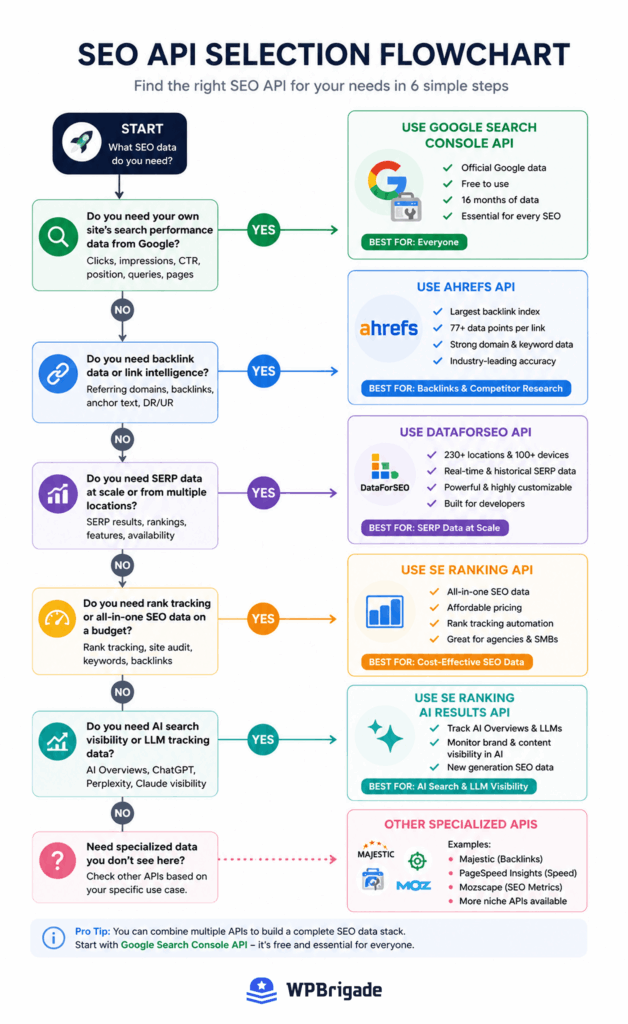
The 10 best SEO APIs are ranked below from highest priority to most specialized.
1. Google Search Console API: Your First and Most Important SEO API
The Google Search Console API gives you direct access to your actual search performance data: clicks, impressions, CTR, and average position. Straight from Google. No estimates, no third-party approximations. And it is completely free.
What you can pull:
- Query-level performance: which keywords drive clicks and impressions for your site
- URL-level performance: which pages rank and for what search terms
- Device breakdown: mobile vs. desktop click distribution
- Index coverage: crawl errors, excluded pages, and coverage issues
The biggest limitation of the GSC dashboard: It only stores 16 months of data. Once that window closes, the data is gone. The API doesn’t remove this limit on its own, but once you pipe the data into Google Sheets, BigQuery, or Looker Studio, you own it permanently.
One real frustration to know about: The default limit is 25,000 rows per request. On large sites with thousands of pages, you will hit this ceiling and miss data unless you paginate your calls or filter by date range. It is a minor annoyance to build around, but worth knowing before you assume one request covers everything.
Pricing: Free. Subject to standard Google API usage quotas.
Best for: Every SEO. If you only ever connect to one API, make it this one.
2. Ahrefs API: Keyword, Backlink, and Organic Traffic Data
The Ahrefs API gives you programmatic access to one of the largest SEO databases in the world. Keyword difficulty scores, referring domain counts, organic traffic estimates, SERP positions, and backlink data at a depth you won’t find elsewhere.
What you can pull:
- Keyword metrics: search volume, Keyword Difficulty (KD), and the top 100 SERP results for any keyword
- Backlink data: referring domains, anchor text distribution, and domain rating per URL
- Organic traffic: traffic value, top pages by traffic, and search performance per domain
- Site audit data: technical issues, crawl health, and on-page signals
Why Ahrefs for backlink data specifically: The Ahrefs backlink endpoint returns 77 data fields per backlink. Most competing endpoints return fewer than 25. That depth matters when you are building link qualification workflows or monitoring a client’s profile for toxic links.
Pricing (as of June 2026): API access is available on Lite, Standard, Advanced, and Enterprise plans. Lite starts at $129 per month (monthly billing) or around $108 per month on annual billing. Standard at $249 per month gives you 150,000 API units per month and is the most practical tier for agencies doing automated reporting.
The honest reality on pricing: The Lite plan’s API unit allocation runs out quickly if you are pulling bulk keyword or backlink data regularly. Most agencies doing real automation find themselves upgrading to Standard within the first month. If automated reporting is your primary use case, budget for Standard from the start rather than discovering the Lite limit mid-project.
Best for: Agencies, in-house SEO teams, and developers building custom reporting dashboards where backlink depth and keyword accuracy are priorities.
3. DataForSEO: The Developer-First SEO Data Provider
DataForSEO is the API most SEO developers reach for when they need flexible, granular access to multiple data types through a single provider. It powers many well-known SEO tools behind the scenes, which tells you something about how reliable the data is.
Unlike platform-based APIs, DataForSEO is built specifically for programmatic access. There is no dashboard product. It is a raw data API for developers who know exactly what they need.
What you can access:
- SERP API: live search results for Google, Bing, Yahoo, YouTube, and 9 other engines across 230+ locations
- Keywords Data API: search volume, CPC, competition scores, and related keyword data
- Backlinks API: referring domains, anchor text, and link authority data
- OnPage API: technical site health checks at page and domain level
- Content Analysis API: entity extraction and semantic content analysis
- AI Overviews API: structured data from Google AI Overview results
Pricing: Pay-as-you-go. You pay per task submitted, not a flat monthly fee. Minimum spend is $50. Cost varies by endpoint, search engine, location, and data volume. For teams with variable usage, this model is genuinely cost-effective: you pay for exactly what you pull.
Where it gets difficult: DataForSEO uses a task-based architecture, unlike most platform APIs. You submit a task, wait for it to process, then retrieve the results. It’s not always synchronous. Budget a few days for a developer to understand this model before committing. If you aren’t technical and you are hoping to connect DataForSEO without engineering help, it’s the wrong choice. This is a developer tool.
Best for: Developers building SEO tools or data pipelines, SaaS teams integrating SEO data into their products, and agencies running high-volume SERP analysis across multiple locations.
4. SE Ranking API: The Best Mid-Market SEO API for Most Teams
SE Ranking covers keyword tracking, backlinks, on-page audit data, competitor analysis, and AI search visibility through a single endpoint set. For most agencies and in-house teams that aren’t building custom software, SE Ranking is where the price-to-value ratio makes the most sense in 2026.
SE Ranking’s API has a split architecture worth understanding. The Data API gives you raw access to SE Ranking’s database of 5.4 billion keywords across 188 countries. The Project API lets you programmatically manage rank tracking projects, site audits, and competitor monitoring inside your SE Ranking account. Most teams use both.
What you can pull:
- Keyword rankings for Google, Bing, and Yahoo across desktop and mobile
- Backlinks: referring domains, anchor text, and link type breakdowns
- Keyword research: search volume, CPC, competition scores, and SERP feature presence
- AI search visibility: citation tracking across ChatGPT, Gemini, Perplexity, Google AI Mode, and Google AI Overviews
- Site audit data: technical SEO issues at page and domain level
- Competitor analysis: organic visibility across multiple domains side by side
Pricing (as of June 2026):
- API add-on: $149 per month on annual billing, 12M credits covering backlinks, domain analysis, keyword research, AI search, and audit APIs
- Standalone SEO Data API: from $179 per month. API-only access without the full SE Ranking platform
Where it falls short: The backlink index is smaller than Ahrefs. For most rank tracking and keyword research workflows, this doesn’t matter, but if your work is heavily link-focused (outreach prospecting, link building campaigns, competitor backlink analysis at depth), you will notice the gap. SE Ranking is excellent for what most teams actually do. Ahrefs is worth the premium when backlinks are the core of your work.
Best for: Agencies doing automated rank tracking, teams that want AI search visibility baked into their reporting, and mid-market buyers who need more than free Google APIs but can’t justify enterprise pricing.
5. SEMrush API: Competitive Intelligence at Scale
The SEMrush API gives you programmatic access to one of the largest keyword databases available: 26 billion keywords across 140+ regional databases, plus domain-level competitive intelligence, position tracking, and site audit data.
What you can pull:
- Domain analytics: organic keywords, traffic trends, and top competitors for any domain
- Keyword research: volume, CPC, difficulty, and SERP feature presence
- Position tracking: daily rank data for any keyword list
- Backlink reports: referring domains, anchor text, and authority scores
- Traffic analytics: estimated monthly visits and traffic source breakdown per domain
Best use case for the API specifically: Competitive analysis at scale. SEMrush’s domain comparison endpoints are strong. If you need to pull organic keyword overlap between your domain and five competitors automatically, then push those gaps into a prioritization model, the SEMrush API handles that well.
Pricing (checked October 2026): API access requires the Advanced SEO + AI Search plan ($549 per month, or $455.67 per month billed annually). API units are purchased separately on top of the subscription.
The honest take: At $549 per month before you have even bought API units, this is a hard number to justify unless your team is already using SEMrush daily for other work. If you are already on the Business plan and paying for it regardless, adding API access is a natural extension. If you are evaluating from scratch and the API is the main reason you want SEMrush, SE Ranking or DataForSEO will give you comparable data at a fraction of the cost.
Best for: Large agencies managing dozens of accounts, enterprise in-house teams, and teams already on the SEMrush Business plan who want to pipe data into custom dashboards.
6. GA4 Analytics Data API: Acquisition, Behavior, and Conversion Data
The Google Analytics Data API gives you programmatic access to all GA4 data: sessions, users, traffic sources, conversion events, eCommerce revenue, and engagement metrics. It is the developer-facing version of your GA4 account, and it’s free.
What you can do with it:
- Automate custom reports for clients or stakeholders without manual exports
- Pull organic conversion data into CRM lead-scoring models
- Combine GA4 data with other sources (ad spend, support tickets, revenue records)
- Run batch reports across multiple GA4 properties in a single API call
- Build audience segmentation reports that GA4’s built-in interface doesn’t support
Pricing: Free. Subject to standard Google Cloud API usage limits.
Want GA4 data inside WordPress without touching an API?
The GA4 Analytics Data API is powerful, but it requires developer credentials and custom code. If you run a WordPress site and want GA4 metrics without any of that setup, Analytify connects your GA4 account directly to WordPress through the plugin settings. Analytify shows per-post traffic, real-time visitors, WooCommerce revenue, form conversions, and author-level stats, all inside your WordPress dashboard. No API configuration.
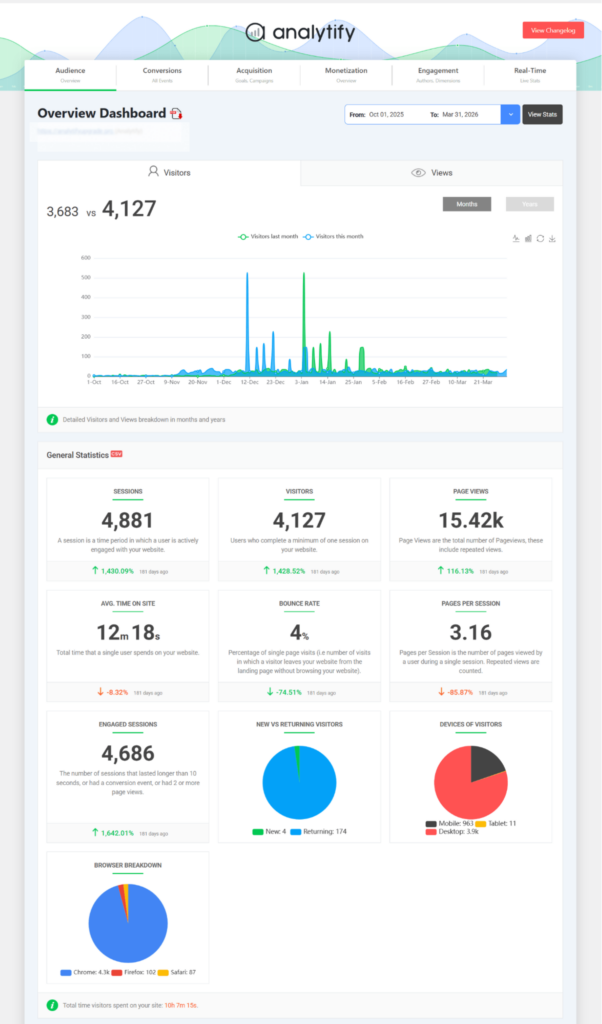
See your GA4 data inside WordPress, start today with Analytify.
7. IndexNow API: Notify Search Engines About Content Changes Instantly
IndexNow is a free protocol that tells search engines the moment a page on your site is added, updated, or removed. Instead of waiting for Googlebot to discover changes on its next crawl, you push the notification directly.
Many WordPress hosts, CDNs, and CMSs already support IndexNow natively. Check your setup before configuring it manually, because you may already have it.
How it works:
- Generate a free IndexNow API key at indexnow.org
- Host the key file in your site’s root directory in txt format
- Submit the key location as a URL parameter
- IndexNow pings participating search engines, including Bing and Yandex, with your updated URLs
Note on Google: As of mid-2026, Google hasn’t officially joined the IndexNow protocol. Bing is the main beneficiary. Faster Bing indexing still matters for visibility, and faster discovery across any engine reduces the time between publishing and traffic.
Pricing: Free.
Best for: Publishing sites, news sites, WooCommerce stores, and any site where content freshness directly drives traffic.
8. PageSpeed Insights API: Automated Core Web Vitals Monitoring
The PageSpeed Insights API gives you programmatic access to Lighthouse performance scores and Core Web Vitals data for any URL. You can check desktop and mobile performance without opening a browser.
Metrics you can pull:
- LCP (Largest Contentful Paint): target below 2.5 seconds
- INP (Interaction to Next Paint): target below 200 milliseconds
- CLS (Cumulative Layout Shift): target below 0.1
- Full Lighthouse scores for performance, accessibility, and SEO
The practical use case: Run a weekly script that checks these scores for your 20 most important pages. Log the results in a spreadsheet. Trigger a Slack alert if any score drops below your threshold. Catch performance regressions before they affect rankings, not after a client notices the traffic drop.
Pricing: Free. Part of Google Cloud APIs.
Best for: Technical SEOs, developers, and anyone accountable for Core Web Vitals.
9. Google Natural Language API: Semantic Analysis and Entity Extraction
The Google Natural Language API applies machine learning to text. It identifies entities (people, places, brands, topics), analyzes sentiment, and tags parts of speech in any piece of content, at scale.
Who actually needs this: Most content teams don’t. This API earns its place when you are auditing hundreds of pages at a time, building a classification system for a large product catalog, or trying to understand which entities Google associates with a topic cluster. For a team publishing 2 to 3 articles a week, the manual equivalent (reading competitors’ top-ranking pages and noting what topics they cover) is faster and just as effective.
SEO use cases where it earns its place:
- Identify which entities Google associates with a topic, then include those same entities in your content to strengthen topical relevance. For example, if you paste the phrase “GA4 tracking” into the API, it returns entities like “Google Analytics”, “conversion tracking”, “session data”, and “eCommerce reporting” as semantically related concepts, a clear signal of what Google expects a thorough article on this topic to cover.
- Build automated content taxonomies for large eCommerce catalogs: classify thousands of products by entity and category without manual work
- Identify the main topic and sub-topics of any page for content audits across large sites
Pricing: Freemium. Up to 5,000 units free per month. Usage-based pricing beyond that.
Best for: Technical SEOs doing content analysis at scale and developers building classification or audit tools. Not for everyday content workflows.
10. Wayback Machine API: Historical Snapshots of Any Webpage
The Wayback Machine API gives you access to the Internet Archive’s historical snapshots of any public URL. It records HTML and visual snapshots of pages over time, going back decades on many major sites.
A note on when this is actually useful: The Wayback Machine is genuinely powerful for two specific situations: large site migrations and competitive research on established sites. For new or small sites with limited crawl history, the data is inconsistent, and the archive may only have a handful of snapshots. If you are researching a domain that launched six months ago, you may get very little back.
SEO use cases where it shines:
- Redirect mapping during large site migrations: pull archived page content from old URLs, then match them to new URLs based on content similarity rather than guesswork.
- Benchmark the domain before starting an engagement: document what the site looked like before your work began so you can clearly show before-and-after.
- Competitive research: see how a well-established competitor’s homepage, pricing page, or navigation changed over the past two to three years. Strategy shifts show up in the archive before anywhere else.
- Content recovery: restore deleted articles or copy from earlier versions of your own site if you need to reconstruct something lost in a migration.
Two APIs worth knowing:
- Save Page Now 2 API: Triggers new snapshots of specific URLs on demand
- CDX Server API: Queries which URLs have been archived and retrieves historical snapshot data programmatically. This is the one most SEOs use for redirect mapping. You can pull a full list of archived URLs for any domain and their last-known content.
Pricing: Free.
Best for: Technical SEOs handling site migrations, competitive researchers, and agencies onboarding established clients where site history matters.
What Are MCP Servers and How Do They Relate to SEO APIs?
MCP stands for Model Context Protocol. It is an open standard that lets AI assistants (ChatGPT, Claude, Cursor and others) connect directly to external data sources through natural language. No API calls. No code.
In 2025 and 2026, Ahrefs, SEMrush, and SE Ranking all launched MCP servers alongside their traditional APIs. What this means in practice: you can type a prompt like “show me the top keywords my site ranks for that dropped this month” directly inside Claude or ChatGPT, and the MCP server pulls the answer from your SEO tool account automatically.
How MCP differs from a traditional API: A traditional API requires you to write code, manage authentication, and format the output. An MCP connection requires one-time configuration and then works in natural language from that point forward. Same underlying data. Different interface entirely.
Where MCP fits in a real workflow: MCP isn’t a replacement for traditional API pipelines in production systems. If you are running automated weekly rank tracking in BigQuery, you still need the API. But for ad hoc research, quick competitive checks, and generating reports on demand within an AI assistant, MCP is faster and requires no code.
Tools that currently support MCP (as of June 2026):
- Ahrefs: MCP included on Lite plan and above
- SEMrush: available via the SEMrush MCP server
- SE Ranking: official MCP support included
If you are building workflows where AI assistants need to pull live SEO data, check whether your tool supports MCP before writing custom API integration code. It will save you significant development time.
How WPBrigade Uses SEO APIs: A Real Workflow
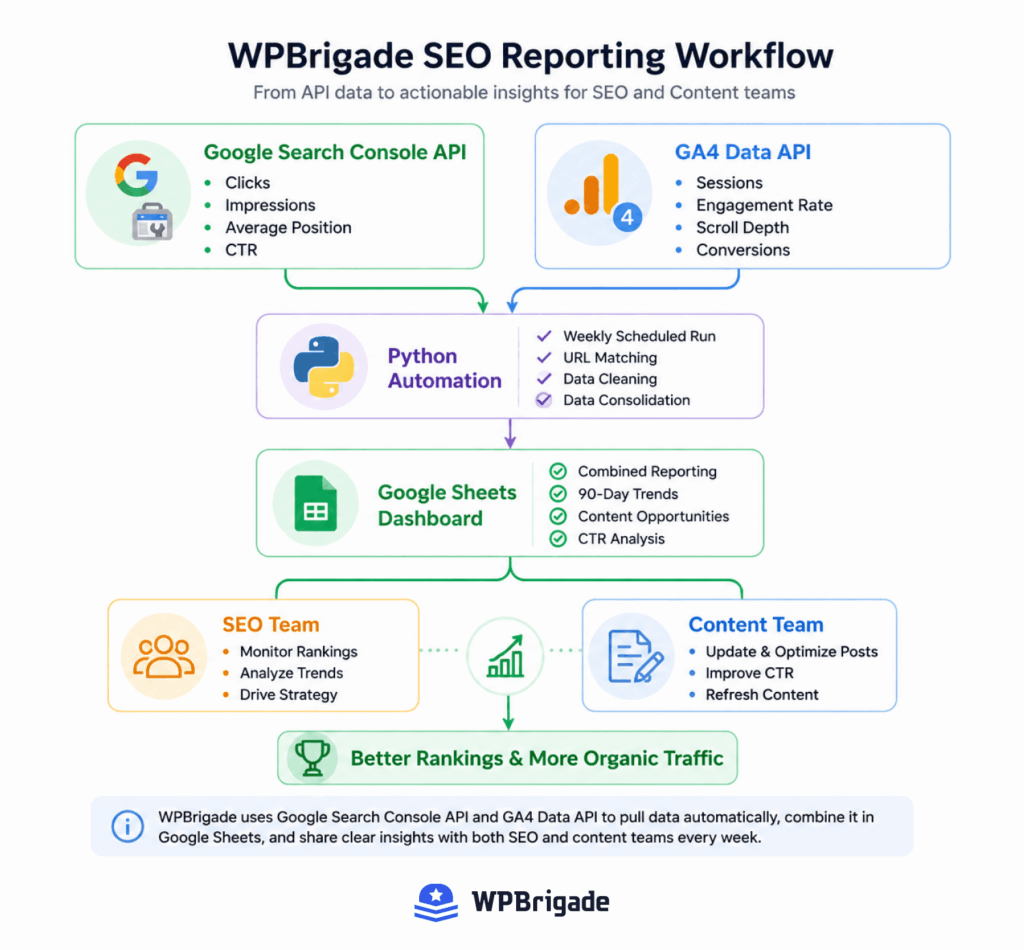
The WPBrigade team uses SEO APIs in a real workflow across Analytify and LoginPress content:
The problem: We publish content across two brands on separate domains. We needed to know, for each individual blog post, how organic traffic was trending over the past 90 days, without opening Google Analytics and manually filtering by URL every time.
The stack:
- Google Search Console API pulls clicks, impressions, and average position for each URL on a weekly schedule. We filter by the past 90 days and segment by query.
- GA4 Analytics Data API pulls sessions, scroll depth, and engagement rate for those same URLs from the matching GA4 property.
- Both datasets feed into a shared Google Sheets dashboard via a Python script that runs every Monday morning.
The output is a single view showing which posts are gaining clicks, which are losing position, and which have high impressions but low CTR, a clear signal to rewrite the title and meta description.
Where Analytify Helps: Some of our content writers don’t want to touch a script or open a spreadsheet. Analytify shows post-level stats inside WordPress. The writer opens a post, scrolls to the bottom of the editor, and sees the last 30 days of GA4 data for that specific URL. No API access required. No dashboard login. That per-post visibility drives quick decisions: is this post worth updating, or has the traffic already moved on?
The broader point: APIs and WordPress plugins serve different people on the same team. The API-into-Sheets workflow handles strategy-level decisions. Analytify handles day-to-day content decisions without requiring technical access.
How to Pick the Right SEO API Stack
When choosing from the best SEO APIs, the right stack depends on what you are trying to automate. Use this framework, then see the direct recommendation for the most common scenario at the end.
Start here regardless of your goal: Google Search Console API. Free, accurate, your actual Google data. Connect it first, always.
Need keyword and backlink data? Ahrefs API for the deepest backlink index. SE Ranking API for the best value if you also want AI search visibility included at the same price.
Need competitive intelligence at scale? SEMrush API if you are already on the Business plan. DataForSEO if you want pay-as-you-go access without platform lock-in.
Need raw SERP data across multiple search engines? DataForSEO. It covers Google, Bing, Yahoo, YouTube, and 9 more across 230+ locations.
Need GA4 reporting automation? GA4 Analytics Data API, free directly from Google.
Need site performance monitoring? PageSpeed Insights API for Core Web Vitals. Pair it with IndexNow for faster content indexing.
Need content analysis at scale? Google Natural Language API for entity extraction and semantic analysis.
Need historical data or migration support? Wayback Machine API.
Want AI assistants to pull SEO data by prompt? Check whether your tool supports MCP before writing custom API code.
The direct recommendation for most agencies starting fresh: Start with SE Ranking API. It covers keyword tracking, backlinks, and AI search visibility in one bill, at a mid-market price. When your backlink research needs outgrow what SE Ranking’s index covers, typically when you are doing link building outreach at scale, that’s the natural point to add Ahrefs. DataForSEO enters the picture when you move from reporting on data to building something with it: a custom tool, a data product, or a workflow that needs raw SERP feeds rather than pre-packaged reports.
Most serious SEO workflows need three to five of these best SEO APIs working together, not just one. The right combination depends on what you’re automating.
SEO API Comparison Tables
Full API Overview
| API | Primary Use | Free or Paid | Technical Level | Best For |
|---|---|---|---|---|
| Google Search Console API | Your own ranking and impressions data | Free | Low | All SEOs, start here |
| Ahrefs API | Keyword, backlink, organic traffic | Paid (from $129 per month) | Medium | Backlink depth, agency reporting |
| DataForSEO | SERP, keyword, backlink, on-page, AI data | Pay-as-you-go ($50 min) | High | Developers, tool builders |
| SE Ranking API | Keyword tracking, backlinks, AI search | Paid ($149 per month add-on) | Medium | Mid-market agencies |
| SEMrush API | Competitive intel, keyword, domain data | Paid (Business plan add-on) | Medium | Enterprise competitive analysis |
| GA4 Analytics Data API | GA4 data export and automation | Free | Medium | Developers, marketing ops |
| IndexNow API | Faster indexing of content changes | Free | Low | Publishing, eCommerce sites |
| PageSpeed Insights API | Core Web Vitals monitoring | Free | Low | Technical SEOs, developers |
| Natural Language API | Entity extraction, semantic analysis | Freemium (5K units per month free) | High | Content analysis at scale |
| Wayback Machine API | Historical snapshots, migration support | Free | Medium | Migrations, competitive research |
Free vs. Paid Breakdown
| API | Free Tier | Paid Cost |
|---|---|---|
| Google Search Console API | Full access | None |
| GA4 Analytics Data API | Full access (quota limits apply) | None |
| IndexNow API | Full access | None |
| PageSpeed Insights API | Full access | None |
| Wayback Machine API | Full access | None |
| Natural Language API | 5,000 units per month | Usage-based beyond that |
| DataForSEO | None | Pay-per-task ($50 minimum) |
| SE Ranking API | None | $149 per month add-on (annual billing) |
| Ahrefs API | None | From $129 per month (Lite plan) |
| SEMrush API | None | Advanced SEO + AI Search plan required ($549 per month base) |
Decision Matrix: Which API for Which Job?
| Goal | Best API | Why |
|---|---|---|
| Track my own keyword rankings | Google Search Console API | Free, direct from Google |
| Research competitor backlinks | Ahrefs API | Largest backlink index available |
| Build a custom SEO data product | DataForSEO | Developer-first, pay-as-you-go |
| Track AI search citations (ChatGPT, Gemini) | SE Ranking API | Native AI visibility tracking included |
| Pull SERP data across 10+ countries | DataForSEO | 230+ location coverage |
| Automate GA4 reporting for clients | GA4 Analytics Data API | Free, direct from Google |
| Monitor Core Web Vitals after deployments | PageSpeed Insights API | Free, automated monitoring |
| Speed up indexing after publishing | IndexNow API | Free, instant notification |
| Classify products by entity at scale | Natural Language API | Machine learning classification |
| Map redirects during a site migration | Wayback Machine API | Historical snapshot access |
Common SEO API Use Cases
Teams use SEO APIs most for rank tracking, reporting, content audits and technical monitoring. The highest-value use cases are:
Automated client reporting: Pull data from GSC, GA4, and Ahrefs into a single Looker Studio dashboard. Clients see live data without you touching a spreadsheet. This saves 3 to 5 hours per client per month at a minimum.
Rank tracking alerts: Use the GSC API or Ahrefs API to check keyword positions daily. Trigger a Slack message or email when a target keyword drops more than 5 positions. Catch drops before they compound into traffic losses.
Keyword cannibalization detection: Pull all keyword-URL pairs from the GSC API. Identify keywords where two or more URLs compete. Flag them automatically. Fix cannibalization before it splits your ranking signals.
Competitive content monitoring: Use the Wayback Machine API to detect when established competitors update their top-ranking pages. Trigger an internal review of your competing article when a rival posts a significant update.
Core Web Vitals regression testing: After every site deployment, run a PageSpeed Insights API check on your 20 most important pages. If any score drops below threshold, trigger a review before rankings are affected.
AI search visibility tracking: Use the SE Ranking AI Search API to monitor how often your brand or content appears in ChatGPT, Gemini, and Perplexity responses for your target queries. As AI-generated answers handle a growing share of search traffic in 2026, tracking citation frequency is becoming as important as tracking keyword positions.
Programmatic site taxonomy: Use the Natural Language API to classify thousands of product descriptions into categories, tags, and entities automatically. This is a genuine time saver on large catalog migrations, the kind of work that would take a team weeks to categorize manually.
How to Set Up the Google Search Console API
The Google Search Console API is the right first step for any SEO API stack. It is free, covers your actual Google data, and takes under 30 minutes to configure the first time.
Step 1: Enable the API in Google Cloud Console. Go to Google Cloud Console. Create a new project or select an existing one. Navigate to APIs and Services, then search for and enable the “Google Search Console API.”
Step 2: Create credentials. Inside APIs and Services, click Credentials. Create an OAuth 2.0 Client ID for a web application, or a Service Account if you are running server-side scripts. Download the credentials JSON file.
Step 3: Authenticate your requests. Use the credentials file to authenticate. The GSC API uses OAuth 2.0. Google’s official client libraries for Python, Node.js, and other languages handle the authentication flow; you don’t need to build it from scratch.
Step 4: Make your first API call. A basic call to pull query-level data for your site looks like this:
GET https://searchconsole.googleapis.com/v1/sites/{siteUrl}/searchAnalytics/query
Set your date range, dimensions (query, page, device, country), and row limit. The API returns clicks, impressions, CTR, and average position per row.
Step 5: Store the data. Push results into Google Sheets, BigQuery, or a reporting tool of your choice. Set up a scheduled script to pull fresh data weekly. This is the step most people skip, and six months later, they want historical data they can no longer recover.
Mistakes to Avoid with SEO APIs
Using SEO APIs incorrectly wastes money, hits rate limits, and creates data problems you’ll have to fix later. Here are the most common ones.
Pulling data you don’t actually use: Every API call counts toward your quota or your bill. Pull only the dimensions and metrics that appear in your reports. Pulling everything “just in case” is expensive and produces noise you will never act on.
Not storing historical data from day one: Some APIs, including GSC, have data retention limits. Build a storage layer before you need it. Do not assume the data will be there when you want to look back six months from now.
Over-relying on one data source: No single SEO API covers everything accurately. Keyword estimates from a third-party tool aren’t the same as your actual click data from GSC. Use each source for what it actually measures.
Ignoring rate limits: Every API has a rate limit. Build retry logic and exponential backoff into your scripts. A script that hammers an endpoint at 100 requests per second when the limit is 60 per minute will get blocked, and stay blocked until you contact support.
Skipping error handling: API responses fail. Servers go down. Quotas get hit without warning. Every API call needs a try-catch block. Without it, one failed call silently breaks the entire pipeline, and you find out three days later when a report is empty.
Paying for a third-party API before testing the free stack: The Google Search Console API, GA4 Analytics Data API, PageSpeed Insights API, IndexNow, and Wayback Machine API together cover a significant amount of what most SEOs need. Test the free stack thoroughly first. Buy paid APIs once you know exactly which gap they fill.
Frequently Asked Questions
SEO APIs: Wrapping Up
Most SEOs over-complicate this. Start with the Google Search Console API, store your data somewhere permanent, and resist the urge to connect six more APIs before you have built anything useful with the first one.
The teams that get the most out of SEO APIs aren’t the ones with the biggest stack. They are the ones who picked one problem, whether that was rank tracking, client reporting, or Core Web Vitals monitoring, built a workflow that solves it, and ran that workflow consistently. The APIs on this list are tools, not achievements. Connecting them is easy. Using them to make better decisions every week is the actual work.
For most agencies starting fresh, SE Ranking covers what you need at a price that makes sense. Add Ahrefs when link building becomes a core part of your workflow. Reach for DataForSEO when you are building something, not just reporting on it.
And if your WordPress site is where the content lives, Analytify gives you GA4 data per post inside WordPress, no API configuration, no dashboard switching. Start tracking per-post traffic inside WordPress with Analytify.
Further Reading:
Which SEO API has made the biggest difference in your workflow, and is there one you’ve tried that didn’t live up to the hype? Drop your experience in the comments below.
Leave a Reply