
The best platform choice for online stores is a critical decision, as it dictates everything from your initial setup speed to your long-term ability to scale.
If you are wondering which one between Shopify vs WordPress is better for your ecommerce store?
The answer to this depends on whether the priority is immediate usability or comprehensive creative control.
Since the eCommerce landscape has evolved, with AI-driven search and highly personalized shopping experiences, platforms must offer more than basic product listings.
Your store must support scalability, search ranking, and conversion optimization. In this guide, I will analyze the eCommerce capabilities of Shopify and WordPress to help align platform selection with specific business objectives.
Shopify vs WordPress (TOC):
- What is Shopify?
- What is WordPress for eCommerce?
- Shopify vs WordPress: Quick Comparison
- Ease of Use: Which Platform Is Beginner-Friendly?
- Customization and Development Flexibility
- Cost Breakdown: Shopify vs WordPress
- SEO and Marketing Capabilities
- Performance and Scalability
- Security and Maintenance
- eCommerce Features Comparison
- Real-World Use Cases
- Shopify vs WordPress for Small Businesses
- Common Mistakes When Choosing an eCommerce Platform
- How WPBrigade Can Help You Build the Right Store
- FAQs
- Ecommerce Solutions: Shopify vs WordPress
What is Shopify?

Shopify is recognized as a leading provider of Commerce-as-a-Service solutions.
It operates on a hosted Software-as-a-Service (SaaS) model, providing a closed, secure environment in which the platform manages technical complexities.
- Turnkey Infrastructure: Hosting, SSL security, and PCI compliance are included with the monthly subscription.
- The Shopify Ecosystem: Shopify e-commerce solutions provide users with a streamlined dashboard that manages functions from inventory control to global shipping.
- Optimized Performance: As Shopify maintains control over its servers, the platform typically delivers high site speed and uptime without additional configuration.
Who is it for?
It’s the premier choice for brands that want to focus 100% on retail and 0% on software maintenance. If you need a fast launch and a reliable checkout, Shopify is the standard.
What is WordPress for eCommerce?
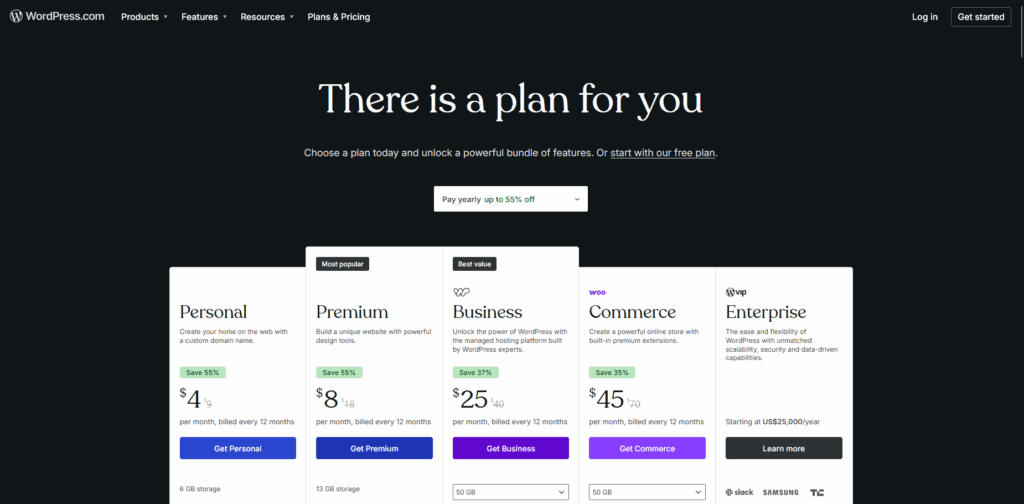
When integrated with the WooCommerce plugin, WordPress serves as an open-source platform.
This model emphasizes complete ownership and creative autonomy, distinguishing it from solutions based on standardized templates.
- Ultimate Flexibility: Users receive unrestricted access to the source code, enabling advanced custom integrations that are not feasible with most SaaS platforms.
- Content-First Commerce: WordPress is widely recognized as a leading content management system (CMS). It is particularly advantageous for strategies that prioritize extensive blogging or organic search optimization.
- Data Sovereignty: Users retain full ownership of their databases, unlike models in which stored data is effectively leased from a third-party provider.
Who is it for?
Enterprises and niche brands that require bespoke functionality or have specific SEO goals that require a scalable long-term setup.
Shopify vs WordPress: Quick Comparison
To help you settle the Shopify vs WordPress debate, it’s necessary to examine the technical skeleton of each platform.
While both can power a multi-million dollar brand, they operate on fundamentally different philosophies: managed convenience versus total creative sovereignty.
The following table compares the critical pillars of an eCommerce operation.
We have analyzed these platforms based on their long-term ROI, the technical tax they impose on your time, and their handling of the rigors of modern digital scaling.
This quick view will help you identify which platform’s constraints you can compromise with, and which features you can’t.
| Feature | Shopify | WordPress + WooCommerce |
| Setup Speed | Instant/Hours | Days/Weeks |
| Maintenance | Automated | User-Responsible |
| Transaction Fees | Yes (unless using Shopify Pay) | None (standard gateway fees only) |
| SEO Depth | Standard/Locked | Advanced/Granular |
| Scalability | Tiered Subscription | Server-Based |
| Ownership | Proprietary | Open-Source |
Ease of Use: Which Platform Is Beginner-Friendly?
When evaluating Shopify vs WordPress, the Ease of Use factor is often the ultimate tie-breaker.
While both platforms have modernized their interfaces, they cater to two very different user types. Let’s look at them through the lens of usage:
Shopify: A Plug-and-Play Platform
Shopify is designed as a closed ecosystem where users never have to see a single line of code.
The Shopify setup process is a guided experience for users. From the moment you sign up, a setup wizard walks you through adding your first product, configuring taxes, and setting up shipping zones.
- Dashboard Experience: The Shopify admin is remarkably clean and focused solely on commerce. Everything you need, orders, analytics, and marketing, is right where you expect it to be.
- Technical Skill Required: Zero. You don’t need to worry about servers, security patches, or database management.
- Time to Launch: Extremely fast. A determined entrepreneur can have a functional, professional-looking store live in a single afternoon.
WordPress: A Build-and-Grow Architecture
WordPress, specifically WooCommerce vs Shopify, offers a build-and-grow approach.
While modern drag-and-drop builders like Elementor or Gutenberg have made design much easier, the administrative side still requires more oversight.
- Dashboard Experience: The WordPress dashboard is a complete CMS. With a centralized page for admins to handle everything from blog posts to complex plugin settings.
- Setup Complexity: You are responsible for procuring your own hosting, installing WordPress, and activating the WooCommerce plugin. This start is what gives WordPress its steeper learning curve.
- Technical Skill Required: Low to Moderate. While you don’t need to be a developer, you do need to feel comfortable managing a stack and ensuring that your hosting, theme, and plugins play nice together.
Expert Tip: WordPress or Shopify for a small business?
If your primary goal is to start selling immediately with zero technical overhead, Shopify is your winner. However, if you view your website as a long-term digital asset and want to learn how to truly control your online environment, WordPress offers an educational path that pays dividends in technical independence.
Customization and Development Flexibility
The decision on Shopify vs WordPress determines whether a business must adapt its operations to the software or tailor the software to its specific requirements.
Let’s look at the differences between the two ecommerce platforms in terms of customization and flexibility for custom development.
Shopify: The Theme-First Framework
Shopify is engineered for speed and consistency.
Customization is primarily facilitated through high-quality themes and the Shopify App Store. Although this approach creates a stable environment, it imposes inherent limitations.
- Theme-Based Customization: Most modifications are implemented through a visual editor. Although Shopify’s templating language enables certain backend adjustments, users ultimately operate within a proprietary framework.
- App Ecosystem Reliance: If you need a specific feature, like a tiered discount system or a custom loyalty program, you usually have to “rent” it from the App Store. This can lead to app creep, where monthly subscription costs stack up and potentially slow down your site’s load speed.
- API and Backend Limitations: As a closed SaaS platform, Shopify restricts modifications to the core checkout code to the Shopify Plus plan and limits changes to database management.
- Shopify Development Services: Professional developers primarily optimize the frontend and integrate third-party APIs, ensuring that stores maintain a premium appearance while operating within Shopify’s secure infrastructure.
WordPress: The No-Limits Architecture
There are truly no limitations to WordPress ecommerce development.
Because it is open-source, you have the literal keys to the factory. You have full code access to both the frontend and the backend database.
- Full Code Access: WordPress enables modifications to checkout functionality and supports the creation of unique interfaces, such as custom “Build-Your-Own-Bundle” solutions. The platform allows for advanced, bespoke PHP and JavaScript development.
- Custom Themes and Plugins: Unlike Shopify, which often restricts users to predefined theme layouts, WordPress enables the creation of entirely unique visual identities. Additionally, private plugins can be developed to address specific business logic without incurring recurring app fees.
- Advanced Integrations: WordPress is highly effective at integrating with niche enterprise resource planning (ERP) systems, custom customer relationship management (CRM) platforms, and complex third-party fulfillment centers. If an API is available, WordPress can facilitate seamless integration without platform-imposed restrictions.
- WordPress Ecommerce Development Flexibility: This approach is considered the gold standard for businesses with unique workflows, including multi-vendor marketplaces, complex subscription models, or high-end service bookings.
Cost Breakdown: Shopify vs WordPress
Understanding the financial commitment of each platform requires looking past the initial signup page. In this section, we break down the Total Cost of Ownership (TCO).
While one platform offers the comfort of a predictable monthly rent, the other operates like a custom-built home, with higher upfront costs but lower taxes as your sales volume grows.
The Shopify Expense Profile
Shopify’s pricing is based on a tiered tax-bracket system. It is designed for predictability, but it can become expensive for high-volume stores that don’t use Shopify’s native tools.
- Monthly Fees ($19 – $2,300): As of 2026, the Basic plan starts at $19/mo, while the Advanced plan reaches $299/mo. Enterprise-level brands on Shopify Plus now see rates starting around $2,300/mo on a 3-year term.
- The App Tax: Most professional stores require 5–10 apps for loyalty programs, advanced filters, or upsells. Unlike WordPress plugins, these are almost exclusively monthly subscriptions, which can easily add $100–$500/mo to your overhead.
- Transaction Penalties: If you don’t use Shopify Payments, you are charged a third-party transaction fee of 0.5% to 2% in addition to your payment processor’s rates. This is a significant factor in the WordPress vs Shopify debate for international sellers.
The WordPress Expense Profile
The cost of WordPress ecommerce development is modular. You have control over every line item, allowing you to scale your costs in direct proportion to your revenue.
- Upfront Investment: Unlike the $0 setup of a template-based Shopify store, a professional WordPress store usually requires an initial investment in WordPress ecommerce development and design, typically ranging from $3,000 to $15,000+ for a custom build.
- Operational Costs: You are responsible for hosting and domain registration. However, many powerful plugins are one-time purchases rather than recurring monthly fees.
- Long-Term ROI: WordPress does not charge platform transaction fees; high-volume stores can save tens of thousands of dollars annually. Over a 3-year perspective, the lower recurring fees often make WordPress the more profitable choice for established brands.
The Hidden Costs: For a small business, Shopify’s low entry cost is unbeatable. But as you scale, Shopify’s convenience tax (transaction fees + app subscriptions) eventually overtakes the maintenance cost of a WordPress site.
| Cost Category | Shopify (Basic) | WordPress (Mid-Level) |
| Platform/Hosting | $468/year | $420/year (Managed) |
| Theme and Design | $0 – $300 | $2,000 – $8,000 (Custom) |
| Apps/Plugins | $1,200/year (Estimated) | $400/year (Premium) |
| Transaction Fees | 2% (if 3rd party) | $0 |
| Total Year 1 | ~$1,800+ | ~$3,000 – $9,000 |
SEO and Marketing Capabilities
In online retail, being easy to find is just as important as being easy to use.
When you compare ecommerce platforms, both offer key features, but they handle search engine visibility in very different ways.
Shopify SEO: Standardization and Simplicity
Shopify offers a strong foundation for users seeking straightforward SEO functionality. The platform includes built-in settings for editing title tags, meta descriptions, and alt text.
However, Shopify enforces a rigid URL structure, requiring specific paths such as /products/ and /collections/, which may hinder technical SEO strategies that prioritize a flat site hierarchy.
Additionally, while Shopify’s blogging capabilities are functional, they lack the depth necessary for advanced content clustering.
WordPress SEO: Technical Flexibility and Precision
For brands that prioritize organic search as a primary growth strategy, WordPress e-commerce development is considered the industry standard.
The platform provides complete technical SEO flexibility, enabling modification of all aspects of site code and structure.
- Advanced SEO Plugins: Tools like Yoast SEO or Rank Math provide fine control over schema markup, sitemaps, and indexing rules.
- Content Marketing Advantage: Since WordPress was born as a blogging platform, it has an unmatched ability to manage large-scale content marketing campaigns.
An advantage of WordPress e-commerce development is its flexibility in analytics.
Unlike Shopify, which imposes limitations on its built-in reporting, WordPress supports integration with advanced tracking tools and enables real-time insights in the dashboard via analytics plugins such as Analytify.
This functionality enables comprehensive monitoring of product-level performance and user behavior without leaving the site.
In evaluating long-term organic growth potential, Shopify offers an efficient solution for rapid deployment.
However, WordPress demonstrates superior performance for sustained growth by supporting complex content strategies and delivering comprehensive analytical insights.
Performance and Scalability
In eCommerce, speed translates directly to revenue. When comparing Shopify vs WordPress, the core difference lies in who manages the engine under the hood as your traffic grows.
Shopify: The Managed Highway
Shopify’s greatest strength is its managed infrastructure. As a SaaS platform, Shopify bears the full burden of server maintenance and uptime.
- Automatic Scaling: Shopify’s servers adjust automatically to traffic spikes, preventing crashes during flash sales.
- CDN Included: A global Content Delivery Network is built in, ensuring fast load times for international customers.
- Predictability: You don’t have to worry about server limits; the platform is built to absorb massive volume out of the box.
WordPress: The High-Performance Engine
With WordPress ecommerce development, performance is hosting-dependent.
While this requires more configuration, it offers a higher ceiling for enterprise scalability because you aren’t sharing resources on a generic public cloud.
- Custom Optimization: You can choose specialized eCommerce hosting and implement advanced caching layers (like Redis) tailored to your store.
- Database Control: For massive inventories, WordPress offers deep optimization that keeps the backend snappy, even with tens of thousands of SKUs.
- Platform Independence: High-growth brands often prefer WordPress to avoid platform lock-in and maintain full control over their tech stack.
For a small business, Shopify offers the easiest path to a fast-enough store without the technical overhead.
However, as you scale toward an enterprise level, Shopify pushes you to increasingly expensive plans. In contrast, scaling a WordPress store involves upgrading your infrastructure and refining your code.
While WordPress requires more management, it provides a more robust foundation for a global, custom-tailored operation.
Security and Maintenance
Digital marketplaces depend significantly on brand credibility and customer trust.
When comparing ecommerce platforms, the allocation of security responsibility is the primary differentiator among major providers.
Let’s analyze both WordPress WooCommerce vs Shopify’s security and maintenance models for a better understanding:
Shopify: A Managed Security Model
Shopify operates as a closed system, managing security on its users’ behalf.
The platform employs a managed security model in which core software and server-side vulnerabilities are continuously monitored by internal security teams.
- Automatic Updates: Updates to the core engine are applied seamlessly in the background, eliminating the need for store owners to intervene.
- PCI Compliance: Shopify is Level 1 PCI DSS-compliant by default, ensuring that sensitive credit card data is managed in accordance with global standards without additional configuration.
WordPress: A Customizable Security Approach
With WordPress ecommerce development, you have more control but also bear more responsibility for hosting.
Security is an active process rather than a background service.
- Plugin-Based Security: Users may implement robust, enterprise-grade firewalls and malware scanners, such as Wordfence or Sucuri, tailored to specific requirements.
- Update Management: Users are responsible for keeping WordPress core, themes, and plugins up to date. While many store owners choose Shopify development services for simplicity, those opting for WordPress often use managed hosting to automate updates.
Risk Comparison for Business Owners
The primary risk associated with Shopify is platform dependency; if the system experiences issues, users must wait for the provider to resolve them.
In contrast, the main risk in WordPress arises from user neglect, as most vulnerabilities result from outdated plugins.
For business owners, Shopify provides peace of mind through automation, whereas WordPress offers security through customization, granting full control over the security infrastructure.
eCommerce Features Comparison
When diving into the WooCommerce vs. Shopify debate, both platforms offer robust toolkits for selling online.
However, the way these features are delivered, integrated versus modular, changes the merchant experience.
Core Selling Tools
Both platforms handle the essentials of modern retail with ease:
- Inventory & Variations: Shopify handles unlimited variations per product, while WordPress has no hard limit, making it ideal for highly complex products.
- Payment & Shipping: Shopify offers its own Shopify Payments and built-in shipping labels. WordPress requires plugins for these, but it doesn’t charge the extra “transaction fees” that Shopify imposes for using third-party gateways.
- Abandoned Cart Recovery: This is native to all Shopify plans. In WordPress, you can implement highly customized, multi-step email sequences via plugins that often outperform Shopify’s default templates.
Advanced Growth Features
For global scaling, multi-currency and subscription support are vital.
Shopify offers these through their “Markets” tool and third-party apps. In contrast, WordPress e-commerce development lets you build a custom subscription engine that integrates directly with your fulfillment workflow.
Reporting and Performance Tracking
One area where the platforms diverge significantly is data visibility.
Store owners who rely heavily on conversion tracking often prefer WordPress because they can customize analytics dashboards and monitor product-level performance with dedicated tools, rather than relying solely on default reports.
For example, plugins built specifically for WordPress allow deeper Google Analytics integration and server-side tracking without switching platforms.
This level of ecommerce platform comparison shows that while Shopify is simpler to view, WordPress is more powerful for those who want to “own” their data insights.
Checkout Customization
This is a major sticking point. Shopify locks its checkout page for security (unless you are on the expensive Plus plan).
With WordPress, you have total checkout customization; you can add custom fields, unique “upsell” triggers, or a one-page checkout flow to maximize conversions.
Real-World Use Cases
Choosing between these platforms shouldn’t be a coin toss. Your selection depends on your current resources and where you see your brand in 24 months.
Choose Shopify If:
- You want an all-in-one solution in a single bill that covers hosting, security, and the store engine.
- A fast launch is required when you have a product ready and need to start processing payments by the end of the week.
- You have limited technical resources, no developer on call, and want a “what you see is what you get” (WYSIWYG) editor.
Choose WordPress If:
- You need complete customization, and your business model requires a unique checkout flow or a bespoke product builder.
- You prioritize SEO and content and plan to dominate search results through heavy blogging and advanced schema markup.
- You want full ownership and the freedom to move your site to any host and own your database entirely.
- You need complex integrations that sync with legacy ERPs or niche third-party software.
Shopify vs WordPress for Small Businesses
For small businesses, the decision between WordPress and Shopify typically depends on the desired level of hands-on involvement and available budget.
- Budget Considerations: Shopify offers a predictable monthly fee (starting at $19), though transaction fees and app subscriptions may reduce profit margins. WordPress generally incurs lower ongoing costs but often requires a greater initial investment for eCommerce development.
- Ease of Management: Shopify minimizes technical maintenance requirements, allowing business owners to focus on operations. In contrast, WordPress necessitates ongoing updates but offers significantly greater long-term flexibility.
- Growth Potential: Both platforms support scalability; however, WordPress enables businesses to transition from a basic online store to a membership site or a complex marketplace as needs evolve.
Common Mistakes When Choosing an eCommerce Platform
Here are some common mistakes owners make while deciding between Shopify vs WordPress:
- Selecting Based on Popularity: The fact that a competitor uses Shopify does not guarantee its suitability for your unique business processes.
- Overlooking Long-Term Costs: An initially inexpensive setup may result in substantial monthly expenses as additional applications are required.
- Neglecting SEO Requirements: Migrating to a platform with inflexible URL structures can negatively impact brands that rely on organic search traffic.
- Failing to Plan for Scalability: It is essential to select a platform capable of accommodating significant increases in traffic without necessitating a complete redevelopment.
- Underestimating Complexity: Initiating a custom WordPress build requires readiness for an extensive initial configuration process.
How WPBrigade Can Help You Build the Right Store
The technology selected to support your online growth should facilitate organizational scalability rather than impose limitations.
At WPBrigade, we reject a one-size-fits-all methodology and instead deliver technical solutions tailored to distinct commercial objectives.
We build high-performance online stores that leverage the full capabilities of the WordPress ecosystem.
A primary advantage of WordPress ecommerce development is its extensive plugin ecosystem.
Rather than depending on a closed application marketplace, we integrate specialized solutions designed to address specific performance and analytics requirements.
For organizations seeking a managed ecommerce experience, we customize Shopify’s Liquid code to deliver a distinctive appearance that differentiates from standard templates.
Migration and Strategy
For clients who have outgrown their current platform, we offer seamless migration services to transfer data and preserve SEO rankings as they transition to a more scalable environment.
FAQs
Ecommerce Solutions: Shopify vs WordPress
Deciding between Shopify vs WordPress isn’t about finding the better platform; it’s about identifying the right tool for your specific business goals.
- Choose Shopify if you value speed and simplicity. For entrepreneurs who want a managed, secure environment with technical details handled behind the scenes. It’s the perfect launchpad for straightforward retail.
- Choose WordPress if you value ownership and scalability. With WordPress ecommerce development, you’re building a custom digital asset. It is the ideal choice for brands that rely on heavy content marketing and need complex integrations.
Ultimately, your platform should reflect your 3-year growth strategy, not just respond to a current trend.
Whether you prioritize the streamlined ease of Shopify development services or the limitless flexibility of an open-source build, ensure your choice allows your business to evolve without technical roadblocks.
That is all for this post. For more related posts, check:
- How to Choose the Right WordPress Plugins Without Hurting Performance
- WordPress Technical Audits: What Agencies Look for Before Scaling
Are you looking for the fastest possible launch, or are you ready to build an entirely custom platform you own?
Let us know in the comments which feature is the most “make or break” for your business!

Leave a Reply