
WordPress speed optimization isn’t just a feature anymore. It’s the foundation of smart businesses in 2026.
In the fast-paced digital landscape of 2026, the definition of a “fast website” has changed for a high performance WordPress site. Users no longer just want pages that load quickly; they demand pages that react instantly. If a customer clicks “Buy Now” and waits even a second, they’re gone.
A high performance WordPress site today is an ecosystem where smart servers meet predicted user behavior. It’s about smooth interactivity, mobile optimization, and site stability during spikes.
At WPBrigade, we don’t just build websites. We develop high-performance digital assets that rank higher and convert better. In this blog post, I will explain the standards for a high-performance WordPress site in 2026, including UX optimization, mobile responsiveness, and more. Let’s begin!
What is Website Performance? Key Metrics Explained
For years, we thought a high performance WordPress site meant “how fast does the text appear?” That is outdated. In 2026, performance will be measured by interactivity for WordPress speed optimization. According to stats by Forbes, “Users form an opinion about a website in 0.05 seconds.”
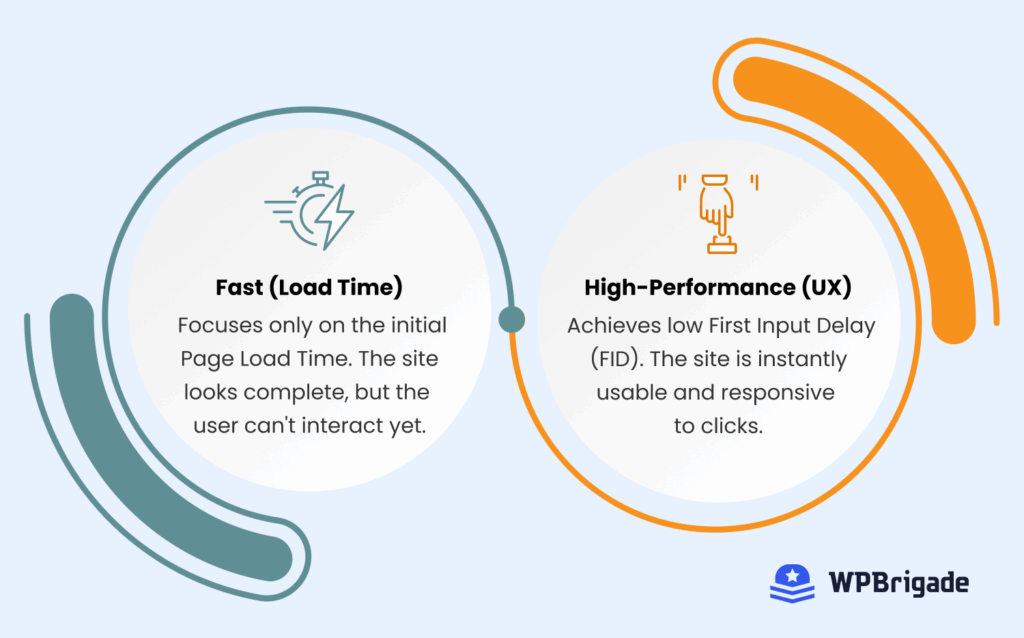
A good real-life scenario to understand the concept of a high performance WordPress site is to think of it like a restaurant.
- Old Standard: How fast does the waiter bring the food to the table?
- 2026 Standard: Once the food is there, can you actually eat it, or are you waiting for silverware?
Let’s See the Key Metrics for High-Performance WordPress Sites
| Metric | What it Measures | Recommended Threshold | Impact |
| TTFB (Time to First Byte) | How fast the server responds to a request | <200ms | Faster initial load, improved UX |
| LCP (Largest Contentful Paint) | How fast does the main content become visible | <2.5s | Reduces perceived waiting time |
| INP (Interaction to Next Paint) | Responsiveness to clicks & interactions | <200ms | Ensures smooth, interactive experience |
WordPress-Specific Performance Challenges
WordPress powers over 43% of the web, but its greatest strength, flexibility, is often its performance weakness. Without expert care and monitoring, “features” turn into “bloat.”
Let’s See Some Common Performance Killers:
| Issue | What Happens | Impact on Performance |
| Bloated Themes | Themes load unnecessary libraries and code | Slower LCP and INP, heavier page load |
| Plugin Overload | Too many plugins are doing what fewer could | Increased JavaScript execution, higher TTFB, and slower page interactivity |
| Database Junk | Auto-saves, spam, expired data | Slower queries, increased server response time |
| Legacy Technology | Outdated PHP versions, old image formats | Poor execution speed, compatibility issues, and heavier downloads |
| Third-Party Scripts | Ads, trackers, chat widgets | Blocks rendering, increases LCP and INP |
Addressing these factors is essential for improving WordPress performance and optimizing speed to build a high-performance WordPress site.
Optimizing Speed for a High Performance WordPress Site
To build a site that is high performance rather than just “fast,” we have to move beyond basic caching and embrace intelligent delivery.
1. Infrastructure at the Edge
Your website shouldn’t live on just one distant server. Think of traditional hosting as a central warehouse. If a customer in London orders something, that data has to cross an ocean to get to them. That travel time, called latency, can slow down the site.
The Edge Standard: We move your website’s content to use global Edge Caching and Content Delivery Networks (CDNs).
- What to do: Use high-quality Managed WordPress Hosting or a Cloud VPS combined with a modern CDN (like Cloudflare, KeyCDN, etc.).
- The How: This network creates mini-warehouses of your site’s data (HTML, images, code) in dozens of locations worldwide. When a user in London visits, a local server in London handles the request.
- The Benefit: Data travels a significantly shorter distance, often reducing the Time to First Byte (TTFB) to under 100ms. The result is instant delivery and a much smoother experience, regardless of where your customer is browsing from.
2. The Upgrade to PHP 8.4+
PHP is the scripting language that runs WordPress, and it’s the engine of your website. If your site is running PHP 8.1 or earlier, you are driving in the wrong gear.
The Performance Standard: You need a modern, optimized engine for high performance.
- What to do: Ensure your host supports PHP 8.4 (or newer).
- The How: PHP 8.4 includes significant advancements in Just-In-Time (JIT) compilation, meaning code is not read and translated line by line each time it is executed.
- The Benefit: The server processes requests significantly faster. This means your website can handle much more traffic (e.g., during a flash sale or viral spike) without crashing or slowing down, directly protecting your revenue.
3. Speculative Loading
In the past, the browser did nothing until you actually clicked a link. That tiny delay is enough to lose an impatient user. Speculative Loading is the performance advantage of 2026.
The Performance Standard: Eliminate slow navigation.
- The How: We implement the Speculation Rules API in the browser to enable your site to intelligently predict the user’s next move. If a user hovers their mouse over a link, the browser guesses they are about to click it and starts downloading.
- The Benefit: When the user actually clicks, the page is already fully loaded and ready to display. This creates a zero-latency, instant-navigation feel, which improves your Interaction to Next Paint (INP) score.
4. Smarter Media Files
It’s no longer enough just to compress a JPEG. We need to be intelligent about image delivery to prevent unnecessary downloads that degrade load times on a high-performance WordPress site.
The Performance Standard: Deliver the most critical media first.
- What to do: Use AVIF format, which provides file sizes up to 50% smaller than traditional JPEGs while retaining superior quality (making it better than even WebP).
- The How: This is a direct instruction to the browser: “Stop waiting for other scripts or CSS; load this critical image first.”
- The Benefit: Your hero image or main product shot loads instantly, signaling to the user (and Google) that your site is ready for business.
Core Web Vitals in WordPress: What You Must Monitor
Google doesn’t guess if your site is good; they measure it using Core Web Vitals. If you fail these, your SEO rankings will suffer. Let’s see key web metrics for a high performance WordPress site:
| Metric | What It Measures | Recommended Threshold | Why It Matters |
| LCP (Largest Contentful Paint) | Loading speed of main content | <2.5s | Fast content delivery reduces bounce rates |
| CLS (Cumulative Layout Shift) | Visual stability of elements | ≤0.1 | Prevents jarring layout shifts that frustrate users |
| INP (Interaction to Next Paint) | Responsiveness to user actions | <200ms | Measures real interactivity; ensures clicks and taps feel instantaneous |
Mobile-First and Responsive Design for Speed
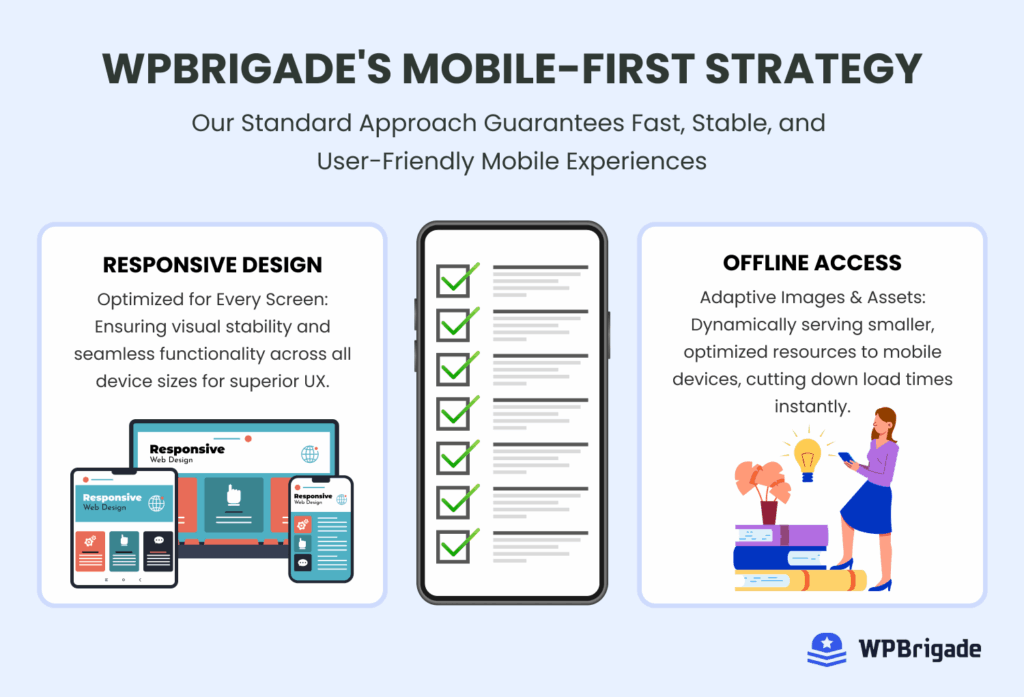
In 2026, desktop traffic is secondary. A high-performance WordPress site is built for the billions of mobile users.
- Responsive is mandatory: Your site must adapt fluidly to any screen size.
- The “Fat Finger” Rule: Buttons and links must be spaced far enough apart so users don’t accidentally click the wrong thing (which ruins your UX score).
At WPBrigade, we follow a mobile-first approach, delivering lightweight, high performance WordPress site that loads fast, feels smooth, and perform exceptionally on any device.
Security and Stability as Performance Factors
A slow site is often a vulnerable site. Here are some security and stability factors that affect a high-performance WordPress site:
- Bot Protection: Hackers use “bots” to attack sites. This traffic eats up your server resources, slowing the site down for real humans. A firewall blocks this bad traffic.
- Clean Code: Malware often injects hidden scripts that mine cryptocurrency or send spam, killing your load times.
- Uptime: A high-performance site is a stable site. If you are down, your speed is zero.
UX and Performance
UX performance isn’t limited to the front pages; micro-interactions like the login process are a critical part of the overall user experience and directly influence how fast and trustworthy a website feels.
When UX is optimized, the result is reduced user friction, leading to the site being perceived as faster and more reliable, which boosts engagement and conversions. The login flow, though often ignored, is an important step in the user journey.
You can enhance the login experience using LoginPress. It improves this process by replacing the default WordPress login screen with a clean, branded, and lightweight interface.

A faster, well-designed login flow achieves several key UX goals:
- Reduces Friction: Users can authenticate without delay or confusion.
- Enhances Speed & Branding: It ensures a smooth, branded experience from the moment a user arrives, reinforcing the site’s overall quality and trustworthiness.
- Improves Perceived Performance: By loading efficiently on mobile and optimizing for responsiveness, it supports better INP (Interaction to Next Paint) scores for the entire user experience.
Ultimately, LoginPress ensures a smooth, consistent user experience from the moment they arrive until they successfully authenticate for a high performance WordPress site.
Advanced Performance Techniques (Optional for Enterprise Sites)
For high-traffic, enterprise-level WordPress sites, standard caching is just the beginning. These techniques bypass the limitations of traditional architecture to achieve instant loading times and scalability for a high performance WordPress site.
1. Decoupled Architecture (Headless WordPress)
This involves separating the front end (what the user sees, usually built with frameworks like React or Next.js) from the WordPress back end (where content is managed).
- Benefit: The front end becomes incredibly fast because it serves only lightweight static files, while WordPress is used only as a powerful, flexible content manager.
2. Server-Side Rendering (SSR)
In a traditional setup, the user’s browser has to download code and then build the entire page. With SSR, the server pre-renders the page into a complete HTML file before sending it.
- Benefit: The browser receives a fully rendered page, leading to much faster Largest Contentful Paint (LCP) and a nearly instant viewing experience.
3. Intelligent Script Management
Instead of simply bundling all JavaScript, performance experts implement lazy-loading critical scripts.
- Benefits: Only the essential JavaScript needed for the above-the-fold content is loaded initially. Non-essential scripts (like chat widgets or footer analytics) are loaded later, after the main page is interactive. This ensures the browser can focus its resources on achieving a low INP score.
4. Performance Monitoring Dashboards
Enterprise-grade sites use dedicated dashboards (such as New Relic or Datadog) to monitor performance in real time.
- Benefit: These tools track database query speed, server health, and traffic spikes, allowing developers to identify and fix bottlenecks before they become noticeable to customers.
Tools to Measure WordPress Performance
You can’t fix what you don’t measure. To truly understand and create a high-performance WordPress site, you need the right data. Here are the tools essential for monitoring and diagnostics:
1. Analytify: The Best WordPress Analytics Plugin
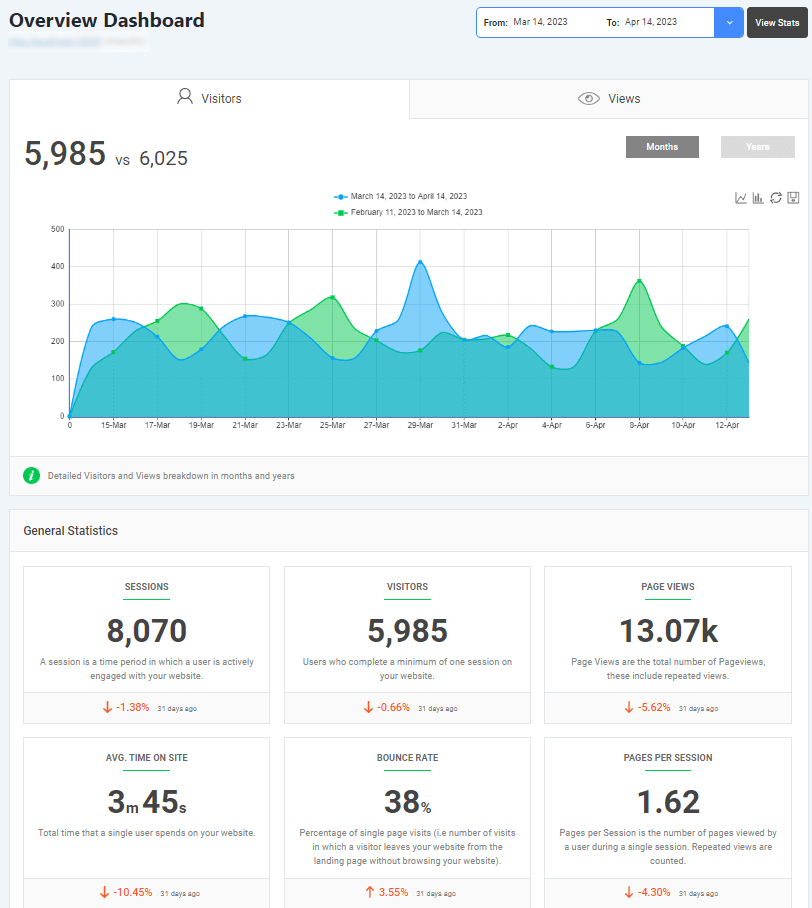
Analytify is the best analytics plugin for WordPress. It helps you connect with GA4 smoothly and shows your site’s analytics right in the WordPress dashboard.
Not only does Analytify help website owners simplify their workflow, but it also ensures they make data-driven decisions.
Here are some of the top features that Analytify provides you to track your site’s performance smartly:
- Integrated Performance Audit: It integrates directly with Google PageSpeed Insights, providing a quick performance audit right next to your user data (like session duration and bounce rate).
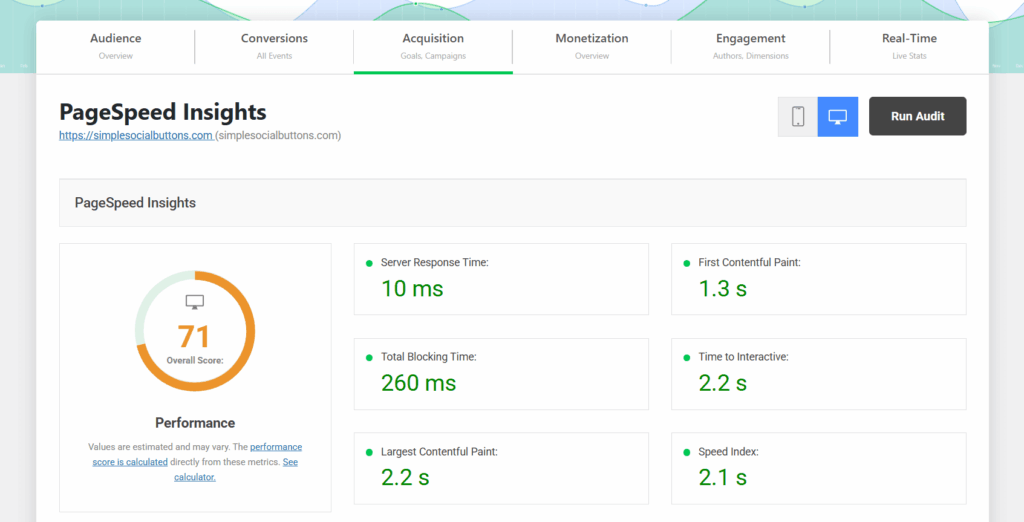
- Actionable WordPress Dashboard Data: It pulls your Google Analytics 4 data directly into your WordPress dashboard, letting you see if slow pages are causing high bounce rates or low conversions, all without forcing you to switch tabs or leave your site.
2. Google PageSpeed Insights
This is a free tool that analyzes a webpage’s performance on both mobile and desktop devices. It provides scores and actionable recommendations based on the essential Core Web Vitals (LCP, INP, CLS) and general speed best practices for a high-performance WordPress site.

3. WebPageTest
This diagnostic tool is excellent for advanced troubleshooting. It allows you to see the exact number of requests, making it easy to identify precisely which script or file is blocking your page from rendering quickly.
FAQs on High-Performance WordPress Site
What is the biggest difference between Page Caching and Object Caching for speed?
Page Caching is like taking a perfect snapshot (a static HTML file) of your entire webpage and serving that to every visitor. This is fast for pages that don’t change often (like blog posts) and drastically reduces server load.
Object Caching is for the complex parts. It saves the results of frequently asked database questions (called “queries”) in high-speed memory (using tools like Redis or Memcached). This is critical for sites with dynamic elements, such as e-commerce stores, personalized dashboards, or busy forums. It prevents WordPress from repeatedly asking the database the same question, improving site performance for logged-in users and complex applications.
Upgrade Hosting: Move from shared hosting to a Managed WordPress or Cloud VPS solution. High-quality hosts use modern server architecture (like NGINX) that responds instantly.
Use Edge/CDN: Implement a global Content Delivery Network (CDN) to ensure your content is served from the geographically closest location to the user, bypassing network latency.
Optimize the Database: A cluttered database slows the server’s initial response. Regularly clean up post revisions, spam, and expired transients using optimization plugins.
Update PHP: Ensure you are running the latest stable PHP version (PHP 8.4+). This speeds up server-side processing, directly lowering the TTFB.
The main issue with traditional “feature-rich” themes is that they often load code for every feature, even if you don’t use it. This creates unnecessary code bloat. Modern, lightweight themes (such as those built for Full Site Editing) only load the CSS and JavaScript needed for the specific blocks actually present on the page.
Conclusion: High-Performance WordPress Site
The era of slow, heavy websites is over. In 2026, building a high performance WordPress site is no longer optional; it’s a business necessity.
Speed, User Experience (UX), Core Web Vitals, and security are no longer separate departments; they are related assets that drive your bottom line. A fast site reduces bounce rate and increases conversions (UX). A high INP score meets Google’s requirements and boosts rankings (Core Web Vitals/SEO). A properly configured server running PHP 8.4 is fast and secure (Security/Performance).
At WPBrigade, our mission is to deliver this integrated, high performance WordPress site. We build clean, fast, and scalable sites that ensure your digital platform is a revenue generator, not a liability.
That is all for this article. For more related posts, check:
- Top 8 WordPress Development Agencies to Consider in 2026
- Top 10 Essential Plugins for WordPress
- Mobile First Design: How to Create the Best UX Strategy
Are you ready to implement high-performance strategies on your site? Let us know which ones you preferred the most!
Leave a Reply