
Under Construction, Coming Soon, and Maintenance Mode is a lightweight and flexible WordPress plugin.
It allows you to display a fully customizable maintenance, coming soon, or under construction page.
This plugin is perfect for controlling your site’s visibility during development, updates, or redesigns without disrupting the live experience for authorized users.
In this guide, I will walk you through installing and activating the Under Construction Maintenance Mode Plugin on your WordPress site, making it easy to manage your website’s availability.
Under Construction Maintenance Mode Plugin Features #
Our plugin provides essential features such as:
- Customizable Maintenance Mode Pages
It lets you display a fully customizable maintenance or coming-soon page. You can tailor the message, branding, and layout to match your company’s look and feel, ensuring a consistent experience for your visitors. - SEO-Friendly Settings
Even when your site is in maintenance mode, it ensures that search engines can still crawl and index important content, helping you maintain your search engine presence during updates. - User Role-Based Access Control
This feature enables you to restrict or allow access to the site based on user roles. Administrators, editors, or other selected roles can still view the full site while others see the maintenance page. - Customizable Logo and Background
You can easily add your brand logo and customize the background of your maintenance page to maintain brand consistency and engage your audience. - Text Customization
Modify the main heading and subheading to clearly communicate your website’s status to visitors. - Social Media Integration
The plugin lets you add links to your social media profiles, with clickable icons on the maintenance page, so visitors can connect with you while the site is under construction. - Google Analytics Integration
Track visitor activity on your maintenance page using Google Analytics to gather data on user behavior, even when your site is offline. - Maintenance Mode Scheduling
Set up automatic start and end times for maintenance mode to activate and deactivate based on a predefined schedule, removing the need for manual intervention. - Custom CSS Support
For advanced users, it provides a custom CSS section, allowing you to apply your own styles to further customize the maintenance page’s appearance beyond built-in options.
How to Activate Maintenance Mode #
To turn on Maintenance Mode for your site, start by logging into your WordPress Admin Dashboard with your administrator credentials.
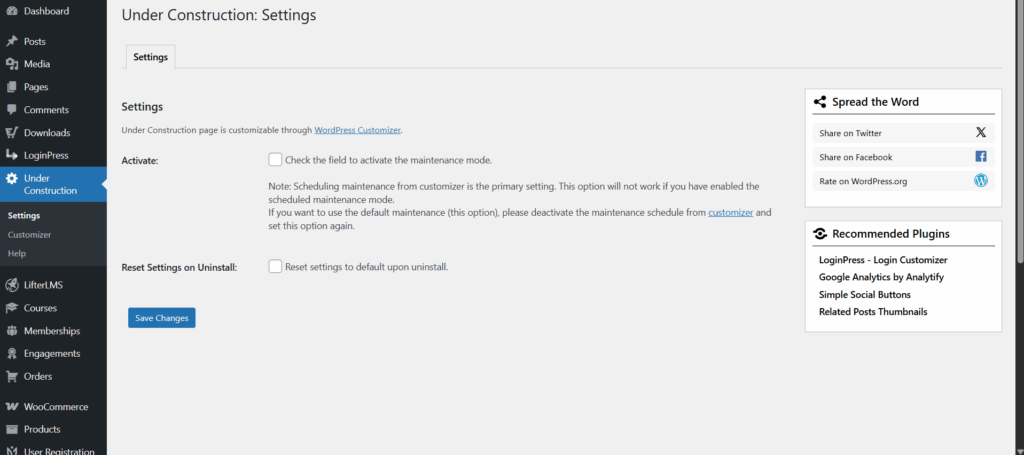
From the menu on the left side of your screen, click Under Construction, then select Settings.
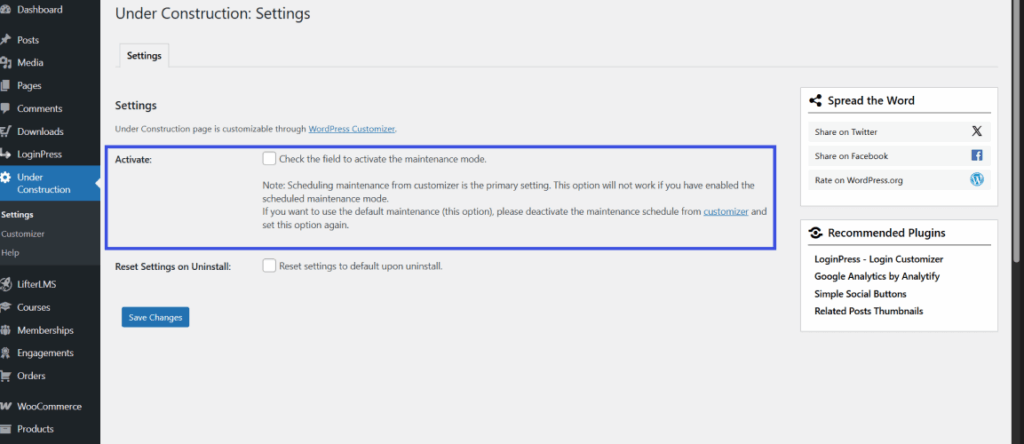
In the panel that appears, check the box labeled Enable Maintenance Mode.
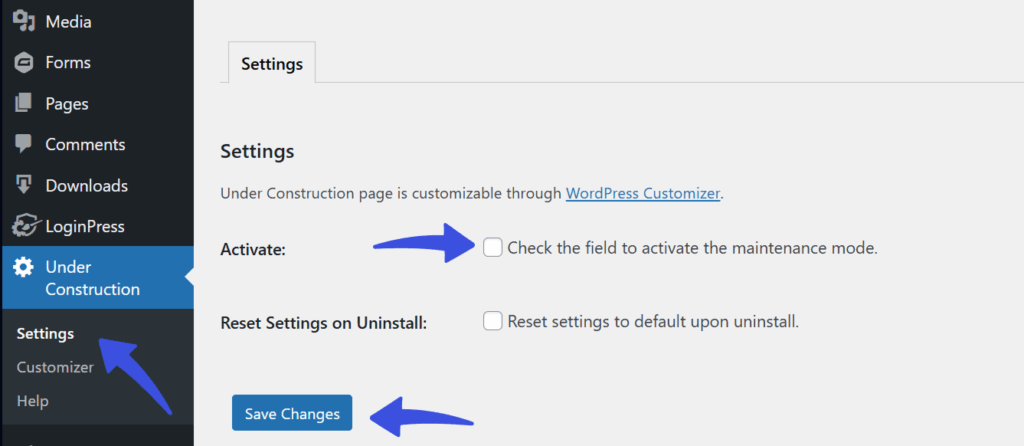
Then click the Save Changes button. Once this is active, your visitors will see your custom maintenance or coming-soon page instead of your live website.
Disable Maintenance Mode for Specific User Roles #
Our plugin allows you to keep the site accessible for certain user roles (e.g., Administrator, Editor) even when Maintenance Mode is activated. To configure role-based access:
- Enable Maintenance Mode
Follow the steps mentioned above to enable Maintenance Mode. - Select User Roles to Bypass Maintenance Mode
A list of active user roles on your site will appear. Select the roles that should bypass maintenance mode and continue to view the full site.
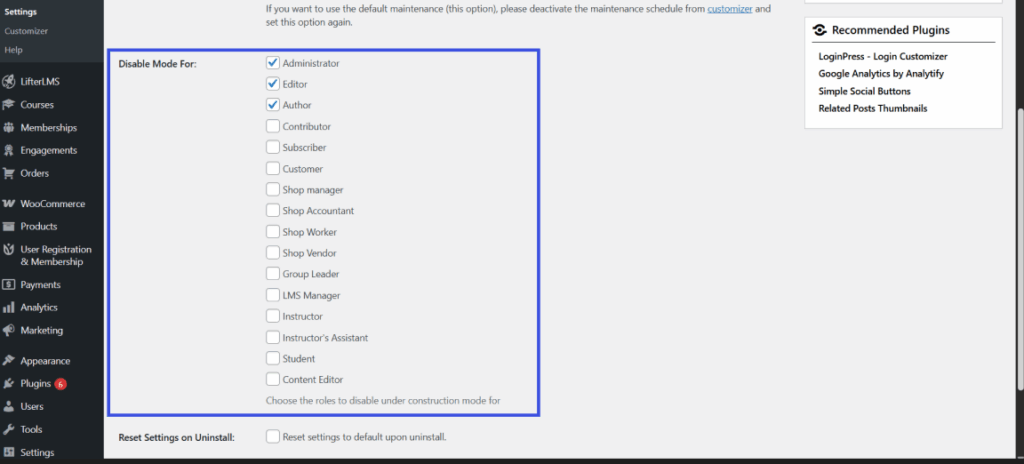
- Save Settings
After selecting the roles, click Save Changes to apply your settings.
This feature is particularly useful for developers, content editors, or clients who need to access the site while updates are being made in the background.
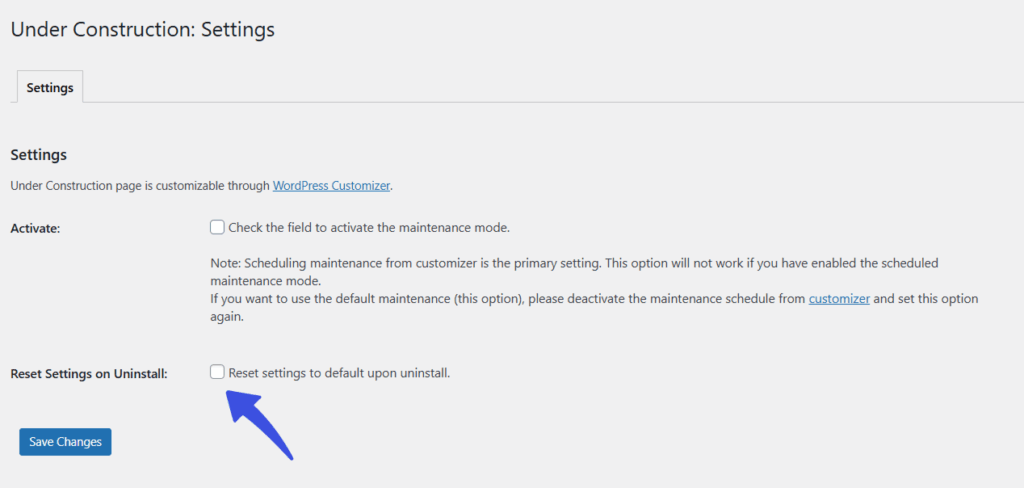
Reset Settings on Uninstall #
When you check this option and save it, all plugin settings will be erased when you uninstall it.
If you decide to reinstall the plugin later, it will start with the default settings, just as if it were being installed for the first time. Any custom settings you had before will be lost.
This option ensures that when the plugin is removed from your site, it doesn’t leave any old settings or changes behind that could affect your website in the future.
Key Notes #
- Custom Design Options: The plugin allows you to customize the design of your maintenance, coming-soon, or under-construction page to reflect your brand’s style, including adding your logo, background images, and custom messages.
- SEO Settings: You can configure SEO settings to allow search engines to index important content during maintenance. This ensures your site’s SEO isn’t negatively impacted while you’re making changes.
For further assistance with our plugin, please visit our support page or contact the WPBrigade team.